
Dataflowr
БесплатноНе проверенEnables AI agents to browse and teach the Deep Learning DIY course, providing access to modules, notebooks, transcripts, quizzes, slides, and homework via MCP t

Описание
Enables AI agents to browse and teach the Deep Learning DIY course, providing access to modules, notebooks, transcripts, quizzes, slides, and homework via MCP tools.
README
The Deep Learning DIY course teaches PyTorch from scratch — tensors, autodiff, CNNs, RNNs, Transformers, VAEs, and diffusion models — through hands-on notebooks. Course resources:
- dataflowr/notebooks — all practical notebooks (PyTorch fundamentals → diffusion models)
- dataflowr/gpu_llm_flash-attention — implement FlashAttention-2 from scratch using Triton
- dataflowr/llm_controlled-generation — structured generation, meta-generation, and self-correction for LLMs
- dataflowr/llm_efficiency - KV Cache and LoRA for minGPT
- dataflowr/transcripts — 318 concept notes extracted from lecture transcripts, with timestamped quotes and cross-references
This package exposes the course as a CLI, REST API, and MCP server so AI agents can navigate and teach it.
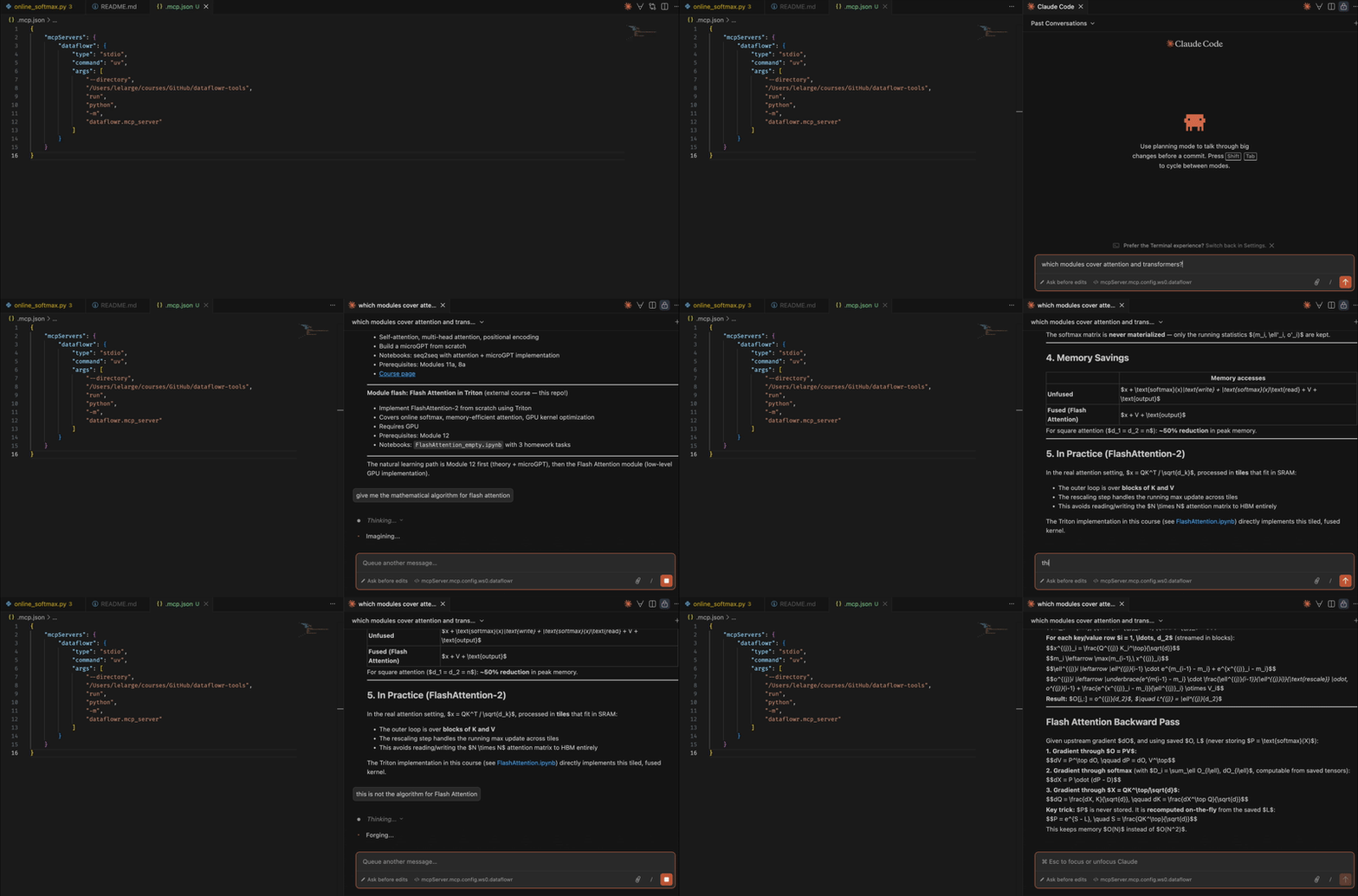
Quick start with Claude Code
Option 1 — Hosted server (no install needed): add a .mcp.json file at the root of your project pointing to the shared instance:
{
  "mcpServers": {
    "dataflowr": {
      "type": "http",
      "url": "https://dataflowr.paris.inria.fr/mcp"
    }
  }
}
Option 2 — Local server: run it yourself with uv (downloads on first use):
{
  "mcpServers": {
    "dataflowr": {
      "type": "stdio",
      "command": "uv",
      "args": ["run", "--with", "dataflowr[mcp]", "python", "-m", "dataflowr.mcp_server"]
    }
  }
}
Claude Code picks this up automatically when you open the folder.
To pre-approve all dataflowr tools (no per-call prompts), also add .claude/settings.json:
{
  "permissions": {
    "allow": ["mcp__dataflowr"]
  }
}
For a global allow (all projects), add the same to ~/.claude/settings.json.
Install
# with uv (recommended)
uv pip install dataflowr          # CLI only
uv pip install dataflowr[api]     # CLI + REST API
uv pip install dataflowr[mcp]     # CLI + MCP server
uv pip install dataflowr[all]     # everything

# with pip
pip install dataflowr
pip install dataflowr[mcp]
Or from source:
git clone https://github.com/dataflowr/dataflowr-tools
cd dataflowr-tools
uv pip install -e ".[all]"
CLI
# Course overview
dataflowr info

# List all modules
dataflowr modules list

# Filter by session, tag, or GPU requirement
dataflowr modules list --session 7
dataflowr modules list --tag attention
dataflowr modules list --gpu

# Full module details (with notebook links)
dataflowr module 12

# Fetch notebook content from GitHub
dataflowr notebook 12                        # practical (default)
dataflowr notebook 12 --kind intro
dataflowr notebook 12 --no-code              # markdown only

# Fetch course website page text (raw markdown from dataflowr/website)
dataflowr page 12

# Fetch lecture slides (from dataflowr/slides)
dataflowr slides 12

# Fetch quiz questions (from dataflowr/quiz)
dataflowr quiz 2a
dataflowr quiz 3

# Browse transcript knowledge base (318 concept notes from lectures)
dataflowr transcripts search "backprop"
dataflowr transcripts get "training loop"

# Compare catalog against website + slides repos
dataflowr sync

# Search by keyword
dataflowr search "attention transformer"
dataflowr search "generative"

# Sessions
dataflowr sessions list
dataflowr sessions get 7

# Homeworks
dataflowr homeworks list
dataflowr homeworks get 1

# JSON output (pipe-friendly)
dataflowr modules list --json | jq '.[] | select(.session == 9)'
dataflowr module 18b --json
REST API
uvicorn dataflowr.api:app --reload
# → http://localhost:8000
# → http://localhost:8000/docs  (Swagger UI)
Endpoints:
| Method | Path | Description |
|---|---|---|
| GET | / |
Course overview |
| GET | /modules |
List all modules (?session=, ?tag=, ?gpu=) |
| GET | /modules/{id} |
Get module by ID |
| GET | /modules/{id}/notebooks |
Get notebooks for a module (?kind=) |
| GET | /modules/{id}/notebooks/{kind}/content |
Fetch notebook cells from GitHub (?include_code=) |
| GET | /modules/{id}/slides |
Fetch lecture slide content from dataflowr/slides |
| GET | /modules/{id}/quiz |
Fetch quiz questions from dataflowr/quiz |
| GET | /modules/{id}/page |
Fetch module source markdown from dataflowr/website |
| GET | /catalog/sync |
Compare catalog against website + slides repos |
| GET | /sessions |
List all sessions |
| GET | /sessions/{n} |
Get session with modules |
| GET | /homeworks |
List all homeworks |
| GET | /homeworks/{id} |
Get homework by ID |
| GET | /search?q=... |
Search modules |
| GET | /transcripts/search?q=... |
Search transcript concept notes |
| GET | /transcripts/{concept} |
Get a transcript concept note |
Examples:
curl http://localhost:8000/modules/12
curl http://localhost:8000/sessions/7
curl http://localhost:8000/search?q=diffusion
curl "http://localhost:8000/modules?session=9&gpu=true"
curl "http://localhost:8000/modules?tag=attention"
curl "http://localhost:8000/modules/12/notebooks/practical/content?include_code=false"
curl http://localhost:8000/modules/12/page
curl http://localhost:8000/modules/2a/quiz
curl http://localhost:8000/modules/3/quiz
curl "http://localhost:8000/transcripts/search?q=backprop"
curl http://localhost:8000/transcripts/training%20loop
MCP Server (for AI agents)
Makes the course natively available to Claude, Cursor, VS Code, and other MCP-compatible agents. Built on the official MCP Python SDK (FastMCP).
Stdio transport (local — Claude Desktop, Cursor, VS Code, Claude Code)
python -m dataflowr.mcp_server
HTTP transport (remote / shared deployments)
python -m dataflowr.mcp_server --http
# → POST http://localhost:8001/mcp  (or $PORT if set)
Client configuration
Claude Code (VSCode extension or CLI)
Add a .mcp.json file at the root of your project (homework repo, notebook folder, etc.):
{
  "mcpServers": {
    "dataflowr": {
      "type": "stdio",
      "command": "uv",
      "args": ["run", "--with", "dataflowr[mcp]", "python", "-m", "dataflowr.mcp_server"]
    }
  }
}
Claude Code picks this up automatically when you open the folder. No global install needed — uv downloads dataflowr[mcp] on first use.
To pre-approve all dataflowr tools (no per-call prompts), also add .claude/settings.json:
{
  "permissions": {
    "allow": ["mcp__dataflowr"]
  }
}
Or register globally (available in every project):
claude mcp add --scope user dataflowr -- uv run --with dataflowr[mcp] python -m dataflowr.mcp_server
Claude Desktop
Edit ~/.claude/claude_desktop_config.json (macOS/Linux) or %APPDATA%\Claude\claude_desktop_config.json (Windows):
{
  "mcpServers": {
    "dataflowr": {
      "command": "python",
      "args": ["-m", "dataflowr.mcp_server"]
    }
  }
}
With uv (no global install needed):
{
  "mcpServers": {
    "dataflowr": {
      "command": "uv",
      "args": ["run", "--with", "dataflowr[mcp]", "python", "-m", "dataflowr.mcp_server"]
    }
  }
}
Cursor
Edit .cursor/mcp.json at the root of your project (or ~/.cursor/mcp.json globally):
{
  "mcpServers": {
    "dataflowr": {
      "command": "python",
      "args": ["-m", "dataflowr.mcp_server"]
    }
  }
}
VS Code
Edit .vscode/mcp.json at the root of your project:
{
  "servers": {
    "dataflowr": {
      "type": "stdio",
      "command": "python",
      "args": ["-m", "dataflowr.mcp_server"]
    }
  }
}
Remote / HTTP (self-hosted)
If running your own instance with --http, point clients at the URL:
{
  "mcpServers": {
    "dataflowr": {
      "type": "http",
      "url": "http://localhost:8001/mcp"
    }
  }
}
Recommended workflow
1. search_modules "attention"      → find relevant modules by keyword
2. get_module "12"                 → full details, notebook links, prerequisites
3. get_page_content "12"           → read the lecture notes
4. get_notebook_content "12"       → work through the exercises
5. get_quiz_content "12"           → self-test your understanding
6. search_transcripts "attention"  → find concept notes from lecture transcripts
7. get_transcript_note "training loop" → read timestamped quotes and cross-references
For a personalised study plan, use the learning_path prompt with a target module.
Tools exposed to the agent
| Tool | Description |
|---|---|
list_modules |
List modules, filterable by session / tag / GPU |
get_module |
Full details for a module |
search_modules |
Keyword search across titles, descriptions, and tags |
list_sessions |
List all sessions |
get_session |
Session + all module content |
get_notebook_url |
GitHub/Colab links for a notebook |
list_homeworks |
All homeworks |
get_homework |
Full details for a homework |
get_slide_content |
Fetch lecture slides from dataflowr/slides |
get_quiz_content |
Fetch quiz questions from dataflowr/quiz |
check_quiz_answer |
Validate a student's quiz answer |
get_notebook_content |
Fetch actual notebook cells from GitHub |
get_notebook_exercises |
Fetch only exercise prompts + skeleton code |
get_page_content |
Fetch module source markdown from dataflowr/website |
get_course_overview |
Full course structure as context |
get_prerequisites |
Prerequisite modules for a given module |
suggest_next |
What to study after completing a module |
sync_catalog |
Compare catalog against website + slides repos |
search_transcripts |
Fuzzy search 318 concept notes from lecture transcripts |
get_transcript_note |
Fetch full content of a transcript concept note |
Prompts exposed to the agent
| Prompt | Arguments | Description |
|---|---|---|
explain_module |
module_id |
Tutoring session — Socratic explanation of a module |
quiz_student |
module_id |
Interactive quiz, one question at a time |
debug_help |
module_id |
Guided debugging help for a practical notebook |
learning_path |
target_module_id, known_modules |
Personalised prerequisite chain to a target module |
Example questions
Once connected, an agent can answer questions like:
- "What should I study before tackling diffusion models?"
- "Give me the Colab link for the microGPT notebook."
- "Which session covers attention mechanisms?"
- "What are all the generative modeling modules?"
- "Show me the Flash Attention homework tasks."
- "Quiz me on Module 3 — loss functions."
- "I'm stuck on the backprop exercise in Module 2b. Help me debug it."
- "Build me a learning path to Module 18b (diffusion models) starting from scratch."
- "What does the professor say about the training loop? Show me the transcript quotes."
Python API
from dataflowr import COURSE

# Get a module
module = COURSE.get_module("12")
print(module.title)          # "Attention and Transformers"
print(module.description)
print(module.notebooks)

# Search
results = COURSE.search("attention")

# Get a session
modules = COURSE.get_session_modules(7)

# Navigate the full catalog
for module in COURSE.modules.values():
    if module.requires_gpu:
        print(f"Module {module.id}: {module.title}")
Design principles
- Content only, no execution. The package exposes the course structure and links. Running notebooks stays in the student's hands.
- Agent-friendly. All outputs are text-first. The MCP server renders markdown so agents can use it directly in responses.
- No external dependencies for core. The catalog, models, and CLI work with only
pydantic,typer, andrich. The API needsfastapi; the MCP server needsmcp. - Single source of truth.
catalog.pyis the only place that needs updating when the course evolves.
Установка Dataflowr
У этого сервера нет опубликованного пакета — он собирается из исходников. Открой репозиторий и следуй инструкции в README.
▸ github.com/dataflowr/dataflowr-toolsFAQ
Dataflowr MCP бесплатный?
Да, Dataflowr MCP бесплатный — установка в пару кликов через Unyly без оплаты.
Нужен ли API-ключ для Dataflowr?
Нет, Dataflowr работает без API-ключей и переменных окружения.
Dataflowr — hosted или self-hosted?
Self-hosted: сервер запускается локально на твоей машине командой из раздела установки.
Как установить Dataflowr в Claude Desktop, Claude Code или Cursor?
Открой Dataflowr на unyly.org, выбери вкладку своего клиента (Claude Desktop, Claude Code, Cursor) и нажми Install — конфиг сгенерируется автоматически, без правки JSON.
Похожие MCP
Fetch
Web content fetching and conversion for efficient LLM usage.
AWS KB Retrieval
Retrieval from AWS Knowledge Base using Bedrock Agent Runtime.
 автор: modelcontextprotocol
Spring AI MCP Server
Provides auto-configuration for setting up an MCP server in Spring Boot applications.
llm-analysis-assistant
A very streamlined mcp client that supports calling and monitoring stdio/sse/streamableHttp, and can also view request responses through the /logs page. It also
 автор: xuzexin-hz
Compare Dataflowr with
Не уверен что выбрать?
Найди свой стек за 60 секунд
Автор?
Embed-бейдж для README
Похожее
Все в категории ai