
DataLakeHouseMCP
БесплатноНе проверенEnables AI-powered MCP clients to interact with data lakehouse components including Kafka, Flink, and Trino/Iceberg for managing topics, jobs, catalogs, and exe

Описание
Enables AI-powered MCP clients to interact with data lakehouse components including Kafka, Flink, and Trino/Iceberg for managing topics, jobs, catalogs, and executing queries.
README
Overview
DataLakeHouseMCP is a Python-based MCP server built using FastMCP. It exposes resources and tools for interacting with data infrastructure components like Kafka, Flink, and Trino/Iceberg. The server is designed to be discoverable and usable by AI-powered MCP clients such as Copilot Chat (VSCode/IntelliJ) and Claude Desktop.
Prerequisites
- Lakehouse Setup: Before using this MCP server, you must bring up the lakehouse environment by following the instructions in the flink-iceberg GitHub repository. Complete all setup steps in that repo's README to ensure Kafka, Flink, Trino, and Iceberg are running locally.
- Python 3.8+ must be installed on your system. Download from python.org.
- uv package manager (recommended for fast installs):
- Install via pip:
pip install uv - More info: uv documentation
- Install via pip:
Demo Outline (including Lakehouse setup from other repo)
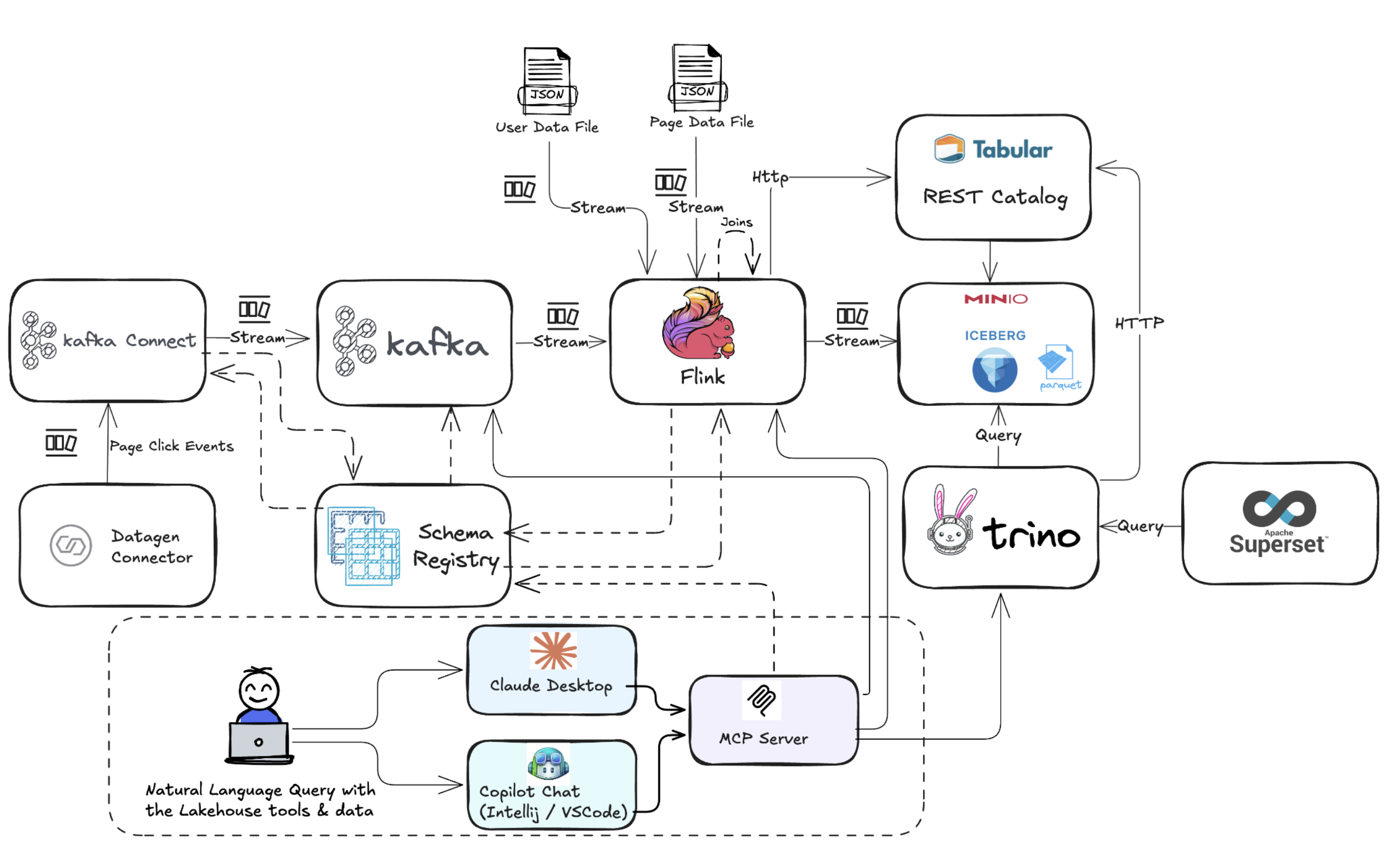
File Structure
main.py: MCP server entry point, tool registration.kafka_tools.py: Kafka-related MCP tools.flink_tools.py: Flink-related MCP tools.trino_tools.py: Trino/Iceberg-related MCP tools.env_config.py: Centralized environment variable loader for all tools.logging_config.py: Centralized logging configuration for all tools.requirements.txt: Python dependencies.
Features
- Kafka Tools: List topics, peek latest messages, dynamic support for Avro/JSON/Text.
- Flink Tools: Cluster metrics, job listing, job details, TaskManager listing and details.
- Trino/Iceberg Tools: List catalogs, schemas, tables, get table schema, execute queries, time travel queries, list snapshots.
- MCP Discovery: All tools/resources are annotated for easy discovery by MCP clients.
Timestamp Format for Iceberg Time Travel Queries
When using the iceberg_time_travel_query tool, the timestamp parameter must be in ISO 8601 format.
Example: '2024-09-12T15:30:45.123456+05:30'
This format includes date, time (with optional milliseconds), and timezone offset.
Installation
- Clone the repository
git clone <your-repo-url>
cd DataLakeHouseMCP
- Create and activate a virtual environment (recommended)
python3 -m venv .venv
source .venv/bin/activate
- Install dependencies using uv
uv pip install -r requirements.txt
Running the MCP Server (Stdio Mode)
This MCP server runs in local stdio mode and does not expose an HTTP endpoint. It is intended to be launched and connected to directly by MCP clients (such as Copilot Chat or Claude Desktop) using standard input/output.
uv run "/path/to/DataLakeHouseMCP/main.py"
Configuring MCP Clients
Claude Desktop
- Go to Settings > Integrations > Model Context Protocol (MCP).
- Click "Add MCP Server" and set the executable path to your MCP server (e.g.
uv). - Set arguments to:
run /path/to/DataLakeHouseMCP/main.py - Optionally, set the working directory to your project folder (e.g.
/path/to/DataLakeHouseMCP). - Save and enable the integration.
- Claude will launch the MCP server in stdio mode and auto-discover available MCP tools and resources.
- Example
claude_desktop_config.json:
{
  "mcpServers": {
    "mcp-data-lakehouse": {
      "command": "uv",
      "args": [
        "run",
        "/path/to/DataLakeHouseMCP/main.py"
      ]
    }
  }
}
Copilot Chat in VSCode
- Open Copilot Chat and go to MCP server configuration (usually in the extension settings or via command palette).
- Add a new MCP server:
- Executable:
uv - Arguments:
run main.py - Working directory:
/path/to/DataLakeHouseMCP
- Executable:
- Save the configuration.
- Example
mcp.json:
{
  "servers": {
    "mcp-data-lakehouse-test": {
      "type": "stdio",
      "command": "uv",
      "args": ["run", "/path/to/DataLakeHouseMCP/main.py"]
    }
  },
  "inputs": []
}
Copilot Chat in IntelliJ
- Open Copilot Chat and go to MCP server configuration (usually in plugin settings).
- Add a new MCP server:
- Executable:
uv - Arguments:
run /path/to/DataLakeHouseMCP/main.py - Working directory:
/path/to/DataLakeHouseMCP
- Executable:
- Save the configuration.
- Example
mcp.json:
{
  "servers": {
    "mcp-data-lakehouse": {
      "type": "stdio",
      "command": "uv",
      "args": [
        "run",
        "/path/to/DataLakeHouseMCP/main.py"
      ]
    }
  }
}
MCP Tools & Features
Kafka Tools
- List Kafka Topics
kafka_topics— Lists all Kafka topics available in the local cluster. - Peek Kafka Topic
peek_kafka_topic— Retrieves the latest N messages from a specified Kafka topic (supports Avro, JSON, and plain text).
Flink Tools
- Cluster Overview
flink_overview— Shows Flink cluster metrics: number of task managers, slots, jobs running/finished/cancelled/failed. - JobManager Metrics
flink_jobmanager_metrics— Returns JobManager metrics (heap memory, CPU load, JVM/process stats). - TaskManagers Metrics
flink_taskmanagers_metrics— Returns TaskManagers metrics (heap memory, network IO, slot utilization). - List Flink Jobs
flink_jobs— Lists all Flink jobs running on the cluster (IDs, names, status). - Flink Job Details
flink_job_details— Returns details for one or more Flink jobs by job ID(s): status, vertices, configuration.
Note: Accepts a list of job IDs. - Probe JobManager Metrics
probe_jobmanager_metrics— Probe one or more JobManager metrics by name (pass a list, even for a single metric). - Probe TaskManager Metrics
probe_taskmanager_metrics— Probe one or more TaskManager metrics by name and TaskManager ID (pass a list, even for a single metric). - List TaskManagers
flink_taskmanagers— Lists all Flink TaskManagers and their details.
Trino & Iceberg Tools
- List Iceberg Tables
trino_iceberg_tables— Lists all Iceberg tables in a specified Trino catalog. - List Trino Catalogs
trino_catalogs— Lists all catalogs available in the Trino cluster. - List Trino Schemas
trino_schemas— Lists all schemas in a specified list of Trino catalogs. - Get Iceberg Table Schema
get_iceberg_table_schema— Returns the schema (columns/types) of an Iceberg table. - Execute Trino Query
execute_trino_query— Executes a SQL query on Trino and returns results. - Iceberg Time Travel Query
iceberg_time_travel_query— Executes a time travel query on Iceberg tables using Trino.
Timestamp format: ISO 8601 (e.g.,2024-09-12T15:30:45.123456+05:30). - List Iceberg Snapshots
list_iceberg_snapshots— Lists all snapshots for a given Iceberg table (snapshot_id, committed_at, operation, etc.).
Example Prompts
You can use the following prompts in any MCP-enabled client with the provided Lakehouse setup
- Show me all Kafka topics available in the cluster
- Show some recent messages from page views
- Provide me a high level overview of my Flink cluster
- How many jobs are running and how many task slots are available in Flink ?
- Provide details of the running jobs
- What metrics are available for job manager and task manager
- Get me JVM memory related metric values for both job manager and task manager
- What are the different catalogs and schemas present in my iceberg environment
- What are the tables present in ice-db schema 10 How many records are there in ice user page views currently
- How much was the count 30 minutes ago Singapore time
- How much was the count at 7:30 PM Singapore time
- What are the most popular pages visited by users? Provide a pie chart with the page description to illustrate
- What about the top regions in terms of user traffic to the site. Provide another pie chart to illustrate this
MCP Tool Discovery
All tools are annotated with descriptions. MCP clients will auto-discover available tools and their parameters, making it easy to interact programmatically or via chat.
Extending
Add new tools/resources by creating functions in the appropriate file and annotating with @mcp.tool or @mcp.resource.
Testing & Troubleshooting
MCP Inspector Tool
You can use the MCP Inspector to test and troubleshoot the MCP server and its tools. This is especially useful for verifying tool interfaces, inspecting tool annotations, and simulating LLM interactions.
Usage
Run the following command in your project directory:
npx @modelcontextprotocol/inspector uv run "/path/to/DataLakeHouseMCP/main.py"
This will start the MCP Inspector in stdio mode, allowing you to interactively test tool definitions and server responses. For more details, see the MCP Inspector documentation.
Troubleshooting
- Ensure all dependencies are installed.
- Check MCP client configuration for correct executable path.
- Review logs for errors (e.g., missing modules, connection issues).
Установка DataLakeHouseMCP
У этого сервера нет опубликованного пакета — он собирается из исходников. Открой репозиторий и следуй инструкции в README.
▸ github.com/Zabi82/DataLakeHouseMCPFAQ
DataLakeHouseMCP MCP бесплатный?
Да, DataLakeHouseMCP MCP бесплатный — установка в пару кликов через Unyly без оплаты.
Нужен ли API-ключ для DataLakeHouseMCP?
Нет, DataLakeHouseMCP работает без API-ключей и переменных окружения.
DataLakeHouseMCP — hosted или self-hosted?
Self-hosted: сервер запускается локально на твоей машине командой из раздела установки.
Как установить DataLakeHouseMCP в Claude Desktop, Claude Code или Cursor?
Открой DataLakeHouseMCP на unyly.org, выбери вкладку своего клиента (Claude Desktop, Claude Code, Cursor) и нажми Install — конфиг сгенерируется автоматически, без правки JSON.
Похожие MCP
Fetch
Web content fetching and conversion for efficient LLM usage.
AWS KB Retrieval
Retrieval from AWS Knowledge Base using Bedrock Agent Runtime.
 автор: modelcontextprotocol
Spring AI MCP Server
Provides auto-configuration for setting up an MCP server in Spring Boot applications.
llm-analysis-assistant
A very streamlined mcp client that supports calling and monitoring stdio/sse/streamableHttp, and can also view request responses through the /logs page. It also
 автор: xuzexin-hz
Compare DataLakeHouseMCP with
Не уверен что выбрать?
Найди свой стек за 60 секунд
Автор?
Embed-бейдж для README
Похожее
Все в категории ai