
Dcc Mcp Zbrush
БесплатноНе проверенZBrush adapter for the DCC Model Context Protocol (MCP) ecosystem — embedded Python SDK + optional socket bridge

Описание
ZBrush adapter for the DCC Model Context Protocol (MCP) ecosystem — embedded Python SDK + optional socket bridge
README

Part of the DCC-MCP host matrix
dcc-mcp-zbrush — ZBrush adapter for DCC-MCP.
It is one of 48 host adapters in the DCC-MCP catalog. Every adapter speaks the same MCP protocol and builds on the same core runtime contract; each one exposes the tools its own host needs on top of that.
This block is generated from the catalog entry in dcc-mcp-catalog.yml. Re-run the generator after changing the catalog.
Agent workflow
AI agents should use the shared gateway through dcc-mcp-cli; IDE users may
continue to use the MCP endpoint. Prefer typed skills and tools over raw scripts.
Install or update the CLI
dcc-mcp-cli is the preferred control path for every shell-capable agent. If
it is missing, ask the user before installing the latest official release:
# Linux/macOS
curl -fsSL https://raw.githubusercontent.com/dcc-mcp/dcc-mcp-core/main/scripts/install-cli.sh | sh

# Windows PowerShell
powershell -ExecutionPolicy Bypass -c "irm https://raw.githubusercontent.com/dcc-mcp/dcc-mcp-core/main/scripts/install-cli.ps1 | iex"
Keep an official build current through the release manifest:
dcc-mcp-cli update check
dcc-mcp-cli update apply
update apply downloads and stages the latest CLI for the next launch. It
does not update a running dcc-mcp-server; update that server in its own
environment.
dcc-mcp-cli dcc-types
dcc-mcp-cli list
dcc-mcp-cli search --query "<task>" --dcc-type zbrush
dcc-mcp-cli describe <tool-slug>
dcc-mcp-cli call <tool-slug> --json '{"key":"value"}'
dcc-types reports release-catalog support; list reports live sessions. If a
tool belongs to an inactive progressive skill, call dcc-mcp-cli load-skill <skill-name> --dcc-type zbrush before retrying. For post-task improvement,
attach a stable session id with --meta-json, query dcc-mcp-cli stats --range 24h --session-id <task-id>, then pass the bounded evidence to the
review_skill_improvement prompt from dcc-mcp-skills-creator.
PyPI Python 3.10+ License: MIT Status: Pre-Alpha
ZBrush adapter for the DCC Model Context Protocol ecosystem.
Requires ZBrush 2026.1+ with the official Python SDK (CPython 3.11 embedded in ZBrush).
Showcase
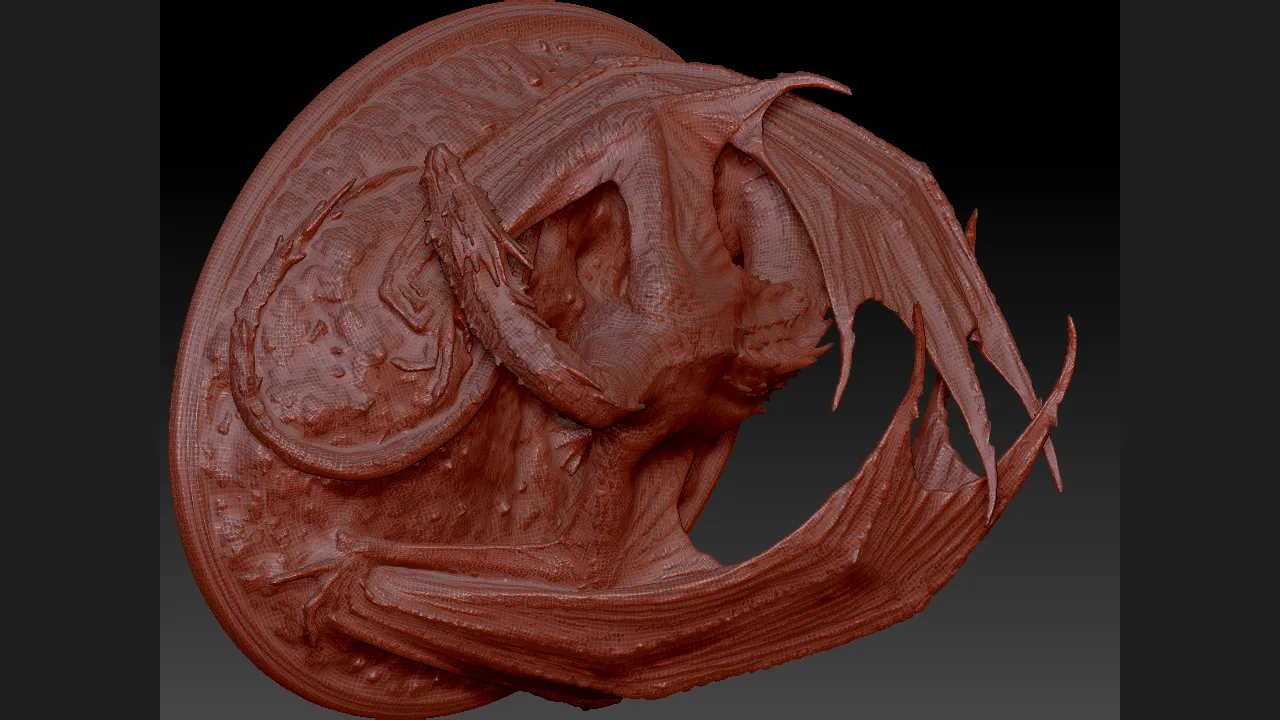
Real ZBrush 2026 evidence from a typed, quiet high-poly workflow: 2,499,970 points / 5,000,000 faces, inspected and exported as the active Dragon subtool. Fantasy Dragon model by Artec 3D, used under CC BY 4.0; the source model is not included in this repository. See the full workflow and copyable prompt.
Quick install
1. Install a fixed wheel version
python -m pip install "dcc-mcp-zbrush==<version>"
The wheel includes the lifecycle CLI and the sidecar bridge payload.
2. Plan and apply the plugin install
Set ZBRUSH_USER_ASSETS_DIR, then run the standard lifecycle. The installer
requires an explicit ZBrush path so it can prove the 2026.1+ host floor.
dcc-mcp-zbrush install --version <version> --dcc-path "<ZBrush path>" --python python --dry-run --json
dcc-mcp-zbrush install --version <version> --dcc-path "<ZBrush path>" --python python --yes --json
The fixed release payload is SHA-256 verified before caching. Sidecar mode
installs a dedicated module and appends a bounded managed block to the shared
Python/init.py; it never overwrites that file. Receipt-backed uninstall and
rollback restore the previous state. Applying an install or upgrade stages a
candidate and returns exit 50; the candidate is committed only after the
exact ZBrush process, start identity, endpoint, version, and loaded module
origins pass verify.
See the canonical lifecycle SOP (raw URL).
3. Restart ZBrush
Launch or restart ZBrush, then start the external MCP sidecar:
dcc-mcp-zbrush --mode sidecar --socket-port 9876
The plugin registers a top-level DCC MCP palette through the official ZBrush Python SDK with these actions:
- Copy Instance ID
- Server Info
- About DCC MCP
Instance identity belongs to the MCP server. In embedded mode the first two
actions read the public DccServerBase runtime context. The standalone
sidecar plugin does not guess identity from environment variables or registry
files; it directs you to dcc-mcp-cli list when that external context is not
available in the ZBrush process.
4. Verify host readiness
Verify the dynamically allocated instance URL:
dcc-mcp-zbrush verify --version <version> --dcc-path "<ZBrush path>" --python python --json
dcc-mcp-cli list
5. Configure your AI client
Add the MCP server to your AI client config (Cursor, Claude Desktop, etc.):
{
  "mcpServers": {
    "zbrush": {
      "url": "http://127.0.0.1:9765/mcp"
    }
  }
}
How it works
ZBrush does not ship a built-in HTTP REST server. The pre-alpha scaffold that assumed Preferences > Network > Enable HTTP Server was incorrect.
The supported integration paths are:
| Mode | When to use | Stack |
|---|---|---|
| Sidecar + socket plugin (recommended) | Production GUI and CI clients | External Python → TCP :9876 → main-thread bridge inside ZBrush |
| Embedded (advanced) | Pure-Python experiments only | Python plugin inside ZBrush → zbrush.commands |
Rust is not loaded inside ZBrush. The dcc-mcp-core wheel (PyO3) runs
in the external sidecar process; importing its extension module into the ZBrush
2026 embedded VM is not a supported runtime path. The ZBrush-facing bridge is
Python only and executes requests serially on the host main thread while
pumping UI updates between requests. Only one SDK request is admitted at a
time; additional requests fail with a retryable busy response. ping does not
touch the SDK, but cannot respond if a native operation holds Python's GIL.
A long native operation can still
make Windows report ZBrush as not responding because the Maxon SDK call itself
is synchronous. If a bridge timeout says the request is still running, do not
retry the mutation automatically; inspect the scene after bridge health recovers.
File import,
export, and baking suppress scripted action feedback without wrapping the
native operation in zbc.freeze(), so ZBrush can still present progress or a
required native dialog.
For blocked dialogs, short health probes, and queue-expiry limits, see
Blocked bridge safeguards. These safeguards do not
propagate an earlier MCP/REST timeout or make /v1/readyz a host-execution proof.
GoZ C++ SDK is for mesh exchange between DCC apps, not general MCP automation — we do not build the primary adapter on GoZ.
Recommended sidecar mode:

AI Agent → Gateway :9765 → OS-assigned MCP instance → ZBrushMcpServer
         → TCP :9876 → mcp_socket_bridge.py (inside ZBrush) → zbrush.commands
Features (v0.2.0)
DccServerBaseadapter with progressive skill loading- Bundled skills:
zbrush-scripting,zbrush-scene,zbrush-subtool,zbrush-brush,zbrush-viewport,zbrush-interchange,zbrush-import-to-scene,zbrush-dialog - In-process executor for ZBrush's embedded Python VM
- Optional socket bridge plugin for sidecar deployments
- Top-level DCC MCP palette registered through
zbrush.commands - Gateway election compatible with
dcc-mcp-core
Requirements
- ZBrush 2026.1+
- Python 3.10+ on the sidecar host (ZBrush itself ships 3.11)
dcc-mcp-core >= 0.20.14, < 0.21.0
Environment variables
| Variable | Default | Purpose |
|---|---|---|
DCC_MCP_ZBRUSH_PORT |
OS-assigned | Optional fixed MCP instance port |
DCC_MCP_ZBRUSH_MODE |
auto | embedded or sidecar |
DCC_MCP_ZBRUSH_AUTOSTART |
1 |
Auto-start embedded server from plugin |
DCC_MCP_ZBRUSH_SOCKET_PORT |
9876 |
Socket bridge port (sidecar) |
DCC_MCP_GATEWAY_PORT |
9765 |
Gateway election port |
DCC_MCP_MINIMAL |
1 |
Progressive skill loading |
Bundled skills
| Skill | Tools |
|---|---|
zbrush-scripting |
execute_python, get_session_info |
zbrush-scene |
get_scene_info, list_subtools |
zbrush-subtool |
select_subtool, get_subtool_status |
zbrush-brush |
create_wrinkle_brush, load_wrinkle_brush |
zbrush-viewport |
capture_turntable |
zbrush-interchange |
export_active_subtool_obj |
zbrush-dialog |
get_active_dialog, click_dialog_button (sidecar on macOS: read and answer a blocking ZBrush note) |
Path concepts
- PYTHONPATH — where Python looks for packages (
pip installhandles this) - ZBRUSH_USER_ASSETS_DIR / ZBRUSH_PLUGIN_PATH — plugin scan roots used by ZBrush 2026.1+
pip install dcc-mcp-zbrush puts the Python package on PYTHONPATH. The
lifecycle CLI installs host files transactionally; do not copy a bridge over
the shared Python/init.py manually.
Skill authoring
Skills lazy-import zbrush.commands and run on the main thread (affinity: main).
The sidecar-only zbrush-dialog skill is the one exception (affinity: any): it
never calls zbrush.commands and must run while a note blocks the main thread.
from dcc_mcp_core.skill import skill_entry
from dcc_mcp_zbrush.api import import_zbc, with_zbrush, zb_success


@skill_entry
@with_zbrush
def my_tool(**kwargs) -> dict:
    zbc = import_zbc()
    count = zbc.get_subtool_count()
    return zb_success(f"{count} subtool(s)", count=count)
Sidecar mode
After completing the receipt-driven install and restarting ZBrush, run the MCP server outside ZBrush:
The sidecar can also start first: it retains the bridge endpoint and retries the connection on the first tool call after ZBrush becomes available.
dcc-mcp-zbrush --mode sidecar --socket-port 9876
Development
See docs/development.md for source-based setup, testing, and contribution workflow.
References
- ZBrush Python SDK 2026.1
- ZBrush Python environment
- GoZ SDK (mesh exchange only)
- Community reference: newsbubbles/zbrush-mcp (socket bridge pattern)
License
MIT
Установить Dcc Mcp Zbrush в Claude Desktop, Claude Code, Cursor
unyly install dcc-mcp-zbrushСтавит в Claude Desktop, Claude Code, Cursor и VS Code — сам разбирается с npx, uvx и сборкой из исходников.
Впервые? Поставь CLI: curl -fsSL https://unyly.org/install | sh
Или настроить вручную
Выполни в терминале:
claude mcp add dcc-mcp-zbrush -- uvx dcc-mcp-zbrushПошаговые гайды: как установить Dcc Mcp Zbrush
FAQ
Dcc Mcp Zbrush MCP бесплатный?
Да, Dcc Mcp Zbrush MCP бесплатный — установка в пару кликов через Unyly без оплаты.
Нужен ли API-ключ для Dcc Mcp Zbrush?
Нет, Dcc Mcp Zbrush работает без API-ключей и переменных окружения.
Dcc Mcp Zbrush — hosted или self-hosted?
Self-hosted: сервер запускается локально на твоей машине командой из раздела установки.
Как установить Dcc Mcp Zbrush в Claude Desktop, Claude Code или Cursor?
Открой Dcc Mcp Zbrush на unyly.org, выбери вкладку своего клиента (Claude Desktop, Claude Code, Cursor) и нажми Install — конфиг сгенерируется автоматически, без правки JSON.
Похожие MCP
Opencode Omniroute Plugin
OpenCode plugin for the OmniRoute AI Gateway. Drives dynamic model discovery, /connect auth flow, and multi-instance OmniRoute providers via the official @openc
 автор: GitHub Actions
Roblox Studio
Enables AI coding tools to control Roblox Studio for workspace exploration, instance manipulation, and script management. It provides tools for playtesting, sce
 автор: paralov
Antigravity Drawio
MCP server that enables AI assistants to create, parse, render, and validate Draw.io diagrams programmatically.
 автор: S-SUJAN-S
Fetch
Web content fetching and conversion for efficient LLM usage.
AWS KB Retrieval
Retrieval from AWS Knowledge Base using Bedrock Agent Runtime.
 автор: modelcontextprotocol
Spring AI MCP Server
Provides auto-configuration for setting up an MCP server in Spring Boot applications.
llm-analysis-assistant
A very streamlined mcp client that supports calling and monitoring stdio/sse/streamableHttp, and can also view request responses through the /logs page. It also
 автор: xuzexin-hz
MCP-Agent
A simple, composable framework to build agents using Model Context Protocol by [LastMile AI](https://www.lastmileai.dev)
 автор: lastmile-ai
Spring AI MCP Client
Provides auto-configuration for MCP client functionality in Spring Boot applications.
mcp.natoma.ai
A Hosted MCP Platform to discover, install, manage and deploy MCP servers by [Natoma Labs](https://www.natoma.ai)
Compare Dcc Mcp Zbrush with
Не уверен что выбрать?
Найди свой стек за 60 секунд
Автор?
Embed-бейдж для README
Похожее
Все в категории ai