
Deepl I18n
БесплатноНе проверенMCP server for translating JSON localization files via DeepL API or local LLMs, enabling agents to estimate, check, and run translations.

Описание
MCP server for translating JSON localization files via DeepL API or local LLMs, enabling agents to estimate, check, and run translations.
README
Translate your JSON localization files with the DeepL API. DeepL-first, config-driven, and free — no telemetry, no account required beyond a DeepL API key (the free tier gives 500,000 characters/month).
Unofficial project. Not affiliated with, sponsored by, or endorsed by DeepL SE. "DeepL" is a trademark of DeepL SE; used here only to describe API compatibility.
Point it at a source-language JSON file, list your target languages, and it fills in only the missing keys — existing translations are preserved, obsolete keys are removed, and placeholders are protected from corruption.
Optionally translate via a local LLM (LM Studio) instead of DeepL — see Local model.

Features
- Incremental — only missing/empty keys are translated; existing values stay untouched.
- No double billing — identical source strings are translated once per run and reused across all keys (a per-run translation memory), so repeated values like "OK" or "Cancel" don't cost extra characters.
- Placeholder-safe — variables like
{{ name }}are shielded from translation and verified afterwards, catching both changed tokens and corruption where a placeholder gets glued to a word (e.g.d{{value1}}ových). The placeholder format is configurable ({{ }},%s,{0}, …). - Multiple formats — JSON and YAML (nested), Java
.propertiesand iOS.strings(flat); auto-detected by extension or forced with--file-format. Nested objects are recursed; non-string values (numbers, booleans, null) are copied verbatim. - Formality, context & model — set DeepL
formality, acontextprompt, and themodel_type(quality- vs. latency-optimized) to steer tone, terminology and speed. - Cost transparency — every run reports the characters DeepL actually billed.
- Nice output, or JSON — colored output, tables and progress bars when
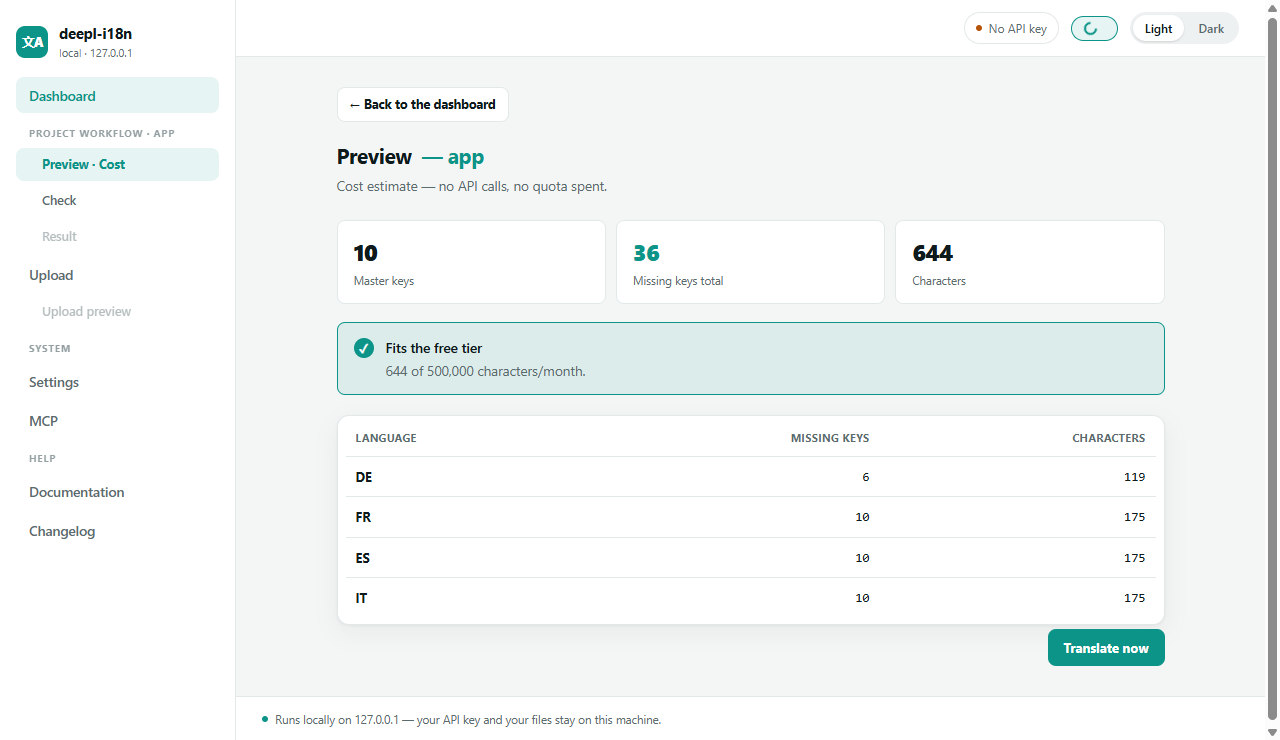
richis installed (pip install deepl-i18n[rich]);--jsonfor machine-readable results in scripts/CI. - Dry run — see how many keys and characters would be translated, and whether it fits the DeepL free tier — without an API key and without spending any quota, so you can estimate the cost before signing up.
- Quota display — real-time DeepL character usage.
Requirements
- Python 3.10+
- A DeepL API key
deepl(the only third-party dependency)
Setup
# create & activate a virtual environment
python -m venv venv
./venv/Scripts/activate        # Windows
# source venv/bin/activate     # macOS/Linux

# install the CLI (and its only dependency, deepl) from source
pip install -e .
This installs a deepl-i18n command. config.json and .env are resolved from the
current working directory, so run the command from your project folder (or pass
--config path/to/config.json).
API key
Provide your DeepL API key in one of these ways (checked in this order):
DEEPL_API_KEYenvironment variable (recommended, especially for CI)- a
.envfile in the project root containingDEEPL_API_KEY=your-key(copy.env.exampleto.env)
.env and config.json are git-ignored so your key and local paths never get committed.
Configuration
Copy the example config and adjust it:
cp config.example.json config.json
{
  "source_lang": "EN",
  "output_languages": ["DE", "FR", "ES", "IT", "PT-PT"],
  "filename_overrides": {},
  "formality": "default",
  "placeholder_pattern": "{{\\s*\\w+\\s*}}",
  "context": "Optional: describe your app so DeepL picks the right terminology and tone.",
  "targets": {
    "app": {
      "input_path": "./locales/en.json",
      "output_dir": "./locales"
    }
  }
}
| Key | Meaning |
|---|---|
source_lang |
DeepL source language code of your master file (e.g. EN, DE). |
output_languages |
Target language codes (e.g. DE, FR, PT-PT, EN-US). |
filename_overrides |
Map a language code to a custom output filename, e.g. {"EN-US": "en"} → en.json. |
formality |
less/more/prefer_less/prefer_more/default, or a per-language object like { "FR": "more", "DE": "less" }. Applied only to languages that support it. |
placeholder_pattern |
Regex matching your placeholders. Default {{ … }}. Use e.g. %\\d*\\$?[sd@] (printf) or \\{\\d+\\} (MessageFormat). |
context |
Optional prompt passed to DeepL to disambiguate terminology and tone. |
glossary |
Optional path to a glossary file (see Glossary), or null. |
file_format |
Force a format (json/yaml/properties/strings), or null to auto-detect by extension. |
model_type |
DeepL model: quality_optimized (default), latency_optimized, prefer_quality_optimized, or null. |
targets |
Named input/output path pairs. Each needs input_path (the source file) and output_dir. |
Output filenames use the lowercase language code (e.g. de.json, pt-pt.json) unless
overridden.
Usage
All commands take a <target> — a key under targets in your config.json.
# translate the missing keys of a target
deepl-i18n translate app

# only one language
deepl-i18n translate app --lang FR

# dry run — no API key, no API calls, no files written; shows keys, characters, free-tier fit
deepl-i18n translate app --dry-run
deepl-i18n translate app --dry-run --lang FR

# re-translate existing keys, and keep a .bak of each file before overwriting
deepl-i18n translate app --override --backup

# translate several target languages at once
deepl-i18n translate app --parallel 4

# machine-readable output for scripts/CI
deepl-i18n translate app --dry-run --json
deepl-i18n check app --json

# use a config elsewhere (--config works before or after the subcommand)
deepl-i18n translate app --config ./locales/config.json
deepl-i18n --config ./locales/config.json translate app
Watch
Re-translate automatically whenever the source file changes:
deepl-i18n watch app                 # polls the source file (default every 2s)
deepl-i18n watch app --interval 5 --backup
Check (CI gate)
Validate existing translations without translating anything: reports missing/empty keys and placeholder corruption, and exits non-zero if any problem is found — ready to drop into CI.
deepl-i18n check app
deepl-i18n check app --lang FR
DeepL quota
deepl-i18n usage
Also printed automatically at the end of every translate run and dry run.
File formats
The format is detected from the source file's extension; output files use the same
extension. Force it with --file-format (or file_format in the config) when the
extension is ambiguous or missing.
| Format | Extensions | Structure | Notes |
|---|---|---|---|
| JSON | .json |
nested | i18next-style; non-string values preserved |
| YAML | .yaml, .yml |
nested | needs pip install deepl-i18n[yaml]; comments preserved (ruamel.yaml) |
| Java properties | .properties |
flat | #/! comments, =/: separators, line continuations |
| iOS strings | .strings |
flat | /* */ and // comments |
| Flutter ARB | .arb |
flat | @key metadata preserved; @@locale set to the target language |
| Android XML | .xml |
flat | <string> elements; translatable="false" entries are not written to target files |
| CSV | .csv |
flat | key,value columns; optional header row |
deepl-i18n translate app --file-format yaml
Two behaviours worth knowing before you point this at a commented file:
- Comments survive in YAML only. ARB keeps its
@keymetadata, and comments in the source file are of course never touched. But.propertiesand.stringstarget files are rewritten from the parsed data, so comments that were in an existing target file are lost on the next run. Keep the prose in your source file, or use YAML. translatable="false"disappears from Android target files. Those strings are read (so the key isn't reported missing) but not written tovalues-de/strings.xmletc. That matches the Android convention — non-translatable strings live only in the defaultvalues/strings.xml— but it does mean the entry is gone from the target file, not just left untranslated.
gettext .po/.pot has its own command (see gettext). ARB template
regeneration is still on the roadmap.
gettext (.po)
gettext is different: the source text is the msgid (the key), and source + translation
live in the same file — so it has a dedicated command instead of the generic pipeline. It
fills the empty msgstr entries from the msgid via DeepL, in place.
pip install deepl-i18n[po]

deepl-i18n po locale/de/LC_MESSAGES/messages.po      # target language from the file's header
deepl-i18n po locale/ --source-lang EN               # whole tree; target inferred per file
deepl-i18n po de.po --target-lang DE --override --backup
- Target language comes from
--target-lang, else the file'sLanguage:header, else the filename. Source language from--source-lang(or configsource_lang, elseEN). - Reuses batching, per-run translation memory, glossary and placeholder checks. For gettext
placeholders (
%s,%(name)s,{0}), setplaceholder_patternin your config. - Plurals: the singular form is filled from
msgid, the others frommsgid_plural. For languages with more than two plural forms, the entry is markedfuzzyfor review.
Glossary
Keep terminology consistent across languages. Point glossary in your config (or pass
--glossary path) at a JSON file with two optional sections:
{
  "doNotTranslate": ["BeerpongMe", "Rerack", "Bracket"],
  "terms": {
    "Turnier": { "FR": "tournoi", "ES": "torneo" }
  }
}
doNotTranslate— terms kept verbatim in every target language.terms— per-term, per-language forced translations (language codes match youroutput_languages; a base code likeENalso matchesEN-US).
You can also keep the glossary as a spreadsheet-friendly CSV/TSV with a term column
followed by language columns; a row with empty language cells becomes doNotTranslate:
term,FR,ES,IT
Turnier,tournoi,torneo,torneo
BeerpongMe,,,
For DeepL, an ephemeral glossary is created for each target language, used for that run, and deleted afterwards (glossary create/delete cost no characters). Language pairs DeepL doesn't support for glossaries are skipped with a note. For the local model, the same glossary is injected into the prompt.
# validate a glossary file and preview entries per language (no API calls)
deepl-i18n glossary check app --glossary glossary.json

# manage glossaries stored on DeepL
deepl-i18n glossary list
deepl-i18n glossary delete <id>
deepl-i18n glossary delete --all
LLM provider (local or hosted)
Instead of DeepL you can translate with any OpenAI-compatible LLM — local (LM Studio,
Ollama; default http://localhost:1234) or hosted (OpenAI, Groq, Together, Azure, …). Same
key-selection logic (missing keys only), same output files, same placeholder safety.
deepl-i18n local app                       # or: deepl-i18n llm app  (local LM Studio)
deepl-i18n local app --lang CS
deepl-i18n local app --dry-run
deepl-i18n local app --single              # key-by-key instead of batch
deepl-i18n local app --chunk-size 20       # keys per batch request (default 30)

# hosted provider (OpenAI-compatible)
deepl-i18n llm app --base-url https://api.openai.com --api-key sk-... --model gpt-4o-mini
--base-url/--api-key/--model can also be set via LLM_BASE_URL, LLM_API_KEY,
LLM_MODEL (env). No key is sent when none is configured (local servers need none).
Compare a local model against DeepL, side by side, without writing anything:
deepl-i18n compare app --lang CS
For each key it prints the source, DeepL's live translation, the local model's, and — if
a target file already exists — what's currently in that file. DeepL is really called here, so
compare uses quota (it tells you how many characters before it starts, and what was billed
at the end). Nothing is written to disk.
LMSTUDIO_MODEL and LMSTUDIO_URL can be set via environment variables.
MCP server
Expose the tool to MCP clients (Claude Desktop, Claude Code, …) so an agent can estimate, check and run translations for you.
pip install deepl-i18n[mcp]
Tools:
| Tool | What it does |
|---|---|
dry_run_estimate |
missing keys/characters per language, free-tier fit — no API calls |
check_integrity |
completeness + placeholder check; returns {ok, issues} |
deepl_usage |
current DeepL quota |
translate_missing |
translate missing keys and write the files (uses quota) |
Each tool takes a target (a key under targets), an optional lang, and an optional
config path. Register the server with your client (set cwd to the folder that holds
your config.json and API key):
{
  "mcpServers": {
    "deepl-i18n": {
      "command": "/path/to/your/project/.venv/bin/deepl-i18n-mcp",
      "cwd": "/path/to/your/i18n/project"
    }
  }
}
Use the absolute path. A bare
"command": "deepl-i18n-mcp"usually fails withFailed to reconnect: the client starts the process without your activated venv, so the executable isn't on itsPATH. It works in your own terminal (whereactivatehas run), which makes the error confusing. On Windows the path ends in\.venv\Scripts\deepl-i18n-mcp.exe. If you'd rather not hard-code it:{ "command": "/path/to/.venv/bin/python", "args": ["-m", "deepl_i18n.mcp_server"] }
cwdcan be dropped if the client already starts in your project folder.
Every executable also runs the server as a subcommand, which is the simplest option if the
scripts directory isn't on the client's PATH — and the only one for the standalone binary,
which has no separate deepl-i18n-mcp:
{
  "mcpServers": {
    "deepl-i18n": {
      "command": "C:\\path\\to\\deepl-i18n.exe",
      "args": ["mcp"],
      "cwd": "C:\\path\\to\\your\\i18n\\project"
    }
  }
}
The MCP page of the web UI (deepl-i18n serve) prints this snippet with your own
absolute path filled in, and its self-test starts the server and runs a real
initialize + tools/list handshake over stdio.
Not sure what your path is? Run
deepl-i18n serveand open the MCP page — it shows the absolute path, a ready-to-copy snippet, and a self-test that actually starts the server and runsinitialize+tools/listover stdio.
Web UI (local)
A small local web app for non-developers — runs on 127.0.0.1 only, so your API key and
files never leave your machine.
pip install deepl-i18n[ui]
deepl-i18n serve            # opens http://127.0.0.1:8765 in your browser
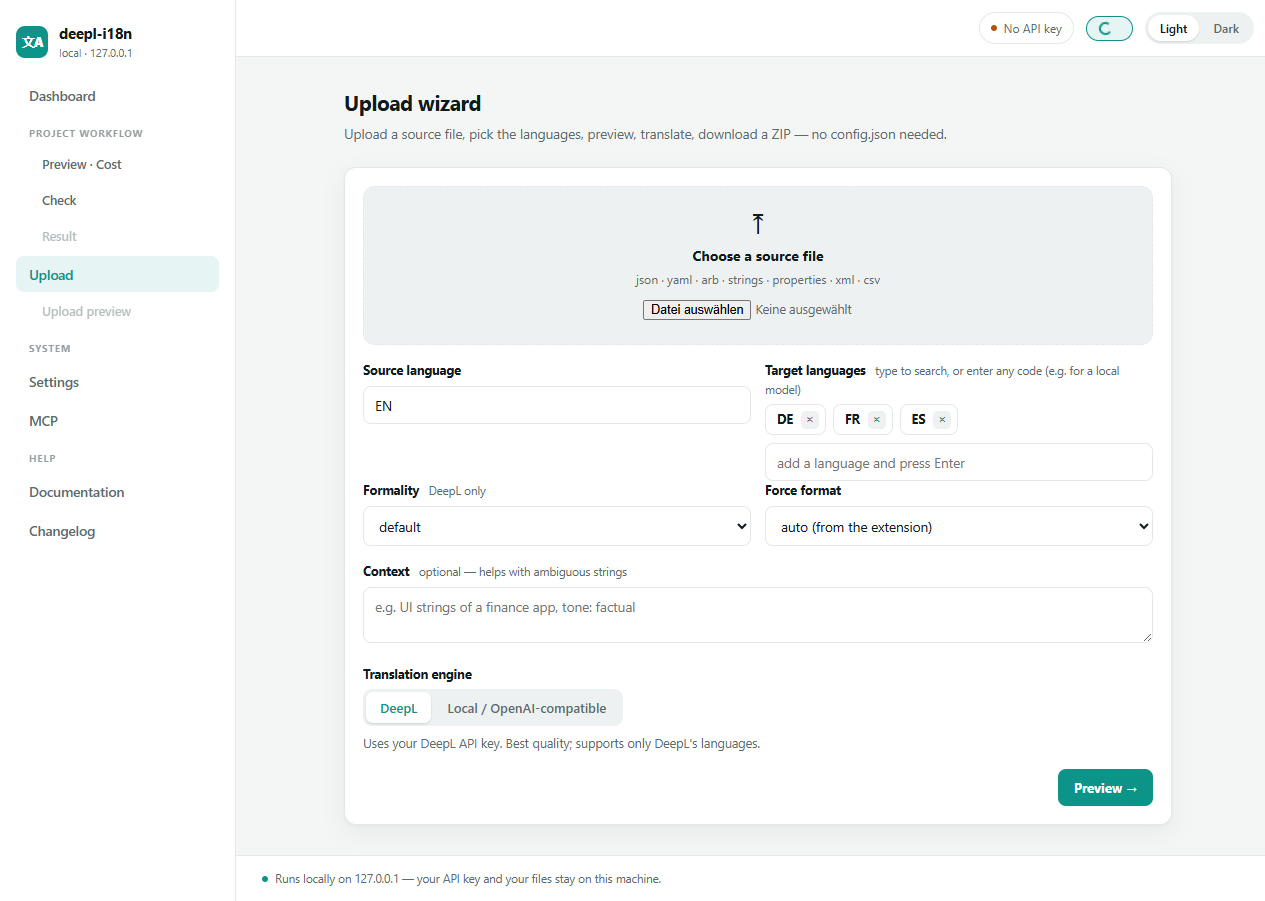
The upload wizard needs no config.json — drop a source file, pick the target languages
(type-to-search or enter any code), choose DeepL or a local model, and preview before spending
anything:
The cost preview lists exactly which keys are missing per language, the characters DeepL would bill, and whether it fits the free tier — no API key required, no quota spent:
Six pages:
- Dashboard — reads your
config.json, lists targets, and gives each a Preview (cost), Check, and Translate button with an inline diff of what changed. - Upload wizard — no config needed: upload a source file, pick target languages, see the cost preview, translate, and download the results as a ZIP.
- Settings — edit
config.jsonin the browser: languages, formality (global or per language), model type, context, glossary, filename overrides and targets. The placeholder regex has a live tester, so you can see what it matches before saving. Everything is validated before it's written, the file is replaced atomically with a.bakalongside it, and fields the UI doesn't manage are left untouched. Your API key is never written toconfig.json(that file usually lives in your repo) — it goes into.env. - MCP — shows whether the MCP server is installed, where its executable is, a
ready-to-copy client snippet with the absolute path, and a self-test that starts the server
and runs a real
initialize+tools/listhandshake over stdio. Useful when your client says "failed to reconnect" and you want to know whose fault it is. - Documentation — this README, rendered in the browser.
- Changelog —
CHANGELOG.md, rendered in the browser.
Both help pages strip remote images (the badges), so opening them makes no network requests.
They need markdown, which comes with the [ui] extra; without it the raw text is shown.
Preview and check work without an API key; translating uses the key from
DEEPL_API_KEY/.env (or a field in the upload wizard). Light and dark theme follow your
system setting and can be toggled in the sidebar.
The UI binds to 127.0.0.1 and has no authentication — it can read and write files and spend
quota, so don't expose it with --host 0.0.0.0 on an untrusted network.
GitHub Action
Auto-translate on every change to your source file and open a pull request with the result.
Add your DeepL key as the DEEPL_API_KEY repository secret, then:
name: Translate
on:
  push:
    paths: ["locales/en.json"]   # your source file
permissions:
  contents: write
  pull-requests: write
jobs:
  translate:
    runs-on: ubuntu-latest
    steps:
      - uses: actions/checkout@v4
      - uses: lancedelgardo/deepl-i18n@main
        with:
          target: app
          args: --parallel 4
        env:
          DEEPL_API_KEY: ${{ secrets.DEEPL_API_KEY }}
      - uses: peter-evans/create-pull-request@v6
        with:
          title: "Update translations"
          commit-message: "chore(i18n): update translations"
          branch: i18n/update
The action installs deepl-i18n and runs translate; create-pull-request opens a PR with
only the changed locale files. Prefer to commit straight to the branch instead? Use the
Watch command's --auto-commit locally, or drop the create-pull-request step and
commit in the workflow.
Standalone binary
Prefer not to install Python? Every GitHub release ships a single self-contained executable for Windows, macOS and Linux (built with PyInstaller — all format backends and the web UI bundled). Download the one for your OS from the releases page and run it:
./deepl-i18n-linux-x64 translate app
./deepl-i18n-linux-x64 serve
Docker
Run the web UI in a container (bound to 127.0.0.1 only):
DEEPL_API_KEY=your-key docker compose up
Your project (config.json + locale files) is mounted at /work; open
http://127.0.0.1:8765. Or without compose:
docker build -t deepl-i18n .
docker run --rm -p 127.0.0.1:8765:8765 -e DEEPL_API_KEY=$DEEPL_API_KEY -v "$PWD:/work" -w /work deepl-i18n
Your paths must be relative and inside the mounted folder. Only
./is mounted, and the container is Linux. Aconfig.jsonwith"input_path": "C:\\Users\\me\\app\\en.json"— or with any path pointing at a sibling directory outside the project — resolves to nothing inside the container, and every button fails with "master file not found". Use paths like./locales/en.json(as inconfig.example.json). If your locale files really do live next to the project, mount the parent instead and adjustworking_dirindocker-compose.yml.The first
docker compose uppulls the base image and can take minutes while the "bake" progress bar appears frozen atBuilding 0.9s.docker compose build --progress=plainshows what's actually happening.
Shell completion
Optional tab-completion for subcommands, flags and your target names (from config.json):
pip install deepl-i18n[completion]
# bash / zsh (add to your ~/.bashrc or ~/.zshrc):
eval "$(register-python-argcomplete deepl-i18n)"
Development
Locked with uv for reproducible installs (uv.lock):
uv sync --extra dev              # .venv with pytest + all optional backends
uv run --frozen pytest -q        # offline test suite (no DeepL calls)
Plain pip works too: pip install -e .[dev] && pytest -q. See
CONTRIBUTING.md for details.
CI runs the suite on Python 3.10–3.13 via GitHub Actions (.github/workflows/ci.yml),
installing exactly the versions pinned in uv.lock.
Roadmap
This project is being generalized from an internal tool into a public, DeepL-first i18n
CLI. See ROADMAP.md for planned work (unified CLI, pip install, glossary
support, more providers, an MCP server, more file formats, and more).
License
MIT © 2026 Lorenz Schubert — free to use, modify and distribute, including commercially, as long as the copyright notice is kept.
Установка Deepl I18n
У этого сервера нет опубликованного пакета — он собирается из исходников. Открой репозиторий и следуй инструкции в README.
▸ github.com/lancedelgardo/deepl-i18nFAQ
Deepl I18n MCP бесплатный?
Да, Deepl I18n MCP бесплатный — установка в пару кликов через Unyly без оплаты.
Нужен ли API-ключ для Deepl I18n?
Нет, Deepl I18n работает без API-ключей и переменных окружения.
Deepl I18n — hosted или self-hosted?
Self-hosted: сервер запускается локально на твоей машине командой из раздела установки.
Как установить Deepl I18n в Claude Desktop, Claude Code или Cursor?
Открой Deepl I18n на unyly.org, выбери вкладку своего клиента (Claude Desktop, Claude Code, Cursor) и нажми Install — конфиг сгенерируется автоматически, без правки JSON.
Похожие MCP
GitHub
PRs, issues, code search, CI status
 автор: GitHub
Filesystem
Secure file operations with configurable access controls.
Memory
Knowledge graph-based persistent memory system.
Template MCP Server
A CLI tool to create a new Model Context Protocol server project with TypeScript support, dual transport options, and an extensible structure
 автор: mcpdotdirect
Compare Deepl I18n with
Не уверен что выбрать?
Найди свой стек за 60 секунд
Автор?
Embed-бейдж для README
Похожее
Все в категории development