
DeepSeek Reasoner
БесплатноНе проверенIntegrates DeepSeek's R1 reasoning engine with Claude, enabling complex problem-solving through a tool that processes queries and formats reasoning output withi

Описание
Integrates DeepSeek's R1 reasoning engine with Claude, enabling complex problem-solving through a tool that processes queries and formats reasoning output within
README
Enhance Claude's reasoning capabilities with the integration of DeepSeek R1's advanced reasoning engine. This server enables Claude to tackle complex reasoning tasks by leveraging the reasoning capabilites of deepseek r1 model.
🚀 Features
Advanced Reasoning Capabilities
- Seamlessly integrates DeepSeek R1's reasoning with Claude.
- Supports intricate multi-step reasoning tasks.
- Designed for precision and efficiency in generating thoughtful responses.
Complete Setup guide
Installing via Smithery
To install DeepSeek-Claude for Claude Desktop automatically via Smithery:
npx -y @smithery/cli install @HarshJ23/deepseek-claude-MCP-server --client claude
Prerequisites
- Python 3.12 or higher
uvpackage manager- DeepSeek API key (Sign up at DeepSeek Platform)
Clone the Repository
git clone https://github.com/harshj23/deepseek-claude-MCP-server.git
cd deepseek-claude-MCP-server
Ensure UV is Set Up
- Windows: Run the following in PowerShell:
powershell -ExecutionPolicy ByPass -c "irm https://astral.sh/uv/install.ps1 | iex" - Mac: Run the following:
curl -LsSf https://astral.sh/uv/install.sh | sh
- Windows: Run the following in PowerShell:
Create Virtual Environment
uv venv
source .venv/bin/activate
Install Dependencies
uv add "mcp[cli]" httpxSet Up API Key
Obtain your api key from here : https://platform.deepseek.com/api_keysConfigure MCP Server Edit the
claude_desktop_config.jsonfile to include the following configuration: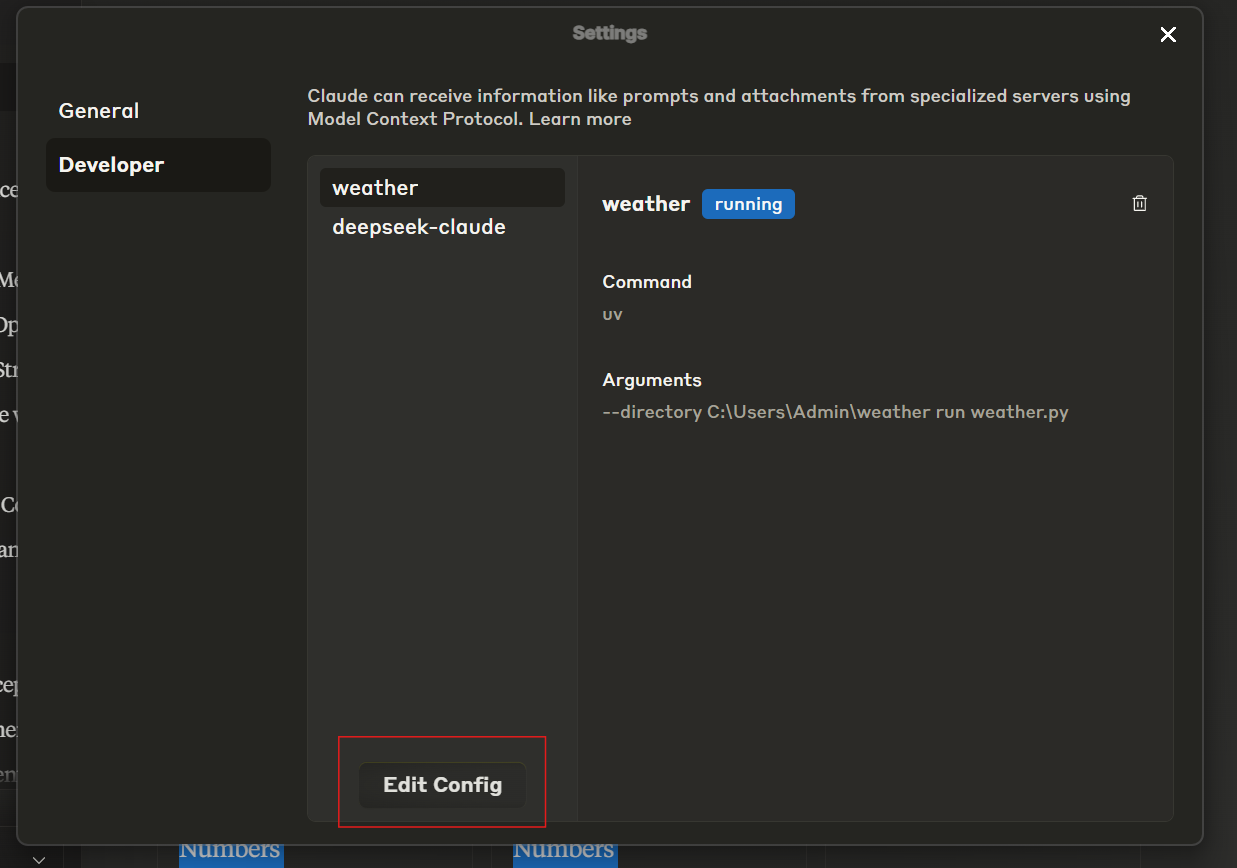
{
    "mcpServers": {
        "deepseek-claude": {
            "command": "uv",
            "args": [
                "--directory",
                "C:\\ABSOLUTE\\PATH\\TO\\PARENT\\FOLDER\\deepseek-claude",
                "run",
                "server.py"
            ]
        }
    }
}
Run the Server
uv run server.pyTest Setup
Restart Claude Desktop.
Verify the tools icon is visible in the interface.
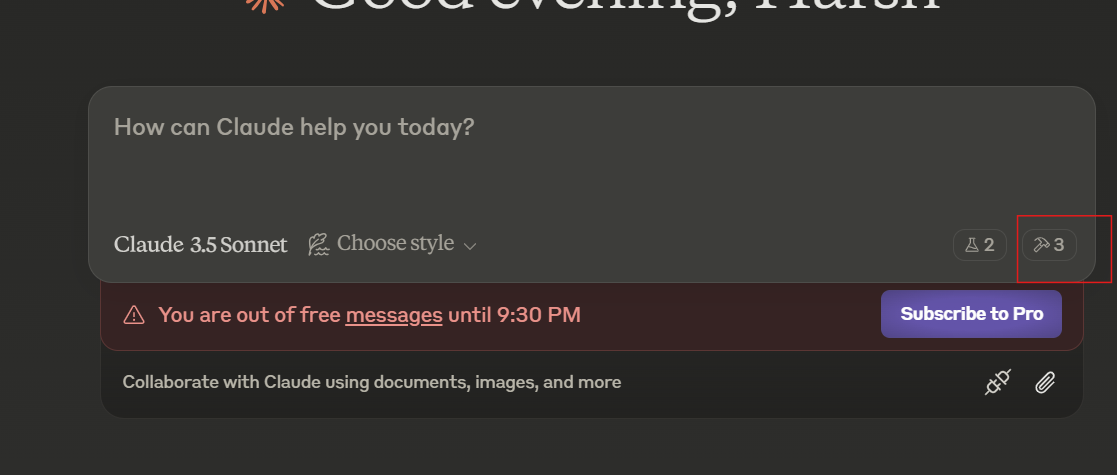
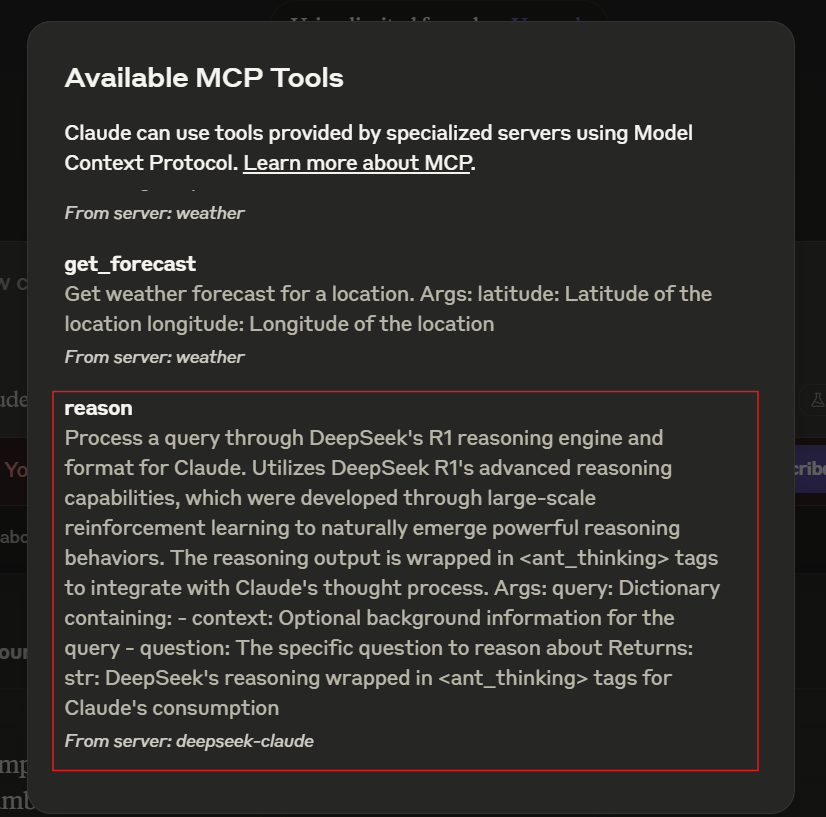
If the server isn’t visible, consult the troubleshooting guide.
🛠 Usage
Starting the Server
The server automatically starts when used with Claude Desktop. Ensure Claude Desktop is configured to detect the MCP server.
Example Workflow
- Claude receives a query requiring advanced reasoning.
- The query is forwarded to DeepSeek R1 for processing.
- DeepSeek R1 returns structured reasoning wrapped in
<ant_thinking>tags. - Claude integrates the reasoning into its final response.
📄 License
This project is licensed under the MIT License. See the LICENSE file for details.
Установка DeepSeek Reasoner
У этого сервера нет опубликованного пакета — он собирается из исходников. Открой репозиторий и следуй инструкции в README.
▸ github.com/ygboy1986/aiclaudeFAQ
DeepSeek Reasoner MCP бесплатный?
Да, DeepSeek Reasoner MCP бесплатный — установка в пару кликов через Unyly без оплаты.
Нужен ли API-ключ для DeepSeek Reasoner?
Нет, DeepSeek Reasoner работает без API-ключей и переменных окружения.
DeepSeek Reasoner — hosted или self-hosted?
Self-hosted: сервер запускается локально на твоей машине командой из раздела установки.
Как установить DeepSeek Reasoner в Claude Desktop, Claude Code или Cursor?
Открой DeepSeek Reasoner на unyly.org, выбери вкладку своего клиента (Claude Desktop, Claude Code, Cursor) и нажми Install — конфиг сгенерируется автоматически, без правки JSON.
Похожие MCP
Fetch
Web content fetching and conversion for efficient LLM usage.
AWS KB Retrieval
Retrieval from AWS Knowledge Base using Bedrock Agent Runtime.
 автор: modelcontextprotocol
Spring AI MCP Server
Provides auto-configuration for setting up an MCP server in Spring Boot applications.
llm-analysis-assistant
A very streamlined mcp client that supports calling and monitoring stdio/sse/streamableHttp, and can also view request responses through the /logs page. It also
 автор: xuzexin-hz
Compare DeepSeek Reasoner with
Не уверен что выбрать?
Найди свой стек за 60 секунд
Автор?
Embed-бейдж для README
Похожее
Все в категории ai