
Deepsql
БесплатноНе проверенThe database agent for Postgres and MySQL - Point it at PostgreSQL or MySQL and ask questions in plain English — schema exploration, query generation, slow quer

Описание
The database agent for Postgres and MySQL - Point it at PostgreSQL or MySQL and ask questions in plain English — schema exploration, query generation, slow query analysis, index recommendations, generated dashboards. Self-hosted and air-gapped.
README
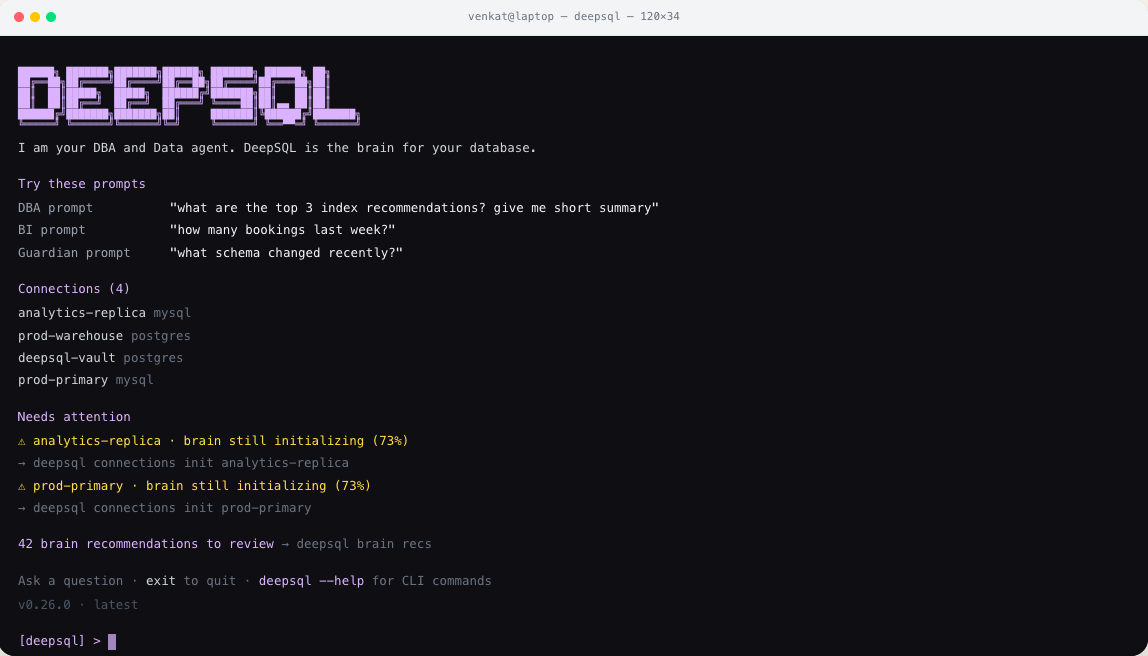
The database agent for Postgres and MySQL. Point it at PostgreSQL or MySQL and ask questions in plain English — schema exploration, query generation, slow query analysis, index recommendations, generated dashboards.
You bring the model. DeepSQL ships with no model provider of its own and no vendor account to sign up for. You point it at OpenAI, Azure OpenAI, a LiteLLM proxy, or a model running on your own hardware, and it uses that. Everything else runs in your environment: database credentials are encrypted in a local vault, and nothing leaves the machines you control except the prompts you send to the endpoint you chose.
📄 Read the whitepaper — the architecture and the reasoning behind it.
Quick start
Five steps, in order. Budget about fifteen minutes, most of it waiting on the first build.
1. Check you have what you need
- Docker Engine with Compose v2 and buildx — verify with
docker compose versionanddocker buildx version. Compose delegates builds to buildx and refuses anything older than 0.17.0. git,curlandopenssl- ~4 GB of memory available to Docker. The backend JVM is configured with a 3 GB max heap, so a smaller allocation fails in ways that look unrelated.
- An API key for a model provider. See step 3 — you need this before you start, not after.
On a fresh server, one command does all of that:
sudo ./scripts/self-host/bootstrap-server.sh
It handles Debian/Ubuntu and Amazon Linux 2023 / RHEL, installs whatever is missing, and
verifies the result before exiting. Worth running even where Docker is already present: a
stock dnf install docker on Amazon Linux 2023 ships neither the Compose plugin
nor a buildx new enough to build, and the resulting failure surfaces much later, at
docker compose up --build, naming neither.
2. Get the code
There are no prebuilt images and no container registry. Compose builds the backend and frontend from your checkout.
git clone https://github.com/DeepSQLAI/deepsql.git
cd deepsql
cp .env.example .env
3. Choose your model
This is the step that matters, and the one thing DeepSQL cannot decide for you.
Open .env and set the chat group. Whatever you pick, the provider id stays openai —
there is one provider implementation and it speaks OpenAI, Azure OpenAI, and every
OpenAI-compatible server. It dispatches on the shape of your endpoint, not on a name
you configure.
| Variable | What to put in it |
|---|---|
DEEPSQL_CHAT_PROVIDER |
openai — always, for every provider below |
DEEPSQL_CHAT_API_KEY |
Your key. For a local model, any non-empty string. |
DEEPSQL_CHAT_ENDPOINT |
The base URL. No working default — set it explicitly. |
DEEPSQL_CHAT_MODEL |
Model name, or your Azure deployment name |
Pick the one that matches you:
OpenAI
DEEPSQL_CHAT_PROVIDER=openai
DEEPSQL_CHAT_API_KEY=sk-your-key
DEEPSQL_CHAT_ENDPOINT=https://api.openai.com/v1
DEEPSQL_CHAT_MODEL=gpt-4o
Azure OpenAI
An .azure.com or .azure-api.net endpoint switches authentication to the api-key
header automatically. _MODEL is your deployment name, not the model name.
DEEPSQL_CHAT_PROVIDER=openai
DEEPSQL_CHAT_API_KEY=your-azure-openai-key
DEEPSQL_CHAT_ENDPOINT=https://your-resource.cognitiveservices.azure.com/
DEEPSQL_CHAT_MODEL=your-deployment-name
Anthropic
Anthropic serves an OpenAI-compatible /v1/chat/completions, so it needs no gateway. It
publishes no embeddings API, so pair it with another provider for embeddings (step 4).
DEEPSQL_CHAT_PROVIDER=openai
DEEPSQL_CHAT_API_KEY=sk-ant-your-key
DEEPSQL_CHAT_ENDPOINT=https://api.anthropic.com/v1
DEEPSQL_CHAT_MODEL=claude-haiku-4-5-20251001
Ollama, vLLM, LM Studio, TGI — your own hardware
Anything speaking the OpenAI wire format. No key is required, but the variable must be non-empty.
DEEPSQL_CHAT_PROVIDER=openai
DEEPSQL_CHAT_API_KEY=ollama
DEEPSQL_CHAT_ENDPOINT=http://host.docker.internal:11434/v1
DEEPSQL_CHAT_MODEL=llama3.1
LiteLLM proxy
Point at the proxy, authenticate with a virtual key, use your own alias. Chat, embeddings and brain initialisation are verified end to end against a self-hosted LiteLLM.
DEEPSQL_CHAT_PROVIDER=openai
DEEPSQL_CHAT_API_KEY=sk-your-litellm-virtual-key
DEEPSQL_CHAT_ENDPOINT=http://litellm:4000/v1
DEEPSQL_CHAT_MODEL=your-alias
Name your alias carefully. _USE_RESPONSES_API defaults to auto, which decides from
the model name rather than from what your endpoint implements. An alias beginning
gpt-5, o1, o3, o4 or codex selects the Responses API. If your gateway does not
serve /v1/responses, avoid those prefixes or set DEEPSQL_CHAT_USE_RESPONSES_API=false.
DEEPSQL_CHAT_PROVIDERgates the whole group: with it unset, no otherDEEPSQL_CHAT_*variable is read. That is the most common reason a carefully filled-in.envappears to be ignored.
4. Add embeddings (recommended)
Configured independently of chat, so they can point at a different provider, key or endpoint — which is exactly what you need when your chat model has no embeddings API.
DEEPSQL_EMBEDDING_PROVIDER=openai
DEEPSQL_EMBEDDING_API_KEY=sk-your-key
DEEPSQL_EMBEDDING_ENDPOINT=https://api.openai.com/v1
DEEPSQL_EMBEDDING_MODEL=text-embedding-3-large
Skipping this is survivable — the app starts and retrieval falls back to keyword-only — but answer quality drops noticeably, so treat it as part of setup rather than an extra.
Your embedding model must produce 3072-dimension vectors. rag_documents.embedding is a
single vector(3072) column shared by every connection, so text-embedding-3-small (1536)
is rejected. Changing width means migrating the column.
5. Install and log in
./scripts/self-host/install.sh
The installer generates your JWT secret, the credential-vault encryption key, the vault
DB password, and the DeepSQL Agent provision secret; prompts for the first admin account;
builds the backend, frontend, and DeepSQL Agent images; starts the stack; and verifies
pgvector is live. The Agent tab and AI dashboard generation are served by the
deepsql-agent Compose service — no host-side agent install is required.
The first build takes several minutes — it compiles the Spring Boot backend with Maven inside the container, bundles the frontend with Vite, and builds the DeepSQL Agent image. It has not hung. Later builds reuse the Docker layer cache.
Then open http://localhost:3000 and log in with the admin email and password you entered.
Back up
ENCRYPTION_KEYfrom.envnow. It encrypts every database credential you store. Lose it and you re-enter all of them — there is no recovery path.
Prefer to drive Compose yourself?
.env.example ships two values empty on purpose — they are validated secrets, not free
text, and the backend refuses to start without them.
printf 'SECURITY_JWT_SECRET=%s\n' "$(openssl rand -base64 64 | tr -d '\n')" >> .env
printf 'ENCRYPTION_KEY=%s\n'      "$(openssl rand -base64 32)"             >> .env

docker compose up -d --build
That builds and starts everything but leaves you unable to log in: there is no seeded
account, self-service signup is disabled, and the wizard's POST /setup/initialize is
disabled. The first user is created through a localhost-only bootstrap endpoint — set
SECURITY_ADMIN_BOOTSTRAP_ENABLED=true and ADMIN_BOOTSTRAP_SECRET in .env and call it
yourself. install.sh does exactly this, then turns the flag back off.
What it does
Your 24/7 DBA and data engineer. It answers BI questions, fixes slow queries, and watches your schema — all from one shared brain.
- Answers BI questions. Ask in plain English. The agent loads your business context, resolves the schema, drafts and validates SQL, then executes it read-only — with every step you can inspect. The hand-written SQL editor is the only path that can mutate, and only for a confirming admin.
- Fixes slow queries. Reads
pg_stat_statementsor the MySQL slow log, groups queries by fingerprint, ranks them by cost, and flags regressions against their baseline. - Index recommendations. Advises, and can apply them for you —
CREATE INDEX CONCURRENTLYon PostgreSQL, so no table lock. - Watches your schema. Tracks what changed and what needs attention, so drift surfaces before it breaks a query or a dashboard.
- A brain that knows your business. Teach it your metrics, rules and conventions once — MRR, active accounts, currency handling — and every query, dashboard and recommendation uses the same governed definitions.
- Dashboards without the analyst backlog. An agent writes a single self-contained HTML document, rendered in a sandboxed iframe with no network access. It reads data only through a read-only query bridge back to the backend — the agent gets creative freedom, the database keeps its guard rail.
- Ask it from anywhere. The web UI, your terminal, or a Slack channel. The MCP server gives coding agents (Claude Code, Cursor, Codex, Claude Desktop) the same capabilities over stdio.
- Postgres and MySQL, in your infra. One dialect registry, read-only execution, and SSH tunnelling to reach databases behind a bastion.
Operating the stack
./scripts/self-host/status.sh                    # compose ps + health probes
./scripts/self-host/smoke-test.sh                # end-to-end check against the vault DB
./scripts/self-host/seed-demo-data.sh            # seed demo e-commerce database for exploration
./scripts/self-host/uninstall.sh                 # stop and remove containers, keep data
./scripts/self-host/uninstall.sh --purge-data    # also drop the volumes
Demo Database
To explore DeepSQL features without connecting your own database, run:
./scripts/self-host/seed-demo-data.sh
This creates a demo_shop e-commerce database with:
- 100 products, 500 customers, 5,000+ orders
- Intentionally suboptimal query patterns (to trigger recommendations)
- Pre-configured slow query analysis and index recommendations
- Sample saved queries in the SQL Editor
- Sample agent conversation history
Alternatively, set DEEPSQL_SEED_DEMO_DATA=1 in .env before running install.sh to seed automatically.
Upgrading:
git pull && docker compose up -d --build
Accessing a remote self-hosted instance (SSH tunnel)
If DeepSQL runs on a server you only reach through a bastion/jump host — common in locked-down cloud environments — forward the frontend port locally instead of exposing it to the internet.
Direct bastion, one hop:
ssh -N -L 3100:localhost:3000 -o ExitOnForwardFailure=yes <user>@<bastion-host>
Target host is itself only reachable from inside the bastion's network (two hops):
add a Host entry per leg in ~/.ssh/config and let ProxyJump chain them — no
manual double-hop command needed.
Host my-bastion
    HostName <bastion-ip-or-dns>
    User <bastion-user>
    IdentityFile ~/.ssh/<bastion-key>

Host deepsql
    HostName <target-host-ip-or-dns>
    Port <target-ssh-port>
    User <target-user>
    IdentityFile ~/.ssh/<target-key>
    ProxyJump my-bastion
    LocalForward 3100 localhost:3000
    ServerAliveInterval 30
    ExitOnForwardFailure yes
ssh -N deepsql
Then open http://localhost:3100. Use a non-3000 local port if something on your
machine (often a local Docker container) already binds 3000 — ExitOnForwardFailure=yes
makes a port collision fail loudly instead of silently handing you a dead tunnel that
looks connected while your browser actually talks to the wrong service.
If the connection hangs at the TCP handshake rather than failing immediately, check, in
order: the target's firewall/security-group rules for the SSH port, whether the target
host is actually reachable from the bastion (ssh <bastion> "nc -zv <target> <port>"),
and only then your local tunnel config — a hung handshake almost always means the
network path is blocked somewhere upstream of your laptop, not a misconfigured tunnel.
Ports
| Service | Port | Override |
|---|---|---|
| Frontend | 3000 | DEEPSQL_FRONTEND_PORT |
| Backend | 8080 | DEEPSQL_BACKEND_PORT |
| Postgres | 5432 | DEEPSQL_POSTGRES_PORT |
| Valkey | 6379 | DEEPSQL_VALKEY_PORT |
Configuration reference
Everything lives in .env, documented inline. The variables that matter most:
| Variable | Purpose |
|---|---|
DEEPSQL_CHAT_PROVIDER, _API_KEY, _ENDPOINT, _MODEL |
The chat model. Required. |
DEEPSQL_EMBEDDING_PROVIDER, _API_KEY, _ENDPOINT, _MODEL |
Embeddings for retrieval. Optional; without them retrieval is keyword-only. |
DEEPSQL_CHAT_TEMPERATURE, _API_VERSION, _USE_RESPONSES_API |
Optional chat tuning. _USE_RESPONSES_API is true / false / auto. |
SECURITY_JWT_SECRET |
Signs session tokens. Generate with openssl rand -base64 64. |
ENCRYPTION_KEY — or ENCRYPTION_KEYS + ENCRYPTION_KEY_ID |
AES-GCM key(s) for the credential vault. The backend refuses to start without one. |
DB_URL, DB_USERNAME, DB_PASSWORD |
The vault database. Compose points these at its own postgres service. |
SPRING_PROFILES_ACTIVE |
prod for self-hosting — hardened defaults. |
SECURITY_AUTH_ENABLED |
Set false only for local development. |
SECURITY_ADMIN_BOOTSTRAP_ENABLED, ADMIN_BOOTSTRAP_SECRET |
Gate the localhost-only first-admin endpoint. |
CORS_ALLOWED_ORIGINS |
Browser origins allowed to call the API. |
VECTOR_STORE_TYPE |
pgvector (the self-hosting default) or azure. |
EMBEDDING_FAIL_OPEN |
Whether a failed embedding call degrades silently or raises. |
SLACK_*, EMAIL_* |
Optional Slack bot and SMTP. |
Telemetry
The backend can report anonymous install and usage counters to PostHog. No project key
ships with this repository, so the sink is a no-op unless you configure
deepsql.telemetry.posthog-project-key yourself. DO_NOT_TRACK=1 or
DEEPSQL_TELEMETRY_DISABLED=1 disables it outright, as does the admin toggle.
MCP server
mcp/ exposes 44 tools wrapping the backend API, so agents reuse the same orchestration,
retrieval and guardrails instead of getting raw database credentials. SQL execution is
read-only-enforced before it reaches the backend.
DEEPSQL_API_BASE_URL=http://localhost:8080/api/ \
DEEPSQL_AUTH_TOKEN=<your-deepsql-token> \
npm run mcp:phase1
It has no npm dependencies of its own — npm run mcp:phase1 is just
node mcp/deepsql-phase1-server.js, so it runs straight from a fresh clone.
See mcp/README.md for the CLI, editor configuration and the full tool table, and docs/root/MCP_PHASE1.md for rollout notes.
Development
Run the stateful dependencies in Docker — PostgreSQL needs the pgvector extension, which is tedious to install by hand — and everything else natively for hot reload.
docker compose up -d postgres valkey    # requires .env to exist

cd backend && ./mvnw spring-boot:run    # http://localhost:8080/api
npm install && npm run dev              # http://localhost:3000
You need JDK 25 and Node 22. Maven comes from the wrapper (./mvnw), which pins the
same version CI uses — no separate install.
The backend needs the same environment as the container: at minimum DB_URL, DB_USERNAME,
DB_PASSWORD, SECURITY_JWT_SECRET, ENCRYPTION_KEY, and the DEEPSQL_CHAT_* group.
Authentication is on by default in every profile and there is no admin/admin shortcut:
either create the first account through the bootstrap flow, or set
SECURITY_AUTH_ENABLED=false to let the backend accept unauthenticated API calls while you
work on it.
npm run lint                # eslint
npm run build               # production frontend bundle
cd backend && ./mvnw test   # backend test suite
Stack
Spring Boot 4 on Java 25 · React 19 + Vite · PostgreSQL with pgvector · Valkey for caching · nginx.
Documentation
- Whitepaper — architecture and design rationale
- docs/README.md — documentation index
- AGENTS.md — codebase map
- mcp/README.md — CLI and MCP server
- SECURITY.md — reporting a vulnerability
License
Установка Deepsql
У этого сервера нет опубликованного пакета — он собирается из исходников. Открой репозиторий и следуй инструкции в README.
▸ github.com/DeepSQLAI/deepsqlFAQ
Deepsql MCP бесплатный?
Да, Deepsql MCP бесплатный — установка в пару кликов через Unyly без оплаты.
Нужен ли API-ключ для Deepsql?
Нет, Deepsql работает без API-ключей и переменных окружения.
Deepsql — hosted или self-hosted?
Self-hosted: сервер запускается локально на твоей машине командой из раздела установки.
Как установить Deepsql в Claude Desktop, Claude Code или Cursor?
Открой Deepsql на unyly.org, выбери вкладку своего клиента (Claude Desktop, Claude Code, Cursor) и нажми Install — конфиг сгенерируется автоматически, без правки JSON.
Похожие MCP
wenb1n-dev/SmartDB_MCP
A universal database MCP server supporting simultaneous connections to multiple databases. It provides tools for database operations, health analysis, SQL optim
 автор: wenb1n-dev
Postgres Server
This server enables interaction with PostgreSQL databases through the Model Context Protocol, optimized for the AWS Bedrock AgentCore Runtime. It provides tools
 автор: madhurprash
Postgres
Query your database in natural language
 автор: Anthropic
PostgreSQL
Read-only database access with schema inspection.
автор: modelcontextprotocolRedis
Interact with Redis key-value stores.
автор: modelcontextprotocolSQLite
Database interaction and business intelligence capabilities.
автор: modelcontextprotocolmxcp
Open-source framework for building enterprise-grade MCP servers using just YAML, SQL, and Python, with built-in auth, monitoring, ETL and policy enforcement.
 автор: raw-labs
tadas-github/a2asearch-mcp
MCP server to search 4,800+ MCP servers, AI agents, CLI tools and agent skills. Install: npx -y a2asearch-mcp. Ask Claude: "Find MCP servers for database access
 автор: tadas-github
julien040/anyquery
Query more than 40 apps with one binary using SQL. It can also connect to your PostgreSQL, MySQL, or SQLite compatible database. Local-first and private by desi
 автор: julien040
drakonkat/wizzy-mcp-tmdb
A MCP server for The Movie Database API that enables AI assistants to search and retrieve movie, TV show, and person information.
 автор: drakonkat
Compare Deepsql with
Не уверен что выбрать?
Найди свой стек за 60 секунд
Автор?
Embed-бейдж для README
Похожее
Все в категории data