
Design Doc Generator
БесплатноНе проверенTurns Claude Code session work into professional design docs with a slash command, no copy-pasting or signup needed.

Описание
Turns Claude Code session work into professional design docs with a slash command, no copy-pasting or signup needed.
README
Design Doc Generator
One command in Claude Code. A polished design doc — Markdown and HTML, both saved straight into your repo.
❌ Without it
- Real work gets done. The design doc doesn't — it gets skipped, or rushed into a note nobody reads.
- Diagrams get left out because drawing them takes longer than the fix did.
- Three months later, nobody remembers why it was built that way. Not even you.
✅ With it
- Run
/design-doc. Claude turns the session you just had into a structured, professional doc. - Two diagrams, generated and styled automatically. Nobody drags a single box.
- The reasoning gets captured while it's fresh — not reconstructed from memory later.
What you get
| Output | Where |
|---|---|
| Markdown file | docs/<title>.md in your project |
| Interactive HTML | Same folder, docs/<title>.html — light/dark theme, sticky nav |
Both are always saved, every time — nothing to opt into.
Every doc includes:
- Abstract, problem statement, architecture and flow diagrams, key decisions and trade-offs, risks — irrelevant sections are dropped, never padded
- At least two Mermaid diagrams wherever the session supports them: a static architecture view and a runtime sequence view, sized and styled automatically
- An auto-inserted table of contents
- Two more doc shapes, detected automatically: a root-cause/bug-investigation report, and a comparison doc for "which approach" decisions
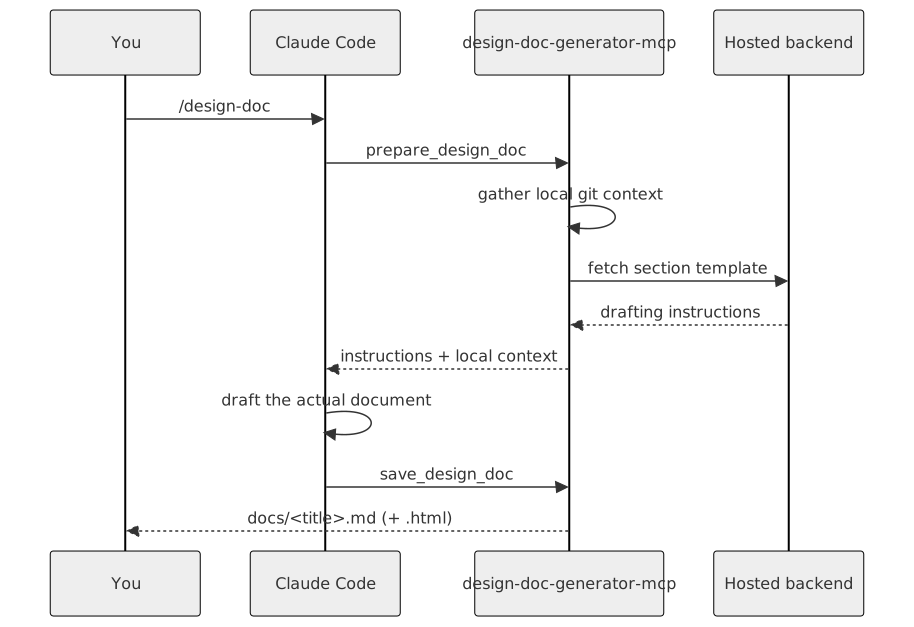
How it works
Install
npx design-doc-generator-mcp init
Run once, inside the project you want to document — registers the MCP server and installs the /design-doc
skill. Restart Claude Code, do real work, then run:
/design-doc
Usage
| Flag | What it does |
|---|---|
| (none) | Drafts the default design doc for whatever was just discussed |
--activate YOUR-KEY |
Activates a Pro license key |
--help |
Shows usage help |
Running it again on the same topic updates the same files — it never creates a duplicate.
Your code never leaves your machine
This tool never reads your source files. It never calls an LLM itself. It only reads lightweight git metadata —
branch, git status, a git diff --stat summary, your last 15 commit messages. Claude drafts the document
inside your own session, on your own account.
Two things ever reach a network: the section template request when drafting (a mode string, plus your license
key if you've activated one), and your license key itself when you run --activate. Pro status is always
verified against that key server-side, never assumed from anything the client claims.
Free vs. Pro
| Free | Pro | |
|---|---|---|
| Design docs | 5 / day | Unlimited |
| Content depth | Full | Full |
| HTML export | Included | Included |
| Signup required | No | No |
Pro removes the daily cap. That's the only difference.
License
Elastic License 2.0 — free to install and use for drafting your own design docs. You may not resell it as a hosted service, or bypass its license-key checks.
Установка Design Doc Generator
У этого сервера нет опубликованного пакета — он собирается из исходников. Открой репозиторий и следуй инструкции в README.
▸ github.com/sanskriti17/design-doc-generator-mcpFAQ
Design Doc Generator MCP бесплатный?
Да, Design Doc Generator MCP бесплатный — установка в пару кликов через Unyly без оплаты.
Нужен ли API-ключ для Design Doc Generator?
Нет, Design Doc Generator работает без API-ключей и переменных окружения.
Design Doc Generator — hosted или self-hosted?
Self-hosted: сервер запускается локально на твоей машине командой из раздела установки.
Как установить Design Doc Generator в Claude Desktop, Claude Code или Cursor?
Открой Design Doc Generator на unyly.org, выбери вкладку своего клиента (Claude Desktop, Claude Code, Cursor) и нажми Install — конфиг сгенерируется автоматически, без правки JSON.
Похожие MCP
GitHub
PRs, issues, code search, CI status
 автор: GitHub
Filesystem
Secure file operations with configurable access controls.
Memory
Knowledge graph-based persistent memory system.
Template MCP Server
A CLI tool to create a new Model Context Protocol server project with TypeScript support, dual transport options, and an extensible structure
 автор: mcpdotdirect
Compare Design Doc Generator with
Не уверен что выбрать?
Найди свой стек за 60 секунд
Автор?
Embed-бейдж для README
Похожее
Все в категории development