
Destiny2
БесплатноНе проверенA TypeScript MCP Server exposing the bungie API as natural-language tools in claude desktop.

Описание
A TypeScript MCP Server exposing the bungie API as natural-language tools in claude desktop.
README
Search your vault and move/equip gear in plain english
You:    Which of my Fatebringers have Firefly and Explosive Payload?
Claude: You've got exactly one sitting in your Vault, and it's rolled perfectly:
        Fatebringer (Kinetic Hand Cannon)
        Fluted Barrel
        Appended Mag
        Explosive Payload (equipped)
        Firefly (equipped)


You:    Pull it to my titan and equip it
Claude: Sent Multimach CCX to the Vault to make room, pulled Fatebringer onto your
Titan and equipped it.
It reads every weapon and armour piece across your vault and all three characters with power, stats and the perks your copy actually rolled. It can move items between characters and the vault, pull from the postmaster, and equip on arrival.
Requirements
- Claude Desktop on Windows or macOS. Nothing else to install, Claude supplies the runtime the extension needs.
- A Bungie.net account with Destiny 2.
Linux isn't supported: Claude Desktop doesn't ship a runtime there. You can still run it from source.
1. Install the extension
Download destiny2-mcp.mcpb from the
latest release.
In Claude Desktop: Settings -> Extensions -> Advanced settings -> Install extension… and pick the file.
It will ask for three values. Leave that dialog open for now. Once you see the screen below proceed to step 2.
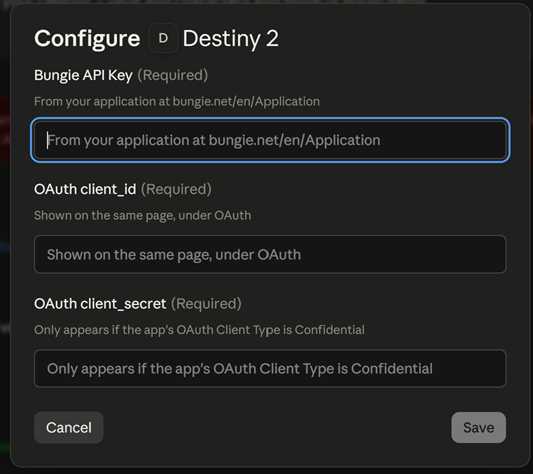
2. Register a Bungie application
Every user registers their own application. Everything is stored locally on your device.
Go to https://www.bungie.net/en/Application and click Create New App.
Fill it in exactly like this — three of these four fields will break the extension if they're wrong, and the errors they produce are not obvious:
| Field | Value |
|---|---|
| Application Name | Anything. My Destiny MCP is fine |
| Website | Anything e.g. 'example.com'. Can also leave blank |
| OAuth Client Type | Confidential not Public |
| Redirect URL | https://127.0.0.1:7777/callback |
| Scope | - Read your Destiny 2 information - Move or equip Destiny gear and other items. |

Client Type: Public clients don't get a refresh token, meaning you would have to reauthenticate every hour. Only Confidential is supported.
Redirect URL: it must match character for character, including https
and the port.
Now click 'Create New App'. Once the app is created The page should show these three values:
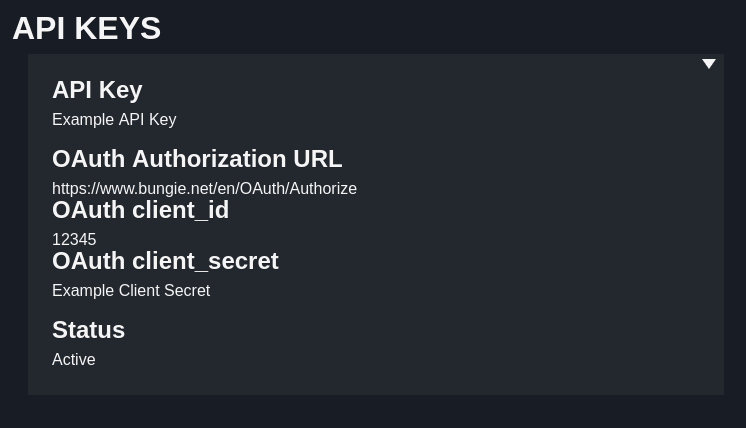
| On the Bungie page | Goes in the Claude field |
|---|---|
| API Key | Bungie API Key |
| OAuth client_id | OAuth client_id |
| OAuth client_secret | OAuth client_secret |
The client secret only appears once the app is saved as Confidential. If you can't find it, that setting is why.
Paste all three into Claude, click enable, then fully quit and reopen Claude Desktop. Check your system tray and close it from the icon there.
3. First run
Ask Claude something like "What's equipped on my hunter?". Three things happen once, in this order:
It downloads Destiny's item database. About 350 MB, unpacked into
%APPDATA%\destiny2-mcp. This can take a few minutes on first use and never
happens again until Bungie ships a new season (so never).
Claude gives you a link to authorise. Click it, approve access on bungie.net.
Your browser warns that the connection isn't private. This is expected, and it is not a problem. The extension spins up a small web server on your own machine to get the response from Bungie, and it signs its own certificate to do it. Click Advanced → Proceed to 127.0.0.1 (unsafe). You'll see "You can close this window", and you're done. It won't ask again.

Then ask Claude again. From here it just works.
What it can and can't do
- Tokens never leave your machine. They're stored in
%APPDATA%\destiny2-mcpand used only to talk to Bungie. - Nothing it does can dismantle an item. Bungie's API has no dismantle or delete, every move can be undone by moving the item back. This is why it doesn't stop to confirm each action.
- It will move things you didn't explicitly name. Moving an equipped item equips something else first, moving into a full slot sends the lowest-power item there to the vault. Both are reported so you can just ask to undo them.
Troubleshooting
"Destiny 2 MCP is not configured. Missing: …" One or more values didn't reach the extension. Re-enter them in Settings -> Extensions -> Destiny 2, then fully quit and reopen Claude Desktop (make sure its closed in the system tray).
"Your Bungie application is registered as a public OAuth client." Set OAuth Client Type to Confidential on your app page. A client secret appears once you save it, paste that into the extension's settings.
"Timed out waiting for OAuth callback."
Your app's Redirect URL doesn't match https://127.0.0.1:7777/callback, so the
browser never reached the extension. Check it character for character. If it is
correct, something else on your machine may be using port 7777.
"2108 | AccessNotPermittedByApplicationScope"
Your app is missing the Move or equip Destiny gear scope. Check itthen delete
%APPDATA%\destiny2-mcp\tokens.json and authorise again. Scopes are baked into the
token when it's issued, so fixing the app alone changes nothing for the token you
already have.
Claude says the extension is disconnected.
Check the log at %APPDATA%\Claude\logs\mcp-server-destiny2.log.
Building from source
Requires Node 24+.
git clone https://github.com/KubaKuchniak31415/destiny2-mcp.git
cd destiny2-mcp
npm install
cp .env.example .env      # then fill in the three Bungie values
npm start
npm run bundle produces the .mcpb. npm test, npm run lint and
npm run typecheck do what they say.
Licence
ISC
Установка Destiny2
У этого сервера нет опубликованного пакета — он собирается из исходников. Открой репозиторий и следуй инструкции в README.
▸ github.com/KubaKuchniak31415/destiny2-mcpFAQ
Destiny2 MCP бесплатный?
Да, Destiny2 MCP бесплатный — установка в пару кликов через Unyly без оплаты.
Нужен ли API-ключ для Destiny2?
Нет, Destiny2 работает без API-ключей и переменных окружения.
Destiny2 — hosted или self-hosted?
Self-hosted: сервер запускается локально на твоей машине командой из раздела установки.
Как установить Destiny2 в Claude Desktop, Claude Code или Cursor?
Открой Destiny2 на unyly.org, выбери вкладку своего клиента (Claude Desktop, Claude Code, Cursor) и нажми Install — конфиг сгенерируется автоматически, без правки JSON.
Похожие MCP
Fetch
Web content fetching and conversion for efficient LLM usage.
Roblox Studio
Enables AI coding tools to control Roblox Studio for workspace exploration, instance manipulation, and script management. It provides tools for playtesting, sce
 автор: paralov
Opencode Omniroute Plugin
OpenCode plugin for the OmniRoute AI Gateway. Drives dynamic model discovery, /connect auth flow, and multi-instance OmniRoute providers via the official @openc
 автор: GitHub Actions
AWS KB Retrieval
Retrieval from AWS Knowledge Base using Bedrock Agent Runtime.
 автор: modelcontextprotocol
Spring AI MCP Server
Provides auto-configuration for setting up an MCP server in Spring Boot applications.
llm-analysis-assistant
A very streamlined mcp client that supports calling and monitoring stdio/sse/streamableHttp, and can also view request responses through the /logs page. It also
 автор: xuzexin-hz
MCP-Agent
A simple, composable framework to build agents using Model Context Protocol by [LastMile AI](https://www.lastmileai.dev)
 автор: lastmile-ai
Spring AI MCP Client
Provides auto-configuration for MCP client functionality in Spring Boot applications.
mcp.natoma.ai
A Hosted MCP Platform to discover, install, manage and deploy MCP servers by [Natoma Labs](https://www.natoma.ai)
MCPHub
Website to list high quality MCP servers and reviews by real users. Also provide online chatbot for popular LLM models with MCP server support.
Compare Destiny2 with
Не уверен что выбрать?
Найди свой стек за 60 секунд
Автор?
Embed-бейдж для README
Похожее
Все в категории ai