
Devflows
БесплатноНе проверенEnables AI coding agents to drive developer workflows as BPMN processes on a local CIB seven engine, including starting releases, inspecting runs, and approving

Описание
Enables AI coding agents to drive developer workflows as BPMN processes on a local CIB seven engine, including starting releases, inspecting runs, and approving human-decision gates via MCP tools.
README
Run your developer workflows as BPMN processes on a local CIB seven engine, and drive them from AI coding agents such as Claude Code through an MCP server.
One workflow so far: the release ritual of a repository. Run the quality gates, draft the release notes, decide whether a human even needs to look, tag, publish. This repository cuts its own releases by running that process on itself.
Why
Cutting a release is a process with a human decision in the middle of it. Normally that process lives in someone's head and in a terminal scrollback. Nothing records that the gates ran, that a person approved, or what was published.
A process engine is exactly the right tool for that shape of problem. CIB seven keeps the state, keeps the history, and knows how to wait for a human. Your machine still does the work, and an AI agent can start a run and watch it, but it cannot skip the approval, because the approval is a step in the process rather than a promise in a prompt.
Four things here are the reason this is a process and not a shell script:
- The approval policy is data, not code. A DMN decision table decides whether a release needs a human at all. Change the rules without touching a line of Python.
- An AI drafts the release notes, and a human owns them. The draft appears in the approval form, and whatever is approved is what gets published.
- A failed publish undoes its own tag. BPMN compensation, so a broken release leaves nothing behind.
- A forgotten approval ends itself. A boundary timer rejects a release nobody answered.
Architecture
flowchart LR
    agent["Claude Code<br/>(any MCP client)"] -- stdio --> mcpserver["devflows-mcp"]
    mcpserver -- REST --> engine["CIB seven engine<br/>Docker, H2, localhost:8080"]
    human["You, in the web UI"] -- approve --> engine
    engine -- fetchAndLock --> worker["devflows-worker"]
    worker -- shell --> repo["your repository<br/>pytest, ruff, git, gh"]
The engine never runs a shell command and never touches your repository. It hands out work; the worker on your machine polls for it and does it. That is the standard Camunda 7 external task pattern, and it is what makes it safe to let a process drive a developer machine.
The release process
flowchart LR
    start((start)) --> gates["Run gates<br/><i>devflows.gates</i>"]
    gates --> q1{Gates passed?}
    q1 -- no --> failed((Gates failed))
    q1 -- yes --> notes["Draft release notes<br/><i>devflows.notes</i>"]
    notes --> policy["Decide policy<br/><i>DMN release-policy</i>"]
    policy --> q2{Approval required?}
    q2 -- "policy says ship" --> tag
    q2 -- "ask a human" --> approve["Approve release<br/><i>user task</i>"]
    approve -. timer .-> expired((Approval expired))
    approve --> q3{Approved?}
    q3 -- stop --> rejected((Release rejected))
    q3 -- ship --> tag["Tag<br/><i>devflows.tag</i>"]
    tag --> publish["Publish<br/><i>devflows.publish</i>"]
    publish -. "publish failed" .-> undo["Delete the tag<br/><i>devflows.untag</i>"]
    undo --> pubfail((Publish failed))
    publish --> released((Released))
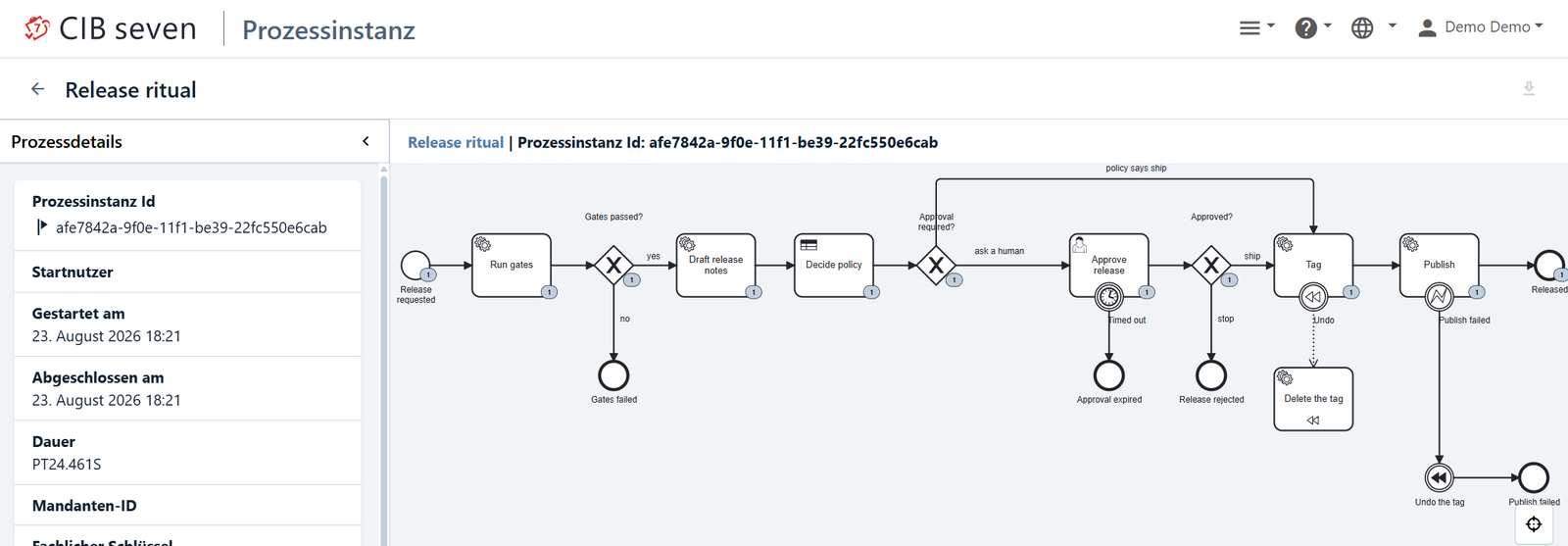
The rectangles with a topic name are external tasks. "Decide policy" is a business rule task that
calls the DMN decision. "Approve release" is a BPMN user task, so it waits, it survives an engine
restart, and it can be answered either in the web UI or through the approve_gate MCP tool.
dry_run=true runs the gates for real and changes nothing else: no tag, no push, no release.
The approval policy
processes/release-policy.dmn is a decision table with a FIRST hit policy:
release_kind |
gates_passed |
Approval required | Reason |
|---|---|---|---|
| any | false |
true |
Gates failed, a human has to look |
patch |
true |
false |
Patch release with green gates, approved by policy |
| any | any | true |
Minor or major release, a human decides |
release_kind comes from comparing the candidate version against the newest tag in the repository.
With no previous tag it is major, so a first release always asks a human. Edit the table in
Camunda Modeler and redeploy; no code changes.
On the auto-approved path approved is never set, because no human said yes. The history records
approval_required=false and policy_reason instead.
Release notes
draft_notes collects the commits since the previous tag and asks the local claude CLI to write
markdown release notes. The draft lands in the approval form as an editable field, and whatever is
approved becomes the body of the GitHub Release.
If claude is not installed, or the call fails, the notes fall back to the plain commit list.
notes_source records which happened. Nothing leaves your machine except through the CLI you
already run, and this project holds no API key of its own.
When a step fails
Two different failures, handled two different ways.
A step that might work next time, such as a network blip or gh not being logged in, is
reported to the engine as an external task failure with retries left. The worker backs off 5 s,
15 s, then 60 s, and only then does an incident appear.
A step that will not work next time, such as a publish that was refused, is reported as a BPMN
error with the code PUBLISH_FAILED. An error boundary event catches it, throws compensation, and
the undo_tag handler deletes the tag locally and on the remote. No incident is raised, because
nothing is broken; the release simply did not happen.
What it looks like
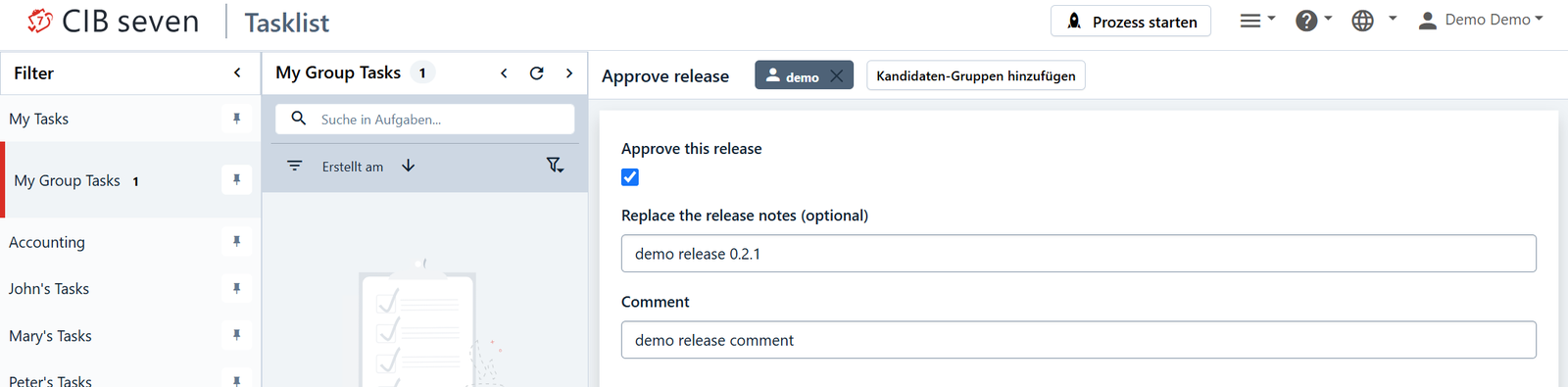
The process stops and waits for a person. The approval carries the gate results and the drafted
release notes, and it belongs to the camunda-admin group rather than to one named user, so
whoever is around can pick it up.
Afterwards the whole run is in the history: which gates ran, what the policy decided, who approved, what was tagged and where it was published.
Quickstart
docker compose -f engine/docker-compose.yml up -d
uv sync
uv run pytest -m "not integration" && uv run ruff check .
Deploy the process and the decision table (once per engine):
curl -s -X POST http://localhost:8080/engine-rest/deployment/create -F "deployment-name=cibseven-devflows" -F "release.bpmn=@processes/release.bpmn" -F "release-policy.dmn=@processes/release-policy.dmn"
Check that everything a release needs is in place:
uv run devflows-doctor
Start the worker and leave it running in its own terminal:
uv run devflows-worker
Start a dry release of this repository. Replace repo_path with this repository's absolute path.
Use forward slashes even on Windows (C:/Users/you/repos/cibseven-devflows): they work, and they
save you from fighting your shell over backslash escaping.
curl -s -X POST http://localhost:8080/engine-rest/process-definition/key/devflows-release/start -H "Content-Type: application/json" -d '{"variables":{"repo_path":{"value":"ABSOLUTE/PATH/TO/cibseven-devflows","type":"String"},"version":{"value":"0.2.0","type":"String"},"dry_run":{"value":true,"type":"Boolean"}}}'
Then approve it at http://localhost:8080/webapp/#/seven/auth/tasks as demo / demo:
filter My Group Tasks, claim Approve release, tick approve, submit.
In practice you start runs through the MCP server instead of curl. See docs/DEMO.md for the full walkthrough, or docs/DEMO.de.md auf Deutsch.
devflows.yaml
Each repository describes its own release in a devflows.yaml at its root:
gates:
  - name: tests
    run: uv run pytest -q
  - name: lint
    run: uv run ruff check .

tag:
  format: "v{version}"

publish:
  run: gh release create v{version} --notes-file {notes_file}
| Key | Meaning |
|---|---|
gates |
Ordered list of quality gates. Each needs a name and a shell command in run. The first non-zero exit code ends the release. |
tag.format |
How the tag name is built. {version} is the only placeholder. Optional; defaults to v{version}. |
publish.run |
The shell command that publishes the release. Placeholders: {version}, and {notes_file} for the path of a file holding the approved release notes. |
Use {notes_file} to publish the notes the human approved. Leave it out and use
--generate-notes if you would rather GitHub wrote them.
Unknown top-level keys are ignored, so a newer version of devflows can add steps without breaking an older file.
The MCP tools
devflows-mcp speaks MCP over stdio and works from any MCP client.
| Tool | Arguments | Returns |
|---|---|---|
engine_status |
— | Whether the engine answers, its version, its engine names |
deploy_process |
bpmn_path (optional) |
Deployment id and the deployed process definition keys |
list_processes |
— | Deployed process definitions with key, version and id |
start_release |
repo_path, version, dry_run (default true) |
Process instance id and a link to it in the web UI |
get_run |
process_instance_id |
State, current activity, open tasks, the gate report, all variables |
list_gates |
repo_path |
The gates that repository would run. Does not touch the engine |
approve_gate |
task_id, approve, comment |
Confirmation that the approval task was completed |
list_runs |
limit |
Recent runs with their state, newest first |
retry_run |
process_instance_id |
Gives a run stuck on an incident another attempt |
cancel_run |
process_instance_id, reason |
Stops a run; the reason stays in the history |
doctor |
repo_path (optional) |
Engine, process, decision and config in one call |
Every tool returns a dictionary with an ok flag, and an error string when ok is false.
No tool raises, because the caller is a language model that has to explain the failure to a person.
Using it from Claude Code
plugin/ is a Claude Code plugin around the same server:
plugin/.mcp.jsonstartsdevflows-mcpwithuv run.plugin/skills/release-with-devflows/SKILL.mdtells the agent when to use the engine and in what order to call the tools, including the rule that it must stop and ask before approving.plugin/commands/release.mdprovides/devflows:release <version> [--real].
To wire the server into any other MCP client directly:
{
  "mcpServers": {
    "cibseven-devflows": {
      "command": "uv",
      "args": ["run", "devflows-mcp"]
    }
  }
}
Configuration
| Variable | Default | Used by |
|---|---|---|
DEVFLOWS_ENGINE_URL |
http://localhost:8080/engine-rest |
worker, MCP server |
DEVFLOWS_WORKER_ID |
devflows-worker-<hostname> |
worker |
DEVFLOWS_LOCK_MS |
300000 |
worker |
DEVFLOWS_POLL_MS |
10000 |
worker |
DEVFLOWS_BPMN_PATH |
found next to the package | MCP server |
Variables you can set when starting a run:
| Variable | Default | Meaning |
|---|---|---|
repo_path |
— | Absolute path of the repository to release |
version |
— | Version without the tag prefix, for example 0.2.0 |
dry_run |
— | When true, nothing is tagged or published |
approval_timeout |
PT24H |
ISO 8601 duration before an unanswered approval expires |
A short approval_timeout such as PT2M makes the timer easy to demonstrate.
Security
Two things about this project are deliberate, and both assume it runs on your own machine:
- The engine has no authentication. The REST API on
localhost:8080accepts anything that can reach it. Do not expose that port to a network you do not control. - The worker runs shell commands. They come from the
devflows.yamlof the repository you asked it to release, they run as you, in that repository, and they are the same commands you would type. Only point it at repositories you trust.
There is no cloud service, no telemetry and no account beyond the GitHub credentials gh already
has.
Repository layout
| Directory | What is in it |
|---|---|
engine/ |
Docker Compose for a local CIB seven 2.2.0 engine |
processes/ |
release.bpmn, the release ritual, and release-policy.dmn, the approval policy |
core/ |
devflows_core: engine REST client, config parsing, shell step runner |
workers/ |
devflows_worker: the external task worker |
mcp/ |
devflows_mcp: the stdio MCP server |
plugin/ |
The Claude Code plugin |
tests/ |
Unit tests, plus tests/integration/ which needs a live engine |
docs/ |
The demo script, and the design and plan documents |
Requirements
- Docker Desktop, for the engine
- Python 3.12 and uv
git, andghauthenticated, for the tag and publish steps- The
claudeCLI, optionally, for AI-drafted release notes - Camunda Modeler 5.x if you want to edit the diagrams (optional). Open
processes/release.bpmnandprocesses/release-policy.dmnas Camunda 7 files.
License
Apache License 2.0. See LICENSE.
Установка Devflows
У этого сервера нет опубликованного пакета — он собирается из исходников. Открой репозиторий и следуй инструкции в README.
▸ github.com/0langa/cibseven-devflowsFAQ
Devflows MCP бесплатный?
Да, Devflows MCP бесплатный — установка в пару кликов через Unyly без оплаты.
Нужен ли API-ключ для Devflows?
Нет, Devflows работает без API-ключей и переменных окружения.
Devflows — hosted или self-hosted?
Self-hosted: сервер запускается локально на твоей машине командой из раздела установки.
Как установить Devflows в Claude Desktop, Claude Code или Cursor?
Открой Devflows на unyly.org, выбери вкладку своего клиента (Claude Desktop, Claude Code, Cursor) и нажми Install — конфиг сгенерируется автоматически, без правки JSON.
Похожие MCP
Notion
Read and write pages in your workspace
 автор: Notion
Linear
Issues, cycles, triage — from Claude
 автор: Linear
Google Drive
Search and read your Drive files
 автор: Google
mindsdb/mindsdb
Connect and unify data across various platforms and databases with [MindsDB as a single MCP server](https://docs.mindsdb.com/mcp/overview).
 автор: mindsdb
fulcradynamics/fulcra-context-mcp
MCP server for accessing personal health and biometric data including sleep stages, heart rate, HRV, glucose, workouts, calendar, and location via the Fulcra Li
 автор: fulcradynamics
aymericzip/intlayer
A MCP Server that enhance your IDE with AI-powered assistance for Intlayer i18n / CMS tool: smart CLI access, access to the docs.
 автор: aymericzip
rinadelph/Agent-MCP
A framework for creating multi-agent systems using MCP for coordinated AI collaboration, featuring task management, shared context, and RAG capabilities.
 автор: rinadelph
WhenLabs-org/when
Developer toolkit: auto-detect stack for AI context files, catch port conflicts, validate .env schemas, spot docs drift, audit dependency licenses, and time cod
 автор: WhenLabs-org
Beltran12138/wecom-docs-mcp-server
WeCom (Enterprise WeChat) document operations via MCP: create, read, and edit Docs and Smartsheets (9 tools). Fills the doc-CRUD gap — existing WeCom MCP server
 автор: Beltran12138
madbonez/caldav-mcp
Universal MCP server for CalDAV protocol integration. Works with any CalDAV-compatible calendar server including Yandex Calendar, Google Calendar (via CalDAV),
 автор: madbonez
Compare Devflows with
Не уверен что выбрать?
Найди свой стек за 60 секунд
Автор?
Embed-бейдж для README
Похожее
Все в категории productivity