
DevKit For Strapi Server
БесплатноНе проверенProvides AI agents with ground-truth knowledge of Strapi projects by reading real schema files, enabling accurate queries and safe refactoring operations.

Описание
Provides AI agents with ground-truth knowledge of Strapi projects by reading real schema files, enabling accurate queries and safe refactoring operations.
README

DevKit for Strapi
Accurate, project-aware tooling for Strapi magic strings — for your editor and your AI agent.
Where Copilot guesses, DevKit for Strapi knows: it reads your real schema.json.




Docs · Install for VS Code · Cursor / Windsurf · MCP server on npm
Why
Strapi runs on magic strings — UIDs like api::article.article, service/controller refs, policy and
middleware names, component UIDs, route handlers. In most editors they have no autocomplete, no
validation, and broken navigation, and a typo fails silently at runtime. AI coding assistants don't
close the gap: an inline completion is a plausible guess, not a lookup — and an agent that greps for
references inherits the same blind spots you do.
DevKit for Strapi reads the real content-types, components, services, controllers, policies, middlewares and routes of every Strapi project in your workspace, and turns those strings into first-class, verified code — in two surfaces that share one engine:
- a VS Code extension for humans, and
- an MCP server that gives AI agents the same ground truth.
The rule everywhere: guarantee, don't guess. When something can't be proven (a non-literal string, a plugin DevKit couldn't read exhaustively), DevKit stays silent rather than show a false positive.
Installed plugins are read too. DevKit reads the plugins in node_modules (users-permissions, upload,
i18n, third-party ones) the way Strapi loads them, statically: it follows their code without ever running
it, and honours config/plugins (a disabled plugin is ignored). plugin::users-permissions.usr is
reported with a fix, and strapi::corss in config/middlewares too. A plugin it can't read completely
stays silent, and without node_modules nothing changes.
🧩 The VS Code extension
Inside a Strapi project — zero config, no type generation:
- Autocomplete — inside a magic string, suggests the real values for the context at your cursor: UIDs, services, controllers, policies, middlewares, components, and a content-type's route actions.
- Diagnostics — underlines references that don't exist (with quick fixes that suggest the closest
match), and flags Strapi v4 patterns (
entityService,data.attributes) used in a v5 project. - Go to definition — Ctrl/Cmd-click a string to jump to the right target: a UID → its
schema.json, a service/controller/policy/middleware → its file, a routehandler→ the controller method, a component → its JSON, aplugin('a').service('b')chain → the plugin's service. - Find references & CodeLens — a “N references” lens on every definition, including per-method
usages (
strapi.service('x').find()calls and route handlers) the TypeScript server can't see, becausestrapi.service(...)is typedany. A second “N incoming relations” lens onschema.json. - Rename (F2) — on an entity or a method: propagates to every call-site and route
handler, renames the underlying file/folder, and updates relation
targets. No grep-and-pray. - Hover — describes what a string resolves to, with the signature for service methods and usage insights (incoming relations, route handlers, data usages).
- The DevKit panel (activity bar), read from your code without starting Strapi:
- Health — what's wrong in the whole project: broken references, policies and middlewares Strapi won't find at startup, refs DevKit can't check (and why), definitions nothing references.
- Routes — every route, and under each one what a request goes through in Strapi's order
(
config/middlewares, auth, policies, route middlewares, handler), each step with whether Strapi will find it. A CodeLens above each controller action lists its routes. - Model — content-types and components with their fields, the fields pointing at each one, the routes exposing it, its usage, and the types installed plugins bring (read-only).
- Plugins — what each plugin adds, and whether DevKit checks the refs into it (and why not).
- Config Sync — with strapi-plugin-config-sync: its options and where they come from, and the
files of
config/syncwith readable names and their status (a file the plugin can't read is an error in it).
- Ctrl+T on Strapi names — UIDs, services, controllers and their actions, policies, middlewares, routes.
- Pro in the panel — refactors from a right-click, through VS Code's Refactor Preview, and the relations diagram: an MCD (entities, straight links, 1 / n cardinalities) or a graph, exported as Markdown (Mermaid), PNG or SVG.
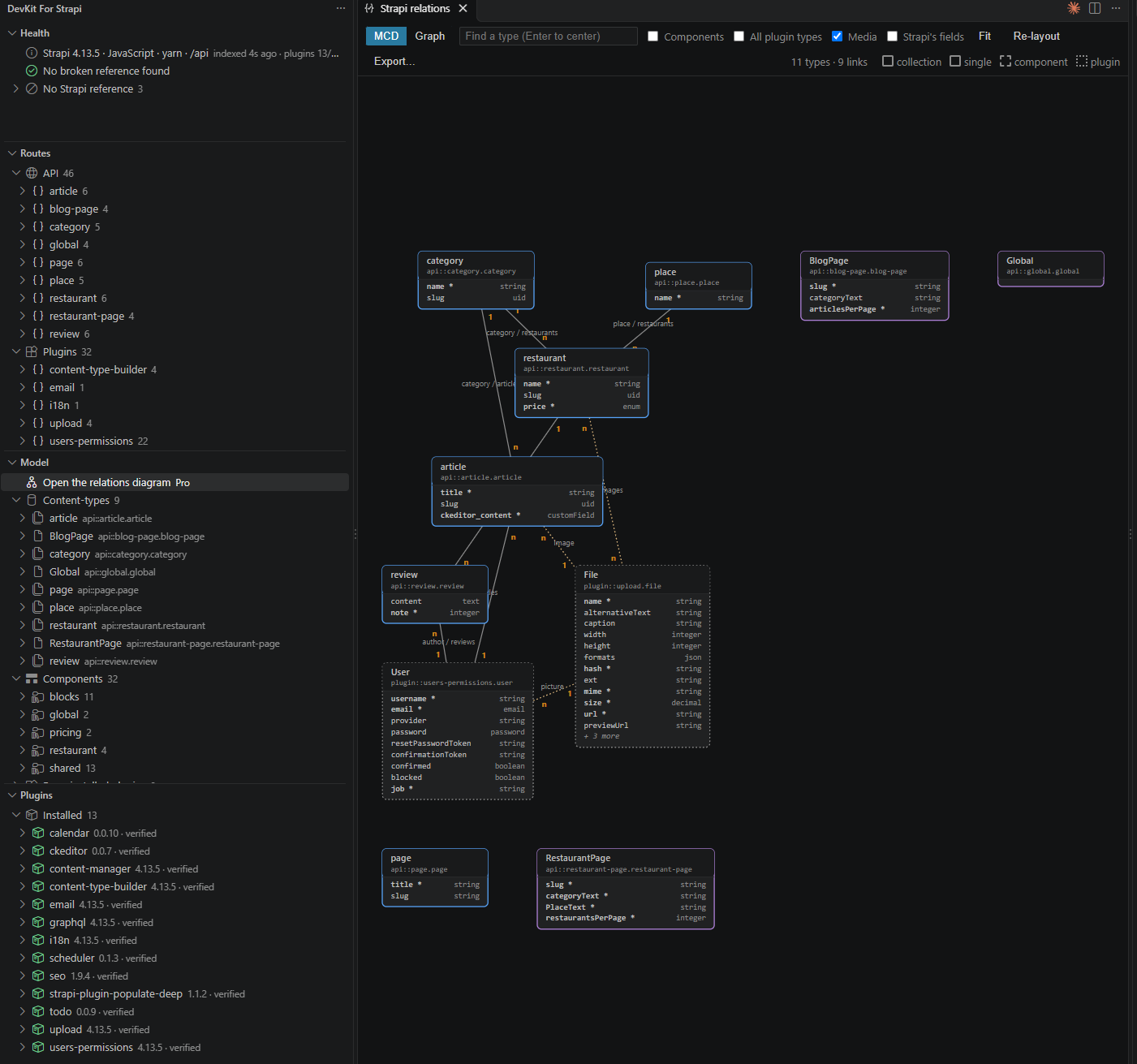
🤖 The MCP server — ground truth for AI agents
The same engine, exposed over the Model Context Protocol so coding agents (Claude Code, Copilot agent mode, Cursor, …) query your project's real values instead of grepping for them. 35 stdio tools, in four layers.
Not Strapi's own MCP server — they do different jobs. Strapi's official MCP acts on your content (CRUD on entries in a running instance, admin token, Strapi ≥ 5.47). DevKit acts on your codebase (reads
schema.jsonand source files — no server, no token, no network; v4 and v5). Use Strapi's MCP to work with your content; use DevKit to work on your code. Many projects want both.
Know — read the project's truth
server_info · list_projects · project_info · list_content_types · list_components · list_artifacts · get_schema ·
resolve · validate_reference · find_references · list_routes · refresh
Understand — health & impact analysis
list_unused (dead code) · list_broken_refs · coverage · find_relation_usages · list_refs (glob) ·
dependencies / dependents (the dependency graph, for cut analysis) · config_sync_status (the
config-sync options and files) · get_model_diagram (the data
model as a Mermaid erDiagram, Pro). list_routes also explains a route: what a request goes through,
in Strapi's order.
Config sync through your Strapi — Pro
config_sync_diff (the real diff between config/sync and the database, from config-sync itself) ·
config_sync_export · config_sync_import: the project's own Strapi, loaded the way the plugin's CLI does,
on a local development database only.
Refactor — plan → review → apply
plan_rename_method / plan_rename_entity · plan_move / plan_move_entities · plan_change_relation ·
plan_rename_attribute · create_plugin · extract_to_plugin, then apply_edits / apply_rename.
Every refactor returns a contractual, reviewable plan (text edits + file creates/renames/deletes + content fingerprints). Applying is explicit and safe by construction: the executor is confined to your discovered project root(s) (symlink-resolved — no escape), refuses to silently overwrite, verifies the fingerprints first (a stale plan is rejected, not applied), is best-effort transactional (rolls back on a mid-write failure), and self-verifies afterward (re-checks for broken refs). Garantir, ne pas deviner — applied to writes too.
Set it up
- VS Code, Cursor, Windsurf, Antigravity — the server is bundled in the extension and auto-registered with the editor's MCP support. Nothing to configure: install the extension and your agent can use the tools.
- Other MCP clients — run
devkit-for-strapi-mcpas a stdio server. The project path is optional: without it the server falls back to the client'srootscapability (Claude Code and Cursor advertise the folder you opened), then to the cwd. Passing it explicitly is still the most reliable — it's indexed at startup, so the first tool call already works on any client. There's also anadd_projecttool to register a project on demand.
For Claude Code, Claude Desktop, or any standalone MCP client:
{
  "mcpServers": {
    "devkit-for-strapi": {
      "command": "npx",
      "args": ["-y", "devkit-for-strapi-mcp@latest", "/absolute/path/to/your/strapi-project"]
    }
  }
}
Try it
Once it's wired, ask your agent:
- "Which content types exist in this project?"
- "What uses
api::article.article?" - "Is
api::article.artclea valid reference?"
It answers from your real schema.json — not from a guess.
Accurate by design
- Reads your real schema — answers come from your project's files, not from a model's guess.
- Multi-project — discovers every Strapi project in the workspace by content (scanning for
@strapi/strapi), never assuming workspace root = Strapi root. References resolve against the project that owns the edited file; an ambiguous request returns candidates, never a silent choice. - Strapi v4 and v5 — the version is detected per project; v4-in-v5 patterns are flagged. Knows the
difference between a
collectionTypeand asingleType(their auto-CRUD actions differ) and a schema-only content-type's auto-generated controller. - JavaScript & TypeScript — identical behavior for ESM and CommonJS projects (challenged by a JS⇄TS parity test).
- Runs everywhere — VS Code and its forks (Cursor, Windsurf, Google Antigravity) via Open VSX and the VS Code Marketplace.
Install
Editor — install from the VS Code Marketplace, or from Open VSX for Cursor / Windsurf / VSCodium (or just search “DevKit for Strapi” in the Extensions view). Open a Strapi project and it works.
AI agent, outside an editor — the MCP server is on npm as
devkit-for-strapi-mcp (and in the official MCP
registry as io.github.PaulRichez/devkit-for-strapi-mcp): npx -y devkit-for-strapi-mcp@latest /path/to/project.
Requirements — a Strapi v4 or v5 project, and VS Code 1.101+ (or a compatible fork). No
configuration, no type generation, no extra setup.
The MCP server needs no separate install in those editors — it ships inside the extension.
Architecture
A pnpm monorepo around one pure engine:
| Package | Role |
|---|---|
devkit-for-strapi-core |
The editor-agnostic engine — all Strapi knowledge, reads IO through a FileSystem seam, pure TypeScript. |
devkit-for-strapi |
The VS Code extension (providers, watcher) — glue, no Strapi logic. |
devkit-for-strapi-mcp |
The stdio MCP server — a third client of the same engine. |
The same core powers the editor, the MCP server, and the tests — so a fact verified once is true on every surface.
Trademark
Independent, community-built tool — not affiliated with, endorsed by, or sponsored by Strapi SAS. “Strapi” is a trademark of Strapi SAS, used here only to describe compatibility.
License
The core engine and the free editor/MCP wedge are free to use (licensed MIT)
(devkit-for-strapi-core, plus the read/navigation/diagnostics surface of the extension and the
read-only MCP tools).
The Pro write/refactor engine (propagated rename, move/extract, schema edits, plan→apply) is a
separate package that is not included in this repository — the packages/pro here is an
MIT-licensed stub that only preserves the public API so the free tier builds and runs. The real Pro
engine is licensed under PolyForm Shield 1.0.0 and is bundled into the published VS Code
extension and MCP server, so those distributed artifacts are governed by MIT AND PolyForm-Shield-1.0.0. Building from this repository produces the free tier; Pro features return a
"Pro required" upsell. Get Pro: https://devkit-for-strapi.paulrichez.fr/pro/.
Установка DevKit For Strapi Server
У этого сервера нет опубликованного пакета — он собирается из исходников. Открой репозиторий и следуй инструкции в README.
▸ github.com/PaulRichez/devkit-for-strapiFAQ
DevKit For Strapi Server MCP бесплатный?
Да, DevKit For Strapi Server MCP бесплатный — установка в пару кликов через Unyly без оплаты.
Нужен ли API-ключ для DevKit For Strapi Server?
Нет, DevKit For Strapi Server работает без API-ключей и переменных окружения.
DevKit For Strapi Server — hosted или self-hosted?
Self-hosted: сервер запускается локально на твоей машине командой из раздела установки.
Как установить DevKit For Strapi Server в Claude Desktop, Claude Code или Cursor?
Открой DevKit For Strapi Server на unyly.org, выбери вкладку своего клиента (Claude Desktop, Claude Code, Cursor) и нажми Install — конфиг сгенерируется автоматически, без правки JSON.
Похожие MCP
Opencode Omniroute Plugin
OpenCode plugin for the OmniRoute AI Gateway. Drives dynamic model discovery, /connect auth flow, and multi-instance OmniRoute providers via the official @openc
 автор: GitHub Actions
Roblox Studio
Enables AI coding tools to control Roblox Studio for workspace exploration, instance manipulation, and script management. It provides tools for playtesting, sce
 автор: paralov
Antigravity Drawio
MCP server that enables AI assistants to create, parse, render, and validate Draw.io diagrams programmatically.
 автор: S-SUJAN-S
Fetch
Web content fetching and conversion for efficient LLM usage.
AWS KB Retrieval
Retrieval from AWS Knowledge Base using Bedrock Agent Runtime.
 автор: modelcontextprotocol
Spring AI MCP Server
Provides auto-configuration for setting up an MCP server in Spring Boot applications.
llm-analysis-assistant
A very streamlined mcp client that supports calling and monitoring stdio/sse/streamableHttp, and can also view request responses through the /logs page. It also
 автор: xuzexin-hz
MCP-Agent
A simple, composable framework to build agents using Model Context Protocol by [LastMile AI](https://www.lastmileai.dev)
 автор: lastmile-ai
Spring AI MCP Client
Provides auto-configuration for MCP client functionality in Spring Boot applications.
mcp.natoma.ai
A Hosted MCP Platform to discover, install, manage and deploy MCP servers by [Natoma Labs](https://www.natoma.ai)
Compare DevKit For Strapi Server with
Не уверен что выбрать?
Найди свой стек за 60 секунд
Автор?
Embed-бейдж для README
Похожее
Все в категории ai