

Описание
MCP server that provides access to DEVONthink
README
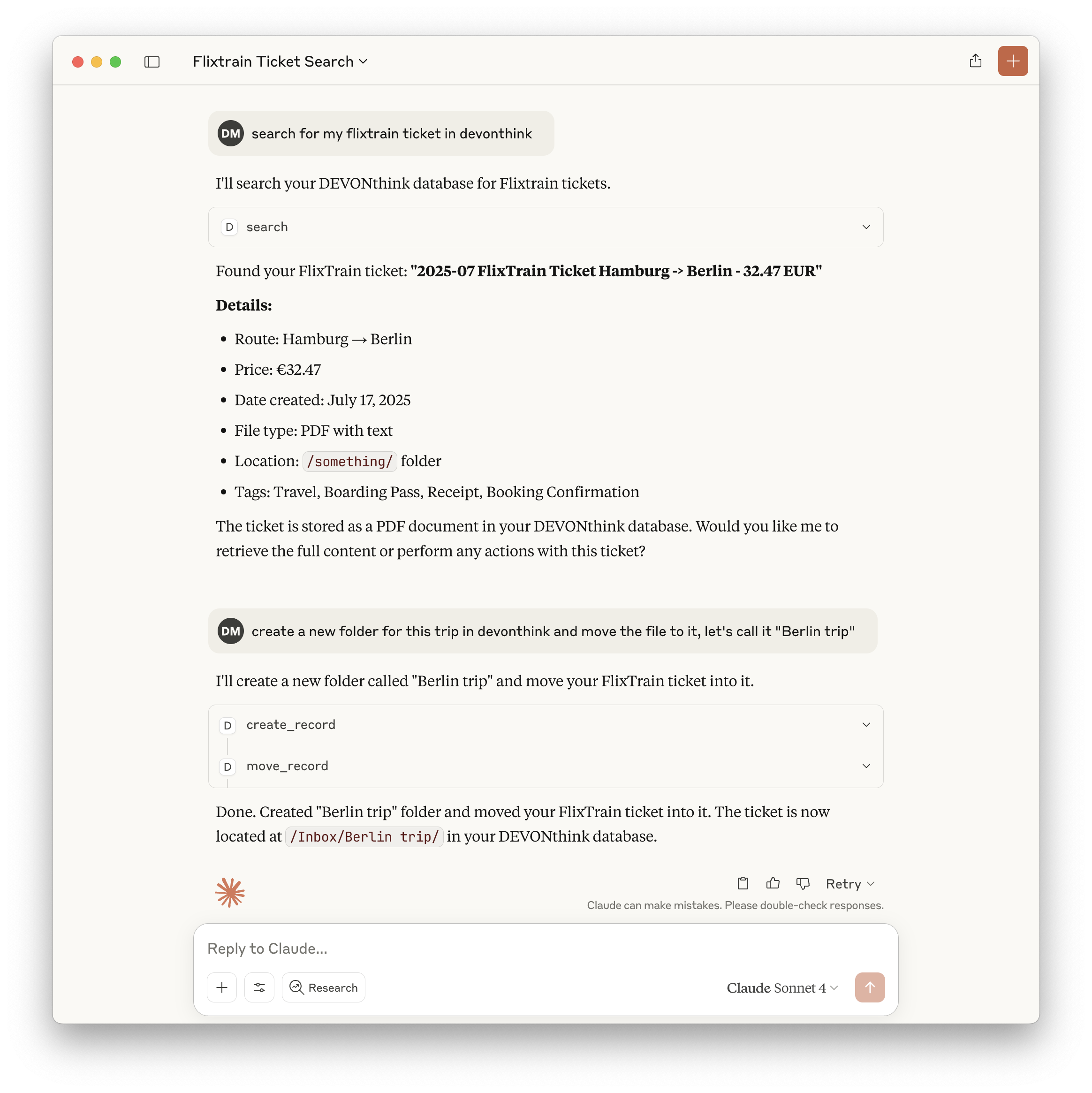
This MCP server provides access to DEVONthink functionality via the Model Context Protocol (MCP). It enables listing, searching, creating, modifying, and managing records and databases in DEVONthink Pro on macOS.
Features
- Exposes a comprehensive set of DEVONthink operations as MCP tools
- List, search, and look up records by various attributes
- Create, delete, move, and rename records and groups
- Retrieve and modify record content, properties, and tags
- Create records from URLs in multiple formats
- List open databases and group contents
- All tools are type-safe and validated with Zod schemas
Tools
Core Tools
is_running- Checks if DEVONthink is currently running
- No input required
- Returns:
{ "success": true | false }
create_record- Creates new records (notes, bookmarks, groups) with specified properties
- Input: record type, name, parent group, and optional metadata
delete_record- Deletes records by ID, name, or path
- Input: record identifier
move_record- Moves records between groups
- Input: record ID and destination group
get_record_properties- Retrieves detailed metadata and properties for records
- Input: record identifier
search- Performs text-based searches with various comparison options
- Input: query string and search options
lookup_record- Looks up records by filename, path, URL, tags, comment, or content hash (exact matches only)
- Input: lookup type and value
create_from_url- Creates records from web URLs in multiple formats
- Input: URL and format options
get_open_databases- Lists all currently open databases
- No input required
list_group_content- Lists the content of a specific group
- Input: group identifier
get_record_content- Retrieves the content of a specific record
- Input: record identifier
rename_record- Renames a specific record
- Input: record ID and new name
add_tags- Adds tags to a specific record
- Input: record ID and tags
remove_tags- Removes tags from a specific record
- Input: record ID and tags
classify- Gets classification proposals for a record using DEVONthink's AI
- Input: record UUID, optional database name, comparison type, and tags option
- Returns: Array of classification proposals (groups or tags) with scores
compare- Compares records to find similarities (hybrid approach)
- Input: primary record UUID, optional second record UUID, database name, and comparison type
- Returns: Either similar records (single mode) or detailed comparison analysis (two-record mode)
Example: Search Tool
{
  "query": "project plan",
  "comparison": "contains",
  "database": "Inbox"
}
Returns:
{
  "results": [
    { "id": "123", "name": "Project Plan", "path": "/Inbox/Project Plan.md" }
  ]
}
Usage with Claude
Add to your Claude configuration:
{
  "mcpServers": {
    "devonthink": {
      "command": "npx",
      "args": ["-y", "mcp-server-devonthink"]
    }
  }
}
Implementation Details
- Uses JXA (JavaScript for Automation) to control DEVONthink via AppleScript APIs
- All tool inputs are validated with Zod schemas for safety and clarity
- Returns structured JSON for all tool outputs
- Implements robust error handling for all operations
- Includes comprehensive tests using Vitest
See CLAUDE.md for full documentation, tool development guidelines, and API reference.
Установить Devonthink в Claude Desktop, Claude Code, Cursor
unyly install devonthinkСтавит в Claude Desktop, Claude Code, Cursor и VS Code — сам разбирается с npx, uvx и сборкой из исходников.
Впервые? Поставь CLI: curl -fsSL https://unyly.org/install | sh
Или настроить вручную
Выполни в терминале:
claude mcp add devonthink -- npx -y mcp-server-devonthinkFAQ
Devonthink MCP бесплатный?
Да, Devonthink MCP бесплатный — установка в пару кликов через Unyly без оплаты.
Нужен ли API-ключ для Devonthink?
Нет, Devonthink работает без API-ключей и переменных окружения.
Devonthink — hosted или self-hosted?
Self-hosted: сервер запускается локально на твоей машине командой из раздела установки.
Как установить Devonthink в Claude Desktop, Claude Code или Cursor?
Открой Devonthink на unyly.org, выбери вкладку своего клиента (Claude Desktop, Claude Code, Cursor) и нажми Install — конфиг сгенерируется автоматически, без правки JSON.
Похожие MCP
GitHub
PRs, issues, code search, CI status
 автор: GitHub
Filesystem
Secure file operations with configurable access controls.
Memory
Knowledge graph-based persistent memory system.
Template MCP Server
A CLI tool to create a new Model Context Protocol server project with TypeScript support, dual transport options, and an extensible structure
 автор: mcpdotdirect
Compare Devonthink with
Не уверен что выбрать?
Найди свой стек за 60 секунд
Автор?
Embed-бейдж для README
Похожее
Все в категории development