
Diagram Server
БесплатноНе проверенAI MCP Tools for Creating, Storing, and Utilizing Diagrams and Mind-maps with a Permanent Library.

Описание
AI MCP Tools for Creating, Storing, and Utilizing Diagrams and Mind-maps with a Permanent Library.
README
A powerful Model Context Protocol (MCP) server for creating, manipulating, and managing Mermaid diagrams with automatic saving and integrated multi-format support. Built with enterprise-grade persistence and designed for seamless AI workflow integration.
🌟 Key Features
🔄 Automatic Saving & Library System
- Auto-save on creation/modification - Never lose your work
- Persistent diagram library stored in
/diagramsdirectory - Metadata tracking with creation/modification timestamps
- Instant load from disk - Diagrams persist across sessions
📁 Integrated Multi-Format Support
- JSON → Flowcharts (hierarchical structure visualization)
- CSV → Organizational/Relationship charts
- Python Code → Class diagrams (automatic AST parsing)
- Markdown → Mind maps (hierarchical content mapping)
- Plain Text → Structured diagrams (with indentation detection)
🎨 Rich Diagram Types
- Flowcharts - Process flows and decision trees
- Sequence Diagrams - Interaction sequences
- Mind Maps - Concept organization and brainstorming
- Gantt Charts - Project timelines and scheduling
- Class Diagrams - Object-oriented system design
- Entity Relationship - Database schema visualization
- User Journey Maps - Experience flow mapping
- Git Graphs - Version control visualization
- Pie Charts - Data visualization
- State Diagrams - State machine modeling
🛠 Professional Tools
- Template Library with 8+ pre-built diagram templates
- Custom save locations in addition to auto-saving
- Smart format detection with conversion recommendations
- Resource access for MCP integration
- Background processing with robust task management
Note: If there is a syntax error converting a diagram remove any () in the underlined code error.

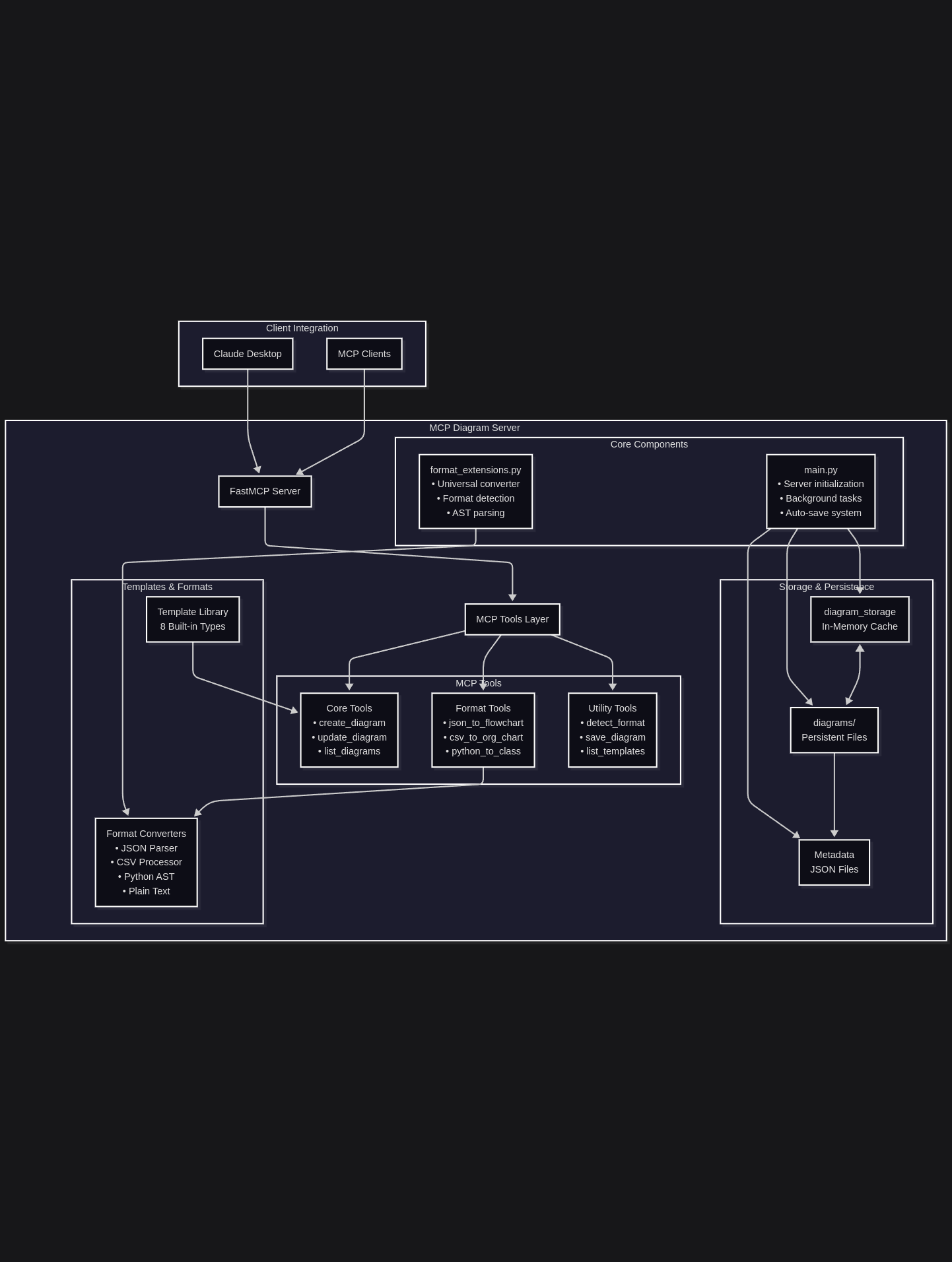
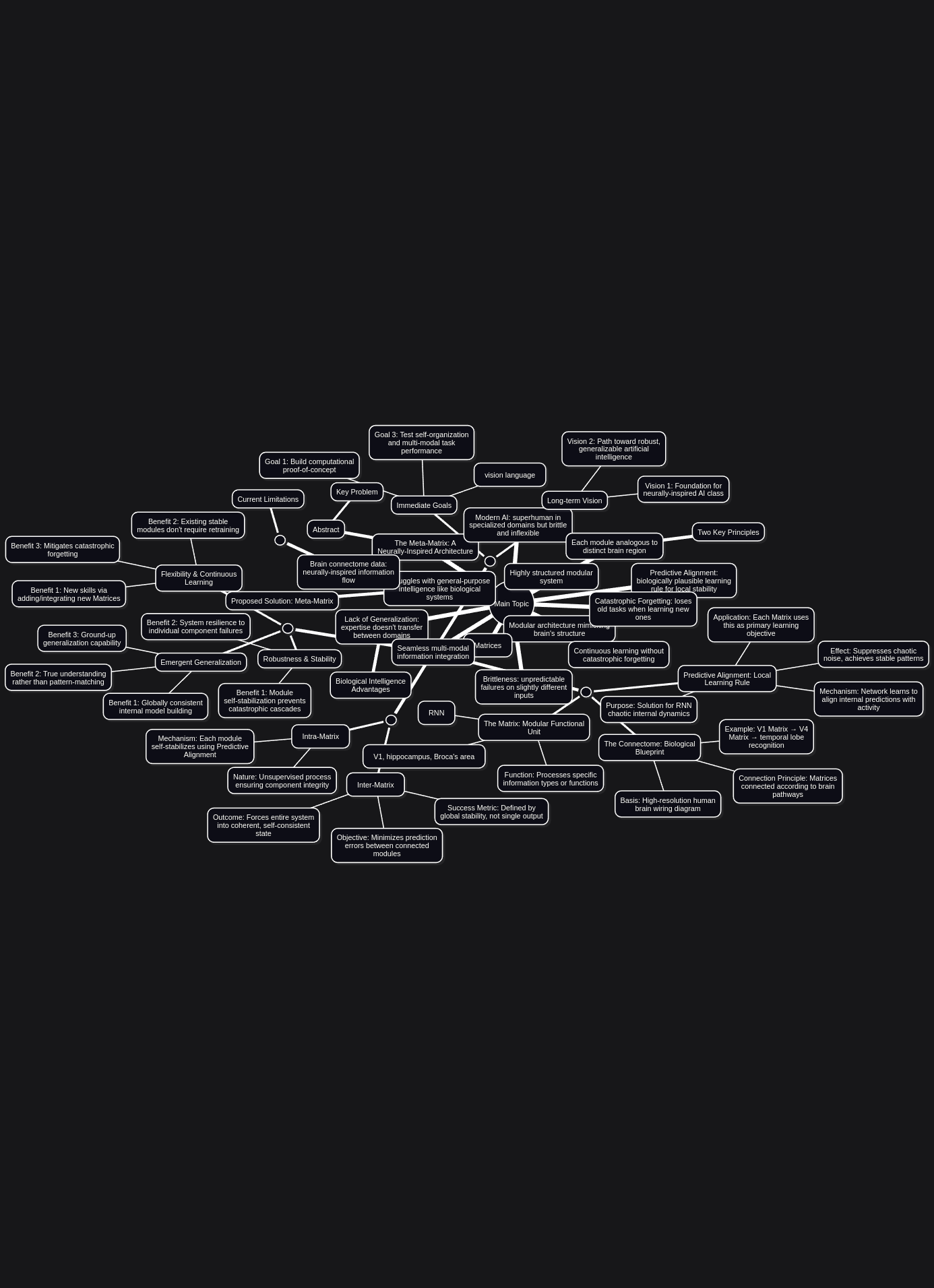
🚀 Quick Start- Simply clone the repository and add the following
Claude Desktop Configuration
Add to your Claude Desktop MCP configuration:
{
  "mcpServers": {
    "diagram-server": {
      "command": "uv",
      "args": [
        "--directory",
        "/your-path-to/mcp-diagram-server",
        "run",
        "main.py"
      ],
      "env": {
        "LOG_LEVEL": "INFO"
      }
    }
  }
}
Installation- will auto-install with config
- Clone the repository:
cd /mcp-diagram-server
- Set up the Python environment:
uv venv --python 3.12 --seed
source .venv/bin/activate
uv add -e .
- Optional - Install Playwright for rendering:
uv add playwright
uv run playwright install chromium
📚 Available MCP Tools
Core Diagram Operations
create_diagram- Create new diagrams with optional templatesupdate_diagram- Modify existing diagram content (auto-saves)get_diagram- Retrieve diagrams from memory or disklist_diagrams- Browse your diagram librarydelete_diagram- Remove diagrams from memory
Format Conversion Tools
convert_format_to_diagram- Universal format converter with auto-detectionjson_to_flowchart- Convert JSON structures to flowchartscsv_to_org_chart- Convert CSV data to organizational/relationship chartspython_to_class_diagram- Convert Python code to class diagramsmarkdown_to_mindmap- Convert structured markdown to mind mapsdetect_file_format- Smart format detection with conversion recommendations
Library Management
save_diagram- Manual save to custom locationslist_templates- Browse available diagram templates- Auto-saving - Automatic persistence (always active)
💡 Usage Examples
Universal Format Conversion
convert_format_to_diagram(
    content='{"api": {"users": ["get", "post"], "orders": ["get", "create"]}}',
    target_type="flowchart",
    name="APIStructure"
)
Result: Auto-saved flowchart showing API structure hierarchy
JSON to Flowchart
json_to_flowchart(
    json_content='{"system": {"frontend": "React", "backend": "FastAPI", "db": "PostgreSQL"}}',
    name="SystemArchitecture"
)
Result: Visual flowchart of system components and relationships
CSV to Organizational Chart
csv_to_org_chart(
    csv_content="Name,Role,Department\nAlice,Director,Engineering\nBob,Engineer,Engineering",
    name="TeamStructure"
)
Result: Organizational chart showing team hierarchy
Python Code to Class Diagram
python_to_class_diagram(
    python_code='''
class DatabaseManager:
    def __init__(self):
        self.connection = None
    def connect(self):
        pass
    def query(self, sql):
        pass
''',
    name="DatabaseDesign"
)
Result: UML class diagram from Python code structure
Smart Format Detection
detect_file_format(
    content='class User:\n    def __init__(self):\n        pass',
    filename="models.py"
)
Result: Format identification with conversion recommendations
Create with Template
create_diagram(diagram_type="sequence", use_template=True, name="UserFlow")
Result: Auto-saved sequence diagram template ready for customization
🔧 Understanding Save Systems
Auto-Save (Always Active)
- When: Every diagram creation and modification
- Where:
/diagramsdirectory with metadata - Format:
.mmdfile +_metadata.json - Purpose: Prevent data loss, maintain library
Manual Save (save_diagram)
- When: On-demand via tool call
- Where: Custom locations you specify
- Format:
.mmdfile +_metadata.json - Purpose: Backups, exports, custom workflows
Both systems work together - Auto-save maintains your library while manual save provides flexibility.
📁 Library Structure
diagrams/
├── SystemArchitecture_converted_20250824_120000.mmd
├── SystemArchitecture_converted_20250824_120000_metadata.json
├── TeamStructure_converted_20250824_130000.mmd
├── TeamStructure_converted_20250824_130000_metadata.json
├── UserFlow_diagram_20250824_140000.mmd
└── UserFlow_diagram_20250824_140000_metadata.json
🎯 Format Conversion Pipeline
The integrated conversion system handles multiple input formats:
JSON Processing
- Auto-detects nested JSON structures
- Generates hierarchical flowcharts showing data relationships
- Preserves key-value relationships and array structures
CSV Analysis
- Parses CSV headers and relationships
- Creates organizational charts or network diagrams
- Handles employee/role data and relationship matrices
Python AST Parsing
- Analyzes Python source code structure
- Extracts classes, methods, and inheritance relationships
- Generates UML class diagrams with method signatures
Plain Text Intelligence
- Detects indentation patterns and structure
- Converts to hierarchical mind maps
- Processes bullet points and numbered lists
Smart Detection
- Content analysis for format identification
- File extension recognition when available
- Conversion recommendations for optimal diagram types
🛡️ Enterprise Features
- Robust Error Handling: Comprehensive exception management
- Process Management: Background task cleanup and monitoring
- Data Integrity: Metadata validation and consistency checks
- Session Persistence: Diagrams survive server restarts
- Format Validation: Input validation for all supported formats
- Concurrent Access: Safe multi-client diagram access
🔄 Workflow Integration
Perfect for:
- AI-Powered Diagramming: Let AI create and modify diagrams from any format
- Documentation Generation: Convert data structures to visual documentation
- Process Visualization: Transform workflows into clear diagrams
- Code Architecture: Generate system diagrams from source code
- Data Visualization: Convert CSVs and JSON to visual representations
- Knowledge Mapping: Convert any structured content to mind maps
📝 License
MIT License - See LICENSE file for details
🤝 Contributing
Contributions welcome! The codebase follows modern Python patterns with comprehensive error handling and robust process management.
🙏 Acknowledgments
- Inspired by Drawnix - Open-source whiteboard tool
- Built with FastMCP
- Powered by Mermaid diagram syntax
- Format conversion powered by Python AST parsing and intelligent structure analysis
📞 Support
For issues or questions, please open an issue on GitHub.
System Requirements: Python 3.10+ | Compatible with Claude Desktop and MCP-enabled clients
🚀 Ready to convert any format to diagrams? Start creating visual representations from JSON, CSV, Python code, and more with automatic saving!
Установка Diagram Server
У этого сервера нет опубликованного пакета — он собирается из исходников. Открой репозиторий и следуй инструкции в README.
▸ github.com/angrysky56/mcp-diagram-serverFAQ
Diagram Server MCP бесплатный?
Да, Diagram Server MCP бесплатный — установка в пару кликов через Unyly без оплаты.
Нужен ли API-ключ для Diagram Server?
Нет, Diagram Server работает без API-ключей и переменных окружения.
Diagram Server — hosted или self-hosted?
Self-hosted: сервер запускается локально на твоей машине командой из раздела установки.
Как установить Diagram Server в Claude Desktop, Claude Code или Cursor?
Открой Diagram Server на unyly.org, выбери вкладку своего клиента (Claude Desktop, Claude Code, Cursor) и нажми Install — конфиг сгенерируется автоматически, без правки JSON.
Похожие MCP
Fetch
Web content fetching and conversion for efficient LLM usage.
AWS KB Retrieval
Retrieval from AWS Knowledge Base using Bedrock Agent Runtime.
 автор: modelcontextprotocol
Spring AI MCP Server
Provides auto-configuration for setting up an MCP server in Spring Boot applications.
llm-analysis-assistant
A very streamlined mcp client that supports calling and monitoring stdio/sse/streamableHttp, and can also view request responses through the /logs page. It also
 автор: xuzexin-hz
Compare Diagram Server with
Не уверен что выбрать?
Найди свой стек за 60 секунд
Автор?
Embed-бейдж для README
Похожее
Все в категории ai