
Docent.nvim
БесплатноНе проверенLet any coding agent guide you through a codebase by navigating your Neovim. A local MCP server for guided code tours

Описание
Let any coding agent guide you through a codebase by navigating your Neovim. A local MCP server for guided code tours
README
Let any coding agent guide you through a codebase by navigating your Neovim by jumping, highlighting, explaining in place instead of pasting code into chat. You talk and the agent shows it in your editor.
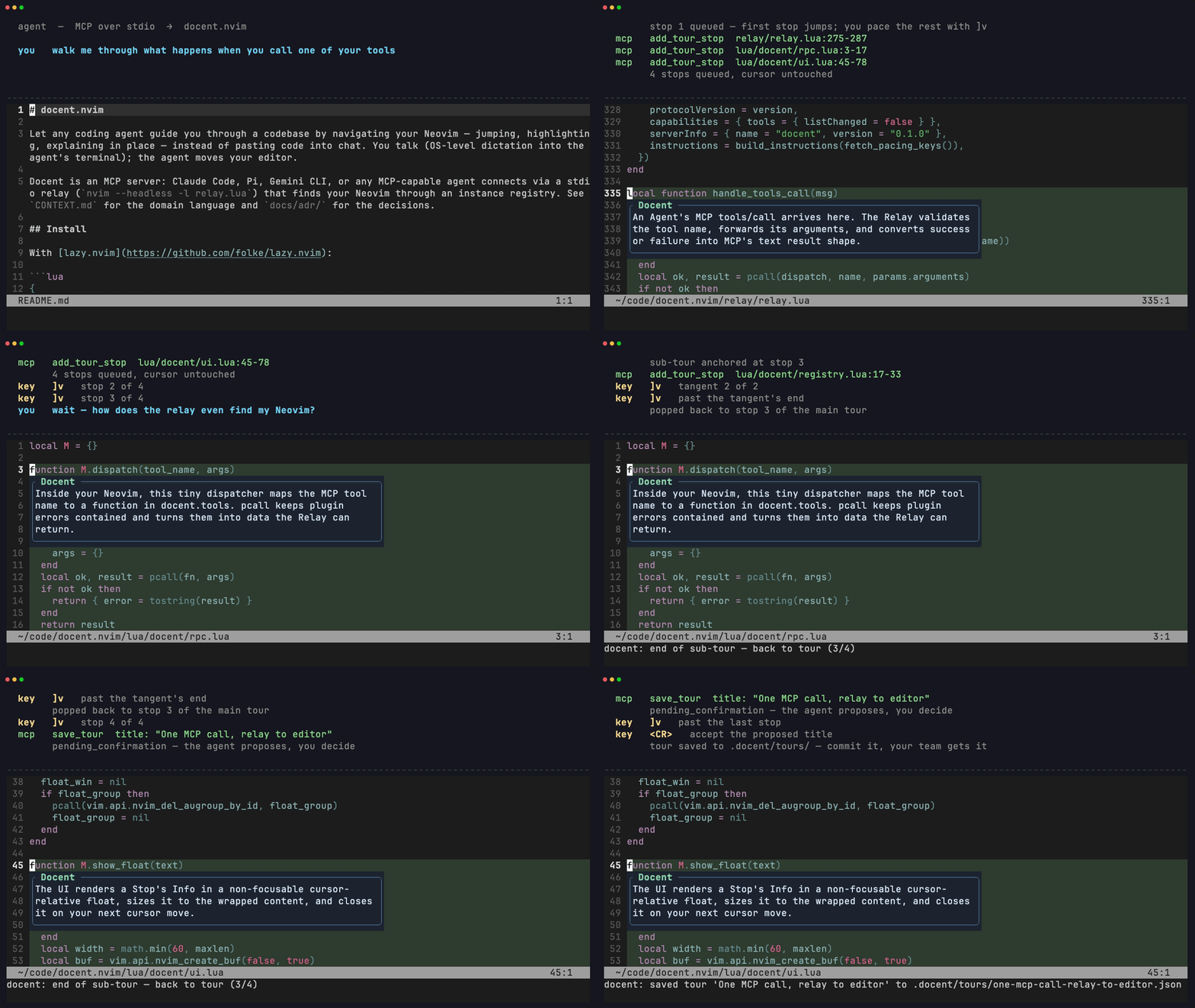
Above: docent giving a tour of docent. The agent queues stops, you pace them with ]v, a tangent branches a sub-tour and pops back where you left it, and the finished tour asks to be saved. Everything on screen is the real plugin driven over real MCP. media/demo.tape re-renders it.
Docent is an MCP server: Claude Code, Amp, Codex, Pi, or any MCP-capable agent connects via a stdio relay (nvim --headless -l relay.lua) that finds your Neovim through an instance registry. See CONTEXT.md for the domain language and docs/adr/ for the decisions.
Install
With lazy.nvim:
{
  "KarthikRaju391/docent.nvim",  -- or { dir = "~/code/docent.nvim" } for a local checkout
  opts = {},
  -- opts = { keymaps = { next = "]t", prev = "[t" } }  -- defaults; or keymaps = false
}
Or call require("docent").setup() yourself. Setup registers this Neovim instance (RPC socket + cwd) in $XDG_STATE_HOME/docent/instances/ so relays can find it; without setup, agents can't connect.
Agent registration
Run :DocentMcpCommand in Neovim. It prints these lines with your actual install path filled in:
Claude Code:
claude mcp add docent -- nvim --headless -l /path/to/docent.nvim/relay/relay.luaAmp:
amp mcp add docent -- nvim --headless -l /path/to/docent.nvim/relay/relay.luaCodex:
codex mcp add docent -- nvim --headless -l /path/to/docent.nvim/relay/relay.luaPi (or any client configured by JSON): add to
~/.pi/agent/mcp.json{ "mcpServers": { "docent": { "command": "nvim", "args": ["--headless", "-l", "/path/to/docent.nvim/relay/relay.lua"] } } }
Use an absolute path to the nvim binary if your agent launches with a stripped PATH (Pi and Codex do). :DocentMcpCommand already emits one. Check the connection with amp mcp doctor, codex mcp get docent, or /mcp in Claude Code.
Run the agent from inside (a subdirectory of) the directory where Neovim is running, the relay targets the instance whose cwd contains the agent's, most recently focused winning ties.
Usage
Keep Neovim open with setup() called, then ask your agent things like:
- "Where do we dedupe pre-meeting deliveries?" → the agent calls
jump_to; your cursor lands there with an info float. - "Walk me through the import flow" → the agent queues tour stops; you pace through them with
]t/[t(or:DocentNext/:DocentPrev/:DocentStop <n>).
Talking to your agent by voice? Voice-mode agents read each stop's info aloud as they navigate, since the float and the spoken reply are the same text.
While a tour is live, pressing <Esc> twice within a second (normal mode) ends the whole tour. A single <Esc> behaves exactly as before: the transient mapping chains to whatever your <Esc> did (e.g. clearing search highlights) and is removed when the tour ends. Disable with opts = { esc_ends_tour = false }.
Commands: :DocentNext, :DocentPrev, :DocentStop <n>, :DocentRestart (back to stop 1 of the active tour), :DocentBack (end a sub-tour), :DocentEnd (exit the whole tour), :DocentInfo (re-show the current stop's info float), :DocentSave <title>, :DocentTours (picker), :DocentMcpCommand. Range highlights use the DocentRange group (links to Visual).
Sub-tours
Tours form a tree. Mid-tour you can ask a tangent question ("wait, what does the registry actually store?") and the agent branches: a sub-tour starts at your current stop, and your pacing keys now walk the tangent. Pacing past the last tangent stop pops you right back to the stop you left the main tour from, so tangents never lose your place. Only the deepest branch is active at a time.
- Past-the-end pop:
]t(or your next key) at the last sub-tour stop returns you to the parent stop. - Skip: the uppercase variant of your next key (
]v→]V, configurable askeymaps.skip) leaves the sub-tour immediately, same as:DocentBack. [tat stop 1 of a sub-tour stays put, because a sub-tour is contained: you leave by finishing it, skipping it, or:DocentBack.:DocentRestartrestarts the deepest (active) tour only.:DocentSave/save_toursaves the active (deepest) tour only. Saving a whole tree is not supported yet.
Keymap conflicts (LazyVim etc.)
The ]t / [t defaults are only set if you haven't mapped them yourself (Nvim's built-in tag defaults are overridden, plugin/user maps are not). On LazyVim, todo-comments.nvim owns ]t/[t, so docent skips them. Pick your own keys:
opts = { keymaps = { next = "]v", prev = "[v" } }
Agents are told your real pacing keys: the relay reads what docent actually bound and puts it in the MCP instructions and in the first tour stop's result (pace_with), falling back to :DocentNext/:DocentPrev wording if no keys were bound.
Saved tours
A good tour is documentation. (This repo ships one of itself! Ask your agent what saved tours it can find here.) Confirmed tours live at .docent/tours/<slug>.json in your project, with file paths relative to the project root, so commit the directory and your whole team (and their agents) gets the tour.
The agent proposes; you decide. save_tour never writes. It only proposes a title. When you pace past the last stop of a tour, docent asks Save tour as: <proposed title>. Press Enter to accept, type over it to rename, or <Esc> to decline. Explicit exits (]V skip, :DocentBack, :DocentEnd, double-<Esc>, clear_tour, loading another tour) discard the proposal silently, so nothing nags you on the way out. :DocentSave <title> still writes immediately, since typing it is itself the confirmation. Don't want the prompt at all? opts = { save_prompt = false }.
Agents are instructed to check list_saved_tours before re-deriving a flow, and to load an existing tour instead. load_tour and :DocentTours bring one back and jump to stop 1. clear_tour only clears the live tour, never saved files.
The agent's tool surface is navigation and info only, with no edits and no shell. Tools: jump_to, highlight, show_info, add_tour_stop, clear_tour, list_tour, save_tour, list_saved_tours, load_tour, get_editor_context.
Установка Docent.nvim
У этого сервера нет опубликованного пакета — он собирается из исходников. Открой репозиторий и следуй инструкции в README.
▸ github.com/KarthikRaju391/docent.nvimFAQ
Docent.nvim MCP бесплатный?
Да, Docent.nvim MCP бесплатный — установка в пару кликов через Unyly без оплаты.
Нужен ли API-ключ для Docent.nvim?
Нет, Docent.nvim работает без API-ключей и переменных окружения.
Docent.nvim — hosted или self-hosted?
Self-hosted: сервер запускается локально на твоей машине командой из раздела установки.
Как установить Docent.nvim в Claude Desktop, Claude Code или Cursor?
Открой Docent.nvim на unyly.org, выбери вкладку своего клиента (Claude Desktop, Claude Code, Cursor) и нажми Install — конфиг сгенерируется автоматически, без правки JSON.
Похожие MCP
GitHub
PRs, issues, code search, CI status
 автор: GitHub
Filesystem
Secure file operations with configurable access controls.
Memory
Knowledge graph-based persistent memory system.
Template MCP Server
A CLI tool to create a new Model Context Protocol server project with TypeScript support, dual transport options, and an extensible structure
 автор: mcpdotdirect
Amap Maps Mcp Server
MCP server for using the AMap Maps API
 автор: duxiaohui
Supabase
Database, auth and storage
 автор: Supabase
Everything
Reference / test server with prompts, resources, and tools.
Git
Tools to read, search, and manipulate Git repositories.
Sequential Thinking
Dynamic and reflective problem-solving through thought sequences.
Time
Time and timezone conversion capabilities.
Compare Docent.nvim with
Не уверен что выбрать?
Найди свой стек за 60 секунд
Автор?
Embed-бейдж для README
Похожее
Все в категории development