
DSIPRouter Server
БесплатноНе проверенEnables AI assistants to manage dSIPRouter operations such as endpoint groups, carrier groups, inbound mappings, and call data retrieval through natural languag

Описание
Enables AI assistants to manage dSIPRouter operations such as endpoint groups, carrier groups, inbound mappings, and call data retrieval through natural language.
README
This repository contains the dSIPRouter MCP Server, which provides an interface to interact with dSIPRouter from conversational AI chatbots such as Claude and ChatGPT.
Overview
The MCP (Model Context Protocol) server allows AI assistants to perform various operations on dSIPRouter, including managing endpoint groups, carrier groups, inbound mappings, and retrieving call data.
Example Questions
Here are some example questions you can ask the AI assistant when using this MCP server:
List the endpoint groups of dSIPRouter
List the carrier groups of dSIPRouter
Create a CSV file with all of the calls that happened yesterday
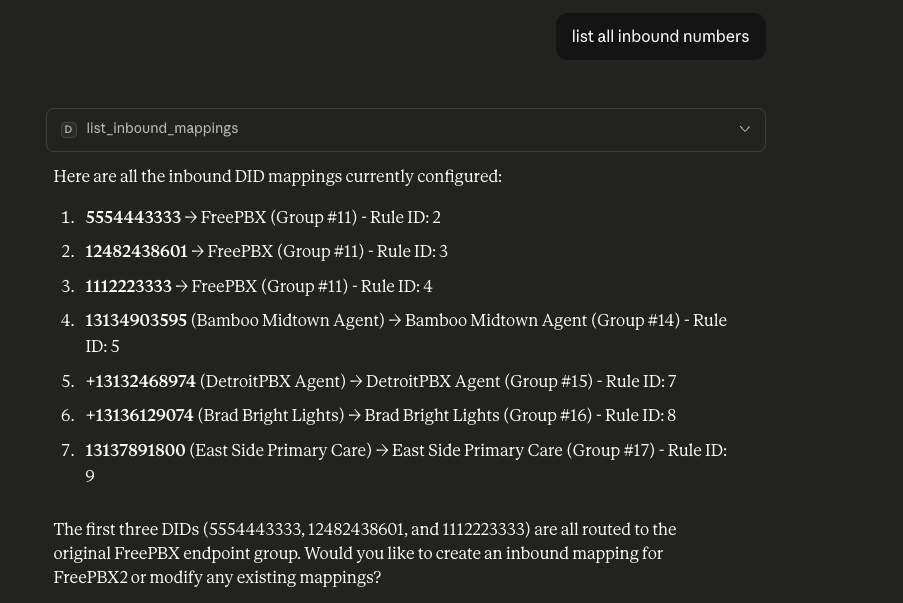
List all inbound numbers
Here's a screenshoot from Claude when asking to "list all inbound numbers"
Requirements
- dSIPRouter 0.70 or later
- dSIPRouter Core License - Contains a 7 Day Trial License
Setup for Claude Desktop
Using Python on Host Machine
Validate that the MCP Server is Working
Install dependencies:
pip install -r requirements.txtSet environment variables:
DSIP_BASE_URL: The base URL of your dSIPRouter instanceDSIP_TOKEN: Your dSIPRouter API tokenDSIP_VERIFY_SSL: Whether to verify SSL certificates (default: true)DSIPMCP_CERT: File location of the certificateDSIPMCP_KEY: File location of the keyDSIPMCP_CA: File location of the CADSIPMCP_PORT: Define the port being used. The default is 443
Run the server:
python main.py --httpNote: You will not see any output if it's running successfully
Stop the Server:
Hit Ctrl-C twice to kill the server
Configure the MCP Server for one or more conversation AI chatbots per the sections below.
Configure Claude
Running the MCP Server on your local system
On MacOS
- Open Claude Configuration File:
nano ~/Library/Application\ Support/Claude/claude_desktop_config.json
- Add the following:
{
  "mcpServers": {
    "dsiprouter": {
      "command": "python",
      "args": ["/full/path/to/main.py"],
      "env": {
        "DSIP_BASE_URL": "https://your-dsiprouter-server:5000",
        "DSIP_TOKEN": "your-dsiprouter-api-token",
        "DSIP_VERIFY_SSL": "true"
      }
    }
  }
}
Save the file
Start Claude
Using Python using Virtual Environment (venv)
Validate that the MCP Server is Working
Install dependencies:
python -m venv .venv
source ./.venv/bin/activate
pip install -r requirements.txt
Set environment variables:
DSIP_BASE_URL: The base URL of your dSIPRouter instanceDSIP_TOKEN: Your dSIPRouter API tokenDSIP_VERIFY_SSL: Whether to verify SSL certificates (default: true)
For example,
export DSIP_BASE_URL=https://your url:5000
export DSIP_TOKEN=your token
export DSIP_VERIFY_SSL=true
Run the server:
python main.pyNote: You will not see any output if it's running successfully
Stop the Server:
Hit Ctrl-C twice to kill the server
Configure the MCP Server for one or more conversation AI chatbots per the sections below.
Configure Claude
On MacOS
- Open Claude Configuration File:
nano ~/Library/Application\ Support/Claude/claude_desktop_config.json
- Add the following:
{
  "mcpServers": {
    "dsiprouter": {
      "command": "<your path>/dsiprouter-mcp-server/.venv/bin/python3",
      "args": ["<your path>/code/dsiprouter-mcp-server/main.py"],
      "env": {
        "DSIP_BASE_URL": "https://your-dsiprouter-server:5000",
        "DSIP_TOKEN": "your-dsiprouter-api-token",
        "DSIP_VERIFY_SSL": "true"
      }
    }
  }
}
Save the file
Start Claude
Setup for ChatGPT
Using Python on Host Machine
Start the MCP Server in HTTP Mode
Install dependencies:
pip install -r requirements.txtSet environment variables:
DSIPMCP_CERT: File location of the certificateDSIPMCP_KEY: File location of the keyDSIPMCP_CA: File location of the CA. Not requiredDSIPMCP_PORT: Define the port being used. The default is 443DSIP_BASE_URL: The base URL of your dSIPRouter instanceDSIP_TOKEN: Your dSIPRouter API tokenDSIP_VERIFY_SSL: Whether to verify SSL certificates (default: true)
For example:
DSIPMCP_CERT=/etc/letsencrypt/live/demo-mcp.dsiprouter.net/fullchain.pem
DSIPMCP_KEY=/etc/letsencrypt/live/demo-mcp.dsiprouter.net/privkey.pem
DSIP_BASE_URL=https://demo.dsiprouter.net:5000
DSIP_TOKEN=<dsiprouter token>
- Run the server:
python main.py --http
If you are running this on a machine without external ip address then set the DSIPMCP_PORT=8000 and restart the MCP Server.
- Expose the local server using ngrok
Open up another terminal, download ngrok, register with ngrok and start ngrok
ngrok http 8000
Setting up ChatGPT to use the dSIPRouter MCP Server
- Login to ChatGPT
- Click Settings, then Apps
- Enable Developer Mode
- Click Create App
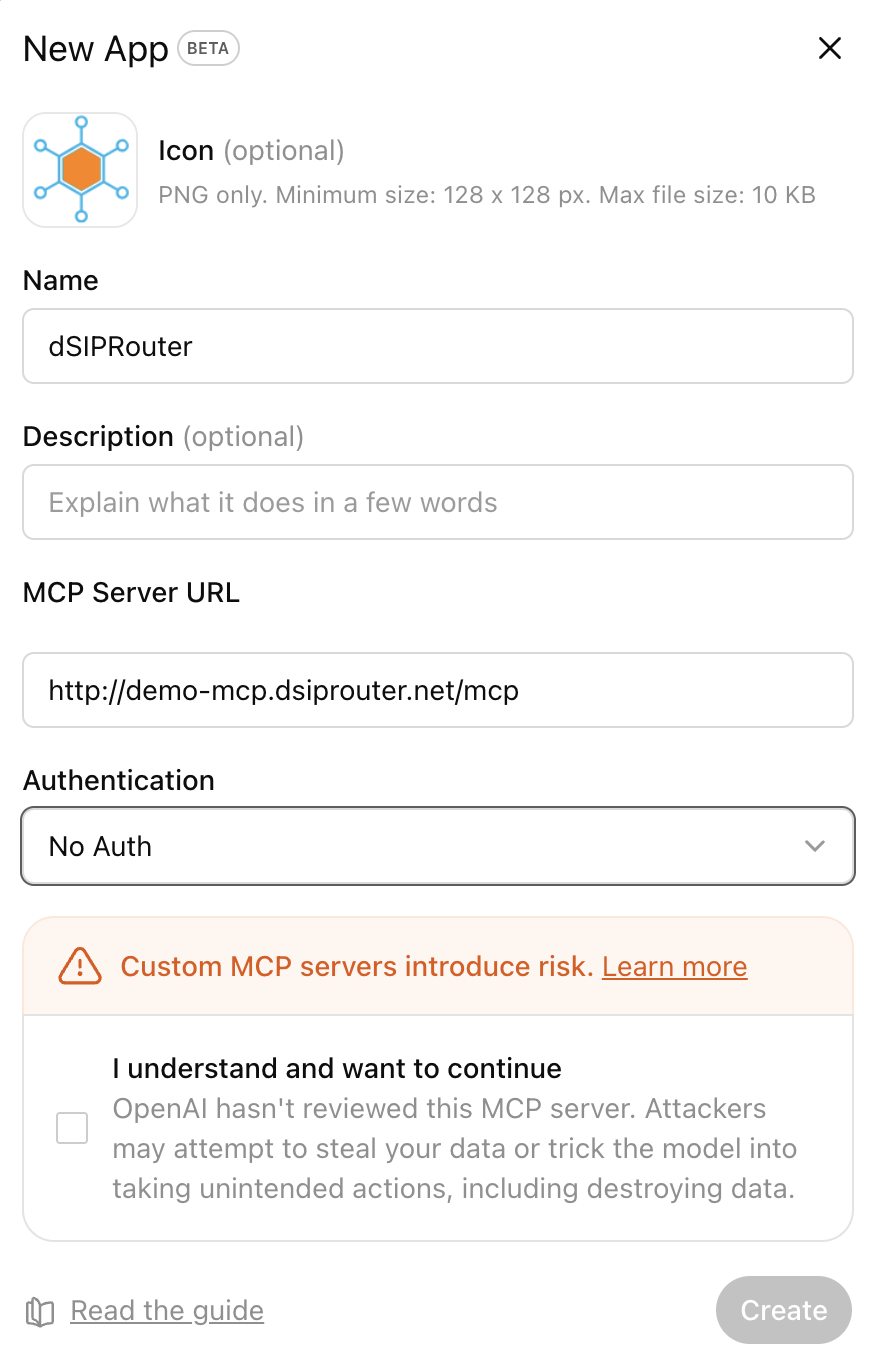
- Enter in the basic info and for the MCP Server URL enter the ngrok external ip address and add /mcp to the end of it. Note, select No-Authentication. The screen should look like this
- Click Create
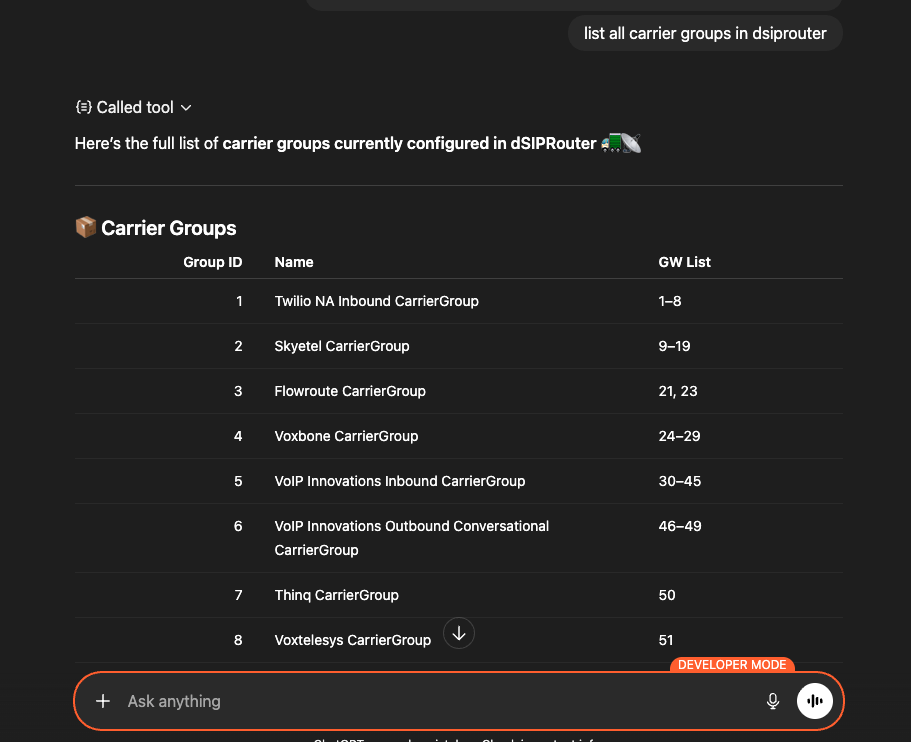
- Start a new chat and ask it a question like "list all carrier groups in dsiprouter". You will get a response like this
Other Info
dSIPRouter API Token
The dSIPRouter API Token is displayed after the initial install of dSIPRouter. Their is no way to obtain your token if you didn't store it. You can reset your dSIPRouter API Token by running this command on your dSIPRouter Server.
dsiprouter setcredentials -ac YOUR_TOKEN
No valid dSIPRouter SSL Cert
If you don't have a valid SSL certificate then set DSIP_VERIFY_SSL as false
Установка DSIPRouter Server
У этого сервера нет опубликованного пакета — он собирается из исходников. Открой репозиторий и следуй инструкции в README.
▸ github.com/dOpensource/dsiprouter-mcpFAQ
DSIPRouter Server MCP бесплатный?
Да, DSIPRouter Server MCP бесплатный — установка в пару кликов через Unyly без оплаты.
Нужен ли API-ключ для DSIPRouter Server?
Нет, DSIPRouter Server работает без API-ключей и переменных окружения.
DSIPRouter Server — hosted или self-hosted?
Доступен hosted-вариант: Unyly запускает сервер в облаке, локальная установка не обязательна.
Как установить DSIPRouter Server в Claude Desktop, Claude Code или Cursor?
Открой DSIPRouter Server на unyly.org, выбери вкладку своего клиента (Claude Desktop, Claude Code, Cursor) и нажми Install — конфиг сгенерируется автоматически, без правки JSON.
Похожие MCP
Fetch
Web content fetching and conversion for efficient LLM usage.
AWS KB Retrieval
Retrieval from AWS Knowledge Base using Bedrock Agent Runtime.
 автор: modelcontextprotocol
Spring AI MCP Server
Provides auto-configuration for setting up an MCP server in Spring Boot applications.
llm-analysis-assistant
A very streamlined mcp client that supports calling and monitoring stdio/sse/streamableHttp, and can also view request responses through the /logs page. It also
 автор: xuzexin-hz
Compare DSIPRouter Server with
Не уверен что выбрать?
Найди свой стек за 60 секунд
Автор?
Embed-бейдж для README
Похожее
Все в категории ai