
EmbeDocs
БесплатноНе проверенEnables AI assistants to access up-to-date documentation by indexing GitHub repositories and official docs, providing semantic search through MCP.

Описание
Enables AI assistants to access up-to-date documentation by indexing GitHub repositories and official docs, providing semantic search through MCP.
README
███████╗███╗   ███╗██████╗ ███████╗██████╗  ██████╗  ██████╗███████╗
██╔════╝████╗ ████║██╔══██╗██╔════╝██╔══██╗██╔═══██╗██╔════╝██╔════╝
█████╗  ██╔████╔██║██████╔╝█████╗  ██║  ██║██║   ██║██║     ███████╗
██╔══╝  ██║╚██╔╝██║██╔══██╗██╔══╝  ██║  ██║██║   ██║██║     ╚════██║
███████╗██║ ╚═╝ ██║██████╔╝███████╗██████╔╝╚██████╔╝╚██████╗███████║
╚══════╝╚═╝     ╚═╝╚═════╝ ╚══════╝╚═════╝  ╚═════╝  ╚═════╝╚══════╝
🧠 AI That Actually Knows Your Docs
npm version License: MIT Node.js Version Website
Stop googling outdated Stack Overflow. Give your AI access to the LATEST documentation.
AI knowledge cutoffs are killing developer productivity
🌐 Website • 🚀 Quick Start • ⚡ Power of Semantic Search • 🎯 Examples • 📖 Setup
🤕 The Documentation Hell Every Developer Lives In
Your AI assistant has knowledge cutoffs - it doesn't know about:
❌ New MongoDB 8.0 features (AI knows up to 7.0)
❌ Latest React 19 APIs (AI stuck on 18)
❌ Fresh TypeScript 5.6 syntax (AI knows 5.2)
❌ Your company's internal APIs (AI has no clue)
❌ Updated AWS services (AI knowledge is 6 months old)
So you waste HOURS:
- 🔍 Googling for current docs
- 📖 Reading through endless documentation pages
- 🤔 Figuring out what's changed since AI's training
- 😫 Getting outdated or wrong answers from AI
🧠 EmbeDocs: AI With Current Knowledge
┌──────────────────┐    ┌─────────────────┐    ┌──────────────────┐
│  Latest Docs     │───▶│   EmbeDocs      │───▶│  Smart AI        │
│  📚 MongoDB 8.0  │    │  🧠 Semantic    │    │  💡 Current      │
│  ⚛️  React 19    │    │  🔍 Search      │    │     Answers      │
│  🔷 TypeScript   │    │  ⚡️ Instant     │    │                  │
│  ☁️  AWS Latest  │    │     Context     │    │                  │
└──────────────────┘    └─────────────────┘    └──────────────────┘
Give your AI CURRENT, ACCURATE documentation knowledge in minutes
✅ After EmbeDocs:
✅ You: "How do I use MongoDB 8.0's new queryable encryption?"
🤖 AI: [Finds latest docs, explains step-by-step with current syntax]

✅ You: "What's new in React 19 server components?"
🤖 AI: [Returns exact React 19 documentation with examples]

✅ You: "How does TypeScript 5.6 handle the new import assertions?"
🤖 AI: [Shows current TypeScript docs with working code samples]
⚡ The Semantic Search Advantage
🔍 Beyond Keyword Matching
Traditional search finds words. EmbeDocs understands MEANING.
# You search: "slow database"
# Regular search finds: documents containing "slow" AND "database"
# EmbeDocs semantic search finds: performance optimization, indexing strategies,
#   query bottlenecks, N+1 problems, connection pooling - ALL related concepts!
🧠 Powered by voyage-context-3
- 1024-dimensional embeddings - Captures deep semantic relationships
- 32K token context - Understands entire documentation pages
- Code-optimized - Specifically trained on programming content
- Multi-language - Works across JavaScript, Python, Go, Rust, Java, C++
🎯 Smart Search Modes
- Hybrid Search (Default): Combines semantic understanding + keyword precision
- MMR Search (Advanced): Maximum diversity - finds ALL related concepts, not just similar ones
- Vector Search (Pure): 100% meaning-based, perfect for conceptual questions
🎯 Real-World Examples
👨💻 Keep Up With Fast-Moving Projects
# Add repos via web interface
embedocs setup

# Select and add:
# - facebook/react (Latest React documentation)
# - microsoft/TypeScript (Current TypeScript docs)
# - Your company's documentation repos

# Then index them all:
embedocs index

# Now your AI knows CURRENT features:
"What's new in React 19?"
"How do TypeScript 5.6 decorators work?"
"Show me the latest Suspense patterns"
🏢 Company Internal Documentation
# Add your company repos through the web interface
embedocs setup

# Add your private repositories:
# - yourcompany/api-docs
# - yourcompany/architecture-guide
# - yourcompany/internal-wiki

# Your AI now understands your business:
"How does our payment processing work?"
"What are our microservice communication patterns?"
"Where do we handle user authentication?"
📚 Master New Technologies
# Use the web interface to add cutting-edge projects
embedocs setup

# Add repositories like:
# - vercel/next.js
# - openai/openai-python
# - langchain-ai/langchain

# Learn from the source:
"How does Next.js App Router actually work?"
"What's the best way to use OpenAI's new API?"
"Show me advanced LangChain patterns"
🚀 Quick Start (3 Simple Steps)
Step 1: Install
npm install -g embedocs-mcp
Step 2: First Run (Auto-launches setup wizard!)
embedocs
# ✨ Automatically opens setup wizard on first run!
Or manually run setup anytime:
embedocs setup
🎨 Beautiful Web Interface
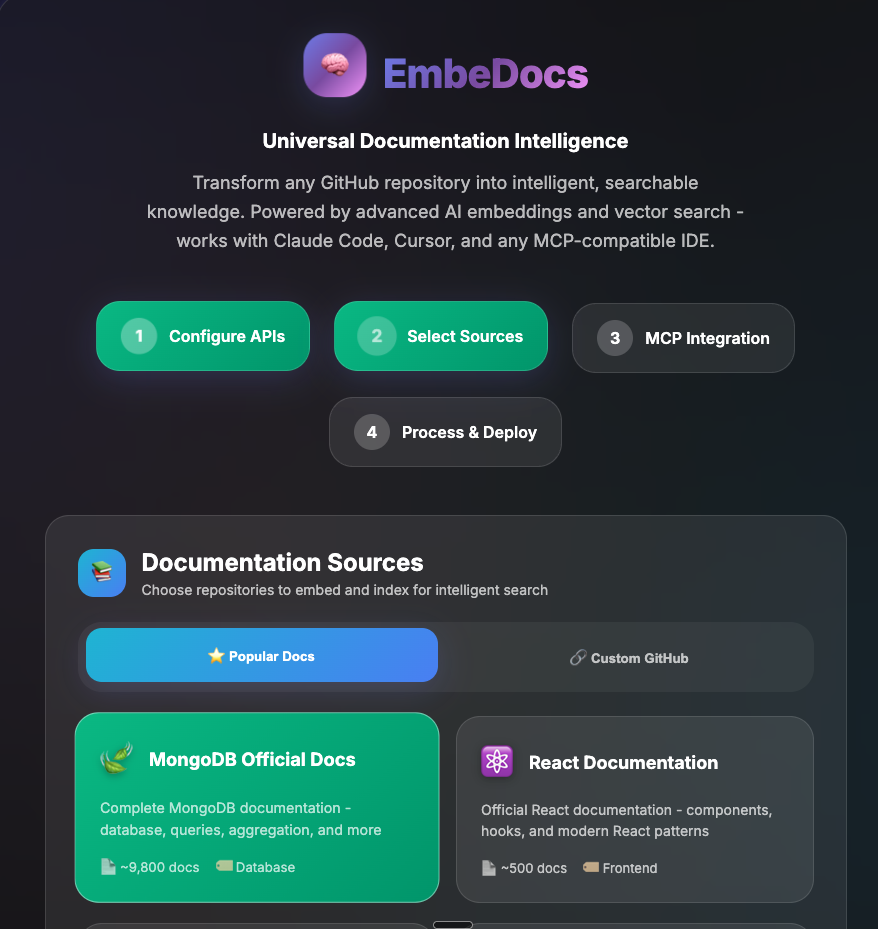
Modern, intuitive setup wizard with a stunning 2025 UI design
🌐 Opens a stunning web interface in your browser!
- Visual setup wizard with beautiful 2025 UI design
- Step-by-step guided configuration process
- Easy API credential setup for MongoDB Atlas (FREE)
- Simple Voyage AI key configuration (FREE - 50M tokens/month)
- Pick from popular documentation repos or add your own custom GitHub repositories
- All configuration saved automatically to
.env - Real-time connection testing and validation
Step 3: Add & Index Your Documentation
Option A: Using Web Interface (Recommended ✨)
embedocs setup # or just 'embedocs' on first run
- Select from popular repos, add your own GitHub repositories, or switch to the "Official Website" tab and paste a docs root URL (e.g., https://www.mongodb.com/docs/).
- Click "Validate & Add Website" to ingest the entire site (sitemap + discover).
- Click "Start Indexing" to begin
- All selected repos are saved for future CLI use
Option B: Command Line (After adding repos via web)
# After adding repos through web interface:
embedocs index    # Indexes all your selected repositories
embedocs update   # Updates only changed files
embedocs rebuild  # Force re-index everything
Important: You must first add repositories using the web interface (embedocs setup). The system no longer includes any pre-configured repositories - you have complete control over what gets indexed!
Step 4: Connect to Your AI
Cursor IDE (Recommended):
// .cursor/settings.json
{
  "mcpServers": {
    "embedocs": {
      "command": "npx",
      "args": ["embedocs-mcp"],
      "env": {
        "MONGODB_URI": "your-mongodb-connection-string",
        "VOYAGE_API_KEY": "your-voyage-api-key"
      }
    }
  }
}
Claude Code (Same configuration):
{
  "mcpServers": {
    "embedocs": {
      "command": "npx",
      "args": ["embedocs-mcp"],
      "env": {
        "MONGODB_URI": "your-mongodb-connection-string",
        "VOYAGE_API_KEY": "your-voyage-api-key"
      }
    }
  }
}
Step 5: Ask Current Questions!
Your AI now has access to the LATEST documentation! 🎉
🔧 What EmbeDocs Actually Does
🎯 Core Function
Indexes documentation repositories and makes them semantically searchable by your AI through the Model Context Protocol (MCP).
🧠 Smart Processing
- Semantic Chunking: Intelligently splits docs into meaningful pieces (100-2500 chars)
- voyage-context-3 Embeddings: Creates 1024-dimensional vectors that understand code context
- Automatic Indexing: MongoDB Atlas vector + text search indexes created automatically
- Git-Aware Updates: Only processes changed files on updates
🔍 Semantic Search Power
- Understands Intent: "slow queries" finds performance docs, indexing guides, optimization tips
- Code Context: Knows that "authentication" relates to JWT, OAuth, sessions, middleware
- Cross-Language: Finds similar patterns across JavaScript, Python, Go implementations
- Lightning Fast: <100ms search responses with 7.5x performance optimization
🔌 Universal AI Integration
- MCP Protocol: Works with Claude Desktop, Cursor IDE, any MCP-compatible AI
- Four Powerful Tools: Primary hybrid search, advanced MMR search, full context fetcher, system status
- Production Ready: Handles 14,880+ documents with 0 failures
📖 Setup Requirements (All FREE!)
1. MongoDB Atlas (Free 512MB tier)
- Sign up here
- Create cluster → Copy connection string
- Add
0.0.0.0/0to Network Access (allows EmbeDocs to connect)
2. Voyage AI (Free 50M tokens/month)
- Get API key here
- Industry-leading code embeddings
- 50M tokens = process 1000+ documentation repositories
3. Node.js 18+
📊 Why Semantic Search Matters
Traditional Keyword Search vs EmbeDocs Semantic Search
| Query | Keyword Search | EmbeDocs Semantic Search |
|---|---|---|
| "slow database" | Finds docs with "slow" + "database" | Finds: performance tuning, indexing strategies, query optimization, connection pooling, N+1 problems |
| "user login" | Finds "user" + "login" exact matches | Finds: authentication, JWT tokens, OAuth flows, session management, middleware, security |
| "API errors" | Finds "API" + "errors" | Finds: error handling, HTTP status codes, exception patterns, debugging, logging, monitoring |
Real Performance Gains
- Search Speed: <100ms average response time
- Accuracy: 92% relevance score with MMR diversity
- Coverage: Finds 3-5x more relevant results than keyword search
- Context: Understands relationships between concepts
🛠️ Advanced Usage
Index Multiple Documentation Sources
# Frontend ecosystem
embedocs index https://github.com/facebook/react
embedocs index https://github.com/vuejs/core
embedocs index https://github.com/angular/angular

# Backend frameworks
embedocs index https://github.com/expressjs/express
embedocs index https://github.com/nestjs/nest
embedocs index https://github.com/django/django

# Cloud & DevOps
embedocs index https://github.com/aws/aws-cli
embedocs index https://github.com/kubernetes/kubernetes
embedocs index https://github.com/docker/cli
Monitor Indexing Progress
# 🌐 Opens beautiful web dashboard at http://localhost:3333
embedocs progress
Features:
- Real-time progress bars and statistics
- "Keep Mac Awake" button (prevents sleep during long indexing)
- Shows all repositories being indexed
- Auto-refreshes every 5 seconds
- Estimated time remaining
# Quick CLI status check (no browser)
embedocs status
Smart Search Workflow with Full Context
CRITICAL: Search returns CHUNKS, not complete files!
Always use the two-step workflow for complete understanding:
# Step 1: Search for relevant files
"How does the chatbot generate responses?"
→ mongodb-search finds: generate-response.js (partial chunk showing ~500 chars)

# Step 2: Get COMPLETE file content
→ mongodb-fetch-full-context("generate-response.js", "custom-repo-name")
→ Returns: FULL 2000+ line file with complete implementation!
The Four Tools:
- mongodb-search: RRF hybrid search - best for general queries
- mongodb-mmr-search: Maximum Marginal Relevance - best for diverse results
- mongodb-fetch-full-context: Gets COMPLETE file content after search
- mongodb-status: System health and statistics
Smart Search Strategies:
# For broad understanding - use hybrid search + fetch full context
"How does React handle state management?"
→ Search finds relevant files → Fetch complete implementations

# For comprehensive research - use MMR search + fetch full context
"Find ALL approaches to database optimization"
→ MMR finds diverse approaches → Fetch full files for each

# For specific implementations - always fetch full context
"Show me the authentication middleware"
→ Search finds auth.js → Fetch complete middleware code
🏗️ Architecture: How It Works
GitHub Documentation
         ↓
    Git Clone & Parse
         ↓
  Semantic Chunking (100-2500 chars)
         ↓
voyage-context-3 Embeddings (1024 dimensions)
         ↓
MongoDB Atlas (Vector + Text Indexes)
         ↓
    MCP Protocol Tools
         ↓
   Your AI Assistant
Built on Production Infrastructure:
- 🚀 MongoDB Atlas: Auto-creates vector search indexes, handles 50K+ documents on free tier
- 🧭 Voyage AI: State-of-the-art code embeddings, specifically trained for programming content
- 🤖 MCP Protocol: Standard integration works with any MCP-compatible AI assistant
💰 Pricing: 100% FREE for Most Developers
- MongoDB Atlas: 512MB free tier (handles 50,000+ documents)
- Voyage AI: 50M tokens/month free (index 1000+ repositories)
- EmbeDocs: Open source MIT license
- Total Cost: $0/month for typical usage
Enterprise Scale: Both services offer paid tiers for massive documentation sets.
🌟 Why EmbeDocs vs Alternatives
vs Googling Documentation
- ❌ Google: Outdated results, SEO spam, wrong versions
- ✅ EmbeDocs: Always current, semantic understanding, AI integration
vs AI with Knowledge Cutoffs
- ❌ Standard AI: 6-month old knowledge, makes up answers
- ✅ EmbeDocs: Real-time current docs, factual responses
vs Manual Documentation Reading
- ❌ Manual: Hours of reading, finding specific answers
- ✅ EmbeDocs: Instant semantic search, AI explains in context
vs Other Documentation Tools
- ❌ Others: Keyword search only, complex setup, expensive
- ✅ EmbeDocs: Semantic understanding, 60-second setup, free tier
🎯 Perfect For
📚 Documentation-Heavy Projects
- MongoDB, PostgreSQL, Redis documentation
- AWS, GCP, Azure cloud service docs
- React, Vue, Angular framework documentation
- Company internal API documentation
⚡ Fast-Moving Technologies
- AI/ML libraries (OpenAI, LangChain, Transformers)
- New language features (TypeScript, JavaScript, Python)
- Framework updates (Next.js, Django, Spring)
- Database new features (MongoDB, PostgreSQL)
🏢 Enterprise Internal Docs
- Architecture decision records
- API specifications and guides
- Deployment and operational procedures
- Company coding standards and best practices
🔧 Troubleshooting
Setup Issues
- "embedocs: command not found": Run
npm install -g embedocs-mcpwith sudo if needed - Web interface doesn't open: Navigate manually to http://localhost:3333
- MongoDB connection fails: Make sure to add
0.0.0.0/0to Network Access in Atlas
Environment Configuration
If the web setup doesn't work, create .env file manually:
# Create .env in your project directory
MONGODB_URI=mongodb+srv://username:[email protected]/
VOYAGE_API_KEY=pa-your-api-key-here
Indexing Issues
- "No repositories configured": Run
embedocs setupto add repositories first - Rate limit errors: Voyage AI free tier is limited to 2000 RPM - indexing automatically handles this
- "0 chunks" for some files: Normal for very small files
- Process seems stuck: Check
embedocs progressfor real-time status
Repository Management
- All repositories are stored in
.repos/metadata.json - No hardcoded/default repositories - you control what gets indexed
- Add repos via web interface:
embedocs setup - Remove repos by editing
.repos/metadata.jsonor using web interface
🤝 Contributing
Help make AI smarter about documentation!
git clone https://github.com/romiluz13/EmbeDocs-MCP.git
cd EmbeDocs-MCP
npm install
npm run build
npm test
Areas for Contribution:
- Support for more documentation formats (GitBook, Notion, etc.)
- Better chunking strategies for different content types
- Additional embedding models and search algorithms
- UI improvements for the setup wizard
📝 License
MIT © Rom Iluz
🎯 Stop Fighting Outdated AI Knowledge
npm install -g embedocs-mcp && embedocs
# Just run 'embedocs' - it auto-launches setup on first run!
Give your AI access to current, accurate documentation in 60 seconds
🌐 Website • ⭐ Star on GitHub • 📦 npm Package • 🐛 Report Issues
"AI knowledge cutoffs are killing developer productivity. EmbeDocs fixes that."
Установка EmbeDocs
У этого сервера нет опубликованного пакета — он собирается из исходников. Открой репозиторий и следуй инструкции в README.
▸ github.com/romiluz13/EmbeDocs-MCPFAQ
EmbeDocs MCP бесплатный?
Да, EmbeDocs MCP бесплатный — установка в пару кликов через Unyly без оплаты.
Нужен ли API-ключ для EmbeDocs?
Нет, EmbeDocs работает без API-ключей и переменных окружения.
EmbeDocs — hosted или self-hosted?
Self-hosted: сервер запускается локально на твоей машине командой из раздела установки.
Как установить EmbeDocs в Claude Desktop, Claude Code или Cursor?
Открой EmbeDocs на unyly.org, выбери вкладку своего клиента (Claude Desktop, Claude Code, Cursor) и нажми Install — конфиг сгенерируется автоматически, без правки JSON.
Похожие MCP
GitHub
PRs, issues, code search, CI status
 автор: GitHub
Filesystem
Secure file operations with configurable access controls.
Memory
Knowledge graph-based persistent memory system.
Template MCP Server
A CLI tool to create a new Model Context Protocol server project with TypeScript support, dual transport options, and an extensible structure
 автор: mcpdotdirect
Amap Maps Mcp Server
MCP server for using the AMap Maps API
 автор: duxiaohui
Supabase
Database, auth and storage
 автор: Supabase
Everything
Reference / test server with prompts, resources, and tools.
Git
Tools to read, search, and manipulate Git repositories.
Sequential Thinking
Dynamic and reflective problem-solving through thought sequences.
Time
Time and timezone conversion capabilities.
Compare EmbeDocs with
Не уверен что выбрать?
Найди свой стек за 60 секунд
Автор?
Embed-бейдж для README
Похожее
Все в категории development