loading…
/ru
Весь каталог
Embody
БесплатноНе проверенMCP server embedded in TouchDesigner with 45 tools for creating operators, setting parameters, wiring connections, managing externalizations, and building real-

Описание
MCP server embedded in TouchDesigner with 45 tools for creating operators, setting parameters, wiring connections, managing externalizations, and building real-time visual projects through natural conversation.
README
Create at the speed of thought.




Full Documentation | Manifesto | Changelog
Embody puts your ideas on screen as fast as you can describe them. Operators, connections, parameters, the works. Want to try a different direction? Spin up a new approach in seconds. Compare attempts side by side. Branch off the one that works. The tool keeps up with you, instead of the other way around.
Three Tools, One Idea
Envoy — forward velocity. An embedded MCP server lets Claude Code, Cursor, and Windsurf talk directly to your live TouchDesigner session. Create operators, wire them up, set parameters, write extensions, debug errors — by saying what you want. No copy-pasting code. No describing your network in chat. Idea → operators in seconds.
Embody — lateral velocity. Tag any operator and Embody externalizes it to files on disk that mirror your network hierarchy. Try a new direction, branch off a good one, restore the state from yesterday — all in seconds. Your externalized files are the source of truth, so every project opens already in flow.
TDN — the substrate that makes both possible. TouchDesigner networks exported as human-readable JSON. The format is what lets your AI agent understand what's on the screen, what lets you diff one attempt against another, and what lets a network reconstruct itself from text on the next project open. TDN is what makes the rest of this possible.
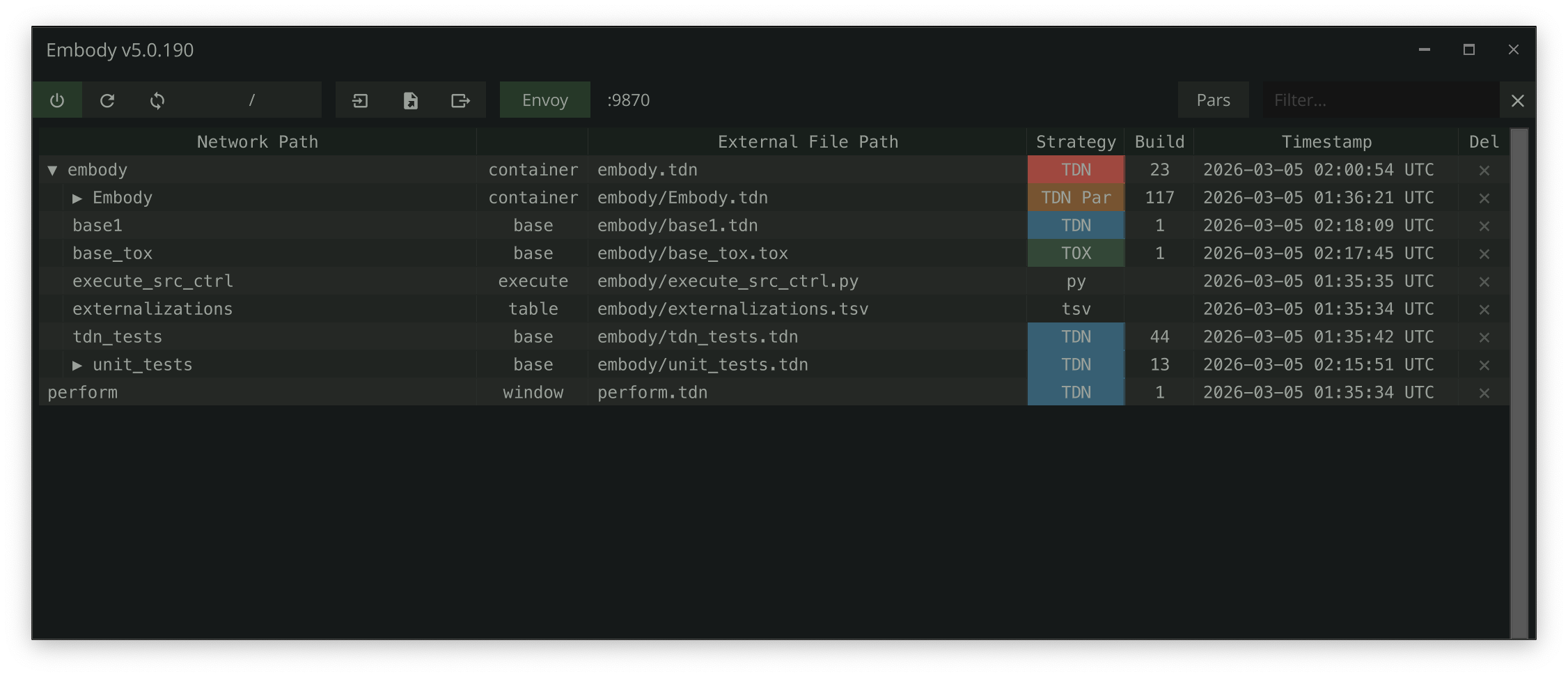
| What | Why it matters | |
|---|---|---|
| 🤖 | Envoy MCP Server | 49 tools let your AI assistant build, wire, parameterize, and debug live networks. The first time you watch it happen, you stop typing operator names by hand for good. |
| 📄 | TDN Network Format | Networks become text. Diff two versions, revisit any version, hand an LLM a complete picture of what's on screen — all from a single .tdn file. |
| 📦 | Automatic Restoration | Externalized operators rebuild themselves from disk on every project open. The .toe is no longer the source of truth — your files are. |
| 📤 | Portable Tox Export | Pull any COMP out as a self-contained .tox with external references stripped. Ship a piece of your project anywhere. |
Quick Start
1. Project Setup
Embody writes externalized files relative to your .toe location — no special folder structure required. Embody works in any project folder; if you happen to use git, every change is also a clean diff for free.
my-project/              ← project folder (optionally a git repo)
├── my-project.toe       ← your TouchDesigner project
├── base1/               ← externalized operators
│   ├── base2.tox        ← COMP (TOX strategy)
│   ├── base3.tdn        ← COMP (TDN strategy — diffable JSON)
│   └── text1.py         ← DAT
└── ...
2. Install and Tag
- Download the Embody
.toxfrom /release and drag it into your TouchDesigner project - Tag operators — select any COMP or DAT and press
lctrltwice to tag and externalize it - Work normally — press
ctrl + shift + uto update all externalizations, orctrl + alt + uto update only the current COMP. On project open, Embody restores everything from disk automatically
Tip: If no operators are tagged, Embody will externalize all eligible COMPs and DATs, which may slow down complex projects. Tagging selectively is recommended.
3. Keyboard Shortcuts
| Shortcut | Action |
|---|---|
lctrl + lctrl |
Tag or manage the operator under the cursor |
ctrl + shift + u |
Update all externalizations |
ctrl + alt + u |
Update only the current COMP |
ctrl + shift + r |
Refresh tracking state |
ctrl + shift + o |
Open the Manager UI |
ctrl + shift + e |
Export entire project to .tdn file |
ctrl + alt + e |
Export current COMP to .tdn file |
For supported formats, folder configuration, duplicate handling, Manager UI, and more — see the Embody docs.
Envoy MCP Server
Embody includes Envoy, an embedded MCP server that gives AI coding assistants direct access to your live TouchDesigner session.
Setup
- Enable Envoy — toggle the
Envoyenableparameter on the Embody COMP - Server starts on
localhost:9870(configurable viaEnvoyport) - Auto-configuration — Envoy creates a
.mcp.jsonin your git repo root - Connect — open a Claude Code session (or restart your IDE) in the repo root — it picks up
.mcp.jsonautomatically
If your project isn't in a git repo, add .mcp.json manually to your project root:
{
  "mcpServers": {
    "envoy": {
      "type": "http",
      "url": "http://localhost:9870/mcp"
    }
  }
}
Tools at a Glance
| Tool | What It Does |
|---|---|
create_op |
Create any operator type in any network |
set_parameter |
Set values, expressions, or bind modes on any parameter |
connect_ops |
Wire operators together |
execute_python |
Run arbitrary Python in TD's main thread |
export_network |
Export networks to diffable .tdn JSON |
create_extension |
Scaffold a full extension (COMP + DAT + wiring) |
get_op_errors |
Inspect errors on any operator and its children |
...and 37 more. See the full tools reference.
When Envoy starts, it generates a CLAUDE.md file in your project root with TD development patterns, the complete MCP tool reference, and project-specific guidance.
TDN Network Format
TDN (TouchDesigner Network) is the file format that makes the rest of Embody possible. It exports an entire operator network — operators, connections, parameters, layout, annotations, DAT content — as a single human-readable JSON file. Your AI agent can read it. You can read it. Any text tool can diff it. The network can rebuild itself from it on the next project open.
This is the substrate. Every other capability — AI-driven building, version control, automatic restoration — builds on top of it.
- Entire project:
ctrl + shift + e - Current COMP:
ctrl + alt + e - Via Envoy:
export_network/import_networkMCP tools
See the full TDN specification for format details, import process, and round-trip guarantees.
Logging
Embody provides a multi-destination logging system:
- File logging (default):
dev/logs/<project_name>_YYMMDD.log, auto-rotates at 10 MB - FIFO DAT: Recent entries visible in the TD network editor
- Textport: Enable the
Printparameter to echo logs - Ring buffer: Last 200 entries via the Envoy
get_logsMCP tool
op.Embody.Log('Something happened', 'INFO')
op.Embody.Warn('Check this out')
op.Embody.Error('Something broke')
Testing
Embody includes 61 test suites (1,469 tests) covering core externalization, MCP tools, TDN format, the Envoy server/bridge, and palette catalogs. Tests run inside TouchDesigner using a custom test runner with sandbox isolation.
op.unit_tests.RunTests()                              # All tests (non-blocking)
op.unit_tests.RunTests(suite_name='test_path_utils')   # Single suite
op.unit_tests.RunTestsSync()                           # All in one frame (blocks TD)
Via Envoy MCP: use the run_tests tool. See the full testing docs for coverage details and how to write new tests.
Troubleshooting
- Timeline Paused: Embody requires the timeline to be running. An error appears if paused.
- Clone/Replicant Operators: Cannot be externalized. Embody warns if you try to tag them.
- Engine COMPs: Engine, time, and annotate COMPs are not supported for externalization.
For more, see Troubleshooting.
Version History
See the full changelog for detailed version history.
Recent releases:
- 5.0.437: A second status axis in the manager -- git-uncommitted. Externalized DAT scripts (
.py/.glsl/.json) use TouchDesigner's bidirectionalsyncfile, so they're never "unsaved" the way TOX/TDN COMPs are -- their only meaningful "changed" state is git-relative (on disk but not committed). Embody now surfaces that as a distinct orange Strategy badge for any externalized file that's saved-but-uncommitted -- TOX, TDN, and DAT alike -- keeping the two axes visually separate: red = unsaved (live network vs on-disk file, which git can't see), orange = saved but uncommitted, green/blue = clean and committed. Thegit statusscan runs on a worker thread (off the main thread, so it never stalls a Refresh frame) with a pure string-based result-to-operator mapping -- the previous synchronous version cost ~121ms per Refresh (agit statussubprocess plus aPath.resolve()per tracked file); it's now a ~6ms async enqueue. Plus achangedfilter keyword (shows only unsaved-or-uncommitted rows, with ancestors so the tree stays intact), lowercase Strategy labels (tox/tdn/tag, matching the file-extension labels), a themeableUncommittedcolorparameter, and a shippedrefresh-after-commitrule that has AI agents pulse an Embody refresh after committing so the orange -> clean transition shows immediately. Runtime-only (never written toexternalizations.tsv) and self-disabling outside a git repo -- zero behavior change for non-git users. Hardened by a 3-agent codex review (no regressions found): the background scan runsgit --no-optional-locks status --untracked-files=all(no.git/index.lockcontention with concurrent commits; new files in fresh folders enumerated), and async completion is generation-guarded so a stale scan can't clobber a newer one. Release.toxverified by a fresh-install smoke test. Test suite 61 suites / 1,469 tests (+20). - 5.0.434: New
diff_tdnMCP tool -- the UNSAVED view git can't give: it diffs the live in-memory TDN network against its on-disk.tdn, answering "what have I changed but not saved?" Pass a COMP path or a.tdnfile path/bare filename ("tooltip.tdn", resolved to its COMP) for one COMP in full per-field detail (old=disk,new=live), or omit the target for a whole-project summary across every live TDN COMP. The comparison is semantic, not byte-level (sametype_defaults/par_templatesnormalization the format uses; volatile export header ignored), matched by name per level so reorders are clean and a deep child edit marks only that child; truncation is honest. Engine inTDNExt(DiffLiveVsDisk/DiffAllLiveVsDisk+ pure_diff_normalized), reusing existing expanders with zero duplication, verified by a 5-reviewer panel. A companion.tdngit diff driver (a textconv auto-installed by Embody:*.tdn diff=tdn+.embody/tdn_textconv.py+git config) strips the volatile export header sogit diff/log/showon a.tdnare clean for committed/history diffs -- the two paths are complementary (diff_tdnfor unsaved, git for committed).get_externalizations/get_externalization_statussurfacestrategy,absolute_path, and arecommended_tool: diff_tdnhint so "what changed incomp.tdn?" routes correctly; validated with a hint-free agent that calleddiff_tdn(notgit diff) for both single-COMP and project-wide questions. Also: a project-wide hard rule against caching extension references (cachedop.X.ext.Ypoints at a dead instance after TD reinitializes the extension) -- the whole codebase swept inline and enforced bytest_no_ext_caching.py; and a fix for the recurring "TouchDesigner is not responding" error during saves -- the STDIO bridge now retries a failed forward for up to 30s while the TD process is alive (forward_with_busy_retry) instead of surfacing a transient save-time stall as a dead server. Docs-site nav pills made readable over content (frosted-glass). Test suite 60 suites / 1,449 tests (+36), all green; release.toxverified by a fresh-install smoke test. - 5.0.429: A friendlier "Duplicate Path Detected" dialog. New
Template Master Nameparameter (Templatemaster, default__template__): when a group of operators sharing one external path has exactly one whose path contains that name as a whole segment (e.g. a__template__parent COMP), it's auto-selected as master and the rest taggedclonewith no prompt — the durable fix for the common template-plus-runtime-copies pattern (ascene_<id>chain each carrying the template's externalized DATs). Opt-in by convention (projects not using the name are unaffected; set your own like_master, or clear to always choose manually); matches a whole segment not a substring, and only on an unambiguous single match. The manual prompt no longer shows N identical same-named buttons — each is now labeled by the differing path segment, numbered to the dialog body (1: __template__,2: scene_1exalohf, …) — and groups larger than 5 operators get a Keep first as master / Dismiss strategy prompt instead of an unreadable button row. Test suite 57 suites / 1,413 tests (+12), all green. - 5.0.428: Everything since v5.0.414 in one release. Headline is
tdn_exclude— aTdnexcludetagparameter (defaulttdn_exclude) that makes a COMP invisible to the TDN system (never exported, stripped, or reconstructed), the durable opt-out for app-managed children under cascade-autotag (runtimeop.copy()content like Moonshine'sproj_<id>chains). Exclusion is honored at a TDN boundary's direct children; a COMP tagged but nested under a non-excluded intermediate is serialized as normal content and preserved (with a warning) rather than silently lost. TDN dirty detection rebuilt: the fingerprint captures each operator's non-default authored parameter values (expr/bindExpr/val, neverpar.eval()), so a parameter edit flags a TDN COMP dirty while a dependency-driven change to a live expression's evaluated value (animation, audio, a moving CHOP) does not — no more perpetual re-export churn on animated COMPs. The sweep is consolidated to one fingerprint per Refresh (was two) for a real frame-time win on large networks;DirtyCountreads the fingerprint result instead of the always-Trueoper.dirty; a reverted edit clears the dirty flag. Envoy resilience: startup status waits for a real bind handshake before reading "Running" (no optimistic lie, including uvicornSystemExit);restart_tdvalidates real non-zombieTouchDesignerPIDs viaps; the status moved into the window header, prefixed "Envoy". Three issue #21 crash fixes hardened across the whole table-read surface:captureParameterscan't crash on broken expressions (authored read, no eval),_cellValguards every externalizations-table read (and warns on genuine row-level corruption), andonProjectPreSaveis fail-safe end-to-end so a hook exception can't truncate the.toe. Plus: the "TDN Content at Risk" dialog gains a persistent Always Skip;externalizations.tsvno longer churns phantom timestamp rows per save; a calmer first-launch palette scan; the manager expand/collapse glyph on top-level rows; a duplicate-BOM fix inWindowHeaderExt; an AI-first Quickstart page; MCP tool count reconciled to 48. A final 7-angle regression review of the branch caught and fixed the live-expression churn, the nested-exclude data loss, the always-dirty count, the stuck dirty flag, the duplicate BOM, and the double sweep — each with a regression test. Verified by a fresh-install smoke test of the release.tox. Test suite 57 suites / 1,401 tests, all green. - 5.0.414: Third value
CustomforAI Project Root(follow-up to Ten0's feedback on issue #19) — paired with a newAI Project Root (Custom)Folder parameter that's greyed out unless the menu is set toCustom. The custom path can be absolute or relative to the.toedirectory (e.g.../). For monorepos where multiple.toefiles share a parent directory, each.toesets the same relative path and they all converge on oneAGENTS.md/.claude//.mcp.json/.embody/envoy.json— which lets the multi-instance MCP feature work naturally across sibling projects. Flipping the menu or changing the path migrates Embody state and AI config to the new location, same atomic move + marker-aware cleanup as the gitroot↔projectfolder flip. Plus two defense fixes from earlier in the cycle:_messageBoxno longer falls back to a real modal dialog when seeded test responses are exhausted (would freeze TD with stacked dialogs after a test run);Verify()won't re-queue the Envoy opt-in prompt while one is already pending (idempotent flag — multipleVerify()calls during a test's Disable/Enable cycle can no longer stack N prompts)._findSettingsFilegot a walk-up fallback to handle the Custom-mode chicken-and-egg (saved custom path lives inconfig.jsonwhich can't be read until settings are restored — so walk up from the.toelooking for any.embody/config.json). - 5.0.413: Two independent bodies of work bundled into one build. (1) Issue #20: parent
.tdnfiles no longer embed the contents of TOX-externalized child COMPs — emits atox_refpointer instead, mirroring the existingtdn_refpattern; round-trip restoration handled by a new Phase 8.5 (_restoreTOXShells) that setsexternaltoxand calls_reloadToxafter import. Plus_validateTOXRefsfor cross-validation parity, the_stripNestedTOXChildrenbackward-compat path for pre-v1.4 files, and TDN format version bumped to 1.4 with the schema updated accordingly. Envoy-toggle frame-drop fix surfaced during diagnosis —_findAvailablePortwas paying a 1.5stime.sleepon the main thread (108 frames at 60fps) whenever the preferred port was held by any listener, including foreign zombie TD processes the wait could never free. Now skips the wait when force-close has nothing of ours to close (caps at 500ms when it does), and branches directly to range-scan when the holder is a foreign live instance in our registry. Measured: Start time 1797ms → 346ms. (2)AI Project Rootparameter (gitrootdefault /projectfolder) for monorepo setups where the TouchDesigner project lives in a subdirectory of a larger repo — flips Embody's AI/MCP config target between the git root and the.toedirectory, with full migration of persistent state and marker-aware cleanup of the old root that preserves user-authored files. Issue #19 fix — thePath.home()length comparison in_findProjectRoot/_findGitRoot/_checkOrInitGitRepobailed before searching when the project lived on a non-home drive (Windows D:\ with home on C:), so subsequent runs failed to find.git, duplicated.mcp.jsonconfig, and broke the MCP connection. Also: registry I/O (RefreshRegistry,_removeFromRegistry, port-conflict detection) routes through_findProjectRoot()for consistency underprojectfoldermode;_atomicMovehelper (copy-to-tmp +os.replace+ unlink) makes cross-filesystem catalog moves safe against partial writes; settings-restore checks both Aiprojectroot candidate roots; orphan-handling renames any leftover critical files after a failed migration to.orphanso fallback lookups don't pick up stale data; legacy file sweep removes old.envoy.json,.embody.json,.envoy-tools-cache.json, and.claude/envoy-bridge.pyfrom previous Embody versions. 6 new tests;test_tdn_file_io66 → 92. - 5.0.407: Critical Windows-only crash hotfix introduced by v5.0.402's registry GC.
_isPidAlive(pid)was built onos.kill(pid, 0)— on Windows, CPython implements that asOpenProcess(PROCESS_ALL_ACCESS) + TerminateProcess(handle, sig)for all sig values, so the "liveness check" literally told the OS to kill the process being checked. Any time_writeEnvoyConfig's GC loop iteratedinstancesand the row contained the running TD's own PID (which it does any time the project has been saved with Envoy enabled), the loop calledTerminateProcess(self_handle, 0)and TD exited with code 0 — silent, no traceback, repro fingerprint matched perfectly. Replaced with safeOpenProcess(SYNCHRONIZE)pattern via ctypes (already in use byenvoy_bridge.is_process_alive); SYNCHRONIZE access doesn't include termination rights. Also rewired the duplicateos.killinside_findAvailablePortthat would have killed any foreign live TD whose registry entry shared the port. Plus:CatalogManagerpalette scan now snapshots and restorestime.play/time.rate/cookRate/realTimearound each chunk so a misbehaving palette component (e.g. the refactoredPalette:logger v2.7.0on TD 2025.32820) can't leave the timeline paused;_verifyMcpImportableshort-circuits whenmcp.serveris already loaded instead of tearing down 82 submodules every toggle; bridgefind_all_td_pids()filters CEF/Web Render helper subprocesses that were generating ~214k phantom "TD process detected" log lines per session;_osLabel()disambiguates Windows 11 from Windows 10 (both report NT 10.0 — discriminator is build ≥22000);execute_src_ctrlreads/writes README as UTF-8 so emoji don't crash the bumper on Windows non-UTF-8 code pages. 19 new tests across 3 new files. Test file count 50 → 53. - 5.0.403: Hotfix for v5.0.402 —
EmbodyExt.Update()rename-detection usedself.ownerComp(an EnvoyExt-only attribute) instead ofself.my. Every Update tick during a save threwAttributeError, which got caught and logged at WARNING but meant the rename-detect path never actually fired. Layer 2 walk-forward in the bridge masked the symptom (lookups still resolved correctly), but the registry would have stayed perpetually keyed to the previous version. One-character fix. - 5.0.402: Three follow-on registry fixes after v5.0.401 verification surfaced edge cases.
_writeEnvoyConfignow garbage-collects dead-PID rows on every write — registries that previously accumulated dead entries across sessions (hard kills, force-quits, crashes) collapse to live-only on the next save (verified: 28 rows → 1 in one cycle).EmbodyExt.Update()caches_last_toe_nameand triggersRefreshRegistry()on basename mismatch — defensive backstop forexecute.py's postSave hook in case it didn't reload. Bridgehandle_launch_tdadds a PID-aware slow-path scan after the fast-path key lookup: walks-forward each alive instance's registeredtoe_pathand refuses if any resolves to the same target — fixes the stale-key + walk-forward composition that could otherwise spawn a duplicate TD. 6 new tests acrosstest_envoy_registryandtest_envoy_bridge. - 5.0.401:
envoy.jsonregistry walks forward across TD's save-time .toe version bump (Foo-5.398.toe→Foo-5.399.toe). Two-layer fix:EnvoyExt._instanceKeyand_writeEnvoyConfigdetect a PID's existing row under a different basename and rename + prune in one write; newRefreshRegistry()is called fromonProjectPostSaveso the registry walks forward even when Envoy doesn't restart. Bridge-side defensive layer:find_latest_versioned_toe()strips<digits>.toeand finds the highest-versioned sibling on disk;resolve_toe_path()now reads frominstances[active](was legacy-flat-only) and routes through the walk-forward helper. Plus a hotfix for the postSave's'EnvoyExt' object has no attribute 'port'crash —RefreshRegistry()now reads the running port from envoy.json by PID instead of a nonexistent instance attribute. 20 new tests acrosstest_envoy_registry(7) andtest_envoy_bridge(13), one updated for the v5.0.399 instance-specific guard. - 5.0.399: New
edit_dat_contentMCP tool for token-efficient surgical text edits — mirrors Claude Code's Edit tool (old_string/new_string, unique match by default, opt-inreplace_all), so a 2-line edit in a 500-line DAT no longer pays for the whole DAT's content on the wire. Bridge multi-launch fix: Envoy can now launch a TD instance alongside an unrelated TD project —handle_launch_tdswapped the blanket "any TD running" guard for an instance-specific check, macOSopen -nflag forces a new process instead of reusing an existing window, and PID identification diffs against a pre-launch snapshot instead of returning the first TD pid found. Plus 11 new tests for the new tool and a one-line fix fortest_set_dat_content_clearthat had been failing since v5.0.397's wipe guardrail. - 5.0.398: Hotfix for a latent race condition that broke the first-install dialog flow on fresh-project drops without a cached catalog.
Update()raced withEnsureCatalogs(), which setsStatus='Scanning defaults (X/N)'to show progress. The old gateif Status != 'Enabled': returnreturned early on that transient value, so_pending_envoy_promptwas never consumed and the Envoy opt-in dialog never appeared. Both gates (Update,ReconcileMetadata) now short-circuit only when Status is explicitly'Disabled'. Plus 2 regression tests that fail without the fix. - 5.0.397:
confirm_wipeguardrail onset_dat_contentMCP tool blocks accidental DAT wipes from malformed agent calls (refusestext="",rows=[], orclear=Truewith no replacement unless explicitly confirmed); TDN at-risk dialog skips TD-managed read-only DAT types (Info, WebRTC, Folder, Monitors, device-discovery, etc.) so the warning only fires for content the user actually authored;.embody/config.jsonnow byte-stable across saves via sorted iteration of_PERSISTED_PARAMS+sort_keys=True(issue #18); test debt cleanup of 28 orphan.txtfiles, 3 stale envoy_bridge stubs replaced with 6 real tests, ancestor_rename tearDown leak fixed, palette tdn_reconstruction tests aligned with current production contract - 5.0.393: Harden Envoy bootstrap so silent failures surface a useful textport message instead of
No module named 'mcp.server'—_setupEnvironmentnow returnsbool, four previously-silent failure paths log explicit errors,Start()aborts before_runServerif deps aren't ready, and a finalimport mcp.servergate catches partial installs (issue #17) - 5.0.392: Critical Windows-only fix —
subprocess.runfrom inside TD raised[WinError 50] The request is not supportedbecause TD's GUI process stdin handle isn't duplicatable, causing Embody's venv-verify to falsely flag healthy venvs as corrupt andshutil.rmtreethem on every TD restart. Fixed by passingstdin=subprocess.DEVNULLon the 5 affectedsubprocess.runsites in the bootstrap and verify-venv paths - 5.0.391: Per-project TouchDesigner build pinning (committed
.embody/project.json+ Envoy bridge auto-discovers the matching install on fresh clones), thread-conflict fix in the MCP update checker, and a 21-assertion cleanup of bridge tests that had been silently broken since the bridge v2 refactor — bridge tests now 148/151 passing, zero failures - 5.0.386: Batch-confirm prompt for duplicate path detection — when multiple groups remain unresolved, one dialog offers
Auto-resolve all/Review individually/Dismissinstead of a separate modal per group - 5.0.383: Clone detection fix for self-referencing masters (reusable UI components using
iop.*expressions), and a cleaner list UI moving the tree expand/collapse indicator into a dedicated column - 5.0.381: Global Perform Mode toggle disables Embody/Envoy/TDN compute during TD performance (Issue #13), auto-resolve duplicate DATs inside active clones without prompting (Issue #15), ancestor-rename disk handling now uses the externalizations folder prefix so
Moveno longer fails with "source folder not found" (Issue #16), new render-coordinate-system rules for TD's bottom-left origin convention (Issue #14) - 5.0.376: Palette scan skips invasive palettes (TDVR framerate popup, AutoUI widget dialog) on fresh-build startup, rebaked palette catalog covers TD 2025.32460, and false "locked content" warnings suppressed inside clones/replicants (Issue #12)
- 5.0.372: TDN three-mode master switch (Off/Export-on-Save/Roundtrip),
read_tdnMCP tool (~20-90× fewer tokens thanget_opwalks), combined DAT+storage Content Safety dialog with "Never Ask" footgun removed, palette detection fix for nativebuttonCOMPoperators, migration nudge for upgrading users, docs + landing page rewrite - 5.0.362: Palette handling control (Ask/Black Box/Full Export) during TDN export, CatalogManager fires on fresh project drops, palette catalog portability + log-level fixes
- 5.0.356: Palette catalog detection, animationCOMP keyframe preservation, external wire preservation across TDN strip/rebuild
- 5.0.354: Consolidate runtime files into
.embody/folder, fix bridge path resolution - 5.0.352: Fix Envoy failing to start after Embody upgrade (restart counter, port race, reclaim timeout)
- 5.0.351: Creation-defaults catalog, stdin-based bridge lifecycle, Envoy resilience hardening
- 5.0.336: Batch MCP operations, Envoy auto-restart on crash and save, 46 MCP tools
- 5.0.330: Envoy bridge v2 — proactive reconciliation, multi-session safety, zero forced restarts
- 5.0.320: TDN v1.3 — parameter sequence round-trip + companion DAT handling (GLSL/Timer/Script/Ramp companions)
- 5.0.310: Fix first-time Envoy setup stuck on "Disabled" (issues #8, #9), git config generation on fresh install
- 5.0.305: Replicant duplicate detection fix (issue #4), TDN export improvements, ExternalizeProject dialog
- 5.0.302: Fix duplicate path clone detection (issue #4), config file location (issue #5), Envoy startup flow
- 5.0.278: Fix folder change crash (issue #3), regression tests
- 5.0.277: Manager UI improvements, Ctrl+Shift+R shortcut, consistent "Update" terminology
- 5.0.275: TDN export keyboard shortcut pars, keyboard shortcuts documentation
- 5.0.274: Settings persistence across upgrades, extension initialization timing docs
- 5.0.263: DAT content safety, palette clone fidelity, recursive TDN fingerprinting, venv validation
- 5.0.259: Mandatory operator layout rules,
/localpath prohibition, TD connectivity recovery - 5.0.258: Multi-instance Envoy support,
switch_instancetool, auto-suffix collision avoidance - 5.0.252: Windows process-kill fix, reconstruction verification fix
- 5.0.251: Nested TDN child-skip on import, depth-sorted reconstruction ordering
- 5.0.243: Headless smoke testing, file cleanup preferences, specialized COMP support, portable .tox hardening
- 5.0.237: TDN v1.1 format, import error surfacing, save-cycle pane restoration, Envoy troubleshooting docs
- 5.0.235:
restart_tdmeta-tool, local MCP handshake, operator overlap warnings - 5.0.233: Project-level performance monitoring,
/validatecommand, test runner dialog fix - 5.0.228: macOS timezone fix, toolbar hover highlight
- 5.0.227: TDN crash safety — atomic writes, backup rotation, content-equal skip, About page filtering
- 5.0.222: Rename
tag_for_externalization→externalize_op, clarify single-step workflow - 5.0.221: TDN annotation properties, GitHub release rule, templates cleanup
- 5.0.220: Network layout rewrite, commit-push checklist rule, expanded MCP tool allowlist, tooltip fix
- 5.0.217: TDN target COMP parameter preservation, user-prompted file cleanup, dock safety, git init hardening
- 5.0.210: DAT restoration on startup, continuity check hardening, manager list row limiting
- 5.0.208: Settings auto-deploy, bridge template, Envoy startup resilience
- 5.0.206: Metadata reconciliation, network layout tool, TDN companion dedup
- 5.0.204: Custom window header, path portability, TDN cleanup
- 5.0.201: Robust first-install init, table schema expansion, release build hardening
- 5.0.190: Automatic restoration — TOX and TDN strategy COMPs fully restored from disk on project open
- 5.0: Envoy MCP server (46 tools), TDN format, test framework (38 suites), macOS support
Contributors
Originally derived from External Tox Saver by Tim Franklin. Refactored entirely by Dylan Roscover, with inspiration and guidance from Elburz Sorkhabi, Matthew Ragan and Wieland Hilker.
License
Как установить
Выполни в терминале:
claude mcp add embody -- npx 
