
Employee Leave Manager
БесплатноНе проверенEnables managing employee leave through natural language, including checking balances, applying for or canceling leave, and viewing history, with data stored in

Описание
Enables managing employee leave through natural language, including checking balances, applying for or canceling leave, and viewing history, with data stored in a local SQLite database.
README
An MCP server that exposes employee leave management (balances, applying for leave, history, etc.) as tools that Claude Desktop (or any MCP client) can call. Data is stored in a local SQLite database.
Prerequisites
- uv — Python dependency manager
- Claude Desktop
Setup
Clone the repo:
git clone https://github.com/TharushiDinushika/Employee-Leave-Manager-MCP.git
cd Employee-Leave-Manager-MCP
Create the project and install dependencies:
uv sync
Activate Virtual Environment
.venv\Scripts\activate
Initialize the database
Creates the SQLite schema and seeds it with sample employees, leave types, and balances:
python init_db.py
Options:
python init_db.py --reset      # drop all tables and reseed from scratch
python init_db.py --no-seed    # create schema only, skip sample data
Run the server
uv run mcp dev server.py
This opens the MCP Inspector, where you can list and test the available tools directly before connecting a client.
Connect to Claude Desktop
Open Claude Desktop and check whether the connector appears automatically.
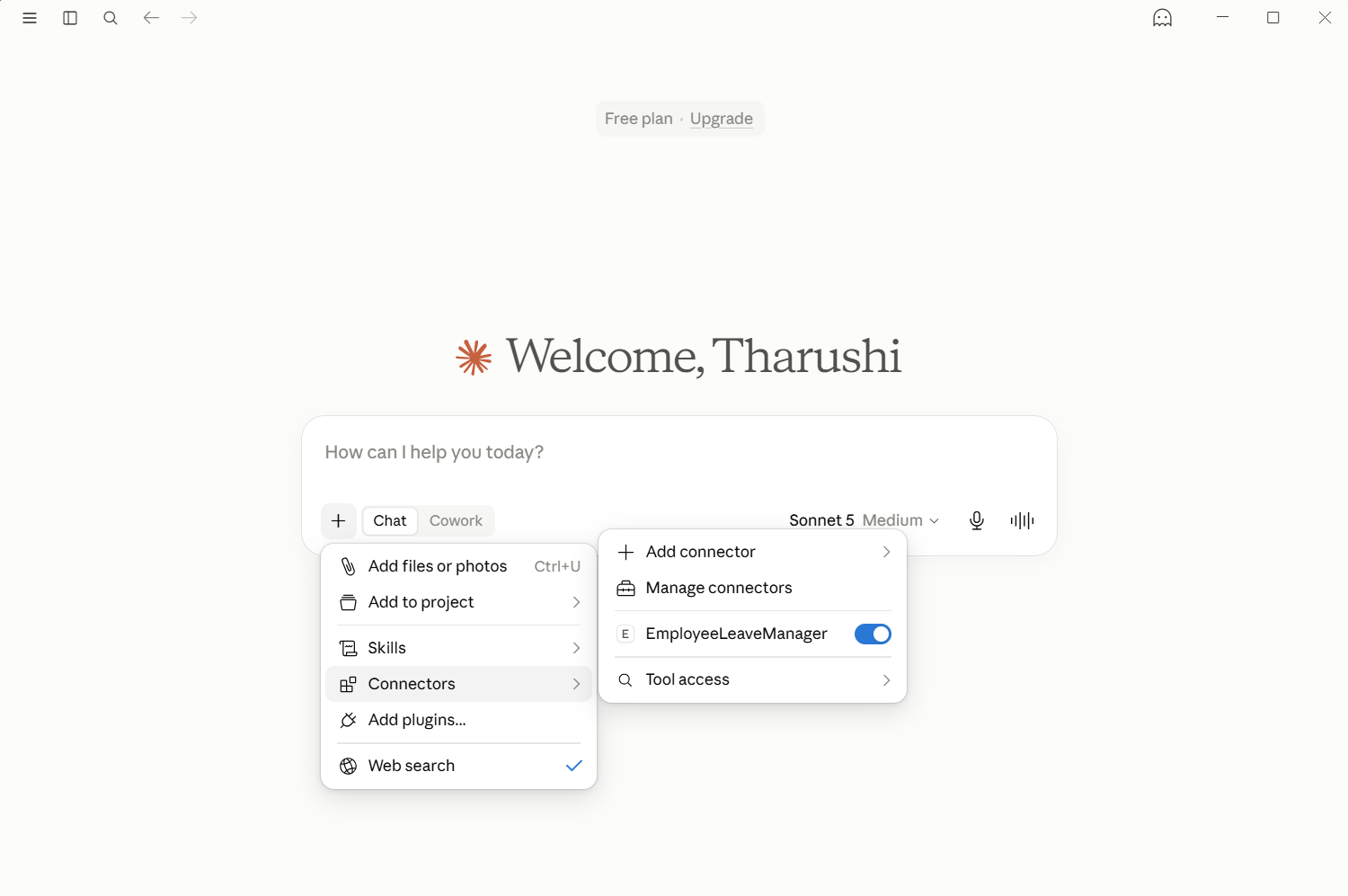
If it doesn't show up, add it manually:
- Go to File → Settings → Developer → Edit Config
- Add the following block to the config file (update the path to match where you cloned the project):
{
  "mcpServers": {
    "EmployeeLeaveManager": {
      "command": "uv",
      "args": [
        "--directory",
        "C:\\path\\to\\Employee-Leave-Manager-MCP",
        "run",
        "server.py"
      ]
    }
  }
}
- Restart Claude Desktop.
- Open a new chat and try asking Claude about employee leave — e.g. "What's E001's leave balance?"
Functionality
The server exposes the following tools:
| Tool | Description |
|---|---|
get_leave_balance(employee_id, leave_type) |
Check remaining leave balance for an employee. Returns balance for a specific leave type, or all types if omitted. |
apply_leave(employee_id, leave_dates, leave_type="annual", reason) |
Apply for leave on one or more specific dates. Validates date format, rejects past or duplicate dates, and checks balance before deducting. |
cancel_leave(employee_id, leave_dates) |
Cancel previously approved leave and refund the balance. |
get_leave_history(employee_id, leave_type) |
View an employee's leave history, optionally filtered by leave type. |
get_leave_types() |
List all available leave types (annual, sick, casual, unpaid) and their default annual allotment. |
list_employees(department) |
List all employees, optionally filtered by department. |
add_employee(employee_id, name, department, email, manager_id) |
Onboard a new employee with default leave balances. |
get_employee_details(employee_id) |
Get an employee's profile (name, department, email, manager). |
It also exposes two resources:
greeting://{name}— a personalized greetingemployee://{employee_id}/summary— a quick profile + balance summary for an employee
Data model
Data lives in a local SQLite database (leave_manager.db), with four tables:
employees, leave_types, leave_balances, and leave_requests. Schema
creation and seeding are handled separately by init_db.py, so the server
itself never modifies the schema — it just reads/writes data.
Project structure
mcp-server/
├── server.py         # MCP server: tools, resources, DB queries
├── init_db.py        # Database schema creation + seeding (run once)
├── leave_manager.db  # SQLite database (created after running init_db.py)
from github.com/TharushiDinushika/Employee-Leave-Manager-MCP
Установка Employee Leave Manager
У этого сервера нет опубликованного пакета — он собирается из исходников. Открой репозиторий и следуй инструкции в README.
▸ github.com/TharushiDinushika/Employee-Leave-Manager-MCPFAQ
Employee Leave Manager MCP бесплатный?
Да, Employee Leave Manager MCP бесплатный — установка в пару кликов через Unyly без оплаты.
Нужен ли API-ключ для Employee Leave Manager?
Нет, Employee Leave Manager работает без API-ключей и переменных окружения.
Employee Leave Manager — hosted или self-hosted?
Self-hosted: сервер запускается локально на твоей машине командой из раздела установки.
Как установить Employee Leave Manager в Claude Desktop, Claude Code или Cursor?
Открой Employee Leave Manager на unyly.org, выбери вкладку своего клиента (Claude Desktop, Claude Code, Cursor) и нажми Install — конфиг сгенерируется автоматически, без правки JSON.
Похожие MCP
wenb1n-dev/SmartDB_MCP
A universal database MCP server supporting simultaneous connections to multiple databases. It provides tools for database operations, health analysis, SQL optim
 автор: wenb1n-dev
Postgres Server
This server enables interaction with PostgreSQL databases through the Model Context Protocol, optimized for the AWS Bedrock AgentCore Runtime. It provides tools
 автор: madhurprash
Postgres
Query your database in natural language
 автор: Anthropic
PostgreSQL
Read-only database access with schema inspection.
автор: modelcontextprotocolCompare Employee Leave Manager with
Не уверен что выбрать?
Найди свой стек за 60 секунд
Автор?
Embed-бейдж для README
Похожее
Все в категории data