
Enola
БесплатноНе проверенEnola. is a local Model Context Protocol (MCP) server. A deterministic map of your codebase for AI coding agents — the real architecture, extracted from your so

Описание
Enola. is a local Model Context Protocol (MCP) server. A deterministic map of your codebase for AI coding agents — the real architecture, extracted from your source, not guessed.
README
A deterministic structural model of your codebase for AI coding agents — your real architecture, extracted from source, not guessed.
enola is a local Model Context Protocol (MCP) server. Point it at one or more repositories and it builds a precise graph of your code's architecture — modules, types, routes, dependencies, and how they all connect — straight from your source. It then exposes tools your AI agent can use to read, traverse, query, and reason over that structure. So before your agent writes a line of code, it already knows the shape of the thing it's editing.
TL;DR — try it in 30 seconds
1. Install
curl -fsSL https://raw.githubusercontent.com/enola-labs/enola/main/install.sh | sh
export PATH="$HOME/.local/bin:$PATH"   # if not already on PATH
2. Connect to your agent
Claude Code:
claude mcp add enola enola
Cursor (add to mcp.json):
{
  "mcpServers": {
    "enola": { "command": "enola" }
  }
}
GitHub Copilot / VS Code (add to .vscode/mcp.json):
{
  "servers": {
    "enola": { "command": "enola" }
  }
}
3. Ask it to map your project
"Generate an architectural snapshot of /path/to/my/project"
Done. Your agent now has a precise structural map of your code. For configuration options, multi-repo setup, and what to ask next, see Quick start below.
Supported languages: Go · JavaScript · TypeScript · Python · Java · Kotlin · Swift · Ruby · Rust · C · C++ · PHP · Vue · Svelte · OpenAPI · gRPC — with framework awareness (Next.js, Nuxt, SvelteKit, FastAPI, Django, Spring, Rails, Laravel, Symfony, SwiftUI, Jetpack Compose, WordPress, …)
Why enola
AI coding agents are powerful, but they're non-deterministic. On every task they re-discover your codebase from scratch — grepping, opening files, inferring how things fit together — and they get it subtly wrong often enough to matter. That guessing costs you time (wrong turns, re-prompts) and tokens (re-reading the same files, every session).
enola removes the guessing from the part that should never be guessed: the structure.
It gives your agent a deterministic structural model — a structural architecture graph of your code's real types and relationships, built by parsers and graph algorithms, not by a language model. The structure is extracted from your source, not summarized from it; these are facts, not notes. Run it twice on the same commit and you get the same answer, every run. The agent starts from facts instead of assumptions.
The result is the difference between vibe coding — prompt, hope, fix — and AI-augmented engineering: fewer wrong turns, fewer tokens burned, and work you can reproduce. enola adds determinism where AI lacks it, and your agent spends its intelligence on the actual problem instead of re-learning your repo.
enola is a first step, not a replacement. It runs before your agent explores, so it knows where to look and what connects to what. It doesn't replace grep, file reading, or code search — it makes them precise.
Isn't this just another AST parser?
Fair question — plenty of tools parse an AST. enola does too. But parsing is the entry point, not the product: it's stage 2 of an 8-stage pipeline (ARCHITECTURE.md → The pipeline). A tree-sitter grammar or an LSP hands you a syntax tree per file; enola treats that as raw material and resolves it into a queryable graph across your whole system.
| A plain AST / tree-sitter / LSP tool gives you… | enola gives you… |
|---|---|
| a syntax tree, one file at a time | a typed, directed graph resolved across files, languages, and repos |
foo.bar() as a call to an unknown token |
foo.bar() resolved to the exact declaring symbol — through dispatch, inheritance, and imports |
| edges exactly as written in source | edges made semantically complete — synthetic has_method, module→import bridges, cross-repo links |
| "find where this text appears" | "what transitively depends on this?" — answered by graph traversal, with accurate totals |
| no way to tell a leaf from a blind spot | a genuine leaf service told apart from a coverage gap |
| text you re-grep and re-infer every session | a byte-identical, content-fingerprinted snapshot |
The gap a parser can't cross is resolution. A parser sees foo.bar() as tokens; enola resolves it to the symbol that actually declares bar, across every dispatch mechanism real code uses — Ruby send/public_send, Swift inherited-method chains, Kotlin callable references, Python absolute-import call edges, Java fully-qualified-name indexing — and then links per-repo graphs so a web client's HTTP or gRPC call resolves all the way to the backend route that serves it. That's why traverse, impact_analysis, and find_path return the exact dependent set instead of grep hits: the graph builder adds edges to make traversals "semantically complete rather than literally what each parser emitted."
And it holds itself to that standard. enola reproduces its output to the byte — the snapshot ID is a content fingerprint, not a random UUID — and a large share of its engineering goes into catching what a naive parser gets subtly wrong: two apps that merely name the same type aren't fused into a false dependency, and a service with unresolved outbound calls is reported as a coverage gap, not a phantom leaf. The graph is derived, never guessed; run it twice on the same commit and it's identical, byte for byte (ARCHITECTURE.md → Determinism).
What it is
Under the hood, enola models your codebase as a graph of architectural types — which we call kinds — and the relations between them. That's the whole concept: not a magic "knowledge graph," just a deeply technical, structural model of what your code actually contains.
The kinds (the nodes):
- module — a package or directory
- symbol — a function, method, struct, interface, type, class, or constant
- route — an HTTP/API endpoint
- storage — a database table or data store
- dependency — an import relationship
- service — a whole repository (used when you analyze several at once)
The relations (the edges) connect them: declares, imports, calls, implements, depends_on, and more. Because the edges are typed and directed, the graph is queryable, not merely searchable — you compute over it. On top of it, enola builds a small set of tools your agent can call to answer real structural questions with exact answers.
Getting to that graph is where the pipeline earns its keep. AST parsing is one stage; the rest is what makes the result queryable: parse → normalize into the typed fact model → link across repos (with 2+ loaded) → build a bidirectional graph index with synthetic edges → run deterministic explainers → emit a provenance receipt (ARCHITECTURE.md → The pipeline). The explainers are real graph algorithms, not regex heuristics — Tarjan's SCC for dependency cycles, cycle-safe longest-path for dependency depth, statistical (mean + 2σ) outlier tests for god-classes, hotspots, and complexity — and each finding carries a confidence score, where 1.0 means a structural fact and anything below is a flagged heuristic (ARCHITECTURE.md → Insights (explainers)).
For the full mental model and internals, see ARCHITECTURE.md.
Who it's for
Everyone above the keyboard needs the same thing enola produces: a structural map of the system that's actually correct. Because the graph is deterministic and derived from source, an agent can turn it into an always-accurate architecture diagram on demand — a mermaid module graph, a cross-repo dependency map — and it matches the code every time, and again next quarter, byte for byte. (enola doesn't draw the diagram; it hands your agent the facts to draw it from, so the picture is never the stale one on the wiki.)
- Developers pairing with an AI coding agent — Claude Code, Cursor, Copilot, Opencode, or any MCP-compatible tool. The agent starts from your real structure instead of re-guessing it every task.
- Teams working across multiple repos — a backend, a web frontend, a mobile app. enola links them into one cross-repo graph so an agent can follow a call from the web client all the way into the service that answers it. And because that's a real graph rather than a fixed set of features, questions you'd otherwise reach for a dedicated tool to answer become plain queries over it — which of the backend's endpoints does no client app call? among them, a cleanup shortlist derived from the same client→server links (verify against callers outside the snapshot — cron jobs, webhooks, third-party consumers — before deleting).
- Anyone about to refactor — and wanting to know the blast radius before touching code.
- Architects — the structural view you usually maintain by hand, computed from the code instead of a diagram that drifts out of date: dependency cycles, layer violations, call-graph hotspots, cross-repo coupling, and dependency depth — plus a module/dependency diagram an agent regenerates from the current commit, so the picture stays honest.
- Engineering leaders — CTOs, VPs, and managers — a trustworthy picture of a codebase's shape for planning, onboarding, and risk. Deterministic signals (cycles, hotspots, coupling) instead of gut feel, a new-hire tour or a deck diagram that matches reality, and a map that's reproducible run to run — so two people looking at it see the same thing.
The tools (and how they work together)
The workflow is simple: generate the snapshot once, then ask. These aren't text lookups — each tool computes over the graph: traverse walks reachability, find_path finds the shortest chain between two points, impact_analysis takes the transitive reverse closure. After the snapshot, your agent has these tools on top of the graph:
| Tool | The question it answers |
|---|---|
generate_snapshot |
"Snapshot this repo." Build or refresh the graph. Run it first; use append to add more repos. |
explore |
"What's in this module/file/symbol, and what touches it?" A guided tour. |
query_facts |
"List exactly these." Every route, every interface, every external dependency. |
query_insights |
"What did the analysis find?" Fetch the computed findings — unused routes, cycles, god-classes — instead of re-deriving them. |
show_symbol |
"Show me the code." Jump straight to a symbol's source. |
traverse |
"What does X depend on?" / "What depends on X?" Walk the graph. |
find_path |
"How does A reach B?" The call or dependency chain between two points. |
impact_analysis |
"If I change X, what breaks?" The blast radius of a change. |
coverage_report |
"Which cross-repo edges did enola resolve vs. miss?" Tell a genuine leaf service from a coverage gap. |
set_baseline |
"Remember the architecture as it is now." Pin a baseline before you start editing. |
diff_snapshot |
"What did my change actually do?" The architectural delta vs. the baseline — new findings, new coupling, added/removed symbols. Warns if the two snapshots aren't comparable. |
snapshot_receipt |
"What was this graph generated over, and how complete is it?" Provenance (version, git ref + dirty, snapshot ID, output hashes) plus extraction-quality metrics. |
compare_receipts |
"Are these two snapshots even comparable?" A comparability verdict + metric deltas — the gate before trusting a diff, and a signal for improving coverage. |
impact_analysis is the one to know. Before a refactor, it computes the full set of code that transitively depends on what you're about to change — grouped by how many hops away it is, and aware of cross-repo dependencies. Instead of your agent guessing what a change might affect (and missing things), it gets the exact dependent set. That's determinism turned into a concrete payoff: safer changes, planned in the right order, the first time.
diff_snapshot closes the loop on the edit itself. Where impact_analysis plans a change, diff_snapshot verifies it: pin a baseline (set_baseline), make your edits, re-snapshot, and ask what changed. It's a delta, not a linter — it reports only what moved (findings that newly appeared or were resolved, new/removed coupling, added/removed symbols) and stays silent about pre-existing state, so a pattern that was already there before and after never fires. Instead of re-reading files to confirm the agent built what it claimed, you get a deterministic answer: generate_snapshot → set_baseline → edit → generate_snapshot → diff_snapshot.
See ARCHITECTURE.md for every tool's full parameters.
See it in action
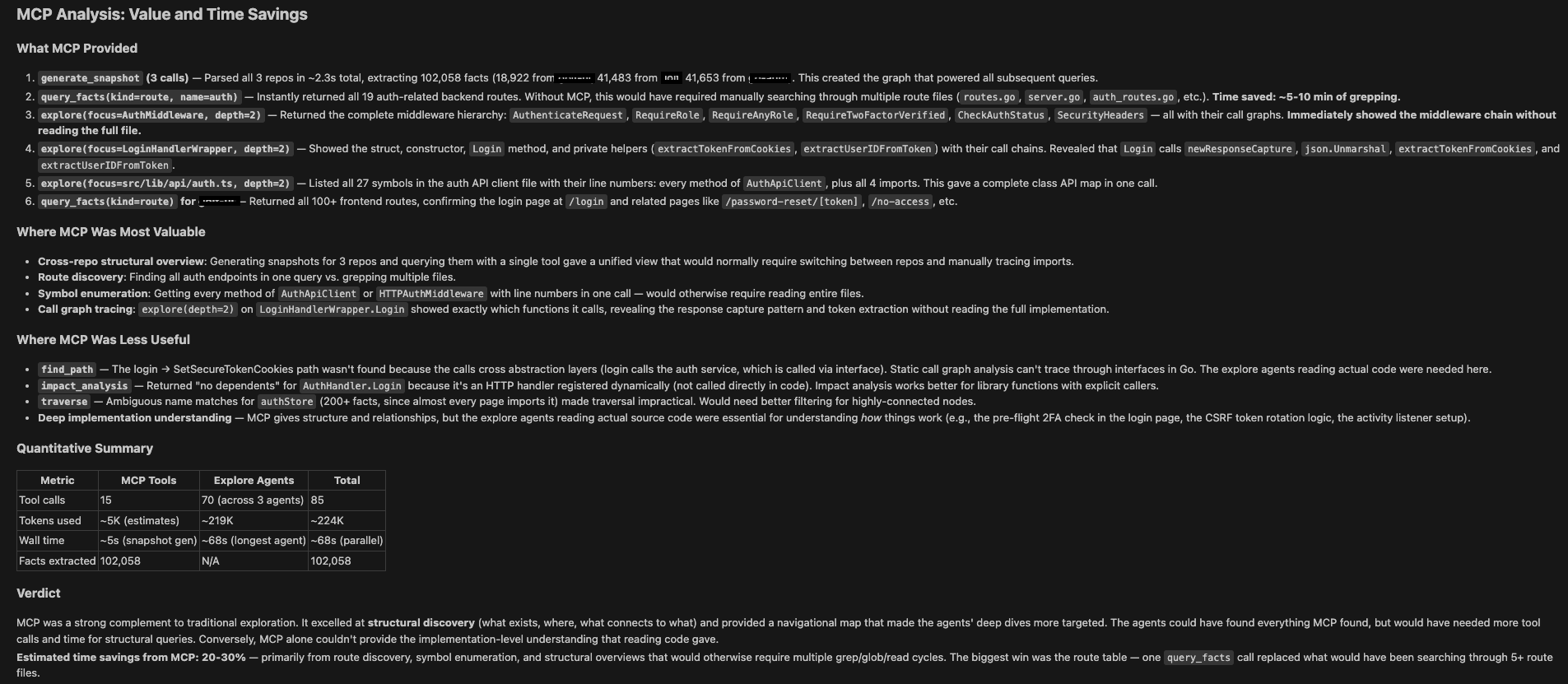
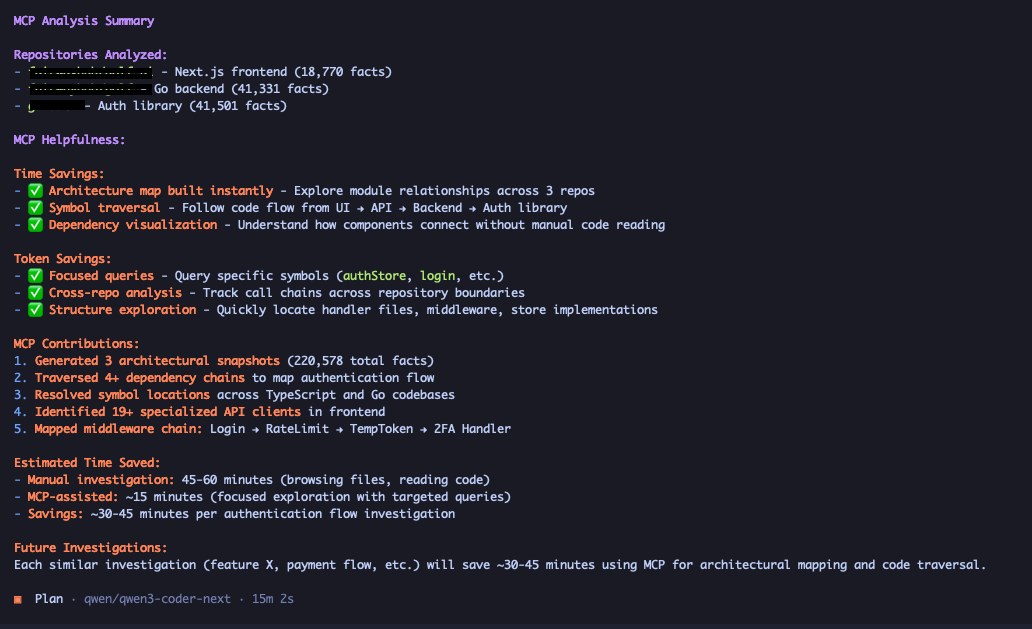
The examples below ask different models to explain the authentication and authorization flow across three repositories — a web UI client, a backend, and a custom auth provider — using the enola snapshot as context.
Claude Code
Opencode
Quick start
Install
Grab a prebuilt binary — no Go toolchain or C compiler required:
curl -fsSL https://raw.githubusercontent.com/enola-labs/enola/main/install.sh | sh
This installs enola to ~/.local/bin. If that's not on your PATH, add it:
export PATH="$HOME/.local/bin:$PATH"
Binaries are published for Linux, macOS (amd64/arm64), and Windows (amd64). You can also download a specific build from the Releases page, or build from source.
Upgrade
Once installed, update to the latest release in place:
enola upgrade
This downloads the newest build for your platform, verifies its checksum, and replaces the running binary. If enola is installed somewhere your user can't write, re-run with elevated permissions or re-run the install script above.
Because your agent launches enola as a long-lived MCP server process, an upgrade only takes effect once that process restarts — reconnect the MCP server so it picks up the new binary:
- Claude Code — restart the session, or re-register with
claude mcp remove enola && claude mcp add enola enola. - Cursor — toggle the enola server off and back on in Settings → MCP (or reload the window).
- GitHub Copilot (VS Code) — restart the server from the
.vscode/mcp.jsoneditor (the Restart CodeLens above the server entry), or reload the window.
Configuration (optional)
enola needs no config file. Every setting has a built-in default, so out of the box it indexes the current repo with all extractors enabled and writes to .enola/. A config file (mcp-arch.yaml) only overrides those defaults — it never adds capability you'd otherwise lack. When enola can't find one it simply prints warning: …, using defaults and carries on.
The install script installs only the binary, by design — it does not place a config file. Grab the bundled one from the repo whenever you want to customize (tune the ignore globs, pick a subset of extractors, change the output dir, …):
curl -fsSL https://raw.githubusercontent.com/enola-labs/enola/main/mcp-arch.yaml -o mcp-arch.yaml
The examples/ directory has ready-made per-language and multi-repo starting points, and examples/full.yaml documents every option. For the full field reference and defaults, see ARCHITECTURE.md → Configuration.
Connect it to your agent
Claude Code — register enola as an MCP server with one command. This assumes the enola binary is on your PATH (the install script above puts it in ~/.local/bin):
claude mcp add enola enola
The shape is claude mcp add <name> <command> [args…]: the first enola names the server, the second is the binary. The trailing config path is optional — omit it (as above) to run on built-in defaults, or pass one to override them:
claude mcp add enola enola /path/to/enola/mcp-arch.yaml
When you do pass a config, its repo: is only the default repository — you can still snapshot any repo by passing repo_path to generate_snapshot. Verify it registered with claude mcp list, then start Claude Code and ask it to generate a snapshot.
Cursor / other MCP clients — add enola to your client's MCP configuration. For example, in Cursor's mcp.json (the config path in args is optional — drop it to use defaults):
{
  "mcpServers": {
    "enola": {
      "command": "enola",
      "args": ["/path/to/enola/mcp-arch.yaml"]
    }
  }
}
GitHub Copilot (VS Code) — add enola to .vscode/mcp.json in your workspace (or your user-level MCP config via MCP: Open User Configuration). Note the top-level key is servers (not mcpServers), and the config path in args is optional — drop it to use defaults:
{
  "servers": {
    "enola": {
      "command": "enola",
      "args": ["/path/to/enola/mcp-arch.yaml"]
    }
  }
}
Or add it from the command line: code --add-mcp "{\"name\":\"enola\",\"command\":\"enola\"}". Then open a project and ask Copilot to generate a snapshot.
Use it
Open a project and ask your agent to map it:
"Generate an architectural snapshot of /path/to/my/project"
That's it. The snapshot takes milliseconds even on large repos, and your agent now has the tools above plus a ready-to-read summary at .enola/llm_context.md. From here, just ask your questions naturally:
"I just joined this project — based on the snapshot, give me a tour: the main modules, how they relate, and where to start reading."
"I need to add an API endpoint for user preferences. Which packages should I touch, and in what order?"
"Are there cyclic dependencies or layer violations I should know about before refactoring?"
"Where are the architectural risks — god classes with high fan-in, call-graph hotspots, overly complex functions, or modules buried deep in the dependency chain?"
"What would break if I refactor
internal/server? Show me the impact analysis."
Working across several repos? Generate the first, then add the rest with append mode — enola links them into one cross-repo graph:
"Generate a snapshot of /path/to/go-service with append mode"
"If I change the auth service, which other services are impacted?"
"Which of my backend's endpoints aren't called by any of the client apps? (Ask via
query_insights(explainer='unused-routes')— cleanup candidates, but check for callers outside these repos first.)"
When you snapshot a different repo without append, enola assumes you're extending the set and auto-appends it — handy when you forgot append on repo #2. If you've actually moved to another project and want a clean single-repo snapshot instead, ask for a fresh one (fresh=true) so the old repos are discarded rather than merged in.
Regenerate after major changes so the snapshot stays current. Refreshes are fast: enola caches each language's facts and re-parses a language only when one of its files (or a shared config like package.json) actually changed, reusing the rest.
Very large repositories (e.g. the Linux kernel). The first, cold index of a huge repo can take a minute or more and may exceed your MCP client's per-tool-call timeout, surfacing as
MCP error -32001: Request timed out. The snapshot usually still finishes and is cached server-side — but to avoid the error, either:
- Raise your MCP client's tool-call timeout. In Claude Code, set the
MCP_TOOL_TIMEOUTenvironment variable (milliseconds) before launching, e.g.MCP_TOOL_TIMEOUT=600000.- Pre-generate from the shell once, then start the server: run
enola --generate <config-pointing-at-the-repo>(writes.enola/), after which the MCP server auto-loads the cached snapshot on startup and latergenerate_snapshotcalls reuse the extractor cache (only changed files are re-parsed), so they return quickly.
Supported languages
| Language | Detected by |
|---|---|
| Go | go.mod |
| Java | pom.xml (Maven) or .java sources (Spring routes / JPA / Lombok DI / Dubbo SPI aware) |
| JavaScript | tsconfig.json / package.json with TypeScript (parsed by the TypeScript extractor) |
| TypeScript | tsconfig.json / package.json with TypeScript (Next.js & monorepo aware) |
| Vue | package.json with vue dependency (Nuxt / Vue Router / Composition API aware) |
| Svelte | package.json with svelte dependency (SvelteKit routing / $lib alias aware) |
| Python | pyproject.toml, requirements.txt, setup.py, … (FastAPI / Django / SQLAlchemy aware) |
| Kotlin | build.gradle(.kts) with Kotlin/Android (Compose / Hilt / Room aware) |
| Swift | Package.swift, .xcodeproj, .xcworkspace (SwiftUI / UIKit aware) |
| Ruby | Gemfile (Rails / ActiveRecord / Packwerk aware) |
| Rust | Cargo.toml (workspace or single crate; crate/module/impl/trait aware; Axum route DSL aware) |
| C / C++ | .c/.h (tree-sitter-c) or .cpp/.hpp/… (tree-sitter-cpp), or CMakeLists.txt/Makefile + header (per-fact language, header/source method merging, namespaces, templates) |
| PHP | composer.json, WordPress markers, or any .php source (WordPress / Laravel / Symfony route + outbound HTTP-client aware) |
| OpenAPI | any spec with an openapi: / swagger: key |
| gRPC | any .proto file (proto services → routes; TypeScript gRPC-web client calls detected) |
Framework- and platform-specific detection for each language is described in ARCHITECTURE.md → Supported languages.
Python, Ruby, PHP, and Rust are parsed with tree-sitter and contribute call and dependency edges to the graph, so
traverse,find_path, andimpact_analysisreach into them — not just modules and routes.
Build from source
Prerequisites: Go 1.25+ and a C compiler (for the tree-sitter bindings).
go build -o enola ./cmd/enola # or: go install ./cmd/enola
To run a one-shot snapshot without starting the MCP server:
enola --generate [config_path] # config_path is optional; defaults to mcp-arch.yaml, falling back to built-in defaults if absent
Artifacts are written to the configured output.dir (default .enola/). The config file is optional — see ARCHITECTURE.md → Configuration for the full field reference and defaults.
Explain a repository at a glance
enola --explain [repo_path] is a one-shot mode that generates a snapshot, computes statistics over the fact graph, and prints a human-readable report to stdout — no MCP server started, no artifacts written to .enola/.
When to use it:
- New contributor getting a first orientation — module count, architecture pattern, hottest packages.
- Pre-refactor sanity check — cycles, layer violations, blast radius of top modules.
- Quick audit without spinning up an AI agent.
# Use the config in the current directory (mcp-arch.yaml)
enola --explain

# Analyze a specific repository path
enola --explain /path/to/repo
The report covers eight sections:
- Overview — path, analysis time, active languages, total fact count
- Architectural kinds — counts of modules, symbols, routes, storage, dependencies, services
- Symbol breakdown — functions, methods, structs, interfaces, and other kinds
- API & data surface — route count broken down by HTTP method, plus storage count
- Dependencies — external, internal, and stdlib import counts
- Architecture — detected pattern with confidence, cyclic dependencies, layer violations, cross-repo edges
- Impact analysis (hotspots) — top modules ranked by fan-in + fan-out coupling, with criticality tier and blast radius
- Code health — per-explainer findings with their top offenders: god classes (high fan-in symbols), call-graph hotspots, deep dependency chains, large public surfaces, and complexity outliers
Every finding carries a confidence score, and it means something exact: 1.0 is a structural fact (a cycle exists; an export ratio measured), while anything below is a flagged heuristic for you to review (a god class is a statistical fan-in outlier, not a rule). The analyses are computed by graph algorithms — Tarjan's SCC for cycles, longest-path for dependency depth, mean+2σ outlier tests for the rest — so the same commit yields the same report.
Here's the actual report for Apache Airflow — a large polyglot codebase (Python, Java, TypeScript, gRPC, and OpenAPI specs) analyzed in a single pass, 122,257 facts in ~2s (extraction parses files in parallel across cores):
════════════════════════════════════════════════════════════
 Repository explanation: apache/airflow
════════════════════════════════════════════════════════════

Overview
  Generated:           2026-07-07T20:51:51Z
  Analysis time:       2.100326959s
  Languages:           python, typescript, java, grpc
  Total facts:         122257

Architectural kinds
  module                   2500
  symbol                  64148
  route                    6426
  storage                    64
  dependency              44371

Symbol breakdown
  method                  40976
  function                12409
  class                    8583
  type                     1393
  variable                  732
  interface                  37
  struct                     10
  enum                        6
  constant                    2

API & data surface
  routes                   6426
    PATCH                  6038
    GET                     247
    POST                     74
    DELETE                   46
    PUT                      20
    HEAD                      1
  storage                    64

Dependencies
  internal                20905
  stdlib                  12858
  external                10607
  unclassified                1

Architecture
  Pattern:             (none detected)
  cyclic dependencies        27
  layer violations            0

Impact analysis (hotspots)
  coupled modules           915
    high criticality        547
    medium criticality      368
  Top hotspots (by coupling):
    module                            fan-in  fan-out crit     blast radius
    airflow-core/src/airflow/models     1661      380 high     66716
    devel-common/src/tests_common/t…    1496      161 high     39422
    providers/common/compat/src/air…    1295        2 high     59376
    airflow-core/src/airflow/utils      1124      132 high     68653
    airflow-core/src/airflow            1172       71 high     71697
    providers/common/compat/tests/u…     776        0 high     65589
    providers/google/src/airflow/pr…     327      329 high     14701
    task-sdk/src/airflow/sdk             591       15 high     64026

Code health
  god classes (high fan-in)    249
    chart/tests/chart_utils/helm_template_gener… 1193 dependents
    devel-common/src/tests_common/test_utils/co… 557 dependents
    devel-common/src/tests_common/test_utils/sy… 476 dependents
    dev/breeze/src/airflow_breeze/utils/console… 376 dependents
    airflow-core/src/airflow/utils/session.crea… 288 dependents
  call-graph hotspots       150
    chart/tests/chart_utils/helm_template_gener… fan-in 1193 / out 7
    devel-common/src/tests_common/test_utils/co… fan-in 557 / out 10
    task-sdk/src/airflow/sdk/execution_time/tas… fan-in 101 / out 37
    airflow-core/src/airflow/utils/session.crea… fan-in 288 / out 6
    providers/hashicorp/src/airflow/providers/h… fan-in 76 / out 21
  deep dependency chains     10
    chart/docs                                   depth 196
    dev/breeze/tests                             depth 196
    dev/breeze/tests/integration_tests           depth 196
    scripts/tools                                depth 196
    airflow-core/tests/unit/api_fastapi/core_ap… depth 195
  large public surfaces      20
    airflow-core/src/airflow/ui/openapi-gen/que… 864/864 (100%)
    airflow-core/src/airflow/ui/openapi-gen/req… 720/720 (100%)
    task-sdk/src/airflow/sdk/execution_time/com… 119/129 (92%)
    providers/edge3/src/airflow/providers/edge3… 100/100 (100%)
    task-sdk/src/airflow/sdk/definitions/mapped… 100/111 (90%)
  complexity outliers        15
    airflow-core/src/airflow/jobs/scheduler_job… complexity 69
    task-sdk/src/airflow/sdk/execution_time/sup… complexity 61
    airflow-core/src/airflow/ui/src/pages/DagsL… complexity 54
    airflow-core/src/airflow/ui/src/hooks.useDa… complexity 53
    dev/breeze/src/airflow_breeze/commands/ci_c… complexity 52
No artifacts are written; .enola/ is not touched. For a persistent snapshot with agent-readable output, use --generate or the MCP server.
For interactive per-module blast-radius queries with configurable depth, see the impact_analysis tool reference in ARCHITECTURE.md → The tools.
Learn more
- ARCHITECTURE.md — the concept, the fact model, the pipeline, and the full tool reference.
- examples/ — ready-made per-language and multi-repo configs.
License
Apache License 2.0 — see LICENSE.
Acknowledgements
enola bundles third-party components under their own licenses; see NOTICE. Swift parsing uses the tree-sitter-swift grammar by Alex Pinkus (MIT), vendored under internal/extractors/swiftextractor/grammar/.
Установка Enola
У этого сервера нет опубликованного пакета — он собирается из исходников. Открой репозиторий и следуй инструкции в README.
▸ github.com/enola-labs/enolaFAQ
Enola MCP бесплатный?
Да, Enola MCP бесплатный — установка в пару кликов через Unyly без оплаты.
Нужен ли API-ключ для Enola?
Нет, Enola работает без API-ключей и переменных окружения.
Enola — hosted или self-hosted?
Self-hosted: сервер запускается локально на твоей машине командой из раздела установки.
Как установить Enola в Claude Desktop, Claude Code или Cursor?
Открой Enola на unyly.org, выбери вкладку своего клиента (Claude Desktop, Claude Code, Cursor) и нажми Install — конфиг сгенерируется автоматически, без правки JSON.
Похожие MCP
Fetch
Web content fetching and conversion for efficient LLM usage.
AWS KB Retrieval
Retrieval from AWS Knowledge Base using Bedrock Agent Runtime.
 автор: modelcontextprotocol
Spring AI MCP Server
Provides auto-configuration for setting up an MCP server in Spring Boot applications.
llm-analysis-assistant
A very streamlined mcp client that supports calling and monitoring stdio/sse/streamableHttp, and can also view request responses through the /logs page. It also
 автор: xuzexin-hz
Compare Enola with
Не уверен что выбрать?
Найди свой стек за 60 секунд
Автор?
Embed-бейдж для README
Похожее
Все в категории ai