
EWS Meeting
БесплатноНе проверенSafely schedule Outlook meetings on on-prem Exchange EWS with room-aware slot suggestions, local credentials, preview-confirmed writes, and audit-friendly lifec

Описание
Safely schedule Outlook meetings on on-prem Exchange EWS with room-aware slot suggestions, local credentials, preview-confirmed writes, and audit-friendly lifecycle records.
README
npm License: MIT Node.js >=18 Python
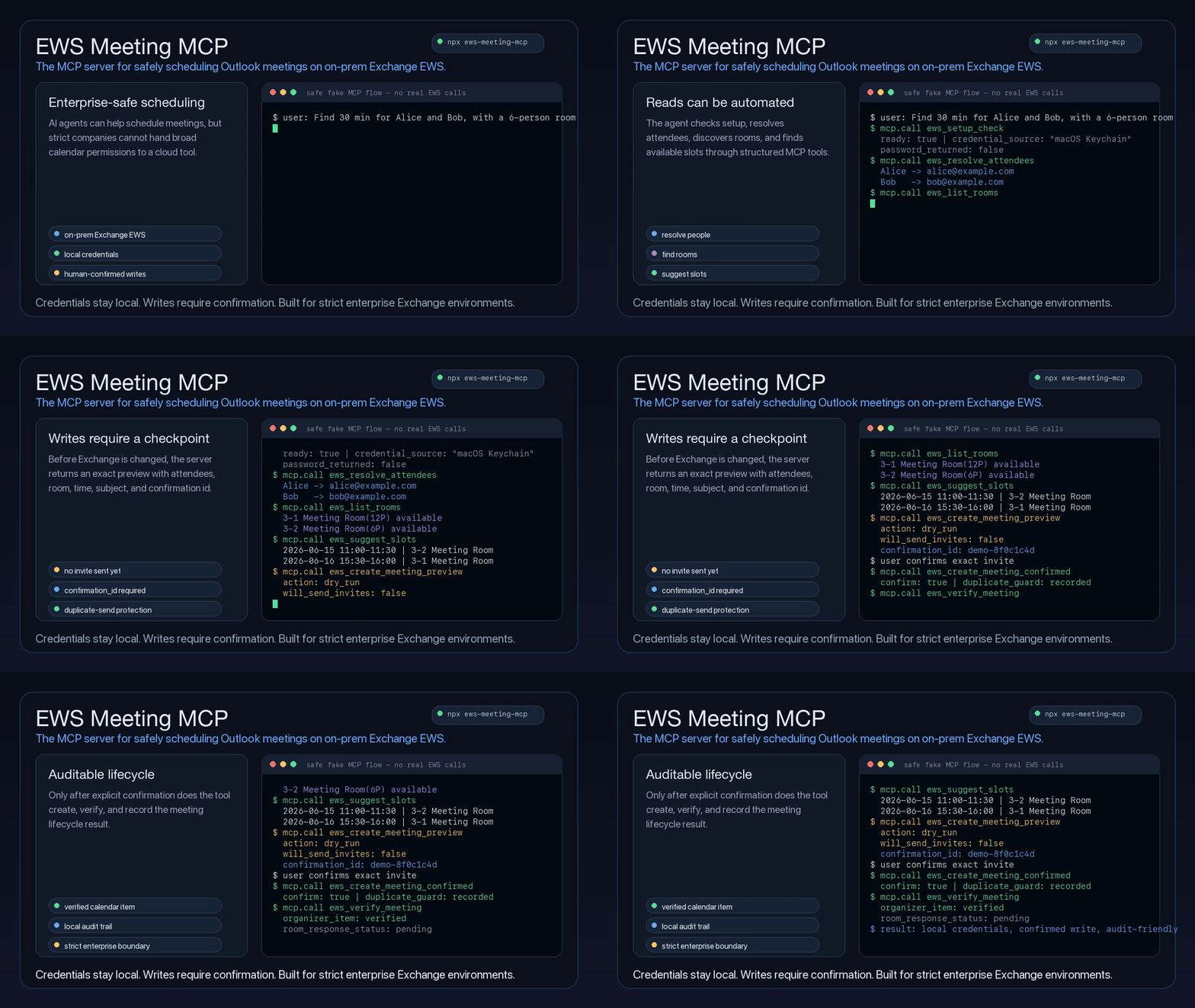
The MCP server for safely scheduling Outlook meetings on on-prem Exchange EWS.
EWS Meeting MCP gives coding assistants and desktop agents a safe, structured way to read Outlook availability, discover rooms, suggest meeting slots, and create, update, or cancel meetings only after an explicit human confirmation step.
It is built for companies where calendar access is sensitive infrastructure: regulated teams, internal networks, strict security review, legacy Exchange deployments, and organizations that cannot simply hand a cloud agent broad Microsoft 365 permissions. Credentials stay local, write operations are previewed before they touch Exchange, and every confirmed lifecycle action can be traced through a local audit trail.
npx ews-meeting-mcp
Why This Exists
Many teams still run calendar infrastructure through on-prem Exchange/EWS. General-purpose agents can reason about scheduling, but they should not receive raw passwords, guess attendee addresses, or send calendar invitations without a reviewable checkpoint.
This is not a generic Outlook wrapper or a Microsoft Graph-first calendar connector. It is designed for the stricter enterprise case: local EWS access, room resources, explicit human approval, duplicate-send protection, and audit-friendly meeting lifecycle tools.
This project wraps Exchange calendar operations in a small MCP surface with:
- Room-aware scheduling: finds overlapping attendee availability and filters meeting rooms by Exchange discovery or local policy.
- Human-in-the-loop writes: create, update, and cancel operations require a preview plus a matching
confirmation_id. - Local-first credential handling: reads
.env, shell environment, or macOS Keychain without passing passwords through the model. - Structured recovery: setup failures return machine-readable error codes and user-facing setup commands.
- Auditability: lifecycle previews, confirmed actions, duplicate confirmations, in-progress states, and structured errors are written to a local JSONL audit log.
- Agent-ready instructions: the MCP server exposes tool descriptions and initialization guidance, and the repo includes a companion skill for agents that support skills.
What Agents Can Do
| Capability | Tooling | Safety posture |
|---|---|---|
| Check setup and credentials | ews_setup_check, ews_keychain_status |
Never returns the EWS password |
| Set up meeting signatures | ews_signature_setup_guide |
Returns copyable HTML sample and local env guidance |
| Read calendar availability | ews_list_calendar, ews_get_free_busy, ews_find_calendar_events |
Read-only |
| Resolve people and rooms | ews_resolve_attendees, ews_list_rooms |
Uses Exchange directory when available |
| Suggest slots | ews_suggest_slots |
Applies local workday, avoid windows, and room capacity |
| Create meetings | ews_create_meeting_preview, ews_create_meeting_confirmed |
Supports optional weekly recurrence; requires preview, explicit approval, and matching confirmation id |
| Update meetings | ews_update_meeting_preview, ews_update_meeting_confirmed |
Requires exact EWS item metadata and matching confirmation id |
| Cancel meetings | ews_cancel_meeting_preview, ews_cancel_meeting_confirmed |
Requires exact EWS item metadata and matching confirmation id |
| Verify and audit | ews_verify_meeting, ews_get_audit_log |
Confirms server-side state without exposing credentials |
Documentation
- Usage Guide: local setup, Keychain, scheduling policy, smoke checks, CLI examples, MCP config, and npm wrapper details.
- Agent Guide: tool contracts, setup checks, attendee resolution, room selection, preview-confirm flows, audit log, and verification rules.
- Publishing: npm package and GitHub Actions release checklist.
Quick Start
1. Configure EWS
Create a .env file in the working directory or provide equivalent environment variables:
EWS_ENDPOINT=https://mail.company.com/EWS/Exchange.asmx
[email protected]
EWS_USERNAME='DOMAIN\your_user'
EWS_AUTH_TYPE=NTLM
EWS_TIMEZONE=Asia/Taipei
Use EWS_AUTH_TYPE=BASIC only if IT confirms Basic auth is enabled and the endpoint is protected by HTTPS.
2. Store the Password
For local development, EWS_PASSWORD works:
EWS_PASSWORD='your-password'
On macOS, Keychain is safer than storing the password in .env or MCP client config:
read -rsp "EWS password: " EWS_PASSWORD
echo
security add-generic-password -U -s ews-meeting-mcp -a 'DOMAIN\your_user' -w "$EWS_PASSWORD"
unset EWS_PASSWORD
Then configure:
EWS_PASSWORD_KEYCHAIN_SERVICE=ews-meeting-mcp
EWS_PASSWORD_KEYCHAIN_ACCOUNT='DOMAIN\your_user'
If EWS_PASSWORD_KEYCHAIN_ACCOUNT is omitted, EWS_USERNAME is used. EWS_PASSWORD always takes precedence when it is set.
3. Add the MCP Server
For an npm-installed MCP client:
{
  "mcpServers": {
    "ews-meeting-mcp": {
      "command": "npx",
      "args": ["-y", "[email protected]"],
      "env": {
        "EWS_ENDPOINT": "https://mail.company.com/EWS/Exchange.asmx",
        "EWS_EMAIL": "[email protected]",
        "EWS_USERNAME": "DOMAIN\\your_user",
        "EWS_PASSWORD_KEYCHAIN_SERVICE": "ews-meeting-mcp",
        "EWS_AUTH_TYPE": "NTLM",
        "EWS_TIMEZONE": "Asia/Taipei"
      }
    }
  }
}
For a local checkout:
{
  "mcpServers": {
    "ews-meeting-mcp": {
      "command": "/path/to/ews-meeting-mcp/.venv/bin/python",
      "args": ["-m", "ews_meeting_mcp.mcp_server"],
      "cwd": "/path/to/ews-meeting-mcp",
      "env": {
        "PYTHONPATH": "src"
      }
    }
  }
}
Optional: Add an Outlook-Style Signature
Meeting invites append a configured HTML signature by default. Ask the MCP tool for a copyable starter template:
ews_signature_setup_guide
Save the returned sample_html as ews-meeting-signature.html in the MCP working directory, then edit the name, email, title, logo URL, and disclaimer. You can also point to a different file:
EWS_MEETING_SIGNATURE_HTML_PATH=/path/to/ews-meeting-signature.html
EWS_MEETING_SIGNATURE_ENABLED=true
Use an HTTPS logo URL recipients can access, or replace the <img> source with a base64 data URI. Set EWS_MEETING_SIGNATURE_ENABLED=false to temporarily stop appending the signature.
4. Verify Setup
npx ews-meeting-mcp --cli env
npx ews-meeting-mcp --cli probe
The first command prints the configured endpoint and account without printing the password. The second command validates that the account can connect to EWS.
Agent Workflow
Scheduling should follow this shape:
user request
-> ews_setup_check
-> ews_signature_setup_guide, if the user needs help creating the optional HTML signature
-> ews_resolve_attendees, if names or aliases are provided
-> ews_list_rooms, if a room may be needed
-> ews_suggest_slots
-> user chooses a slot and room
-> ews_create_meeting_preview
-> show exact invite details, recurrence if present, and confirmation_id
-> user explicitly confirms
-> ews_create_meeting_confirmed with confirm=true and the same confirmation_id
-> ews_verify_meeting, when item id and changekey are available
Recurring meetings are created by passing a structured recurrence object to both preview and confirmed create calls. For example, "every Monday and Wednesday" uses weekly recurrence:
{
  "type": "weekly",
  "interval": 1,
  "weekdays": ["MO", "WE"],
  "range": {
    "type": "numbered",
    "count": 10
  }
}
"Every business day until 7/26" means Monday through Friday, without holiday or makeup-day handling:
{
  "type": "weekly",
  "interval": 1,
  "weekdays": ["MO", "TU", "WE", "TH", "FR"],
  "range": {
    "type": "end_date",
    "end_date": "2026-07-26"
  }
}
If the user asks only for weekdays such as "every Monday and Wednesday" without an end date, occurrence count, or explicit no-end choice, ask for one before previewing.
Existing meeting changes should use exact calendar metadata:
user asks to update or cancel a meeting
-> ews_find_calendar_events with the narrowest known time window
-> user chooses one exact event, if more than one candidate exists
-> ews_update_meeting_preview or ews_cancel_meeting_preview
-> show current/proposed details, warnings, and confirmation_id
-> user explicitly confirms
-> matching confirmed tool with confirm=true and the same confirmation_id
Agents should never infer an event from subject text when multiple candidates are possible.
Safety Model
EWS Meeting MCP is designed around a simple rule: reads may be automated, writes must be reviewable.
- Confirmed create, update, and cancel tools refuse to run unless
confirm=trueis passed. - Confirmed tools require the exact
confirmation_idreturned by the matching preview. - Confirmed update and cancel tools also require the exact EWS
idandchangekeyfromews_find_calendar_eventsor a prior verified result. - Duplicate confirmed requests return
error_code: "duplicate_confirmation"with prior result metadata instead of calling EWS again. - In-progress confirmations return
error_code: "confirmation_in_progress"and should not be blindly retried. - Preview tools never save, move, delete, or send Exchange notifications.
- The local confirmation ledger and audit log store operation metadata, not EWS passwords.
If ews_setup_check returns ready: false, an agent should show the returned user_message or setup_command verbatim and stop. It should not ask for attendee emails or continue scheduling as a workaround.
Scheduling Policy
By default, scheduling tools look for ews-meeting-policy.json in the current working directory. Set EWS_MEETING_POLICY_FILE to point at a different file.
If no policy file exists, built-in defaults are used:
- workday:
10:00to18:00 - avoid:
12:00-14:00 - fallback rooms:
2-11,2-13,2-14,3-1,3-2,3-4
Live room selection uses Exchange room-list discovery when available, then falls back to configured rooms.
Example policy:
{
  "workday_start": "10:00",
  "workday_end": "18:00",
  "avoid": ["12:00-14:00"],
  "rooms": [
    {
      "alias": "3-1",
      "name": "3-1 Meeting Room(12P)",
      "email": "[email protected]",
      "capacity": 12
    }
  ]
}
Policy rooms are merged with the default fallback rooms by alias. A matching alias overrides the default room, and new aliases are appended.
CLI Usage
The npm wrapper starts the MCP server by default:
npx ews-meeting-mcp
Pass --cli to run the Python CLI through the same package:
npx ews-meeting-mcp --cli env
npx ews-meeting-mcp --cli calendar --days 7
Suggest a 30-minute meeting slot:
npx ews-meeting-mcp --cli suggest \
  --attendee [email protected] \
  --attendee [email protected] \
  --start 2026-06-15T09:00:00+08:00 \
  --end 2026-06-19T18:00:00+08:00 \
  --duration-minutes 30 \
  --limit 5
Preview a meeting invitation without sending anything:
npx ews-meeting-mcp --cli create-meeting \
  --attendee [email protected] \
  --attendee [email protected] \
  --start 2026-06-15T11:00:00+08:00 \
  --end 2026-06-15T11:30:00+08:00 \
  --subject "Project sync" \
  --body "Discuss next steps" \
  --location "Webex"
Actually create the meeting and send invitations:
npx ews-meeting-mcp --cli create-meeting \
  --attendee [email protected] \
  --attendee [email protected] \
  --start 2026-06-15T11:00:00+08:00 \
  --end 2026-06-15T11:30:00+08:00 \
  --subject "Project sync" \
  --body "Discuss next steps" \
  --location "Webex" \
  --confirm
The --confirm flag is intentionally required. Without it, the command prints a dry-run preview and does not call EWS to create the event.
Local Development
For detailed setup, smoke tests, CLI examples, and MCP client configuration, see the Usage Guide.
The short development loop is:
python3 -m venv .venv
source .venv/bin/activate
pip install -r requirements.txt
cp .env.example .env
npm test
Run the MCP server from a checkout:
env PYTHONPATH=src python -m ews_meeting_mcp.mcp_server
Companion Skill
The repo includes a companion skill for agents that support skills:
skills/ews-meeting-mcp/SKILL.md
See the Agent Guide for the same workflow in plain Markdown.
Troubleshooting
Operational troubleshooting lives in the Usage Guide. For agent behavior, setup-check handling, and lifecycle safety, see the Agent Guide.
Release
See Publishing.
License
MIT
Установка EWS Meeting
У этого сервера нет опубликованного пакета — он собирается из исходников. Открой репозиторий и следуй инструкции в README.
▸ github.com/ap311036/ews-meeting-mcpFAQ
EWS Meeting MCP бесплатный?
Да, EWS Meeting MCP бесплатный — установка в пару кликов через Unyly без оплаты.
Нужен ли API-ключ для EWS Meeting?
Нет, EWS Meeting работает без API-ключей и переменных окружения.
EWS Meeting — hosted или self-hosted?
Self-hosted: сервер запускается локально на твоей машине командой из раздела установки.
Как установить EWS Meeting в Claude Desktop, Claude Code или Cursor?
Открой EWS Meeting на unyly.org, выбери вкладку своего клиента (Claude Desktop, Claude Code, Cursor) и нажми Install — конфиг сгенерируется автоматически, без правки JSON.
Похожие MCP
Gmail
Read, send and search emails from Claude
 автор: Google
Slack
Send, search and summarize Slack messages
 автор: Slack
Runbear
No-code MCP client for team chat platforms, such as Slack, Microsoft Teams, and Discord.
Discord Server
A community discord server dedicated to MCP by [Frank Fiegel](https://github.com/punkpeye)
Compare EWS Meeting with
Не уверен что выбрать?
Найди свой стек за 60 секунд
Автор?
Embed-бейдж для README
Похожее
Все в категории communication