loading…
/ru
Весь каталог
Excalidraw Server
БесплатноНе проверенEnables AI agents to programmatically control a live Excalidraw canvas with element-level CRUD operations and real-time synchronization. It supports iterative d

Описание
Enables AI agents to programmatically control a live Excalidraw canvas with element-level CRUD operations and real-time synchronization. It supports iterative diagramming through scene descriptions, screenshots, and advanced layout tools for collaborative AI-human workflows.
README
CI Docker Build & Push NPM Version License
Run a live Excalidraw canvas and control it from AI agents. This repo provides:
- MCP Server: Connect via Model Context Protocol (Claude Desktop, Cursor, Codex CLI, etc.)
- Agent Skill: Portable skill for Claude Code, Codex CLI, and other skill-enabled agents
Keywords: Excalidraw agent skill, Excalidraw MCP server, AI diagramming, Claude Code skill, Codex CLI skill, Claude Desktop MCP, Cursor MCP, Mermaid to Excalidraw.
Demo
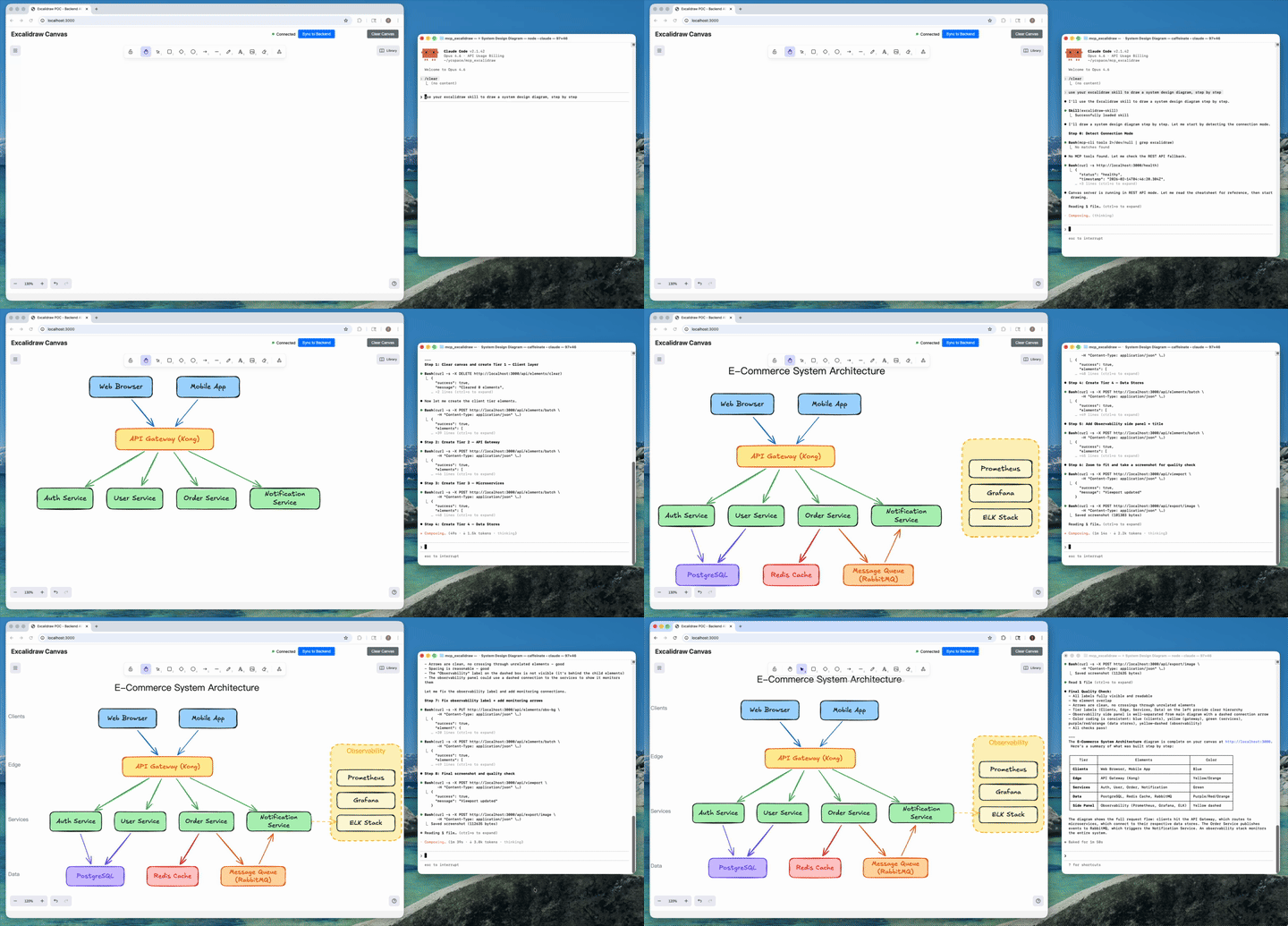
AI agent creates a complete architecture diagram from a single prompt (4x speed). Watch full video on YouTube
Table of Contents
- Demo
- What It Is
- How We Differ from the Official Excalidraw MCP
- What's New
- Quick Start (Local)
- Quick Start (Docker)
- Configure MCP Clients
- Agent Skill (Optional)
- MCP Tools (26 Total)
- Testing
- Troubleshooting
- Known Issues / TODO
- Development
What It Is
This repo contains two separate processes:
- Canvas server: web UI + REST API + WebSocket updates (default
http://localhost:3000) - MCP server: exposes MCP tools over stdio; syncs to the canvas via
EXPRESS_SERVER_URL
How We Differ from the Official Excalidraw MCP
Excalidraw now has an official MCP — it's great for quick, prompt-to-diagram generation rendered inline in chat. We solve a different problem.
| Official Excalidraw MCP | This Project | |
|---|---|---|
| Approach | Prompt in, diagram out (one-shot) | Programmatic element-level control (26 tools) |
| State | Stateless — each call is independent | Persistent live canvas with real-time sync |
| Element CRUD | No | Full create / read / update / delete per element |
| AI sees the canvas | No | describe_scene (structured text) + get_canvas_screenshot (image) |
| Iterative refinement | No — regenerate the whole diagram | Draw → look → adjust → look again, element by element |
| Layout tools | No | align_elements, distribute_elements, group / ungroup |
| File I/O | No | export_scene / import_scene (.excalidraw JSON) |
| Snapshot & rollback | No | snapshot_scene / restore_snapshot |
| Mermaid conversion | No | create_from_mermaid |
| Shareable URLs | Yes | Yes — export_to_excalidraw_url |
| Design guide | read_me cheat sheet |
read_diagram_guide (colors, sizing, layout, anti-patterns) |
| Viewport control | Camera animations | set_viewport (zoom-to-fit, center on element, manual zoom) |
| Live canvas UI | Rendered inline in chat | Standalone Excalidraw app synced via WebSocket |
| Multi-agent | Single user | Multiple agents can draw on the same canvas concurrently |
| Works without MCP | No | Yes — REST API fallback via agent skill |
TL;DR — The official MCP generates diagrams. We give AI agents a full canvas toolkit to build, inspect, and iteratively refine diagrams — including the ability to see what they drew.
What's New
v2.0 — Canvas Toolkit
- 13 new MCP tools (26 total):
get_element,clear_canvas,export_scene,import_scene,export_to_image,duplicate_elements,snapshot_scene,restore_snapshot,describe_scene,get_canvas_screenshot,read_diagram_guide,export_to_excalidraw_url,set_viewport - Closed feedback loop: AI can now inspect the canvas (
describe_scene) and see it (get_canvas_screenshotreturns an image) — enabling iterative refinement - Design guide:
read_diagram_guidereturns best-practice color palettes, sizing rules, layout patterns, and anti-patterns — dramatically improves AI-generated diagram quality - Shareable URLs:
export_to_excalidraw_urlencrypts and uploads the scene to excalidraw.com, returns a shareable link anyone can open - Viewport control:
set_viewportwithscrollToContent,scrollToElementId, or manual zoom/offset — agents can auto-fit diagrams after creation - File I/O: export/import full
.excalidrawJSON files - Snapshots: save and restore named canvas states
- Skill fallback: Agent skill auto-detects MCP vs REST API mode, gracefully falls back to HTTP endpoints when MCP server isn't configured
- Fixed all previously known issues:
align_elements/distribute_elementsfully implemented, points type normalization, removed invalidlabeltype, removed HTTP transport dead code,ungroup_elementsnow errors on failure
v1.x
- Agent skill:
skills/excalidraw-skill/(portable instructions + helper scripts for export/import and repeatable CRUD) - Better testing loop: MCP Inspector CLI examples + browser screenshot checks (
agent-browser) - Bugfixes: batch create now preserves element ids (fixes update/delete after batch); frontend entrypoint fixed (
main.tsx)
Quick Start (Local)
Prereqs: Node >= 18, npm
npm ci
npm run build
Terminal 1: start the canvas
HOST=0.0.0.0 PORT=3000 npm run canvas
Open http://localhost:3000.
Terminal 2: run the MCP server (stdio)
EXPRESS_SERVER_URL=http://localhost:3000 node dist/index.js
Quick Start (Docker)
Canvas server:
docker run -d -p 3000:3000 --name mcp-excalidraw-canvas ghcr.io/yctimlin/mcp_excalidraw-canvas:latest
MCP server (stdio) is typically launched by your MCP client (Claude Desktop/Cursor/etc.). If you want a local container for it, use the image ghcr.io/yctimlin/mcp_excalidraw:latest and set EXPRESS_SERVER_URL to point at the canvas.
Configure MCP Clients
The MCP server runs over stdio and can be configured with any MCP-compatible client. Below are configurations for both local (requires cloning and building) and Docker (pull-and-run) setups.
Environment Variables
| Variable | Description | Default |
|---|---|---|
EXPRESS_SERVER_URL |
URL of the canvas server | http://localhost:3000 |
ENABLE_CANVAS_SYNC |
Enable real-time canvas sync | true |
Claude Desktop
Config location:
- macOS:
~/Library/Application Support/Claude/claude_desktop_config.json - Windows:
%APPDATA%\Claude\claude_desktop_config.json - Linux:
~/.config/Claude/claude_desktop_config.json
Local (node)
{
  "mcpServers": {
    "excalidraw": {
      "command": "node",
      "args": ["/absolute/path/to/mcp_excalidraw/dist/index.js"],
      "env": {
        "EXPRESS_SERVER_URL": "http://localhost:3000",
        "ENABLE_CANVAS_SYNC": "true"
      }
    }
  }
}
Docker
{
  "mcpServers": {
    "excalidraw": {
      "command": "docker",
      "args": [
        "run", "-i", "--rm",
        "-e", "EXPRESS_SERVER_URL=http://host.docker.internal:3000",
        "-e", "ENABLE_CANVAS_SYNC=true",
        "ghcr.io/yctimlin/mcp_excalidraw:latest"
      ]
    }
  }
}
Claude Code
Use the claude mcp add command to register the MCP server.
Local (node) - User-level (available across all projects):
claude mcp add excalidraw --scope user \
  -e EXPRESS_SERVER_URL=http://localhost:3000 \
  -e ENABLE_CANVAS_SYNC=true \
  -- node /absolute/path/to/mcp_excalidraw/dist/index.js
Local (node) - Project-level (shared via .mcp.json):
claude mcp add excalidraw --scope project \
  -e EXPRESS_SERVER_URL=http://localhost:3000 \
  -e ENABLE_CANVAS_SYNC=true \
  -- node /absolute/path/to/mcp_excalidraw/dist/index.js
Docker
claude mcp add excalidraw --scope user \
  -- docker run -i --rm \
  -e EXPRESS_SERVER_URL=http://host.docker.internal:3000 \
  -e ENABLE_CANVAS_SYNC=true \
  ghcr.io/yctimlin/mcp_excalidraw:latest
Manage servers:
claude mcp list              # List configured servers
claude mcp remove excalidraw # Remove a server
Cursor
Config location: .cursor/mcp.json in your project root (or ~/.cursor/mcp.json for global config)
Local (node)
{
  "mcpServers": {
    "excalidraw": {
      "command": "node",
      "args": ["/absolute/path/to/mcp_excalidraw/dist/index.js"],
      "env": {
        "EXPRESS_SERVER_URL": "http://localhost:3000",
        "ENABLE_CANVAS_SYNC": "true"
      }
    }
  }
}
Docker
{
  "mcpServers": {
    "excalidraw": {
      "command": "docker",
      "args": [
        "run", "-i", "--rm",
        "-e", "EXPRESS_SERVER_URL=http://host.docker.internal:3000",
        "-e", "ENABLE_CANVAS_SYNC=true",
        "ghcr.io/yctimlin/mcp_excalidraw:latest"
      ]
    }
  }
}
Codex CLI
Use the codex mcp add command to register the MCP server.
Local (node)
codex mcp add excalidraw \
  --env EXPRESS_SERVER_URL=http://localhost:3000 \
  --env ENABLE_CANVAS_SYNC=true \
  -- node /absolute/path/to/mcp_excalidraw/dist/index.js
Docker
codex mcp add excalidraw \
  -- docker run -i --rm \
  -e EXPRESS_SERVER_URL=http://host.docker.internal:3000 \
  -e ENABLE_CANVAS_SYNC=true \
  ghcr.io/yctimlin/mcp_excalidraw:latest
Manage servers:
codex mcp list              # List configured servers
codex mcp remove excalidraw # Remove a server
OpenCode
Config location: ~/.config/opencode/opencode.json or project-level opencode.json
Local (node)
{
  "$schema": "https://opencode.ai/config.json",
  "mcp": {
    "excalidraw": {
      "type": "local",
      "command": ["node", "/absolute/path/to/mcp_excalidraw/dist/index.js"],
      "enabled": true,
      "environment": {
        "EXPRESS_SERVER_URL": "http://localhost:3000",
        "ENABLE_CANVAS_SYNC": "true"
      }
    }
  }
}
Docker
{
  "$schema": "https://opencode.ai/config.json",
  "mcp": {
    "excalidraw": {
      "type": "local",
      "command": ["docker", "run", "-i", "--rm", "-e", "EXPRESS_SERVER_URL=http://host.docker.internal:3000", "-e", "ENABLE_CANVAS_SYNC=true", "ghcr.io/yctimlin/mcp_excalidraw:latest"],
      "enabled": true
    }
  }
}
Antigravity (Google)
Config location: ~/.gemini/antigravity/mcp_config.json
Local (node)
{
  "mcpServers": {
    "excalidraw": {
      "command": "node",
      "args": ["/absolute/path/to/mcp_excalidraw/dist/index.js"],
      "env": {
        "EXPRESS_SERVER_URL": "http://localhost:3000",
        "ENABLE_CANVAS_SYNC": "true"
      }
    }
  }
}
Docker
{
  "mcpServers": {
    "excalidraw": {
      "command": "docker",
      "args": [
        "run", "-i", "--rm",
        "-e", "EXPRESS_SERVER_URL=http://host.docker.internal:3000",
        "-e", "ENABLE_CANVAS_SYNC=true",
        "ghcr.io/yctimlin/mcp_excalidraw:latest"
      ]
    }
  }
}
Notes
- Docker networking: Use
host.docker.internalto reach the canvas server running on your host machine. On Linux, you may need--add-host=host.docker.internal:host-gatewayor use172.17.0.1. - Canvas server: Must be running before the MCP server connects. Start it with
npm run canvas(local) ordocker run -d -p 3000:3000 ghcr.io/yctimlin/mcp_excalidraw-canvas:latest(Docker). - Absolute paths: When using local node setup, replace
/absolute/path/to/mcp_excalidrawwith the actual path where you cloned and built the repo. - In-memory storage: The canvas server stores elements in memory. Restarting the server will clear all elements. Use the export/import scripts if you need persistence.
Agent Skill (Optional)
This repo includes a skill at skills/excalidraw-skill/ that provides:
- Workflow playbook (
SKILL.md): step-by-step guidance for drawing, refining, and exporting diagrams - Cheatsheet (
references/cheatsheet.md): MCP tool and REST API reference - Helper scripts (
scripts/*.cjs): export, import, clear, healthcheck, CRUD operations
The skill complements the MCP server by giving your AI agent structured workflows to follow.
Install The Skill (Codex CLI example)
mkdir -p ~/.codex/skills
cp -R skills/excalidraw-skill ~/.codex/skills/excalidraw-skill
To update an existing installation, remove the old folder first (rm -rf ~/.codex/skills/excalidraw-skill) then re-copy.
Install The Skill (Claude Code)
User-level (available across all your projects):
mkdir -p ~/.claude/skills
cp -R skills/excalidraw-skill ~/.claude/skills/excalidraw-skill
Project-level (scoped to a specific project, can be committed to the repo):
mkdir -p /path/to/your/project/.claude/skills
cp -R skills/excalidraw-skill /path/to/your/project/.claude/skills/excalidraw-skill
Then invoke the skill in Claude Code with /excalidraw-skill.
To update an existing installation, remove the old folder first then re-copy.
Use The Skill Scripts
All scripts respect EXPRESS_SERVER_URL (default http://localhost:3000) or accept --url.
EXPRESS_SERVER_URL=http://127.0.0.1:3000 node skills/excalidraw-skill/scripts/healthcheck.cjs
EXPRESS_SERVER_URL=http://127.0.0.1:3000 node skills/excalidraw-skill/scripts/export-elements.cjs --out diagram.elements.json
EXPRESS_SERVER_URL=http://127.0.0.1:3000 node skills/excalidraw-skill/scripts/import-elements.cjs --in diagram.elements.json --mode batch
When The Skill Is Useful
- Repository workflow: export elements as JSON, commit it, and re-import later.
- Reliable refactors: clear + re-import in
syncmode to make canvas match a file. - Automated smoke tests: create/update/delete a known element to validate a deployment.
- Repeatable diagrams: keep a library of element JSON snippets and import them.
See skills/excalidraw-skill/SKILL.md and skills/excalidraw-skill/references/cheatsheet.md.
MCP Tools (26 Total)
| Category | Tools |
|---|---|
| Element CRUD | create_element, get_element, update_element, delete_element, query_elements, batch_create_elements, duplicate_elements |
| Layout | align_elements, distribute_elements, group_elements, ungroup_elements, lock_elements, unlock_elements |
| Scene Awareness | describe_scene, get_canvas_screenshot |
| File I/O | export_scene, import_scene, export_to_image, export_to_excalidraw_url, create_from_mermaid |
| State Management | clear_canvas, snapshot_scene, restore_snapshot |
| Viewport | set_viewport |
| Design Guide | read_diagram_guide |
| Resources | get_resource |
Full schemas are discoverable via tools/list or in skills/excalidraw-skill/references/cheatsheet.md.
Testing
Canvas Smoke Test (HTTP)
curl http://localhost:3000/health
MCP Smoke Test (MCP Inspector)
List tools:
npx @modelcontextprotocol/inspector --cli \
  -e EXPRESS_SERVER_URL=http://localhost:3000 \
  -e ENABLE_CANVAS_SYNC=true -- \
  node dist/index.js --method tools/list
Create a rectangle:
npx @modelcontextprotocol/inspector --cli \
  -e EXPRESS_SERVER_URL=http://localhost:3000 \
  -e ENABLE_CANVAS_SYNC=true -- \
  node dist/index.js --method tools/call --tool-name create_element \
  --tool-arg type=rectangle --tool-arg x=100 --tool-arg y=100 \
  --tool-arg width=300 --tool-arg height=200
Frontend Screenshots (agent-browser)
If you use agent-browser for UI checks:
agent-browser install
agent-browser open http://127.0.0.1:3000
agent-browser wait --load networkidle
agent-browser screenshot /tmp/canvas.png
Troubleshooting
- Canvas not updating: confirm
EXPRESS_SERVER_URLpoints at the running canvas server. - Updates/deletes fail after batch creation: ensure you are on a build that includes the batch id preservation fix (merged via PR #34).
Known Issues / TODO
All previously listed bugs have been fixed in v2.0. Remaining items:
- Persistent storage: Elements are stored in-memory — restarting the server clears everything. Use
export_scene/ snapshots as a workaround. - Image export requires a browser:
export_to_imageandget_canvas_screenshotrely on the frontend doing the actual rendering. The canvas UI must be open in a browser.
Contributions welcome!
Development
npm run type-check
npm run build
Как установить
Выполни в терминале:
claude mcp add excalidraw-mcp-server -- npx 


