
Fabric Admin Server
БесплатноНе проверенProvides MCP tools to manage Microsoft Fabric capacities, including listing, creating, updating, and deleting them, using Azure authentication.

Описание
Provides MCP tools to manage Microsoft Fabric capacities, including listing, creating, updating, and deleting them, using Azure authentication.
README
An open-source MCP server to perform operations on Microsoft Fabric, like administration and management of Fabric capacities. At this moment, this repo has an initial set of tools to manage Capacities, but it will be expanded to further support additional tools and Fabric administration workloads.
✨ Features
- Exposes Fabric admin operations as MCP tools;
- Uses secure, yet flexible, authentication mechanisms for Azure and Fabric, like Service Principal and Managed Identities;
- FastAPI + FastMCP for a modern, async, extensible backend;
🤖 Interacting with the MCP Server
You can use any MCP Client to interact with this MCP server. Below, is a sample showing how to interact with it using GitHub Copilot on VSCode as a MCP Client:
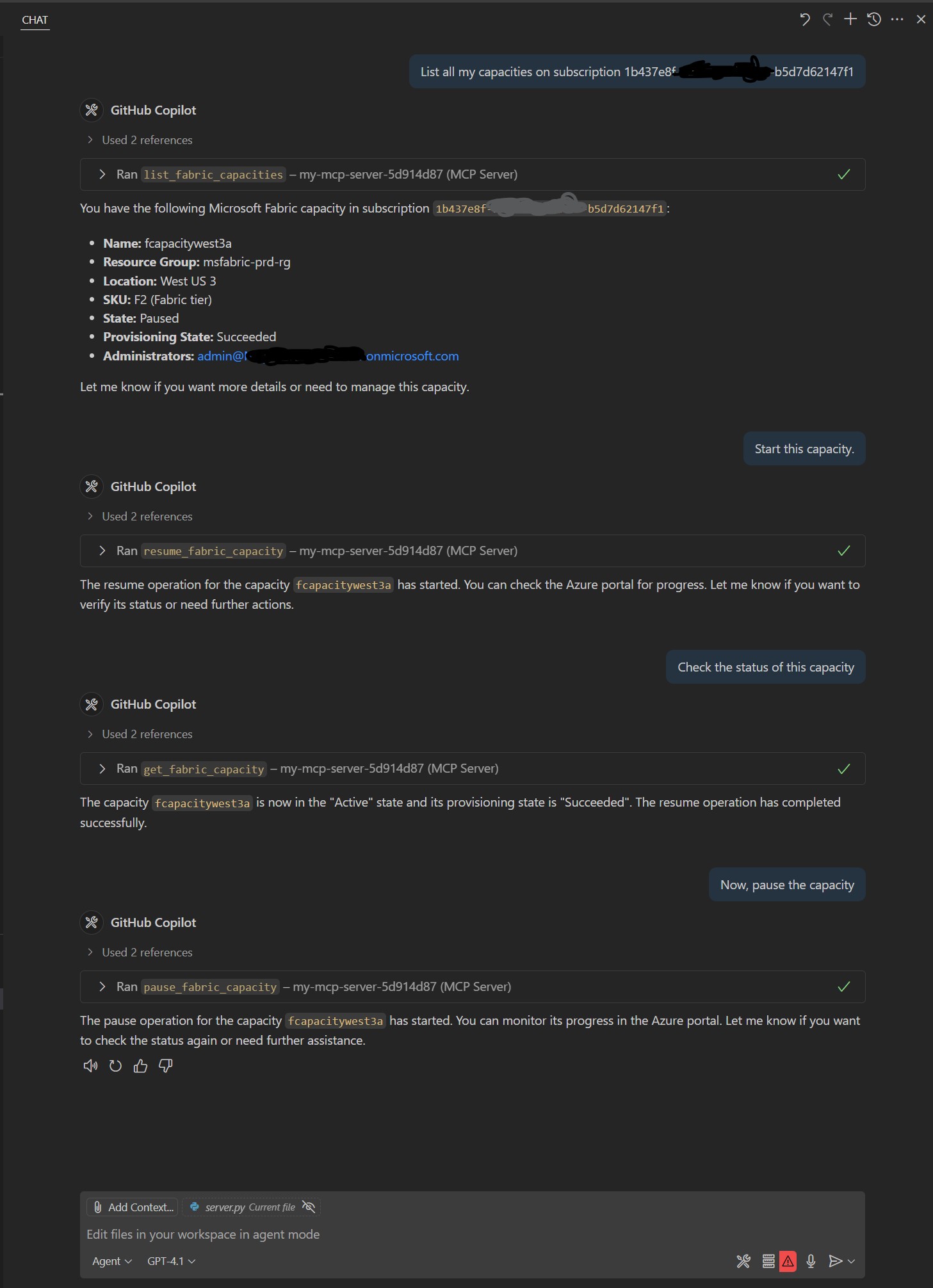
This example demonstrates how the MCP tools are exposed and can be accessed for managing Microsoft Fabric resources.
🗂️ Project Structure
server.py— Main entry point to start the MCP servercommon.py— Shared utilities and loggingsrc/capacity/— Logic to interact with Fabric and expose then as MCP toolsrequirements.txt— Python dependencies
⚡ Quickstart
Install dependencies:
pip install -r requirements.txtSet up authentication:
- The server uses
DefaultAzureCredentialfor secure Azure API access. - You can authenticate using:
- Azure CLI: Run
az loginin your terminal. - Managed Identity: If running in Azure, ensure the managed identity has the required permissions.
- Service Principal: Create a
.envfile in the project root with applicable variables (see "Using a Service Principal for Authentication" section below for details).
- Azure CLI: Run
- The server uses
Run the MCP server locally:
python server.pyThe server will start at http://127.0.0.1:8000/mcp/.
Test with VS Code as a Client:
- Open the Command Palette (
Ctrl+Shift+P), search for "MCP: Connect to Server", and enterhttp://127.0.0.1:8000/mcp/. - You can now use MCP tools exposed by this server directly from VS Code using Agent Mode.
- Open the Command Palette (
📦 Requirements
- Python 3.8+;
- Azure credentials with proper access to the backend (Azure/Fabric admin)/
🔐 Using a Service Principal for Authentication
Create a Service Principal (if you don't have one):
az ad sp create-for-rbac --name <your-app-name> --role Contributor --scopes /subscriptions/<your-subscription-id>Note the
appId(Client ID),tenant, andpassword(Client Secret) from the output.Create a
.envfile in the project root: Copy.env.exampleto.envand fill in your values:AZURE_CLIENT_ID=your-service-principal-client-id AZURE_TENANT_ID=your-tenant-id AZURE_CLIENT_SECRET=your-service-principal-client-secretAuthorize the Service Principal: Ensure the Service Principal has appropriate permissions. For example, at least
Contributorat subscription or Resource Group level to manage Fabric Capacities. Additional Admin API access will be required for additional tools yet to be developed.Run the server: The server will automatically use these credentials for authentication via
DefaultAzureCredential.
🚀 Future Improvements
- Add option to deploy as a Docker image.
- Add option to deploy as an Azure Function.
- Add tools for additional Fabric management operations, such as Workspace management and reviewing capacity settings.
- Improve documentation and provide more usage examples.
- Add automated tests and CI/CD pipeline for deployments.
Установка Fabric Admin Server
У этого сервера нет опубликованного пакета — он собирается из исходников. Открой репозиторий и следуй инструкции в README.
▸ github.com/gmh5225/fabric-admin-mcpFAQ
Fabric Admin Server MCP бесплатный?
Да, Fabric Admin Server MCP бесплатный — установка в пару кликов через Unyly без оплаты.
Нужен ли API-ключ для Fabric Admin Server?
Нет, Fabric Admin Server работает без API-ключей и переменных окружения.
Fabric Admin Server — hosted или self-hosted?
Доступен hosted-вариант: Unyly запускает сервер в облаке, локальная установка не обязательна.
Как установить Fabric Admin Server в Claude Desktop, Claude Code или Cursor?
Открой Fabric Admin Server на unyly.org, выбери вкладку своего клиента (Claude Desktop, Claude Code, Cursor) и нажми Install — конфиг сгенерируется автоматически, без правки JSON.
Похожие MCP
GitHub
PRs, issues, code search, CI status
 автор: GitHub
Filesystem
Secure file operations with configurable access controls.
Memory
Knowledge graph-based persistent memory system.
Template MCP Server
A CLI tool to create a new Model Context Protocol server project with TypeScript support, dual transport options, and an extensible structure
 автор: mcpdotdirect
Compare Fabric Admin Server with
Не уверен что выбрать?
Найди свой стек за 60 секунд
Автор?
Embed-бейдж для README
Похожее
Все в категории development