
Faf Trinity
БесплатноНе проверенMCP server that exposes project context, persistent memory, and agent identity via FAF formats, providing tools like context-aware callTool, remember/recall, an

Описание
MCP server that exposes project context, persistent memory, and agent identity via FAF formats, providing tools like context-aware callTool, remember/recall, and whoami through file-backed storage.
README
npm CI license: MIT mcp-context-card MCP server Business card · Get yours →
Get one. Or add it to yours. The essential MCP server for a project's context, memory, and identity — discoverable to any MCP client, and rendered as one card you can read.
| Light | Dark |
|---|---|
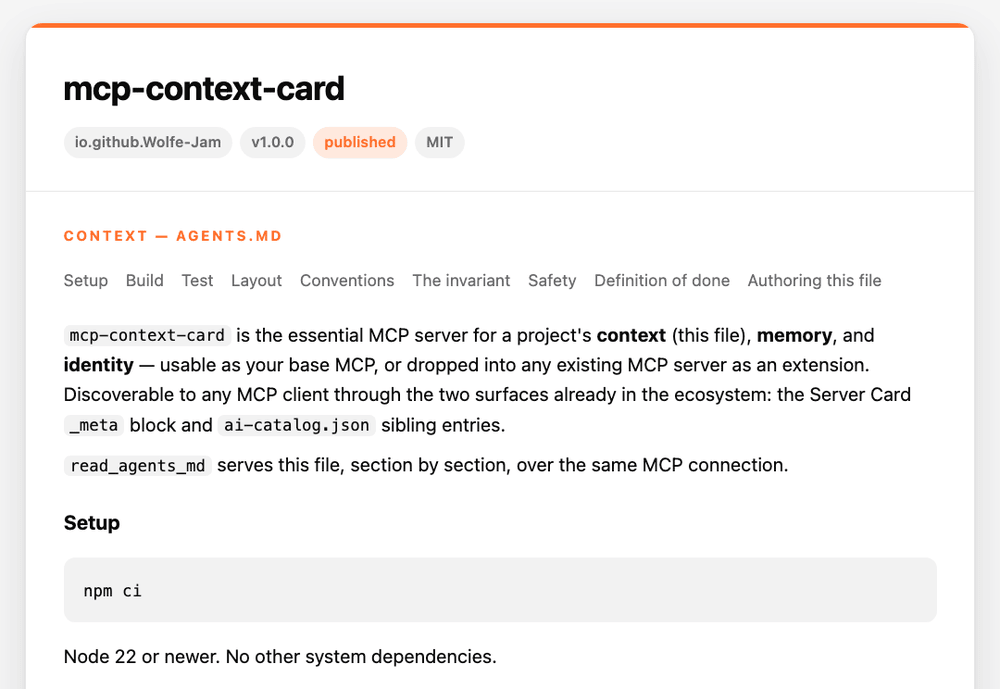 |
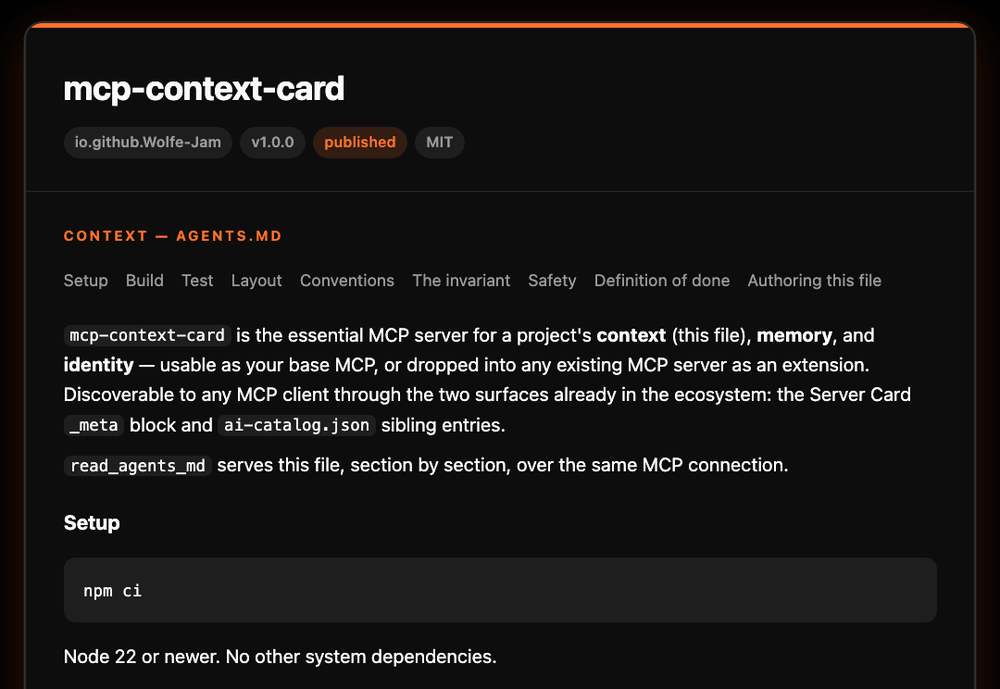 |
See your own project's business card — run this in its folder. It writes
context-card.html and opens it in your browser. The front is the card: name,
title, one-liner. Flip it for the back: About, Context, Memory, Discovery.
npx mcp-context-card card
In your AI client, once the server is added (Add it to your setup), say
show context card. The AI picks where it appears: drawn in the chat by
hosts that support MCP Apps, as Markdown elsewhere. Name a place to choose:
show context card as markdown, show context card in the browser. Clients
that list MCP prompts also offer it as the prompt show; in Claude Code type
/contextcard:show.
context — the project's AGENTS.md, served whole or one section at a time.
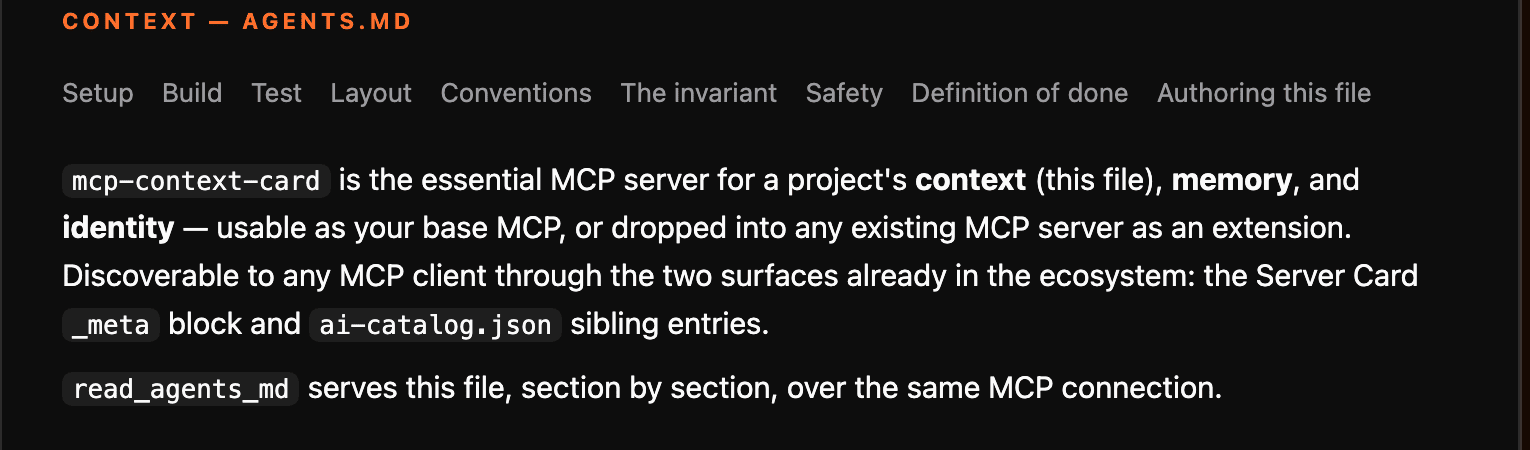
memory — facts that persist across sessions, in a file.
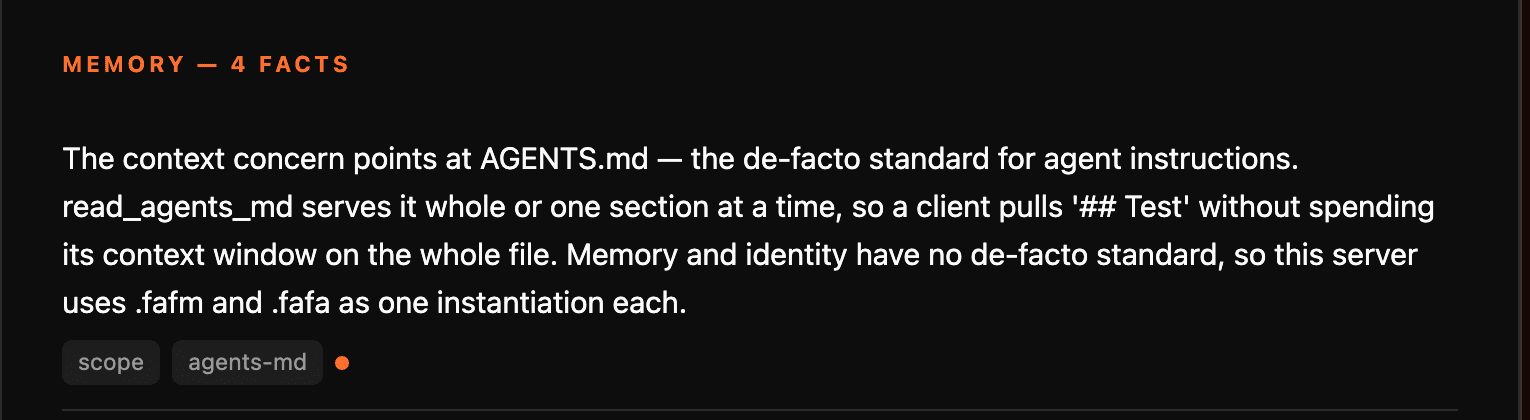
identity — what this server is, from its own .fafa (agent.fafa, else .well-known/fafa).

Discovery goes through two surfaces already in the ecosystem: the Server Card
_meta block and ai-catalog.json sibling entries.
Pick one
| You want to… | |
|---|---|
Add an AGENTS.md — you don't have one |
author_agents_md drafts one from your repo's real facts |
Improve an AGENTS.md — you have one, make it the best it can be |
the same tool, automatically — drop in a project.faf and it upgrades to BEST: goal, who it's for, why |
| Get a new MCP server base — context, memory, identity, wired | stand this up as-is; a host has all three before you write a tool of your own |
| Improve your MCP with context, memory, ID — you already run one | run it alongside your existing server; nothing to migrate, it composes |
A base MCP — or an extension for any other
Context, memory, and identity are essential — every MCP host needs an agent
that knows a project's instructions, remembers facts across sessions, and can
say what it is. mcp-context-card is those three, done once:
- Stand it up as your base MCP. Point a host at it and an agent already
has
AGENTS.mdserved section‑by‑section,remember/recall/forgetmemory that survives a restart, and awhoamiidentity — before a single tool of your own is written. - Or extend any existing MCP with it. Run it alongside a server you already have — filesystem, git, a database, your own — and that agent gains context, memory, and identity discovery it didn't have. Nothing to migrate; it composes.
Ten tools, one prompt (show), two discovery surfaces already in the ecosystem (Server Card
_meta, ai-catalog.json), and a rendered card. MIT, on npm.
It composes:
- serve · discover · render — this server
- author BETTER, keep true — agents-md-facts (
author_agents_mdwraps it for the facts layer; adds a BEST layer of its own fromproject.fafwhen one exists) - files · shell · git — server-filesystem, server-git / github‑mcp‑server, your test runner's MCP
Vendor-free — context is plain Markdown (AGENTS.md); the memory and
identity formats are swappable examples. It reads and writes only its own
three files (AGENTS.md, project.fafm, and agent.fafa or .well-known/fafa), plus the
context-card.html it saves on request — no general file access, no shell,
no search.
The card
The screenshot at the top of this page is exactly this: the same sources rendered as a business card in one self‑contained HTML page. The view for people: read it, screenshot it, drop it in a PR, put it on a status page.
- Front: the name, a title (what it is and its version: "MCP server", "A2A
agent", from where the project's
.fafasays it runs) and a one-liner (the start of its description). - Back (Flip): tabs for About (the identity in full),
Skills (when the
.fafalists capabilities), Context (AGENTS.md), Memory and Discovery. Long content scrolls inside the card. - Landscape or portrait: the ▭ ▯ button switches the view;
--portrait/?layout=portraitsets it. - Light or dark card: the card's colour is its own, like a printed card.
--theme/?theme=sets it (default: follow your OS), and ◐ switches it. The page around it always follows your OS.
Flip, tabs and the view switch are plain CSS, so they work with scripts off.
The one small inline script adds Expand all, opens a #section link on the
back, and opens every section for printing. Hosts that support MCP Apps read
ui://mcp-context-card/card.html: this same page, plus a hidden inline view
and the helper bundled in (scripts/bundle-card-app.mjs), so the host can
fit its frame. Nothing is loaded from the network. The saved
context-card.html, GET /card, and the CLI are the plain page, without
that helper and without the inline view.
In a host, the inline view is a mini card for the panel: monogram, name,
kind · version, one line, and a strip of counts (sections · facts ·
identity), with one action, "Open full card". It shows when the host's
display mode is inline (or picture-in-picture). Fullscreen, and any page
with no host, is the full card. "Open full card" asks the host for
fullscreen; a host that stays smaller points to save_context_card, which
writes the full card to context-card.html.
--expanded / ?expand=all renders both faces flat, every section open,
for a screenshot or print.
npx mcp-context-card card            # at a terminal: writes context-card.html and opens it
npx mcp-context-card card --portrait # the tall view
npx mcp-context-card card --expanded # both faces flat, every section open
npx mcp-context-card card > x.html   # piped/redirected: raw HTML to stdout
GET /card                            # live, on the HTTP transport
GET /card?layout=portrait&theme=light&accent=%230066cc
render_context_card is the one command, with three outcomes. In a chat
whose host supports MCP Apps,
the host draws the card (the mini card in a panel) and the model gets a short
line. Anywhere else, a terminal for one, the reply is the text card: the card
as Markdown. Ask for it as text and format: "markdown" gives the text card in
any chat (an MCP Apps host still draws the card too). HTML goes only to a browser: save_context_card writes
context-card.html into the project, opens it in your browser when the
server runs locally, and replies with the card as Markdown (identity, the
AGENTS.md sections, memory, discovery), a link to the full card, and its
address to copy. The Markdown is a tl;dr by default: five facts, each cut to
its first sentence as stored, so it stays small however much a project
remembers. detail: "full" lists every fact whole. The server's
instructions send show context card to render_context_card, and use
save_context_card only when the user asks for the browser or a file.
Light, dark, or auto. The colour is the owner's: set it in the project's
.fafa (metadata.cards.accent: "#0066cc"), or pass any hex with --accent
or ?accent. With none, the card is drawn in ink, black or white; no colour
is guessed.
This repo's own card, live: auto ·
light ·
dark
(in the AAIF orange its .fafa declares).
Add it to your setup
No AGENTS.md yet?
The author_agents_md tool authors one — BETTER from your repo's real
facts (build/test commands, entry points, toolchain conventions, via
agents-md-facts), or
BEST when a project.faf exists: the same facts, plus its structured
goal, who it's for, and why, as a section ahead of them. Nothing to
configure — the tier follows what's actually there.
(The ladder this follows.)
To author or keep the facts layer true outside a session:
npx agents-md-facts          # author / refresh AGENTS.md
npx agents-md-facts --check  # fail if missing or stale (CI, pre-commit)
See the card
One command, no host, no config — from your project directory:
npx mcp-context-card card
At a terminal it writes context-card.html and opens it in your browser. Piped
or redirected (> card.html, a script, CI) it writes raw HTML to stdout instead;
--stdout forces that from a terminal too. --expanded opens every section.
Wire it into a host
goose, Claude Desktop, Cursor, or any stdio host:
{
  "mcpServers": {
    "contextcard": {
      "command": "npx",
      "args": ["-y", "mcp-context-card"]
    }
  }
}
No path to configure: the server asks the host which project you're in (MCP
roots — goose sends its session's working directory, the Cursor editor its open
folder), then falls back to the directory it was started in if that has an
AGENTS.md. list_context_sources
reports which project it picked and how. To pin one project instead, set
"env": { "MCP_CONTEXT_CARD_ROOT": "/abs/path/to/your/project" }; that always
wins. Identity is optional. Over HTTP instead:
PORT=8080 npx mcp-context-card. Requires Node ≥22.
HTTP mode is local by default, as the MCP transports spec asks: it binds
127.0.0.1, refuses foreign browser origins with 403, and refuses DNS names
rebound to this machine. HOST=0.0.0.0 exposes it (a container or hosted
deploy). There is no authentication or rate limiting, so put an exposed server
behind your own.
Memory is session data: an exposed server shows only its count on /card, and
never serves or lists project.fafm, unless you set
MCP_CONTEXT_CARD_PUBLISH_MEMORY=1. Details:
docs/TRANSPORT.md.
In a host that shows MCP Apps (goose, for one), the card comes with the
official MCP Apps helper, so it reports its size and fits its frame (about
700 KB, loaded by the host, not the model). For the plain card instead
(about 30 KB, the host's default frame), set
"env": { "MCP_CONTEXT_CARD_APP": "plain" }. Everywhere else the card is
plain either way.
In goose, the first start downloads the package, and goose can stop waiting
before it's ready ("process quit before initialization"). Restart goose once it
has downloaded, or install it once (npm i -g mcp-context-card) and set the
command to mcp-context-card.
If command: "npx" fails to spawn (spawn npx ENOENT — seen on Cursor, whose
host process doesn't inherit a shell PATH), point command at node and
the installed dist/bin.js instead — see
docs/WIRING.md. Transport choice is
in docs/TRANSPORT.md.
Extending an MCP you already run: most hosts accept more than one
mcpServers entry — add contextcard alongside server-filesystem,
server-git, or your own, and every agent in that host gains context,
memory, and identity discovery without anything else changing.
Your identifiers
The AI Catalog names each entry urn:air:{domain}:{namespace}:{name}, and
the domain is yours. It comes from your project's .fafa: run
npx faf-cli card init (or --domain example.com), and it writes
agent.id: urn:air:example.com:agent:<short-name>. Your catalog then publishes
urn:air:example.com:context:<short-name> and so on, with no code to change.
This repo's own .fafa says faf.one; that's our example, and yours says yours.
With no .fafa, no domain is invented: the served catalog uses the host it's
served from (localhost when you run it locally), and the static
.well-known/ai-catalog.json uses plain <short-name>:<namespace> IDs.
Why
AGENTS.md is the de-facto standard for telling a coding agent how to work in a
repo. But a client has to know the file exists and read the whole thing into
context. There is no standard way for a server to say "here is my AGENTS.md,
here is what I remember, here is who I am" — so every server that wants this
grows its own shape.
mcp-context-card answers all three through mechanisms that already exist:
- Server Card
_meta(SEP‑2127) — one reverse‑DNS‑namespaced key per concern, readable in‑band as an MCP resource and atGET /mcp/server-card(the 1.x/.well-known/mcp/server-cardstill answers). ai-catalog.json— the Server Card plus sibling entries keyed by media type, atGET /.well-known/ai-catalog.json.
The context concern points at AGENTS.md (text/markdown). Memory and identity
have no de‑facto standard yet, so the examples here use
.fafm and
.fafa — one instantiation each,
swap in your own.
The wire‑level detail is in docs/MECHANISMS.md.
Tools
| Tool | What it's for |
|---|---|
author_agents_md |
draft an AGENTS.md — BETTER from the repo's facts (via agents-md-facts), BEST when a project.faf exists — ready to drop in |
read_agents_md |
return the project's AGENTS.md — whole, or one section by heading |
list_agents_md_sections |
the headings and their levels, so a client pulls one section instead of the whole file (level 1 is the title, which the card doesn't count) |
remember |
write a fact that will still be there next session |
recall |
read a fact stored in a previous session |
forget |
drop or correct a stale fact |
whoami |
this server's name, vendor, version, status, license |
list_context_sources |
what this project publishes, in what media types, via which surface |
render_context_card |
shows the card: drawn in the chat by hosts that support MCP Apps, the card as Markdown everywhere else; format: "markdown" gives the Markdown in any chat (the HTML card: save_context_card, GET /card) |
save_context_card |
write the card to context-card.html in the project and, when the server runs locally, open it in your browser; returns the card as Markdown plus a link to the full version |
Seven tools only read. remember and forget write the memory file, and
save_context_card writes context-card.html, so those three are marked
destructive and a host can ask before running them. Every tool carries a
title and MCP tool annotations.
One prompt, show, asks the model to show the context card. Clients that
list MCP prompts offer it as a command.
The demo
npm run demo walks through context, memory, identity and discovery, live,
over both transports:
- Context — list the
AGENTS.mdsections, then pull just## Test. - Memory —
remember()a fact, stop the server process, start a new one,recall()the same fact. Only the file carries it across. - Identity —
whoami(), and the Server Card_metablock read back from a live client. - Discovery —
list_context_sources(), then the same server over stateless HTTP with its.well-knownroutes andGET /card.
259 tests on Linux, macOS, and Windows, coverage‑gated in CI.
npm run wjttc runs the WJTTC certification suite (seven tiers, from protocol
and Server Card conformance to stdio/HTTP parity and the shipped package). Two spawn a real
child process and check a remembered fact survives the restart — one against
an existing project.fafm, one starting from a project that has never had
one; another checks the stdio and HTTP tool surfaces match, and another checks
every tool's title and behaviour hints against what it actually does.
src/conformance/discovery.ts checks any server's Server Card, AI Catalog and
transport security against the specs, one MUST or SHOULD at a time.
Layout
| Path | What |
|---|---|
src/server.ts |
the ten tools + the Server Card and card resources |
src/agents-md.ts |
reads and section‑splits AGENTS.md |
src/author.ts |
author_agents_md — BETTER via agents-md-facts, BEST when project.faf exists |
src/md.ts |
a minimal dependency‑free Markdown → HTML renderer |
src/render-card.ts |
the card — reads identity + AGENTS.md + memory + discovery into a card; agent-business-card draws it as one HTML page |
src/browser/card-app.ts |
the card's MCP Apps script, bundled into the ui:// resource only |
src/memory.ts |
file‑backed remember / recall / forget |
src/identity.ts |
whoami (.fafa → package.json fallback) + the _meta block |
src/server-card.ts |
the MCP Server Card (SEP-2127, schema v1) |
src/catalog-gen.ts |
writes ai-catalog.json: the Server Card + its sibling entries |
src/transport/http.ts |
the stateless Streamable HTTP app (Hono) |
src/transport/guard.ts |
Origin and Host checks (DNS-rebinding protection) |
src/conformance/discovery.ts |
a portable Server Card / AI Catalog / transport checker |
src/bin.ts |
the entry point — stdio · --http · card · --help · --version |
Related
- Server Card SEP‑2127 · ai-catalog · AGENTS.md
- mcp-project-context — an earlier take on the context concern alone
text/markdown(AGENTS.md) ·application/vnd.fafm+yaml·application/vnd.fafa+yaml
License
MIT.
This repo dogfoods what it serves — its AGENTS.md is a real, current file, and
it ships a project.faf as the structured source behind it.
Установка Faf Trinity
У этого сервера нет опубликованного пакета — он собирается из исходников. Открой репозиторий и следуй инструкции в README.
▸ github.com/Wolfe-Jam/faf-trinityFAQ
Faf Trinity MCP бесплатный?
Да, Faf Trinity MCP бесплатный — установка в пару кликов через Unyly без оплаты.
Нужен ли API-ключ для Faf Trinity?
Нет, Faf Trinity работает без API-ключей и переменных окружения.
Faf Trinity — hosted или self-hosted?
Self-hosted: сервер запускается локально на твоей машине командой из раздела установки.
Как установить Faf Trinity в Claude Desktop, Claude Code или Cursor?
Открой Faf Trinity на unyly.org, выбери вкладку своего клиента (Claude Desktop, Claude Code, Cursor) и нажми Install — конфиг сгенерируется автоматически, без правки JSON.
Похожие MCP
Opencode Omniroute Plugin
OpenCode plugin for the OmniRoute AI Gateway. Drives dynamic model discovery, /connect auth flow, and multi-instance OmniRoute providers via the official @openc
 автор: GitHub Actions
Roblox Studio
Enables AI coding tools to control Roblox Studio for workspace exploration, instance manipulation, and script management. It provides tools for playtesting, sce
 автор: paralov
Antigravity Drawio
MCP server that enables AI assistants to create, parse, render, and validate Draw.io diagrams programmatically.
 автор: S-SUJAN-S
Fetch
Web content fetching and conversion for efficient LLM usage.
AWS KB Retrieval
Retrieval from AWS Knowledge Base using Bedrock Agent Runtime.
 автор: modelcontextprotocol
Spring AI MCP Server
Provides auto-configuration for setting up an MCP server in Spring Boot applications.
llm-analysis-assistant
A very streamlined mcp client that supports calling and monitoring stdio/sse/streamableHttp, and can also view request responses through the /logs page. It also
 автор: xuzexin-hz
MCP-Agent
A simple, composable framework to build agents using Model Context Protocol by [LastMile AI](https://www.lastmileai.dev)
 автор: lastmile-ai
Spring AI MCP Client
Provides auto-configuration for MCP client functionality in Spring Boot applications.
mcp.natoma.ai
A Hosted MCP Platform to discover, install, manage and deploy MCP servers by [Natoma Labs](https://www.natoma.ai)
Compare Faf Trinity with
Не уверен что выбрать?
Найди свой стек за 60 секунд
Автор?
Embed-бейдж для README
Похожее
Все в категории ai