
Fastcontext Explore
БесплатноНе проверенAn MCP server that wraps Microsoft's FastContext as a read-only repository exploration subagent, enabling coding agents to delegate broad code searches and rece

Описание
An MCP server that wraps Microsoft's FastContext as a read-only repository exploration subagent, enabling coding agents to delegate broad code searches and receive compact file:line citations.
README
Your coding agent is wasting tokens. In GPT-5.4 trajectories, reading and searching
account for 56% of all tool-use turns and 47% of the main agent's total tokens —
just to locate the relevant code. FastContext offloads that entirely to a dedicated
subagent, so your main agent receives clean file:line citations instead of a long trail
of exploratory reads.
The result: up to +5.5% accuracy and up to 60% fewer tokens on SWE-bench benchmarks.
This repo is the MCP glue that wires FastContext into every major editor with one click.
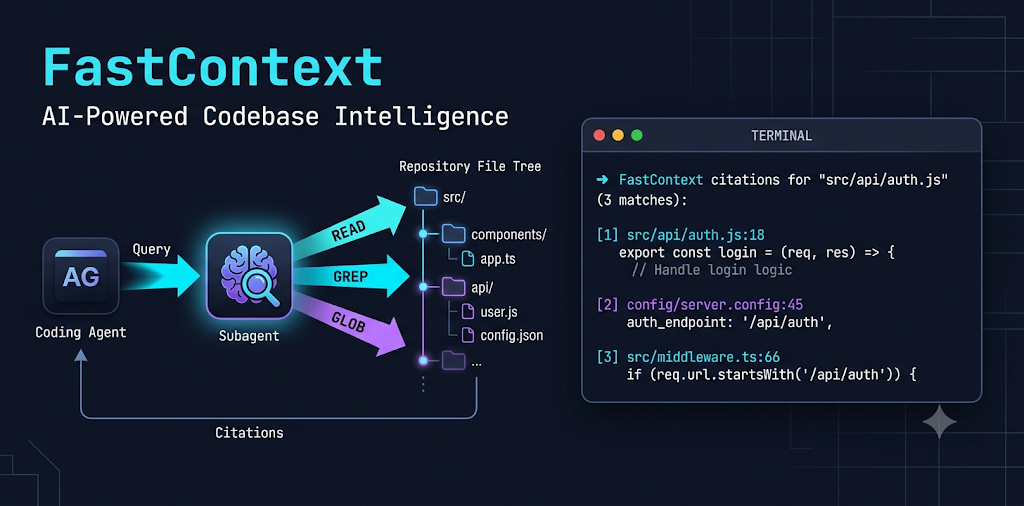 Image created using Nano Banana
fastcontext_explore("where are webhook signatures verified?")
→  src/auth/webhook.py:42-61
→  config/secrets.py:18
Your agent reads those two ranges. Done.
The model
FastContext-1.0 is a model family purpose-trained for repository exploration by Microsoft Research (arXiv:2606.14066). It is not a general LLM asked to search code — it is trained end-to-end on exploration trajectories using SFT then refined with task-grounded RL (GRPO), with rewards based on file- and line-level F1.
At each turn it issues parallel READ / GLOB / GREP tool calls, refines based on
observations, and stops with a compact <final_answer> citation block. Nothing more
enters the main agent's context.
Model family
| Variant | Backbone | Best for | HuggingFace ID |
|---|---|---|---|
| FC-4B-SFT | Qwen3-4B-Instruct | CPU / any GPU, turnkey | microsoft/FastContext-1.0-4B-SFT |
| FC-4B-RL | Qwen3-4B-Instruct | Best 4B quality (RL-refined) | microsoft/FastContext-1.0-4B-RL |
| FC-30B-SFT | Qwen3-Coder-30B-A3B | Max quality, GPU server | microsoft/FastContext-1.0-30B-SFT |
| GGUF / MLX | any of the above | llama.cpp / Apple Silicon | search HuggingFace for FastContext GGUF / FastContext MLX |
All variants support up to 262K token context.
The compact 4B-RL explorer can outperform the larger 30B-SFT — e.g. on SWE-bench Pro with GLM-5.1 it reaches 22.5 vs. 20.0 while using fewer tokens.
Where to download
- LM Studio — search
FastContextin the model browser. Pick FC-4B-SFT or FC-4B-RL for consumer hardware; use MLX builds on Apple Silicon. - HuggingFace — microsoft/FastContext-1.0-4B-SFT, microsoft/FastContext-1.0-4B-RL, microsoft/FastContext-1.0-30B-SFT.
- Ollama / llama.cpp — any GGUF community conversion; search HuggingFace for
FastContext GGUF.
Once loaded, copy the model ID exactly as shown by your runtime and paste it into --model.
Why it's fast
- Small by design: a 4B model laser-focused on one task beats a 70B generalist at it.
- Parallel tool calls in a single turn: covers multiple search hypotheses at once.
- Local and private: no code leaves your machine, no API cost per search.
Install
Add to Cursor Install in VS Code Install in VS Code Insiders
Claude Code (no button — one command):
claude mcp add fastcontext -- uvx --from git+https://github.com/LIVELUCKY/fastcontext-integrations fastcontext-mcp \
  --base-url http://localhost:1234/v1 --model your-model-id --api-key lm-studio
After clicking a button or running the command, set --model to the exact ID your
runtime shows for the loaded model.
Using a remote API? Keep the key secure — see docs/SETUP.md#secure-api-keys.
Prerequisites (once)
# 1. uv (the Python tool runner)
curl -LsSf https://astral.sh/uv/install.sh | sh

# 2. the FastContext explorer CLI on your PATH
uv tool install git+https://github.com/microsoft/fastcontext

# 3. a FastContext model loaded in an OpenAI-compatible runtime
#    e.g. LM Studio: search "FastContext", download FC-4B-SFT or FC-4B-RL,
#    Developer tab → Start Server (serves http://localhost:1234/v1, no API key needed)
No clone, no absolute paths, no environment variables: the server runs via uvx straight
from this repo and takes its connection from the --base-url / --model / --api-key
args. Full details in docs/SETUP.md.
Per-editor setup
GitHub Copilot (VS Code)
Click the Install in VS Code button above — it registers the server directly in VS Code, which Copilot agent mode uses.
Or copy examples/vscode.mcp.json into your project's .vscode/mcp.json
(top-level key is servers, not mcpServers). Enable agent mode — fastcontext_explore appears in the
tool picker. Add the usage guidance to .github/copilot-instructions.md.
Claude Code
Run the claude mcp add command above, or copy examples/claude-code.mcp.json
to your project root as .mcp.json. Append prompts/fastcontext-usage.md
to your CLAUDE.md.
Prefer the upstream-style skill (the CLI directly, reads env vars instead of args)? See examples/claude-code-skill/SKILL.md.
OpenAI Codex CLI
Add examples/codex.config.toml to ~/.codex/config.toml
(header is [mcp_servers.fastcontext] — underscore). Append the usage guidance to your
AGENTS.md.
Cursor
Click Add to Cursor above, or copy examples/cursor.mcp.json
into .cursor/mcp.json. Add the usage guidance as a .cursor/rules/fastcontext.mdc rule.
Cline
Merge examples/cline.mcp.json into Cline's MCP settings
(autoApprove is pre-set for the read-only tool).
Windsurf
Copy examples/windsurf.mcp.json to
~/.codeium/windsurf/mcp_config.json (global) or merge into your project's
.windsurf/mcp.json (local). The format is the same mcpServers object used by
Cursor and Claude Code. Add the usage guidance as a Windsurf rule.
Anything else (Aider, custom agents, shell-only)
Any MCP client: register the command
uvx --from git+https://github.com/LIVELUCKY/fastcontext-integrations fastcontext-mcp --base-url ... --model ....
Any shell-capable agent without MCP: install the FastContext CLI and run
fastcontext -q "<question>" --citation directly (reads BASE_URL/MODEL/API_KEY from
the environment). Guidance: prompts/fastcontext-usage.md.
Make the agent actually delegate
Add prompts/fastcontext-usage.md to your agent's instructions. Without it, agents tend to ignore the tool or re-scan the repo after calling it — which erases the savings. (Where it goes per client.)
Updating
uvx caches the server by commit and does not auto-update. When a new version lands,
the server logs update available: vX.Y.Z on startup (visible in your client's MCP logs).
Pull it with one command:
uvx --refresh --from git+https://github.com/LIVELUCKY/fastcontext-integrations fastcontext-mcp --help
Then restart your client. (Or uv cache clean fastcontext-mcp to force a rebuild on next launch.)
Verify
./scripts/fastcontext-check.sh /path/to/any/repo \
  --base-url http://localhost:1234/v1 --model your-model-id
What's in here
fastcontext_mcp.py        zero-dependency MCP server (connection via args)
pyproject.toml            makes it runnable as `uvx --from git+<repo> fastcontext-mcp`
examples/                 copy-paste config per editor (+ optional Claude skill)
prompts/                  the "when/how to delegate" usage prompt
scripts/                  make-install-buttons.py (regenerate badges), fastcontext-check.sh
docs/                     SETUP.md, TROUBLESHOOTING.md
Credits & license
FastContext is by Microsoft Research, MIT-licensed (github.com/microsoft/fastcontext, arXiv:2606.14066). The optional Claude skill and the usage prompt are adapted from that repo. This integration layer is MIT-licensed (see LICENSE). Not affiliated with or endorsed by Microsoft.
Установить Fastcontext Explore в Claude Desktop, Claude Code, Cursor
unyly install fastcontext-exploreСтавит в Claude Desktop, Claude Code, Cursor и VS Code — сам разбирается с npx, uvx и сборкой из исходников.
Впервые? Поставь CLI: curl -fsSL https://unyly.org/install | sh
Или настроить вручную
Выполни в терминале:
claude mcp add fastcontext-explore -- uvx --from git+https://github.com/LIVELUCKY/fastcontext-integrations fastcontext-mcpFAQ
Fastcontext Explore MCP бесплатный?
Да, Fastcontext Explore MCP бесплатный — установка в пару кликов через Unyly без оплаты.
Нужен ли API-ключ для Fastcontext Explore?
Нет, Fastcontext Explore работает без API-ключей и переменных окружения.
Fastcontext Explore — hosted или self-hosted?
Self-hosted: сервер запускается локально на твоей машине командой из раздела установки.
Как установить Fastcontext Explore в Claude Desktop, Claude Code или Cursor?
Открой Fastcontext Explore на unyly.org, выбери вкладку своего клиента (Claude Desktop, Claude Code, Cursor) и нажми Install — конфиг сгенерируется автоматически, без правки JSON.
Похожие MCP
GitHub
PRs, issues, code search, CI status
 автор: GitHub
Filesystem
Secure file operations with configurable access controls.
Memory
Knowledge graph-based persistent memory system.
Template MCP Server
A CLI tool to create a new Model Context Protocol server project with TypeScript support, dual transport options, and an extensible structure
 автор: mcpdotdirect
Compare Fastcontext Explore with
Не уверен что выбрать?
Найди свой стек за 60 секунд
Автор?
Embed-бейдж для README
Похожее
Все в категории development