
Faxbot
БесплатноНе проверенSelf-hosted, open source, fax-sending API. HIPAA compliant. This fax API includes MCP (Model Context Protocol) support for AI assistant integration.

Описание
Self-hosted, open source, fax-sending API. HIPAA compliant. This fax API includes MCP (Model Context Protocol) support for AI assistant integration.
README




The first and only open‑source, self‑hostable fax platform with a GUI‑first Admin Console, multi‑backend adapters (cloud + self‑hosted), and AI assistant integration.
GUI‑first: Admin Console
- One place to configure backends, keys, inbound, storage, and run diagnostics.
- Open http://localhost:8080 and use the Admin Console (served by the API).
- Traits‑first UI: screens render only what your active provider supports.
Why Faxbot
- One API, many backends: Phaxio, Documo, Sinch, SignalWire, and more (cloud), or self‑hosted FreeSWTICH, SIP/Asterisk, or anything else you can dream up.
- Ability to mix and match outbound and inbound providers, total freedom, fit to your infrastructure.
- HIPAA‑aligned controls: HMAC webhook verification, short‑TTL tokens, compliant logging.
- AI integration: official MCP servers (Node & Python) for stdio/HTTP/SSE with Webhook support.
- Identical SDKs: Node.js and Python with the same surface.
Quick start (Docker Compose)
- Copy
.env(see.env.example). Pick a backend:
- Phaxio (recommended): set
FAX_BACKEND=phaxioandPHAXIO_API_KEY/PHAXIO_API_SECRET. - Sinch: set
FAX_BACKEND=sinch,SINCH_PROJECT_ID/SINCH_API_KEY/SINCH_API_SECRET.
Or one of 20 others that we have pre-made manifests for you to quickly load.
- SIP/Asterisk: set
FAX_BACKEND=sipand AMI vars (see docs).
- Start the API (and Admin Console):
docker compose up -d --build api
- Open the Admin Console: http://localhost:8080
Health checks:
- API:
curl http://localhost:8080/health - Ready:
curl -i http://localhost:8080/health/ready
Optional MCP servers:
docker compose --profile mcp up -d --build faxbot-mcp
docker compose --profile mcp up -d --build faxbot-mcp-sse
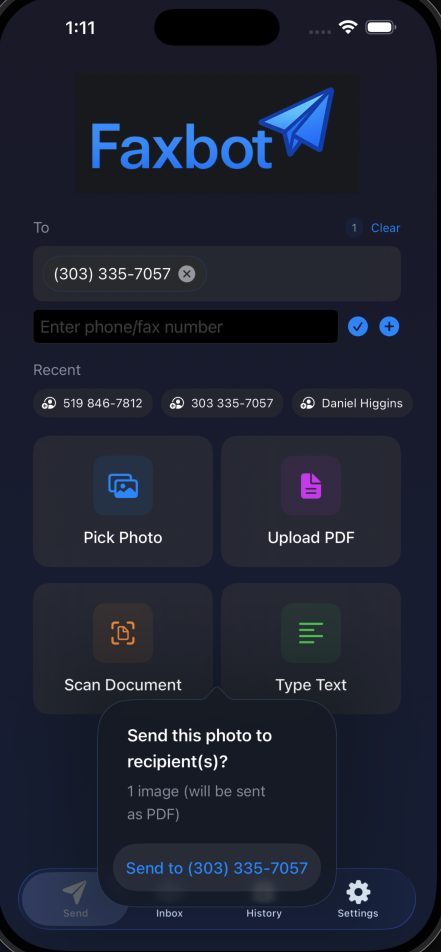
iOS App (TestFlight)
The iOS companion lets you send faxes and check status from your phone. Email [email protected] for an invite.
SDKs
- Python:
pip install faxbot - Node.js:
npm install faxbot→ SDK Usage
Architecture highlights
- Traits‑first capabilities:
/admin/providersand/admin/configexpose active providers + traits; UI and API gate features by traits. - Canonical event & error model: normalized inbound/outbound events, status mapping, and standard error codes.
- Provider adapters: clean boundaries for verify_webhook/parse_inbound/send/status/cancel.
Docs:
Security
- Use
X-API-Key(multi‑key) for auth. - Enforce HTTPS and HMAC signature verification for cloud webhooks.
- No PHI in logs; only IDs/metadata are surfaced.
Contributing
See CONTRIBUTING.md. Please open issues/PRs; this project is GUI‑first and traits‑first—avoid backend‑name checks in new code.
Установка Faxbot
У этого сервера нет опубликованного пакета — он собирается из исходников. Открой репозиторий и следуй инструкции в README.
▸ github.com/DMontgomery40/FaxbotFAQ
Faxbot MCP бесплатный?
Да, Faxbot MCP бесплатный — установка в пару кликов через Unyly без оплаты.
Нужен ли API-ключ для Faxbot?
Нет, Faxbot работает без API-ключей и переменных окружения.
Faxbot — hosted или self-hosted?
Self-hosted: сервер запускается локально на твоей машине командой из раздела установки.
Как установить Faxbot в Claude Desktop, Claude Code или Cursor?
Открой Faxbot на unyly.org, выбери вкладку своего клиента (Claude Desktop, Claude Code, Cursor) и нажми Install — конфиг сгенерируется автоматически, без правки JSON.
Похожие MCP
Fetch
Web content fetching and conversion for efficient LLM usage.
AWS KB Retrieval
Retrieval from AWS Knowledge Base using Bedrock Agent Runtime.
 автор: modelcontextprotocol
Spring AI MCP Server
Provides auto-configuration for setting up an MCP server in Spring Boot applications.
llm-analysis-assistant
A very streamlined mcp client that supports calling and monitoring stdio/sse/streamableHttp, and can also view request responses through the /logs page. It also
 автор: xuzexin-hz
Compare Faxbot with
Не уверен что выбрать?
Найди свой стек за 60 секунд
Автор?
Embed-бейдж для README
Похожее
Все в категории ai