
Figjam Context
БесплатноНе проверенExposes tools to ingest FigJam boards, retrieve context summaries, and answer free-form questions about the board content.

Описание
Exposes tools to ingest FigJam boards, retrieve context summaries, and answer free-form questions about the board content.
README
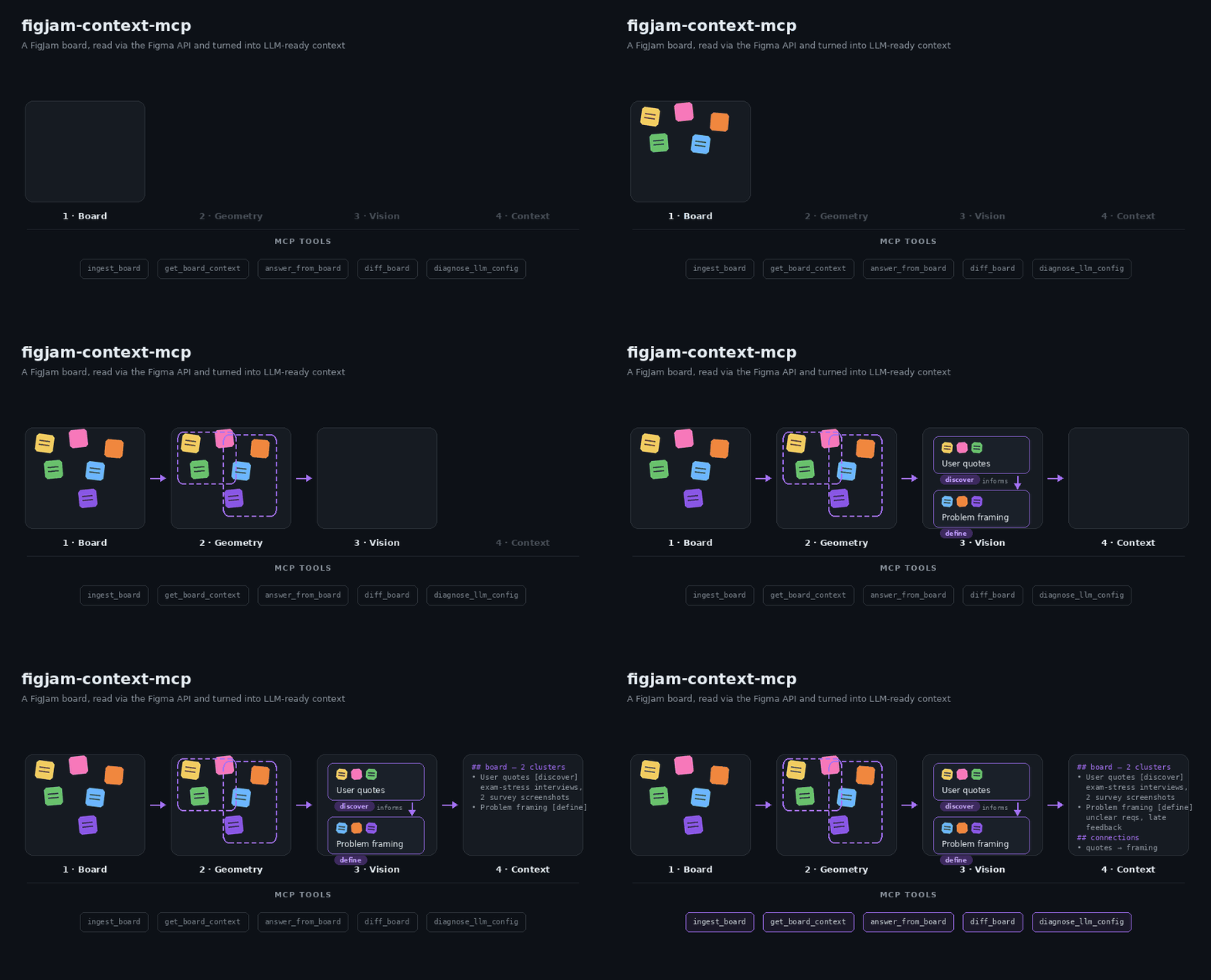
Illustrative overview of the ingest pipeline — not a screen recording.
MCP server that turns a FigJam board into queryable context for LLMs — read directly via the Figma REST API, no manual PDF-export detour. It exposes five tools:
- ingest_board — reads a FigJam/Figma file, clusters its content
spatially, verifies and labels each cluster with a vision model, extracts
connector arrows as cluster-to-cluster relations, and caches the result
under a
boardId(= the Figma file key). - get_board_context — returns a compact, paste-ready context block (clusters + connector relations) for an ingested board, optionally scoped to a topic.
- answer_from_board — answers a free-form question about an ingested board, citing the clusters the answer was derived from.
- diff_board — compares two ingest snapshots of the same board and reports what changed: new/removed/modified clusters, edited nodes, and connector changes ("what came in since the last workshop?").
- diagnose_llm_config — runs small text + vision JSON checks against the active model setup and reports actionable failures.
Ingested boards survive server restarts: get_board_context and
answer_from_board transparently restore the last finished ingest from
.cache/figjam-mcp/ when the in-memory store is empty.
Re-ingests are incremental: every cluster's member content is hashed, and
clusters that didn't change simply reuse their previous label/summary — only
new or edited clusters hit the vision model. Re-ingesting a mostly unchanged
board is therefore almost free. Pass forceFullIngest: true to bypass all
caching and reuse (e.g. after switching models).
How it works
FigJam boards are spatially chaotic: rotated stickies, overlapping shapes, embedded screenshots, no reading order. The pipeline therefore combines geometry with vision:
fetchFileTree+flattenNodeTree— pull the raw node tree and flatten it into normalized nodes (position, size, rotation, text, image refs, connector endpoints), dropping empty structural noise.geometricPreCluster— rotation-aware distance clustering into coarse groups. Neighbor search runs over a spatial grid (near-linear instead of O(n²)), and the gap threshold adapts to the board's density (median nearest-neighbor gap) so dense and airy boards both cluster sensibly. Huge footprints use a bounded overflow path, and connected components over 250 nodes are spatially bisected before reaching an LLM.extractConnectorEdges+buildClusterRelations— connector arrows are excluded from geometric clustering (they deliberately span groups) but captured as a graph: "cluster A → cluster B (label)". These relations are included inget_board_contextoutput and theanswer_from_boardprompt — arrows are the board's semantic structure.refineClusterWithVision— per cluster, node screenshots + extracted text go to a vision model in one request; it confirms which nodes belong together, labels the group, describes embedded images, and writes a 3–5 sentence summary. Clusters are refined concurrently (INGEST_BOARD_VISION_CONCURRENCY, default 3) within the vision budget.mapClustersToPhases(optional) — assigns each cluster to a phase of the chosen framework:double_diamond,lean_canvas,retro,user_journey, or a free-formcustomPhaseslist (or "unclear").- Results are cached in-memory AND persisted per file key;
get_board_contextandanswer_from_boardread from the cache and restore from disk after a restart.
Setup
npm install
cp .env.example .env
Fill in .env:
FIGMA_ACCESS_TOKEN — log in at figma.com, go
to Settings → Security → Personal access tokens, generate a token. (Can
also be passed per-call via the figmaAccessToken input on ingest_board.)
LLM_BASE_URL / LLM_API_KEY / LLM_MODEL_PRESET — any
OpenAI-compatible endpoint. Free options:
- OpenRouter (default in
.env.example): get a key at openrouter.ai/keys. The defaultstudent-freepreset uses explicit free models for each role:google/gemma-4-26b-a4b-it:freefor vision andqwen/qwen3-next-80b-a3b-instruct:freeplusnvidia/nemotron-nano-9b-v2:freefor text/Q&A.openrouter/freeremains a last-resort fallback, not the primary model. - GitHub Models: free with any GitHub account — create a token at
github.com/marketplace/models,
set
LLM_BASE_URL=https://models.github.ai/inference.
Optional overrides:
LLM_MODEL_PRESET— currently supported:student-free.LLM_VISION_MODELS— comma-separated vision model candidates.LLM_TEXT_MODELS— comma-separated text/Q&A candidates.LLM_FAST_TEXT_MODELS— comma-separated small/fast text candidates.- Legacy
LLM_VISION_MODEL/LLM_TEXT_MODELstill work as first-candidate overrides.
Run
npm run dev
This starts the MCP server over stdio using tsx watch. To try the tools
interactively:
npx @modelcontextprotocol/inspector npx tsx src/index.ts
Note: don't pass plain
npm run devto the Inspector (or any MCP client) — npm prints a lifecycle banner to stdout before the server starts, which corrupts the JSON-RPC stream the client expects there. Either invoketsxdirectly as above, or add--silent:npx @modelcontextprotocol/inspector npm run dev --silent.
MCP UI timeouts
ingest_board can be slow because it calls Figma and a vision LLM for board
clusters. If the MCP UI shows MCP error -32001: Request timed out, the client
gave up before those external calls finished.
The server now keeps provider calls bounded by default:
FIGMA_REQUEST_TIMEOUT_MS=15000FIGMA_FILE_REQUEST_TIMEOUT_MS=60000LLM_REQUEST_TIMEOUT_MS=20000LLM_RATE_LIMIT_RETRIES=1LLM_ANSWER_MAX_OUTPUT_TOKENS=800LLM_VISION_MAX_OUTPUT_TOKENS=4096LLM_ANSWER_TOP_K=6LLM_ANSWER_PROMPT_MAX_CHARS=24000INGEST_BOARD_VISION_BUDGET_MS=35000INGEST_BOARD_VISION_CONCURRENCY=3FIGMA_SCREENSHOT_DOWNLOAD_CONCURRENCY=3FIGJAM_MCP_MEMORY_CACHE_MAX_BOARDS=10
ingest_board defaults to ingestMode: "balanced": text-rich clusters use
deterministic summaries, while image-heavy or low-text clusters use vision
within the budget. max_speed skips vision; max_quality attempts vision for
every cluster. Finished ingests are persisted under .cache/figjam-mcp/, keyed
by file state, node hash, model preset, document hint, and ingest mode.
Vision candidates are prioritized by information gain rather than canvas
position. Each request has bounded node/text inventory, and the phase returns
at its configured deadline even if a provider stalls. answer_from_board
retrieves the most relevant clusters plus direct connector neighbours and keeps
the complete prompt under its configured character budget. The in-memory cache
uses LRU eviction; persisted history keeps 20 states and removes snapshots that
become safely unreferenced.
Run diagnose_llm_config after changing model env vars. It verifies structured
text replies with small arithmetic challenges and checks actual image
understanding with a known color image, without ingesting a board.
Usage example
Paste in a Figma board link and ingest it:
// tool: ingest_board
{
  "figmaFileUrl": "https://www.figma.com/board/AbC123XyZ456/Semester-Project-Research",
  "docStructureHint": "double_diamond"
}
// → { "boardId": "AbC123XyZ456", "clusterCount": 5, "relationCount": 3,
//     "summary": "Ingested board AbC123XyZ456: 5 clusters — \"User interview quotes\", \"Problem framing\", …" }
Instead of a built-in framework (double_diamond, lean_canvas, retro,
user_journey) you can pass your own phase names — clusters are then mapped
onto them by keyword match:
{ "figmaFileUrl": "…", "customPhases": ["Ideen", "Feedback", "Offene Fragen"] }
The boardId is the file key itself — re-running ingest_board on the same
file refreshes the cache entry. Then pull context, optionally scoped to a
topic:
// tool: get_board_context
{ "boardId": "AbC123XyZ456", "topic": "user research" }
// → contextText:
// FigJam board AbC123XyZ456 — 2 of 5 clusters (topic: user research):
//
// ## User interview quotes [discover]
// Sticky notes with verbatim quotes from six student interviews about exam
// stress. Two embedded screenshots show survey results (bar charts of study
// habits). Main pain points: unclear requirements and late feedback. …
//
// ## Connections between clusters (from connector arrows)
// - "User interview quotes" → "Problem framing" — "informs"
The contextText block is deliberately token-lean — paste it straight into
a documentation-writing chat (e.g. for a semester report). Or ask directly:
// tool: answer_from_board
{ "boardId": "AbC123XyZ456", "question": "What were the main user pain points?" }
// → { "answer": "Unclear requirements and late feedback …",
//     "citedClusters": ["User interview quotes", "Problem framing"] }
After the board evolved (say, workshop 2), ingest again — unchanged clusters are reused, so this is fast — and diff the snapshots:
// tool: diff_board
{ "boardId": "AbC123XyZ456" }
// → summaryText:
// FigJam board AbC123XyZ456 — changes from 2026-07-03T14:02:11Z to 2026-07-10T09:41:52Z:
//
// New clusters (1):
// - "Feedback round 2": Sticky notes with feedback from the second usability test.
// Modified clusters (1):
// - "User interview quotes": +3 nodes, 1 edited
// Connections: +1 / -0
// - new: "Feedback round 2" → "Problem framing" — "confirms"
// Nodes: +9 added / -0 removed / 1 edited.
// Unchanged clusters: 4.
compareTo selects an older baseline (2 = two ingests back, …); the history
keeps the last 20 distinct board states per file.
Scripts
npm run dev— run the server withtsx watch(auto-restart on change).npm run build— clean and compile TypeScript todist/, preserving an executable CLI.npm start— run the compiled server fromdist/.npm test— run the Vitest test suite.npm run typecheck— type-check both source and tests without emitting files.npm run check— type-check, test, build, and validate the package metadata/binary.npm run package:smoke— pack the npm tarball, execute its CLI, and verify MCP initialization/tool discovery.
Publishing runs the same checks automatically through prepack; CI exercises
that complete package path on the minimum supported Node version and an LTS line.
Project layout
src/
├── index.ts        # stdio entrypoint
├── server.ts       # McpServer setup + tool registration
├── tools/          # tool handlers (ingest pipeline, context, Q&A)
├── schemas/        # Zod input/output schemas per tool
├── lib/            # Figma API, node tree, clustering, vision, LLM, cache
└── types.ts        # shared domain types
Установка Figjam Context
У этого сервера нет опубликованного пакета — он собирается из исходников. Открой репозиторий и следуй инструкции в README.
▸ github.com/ecestnrkl/figjam-mcpFAQ
Figjam Context MCP бесплатный?
Да, Figjam Context MCP бесплатный — установка в пару кликов через Unyly без оплаты.
Нужен ли API-ключ для Figjam Context?
Нет, Figjam Context работает без API-ключей и переменных окружения.
Figjam Context — hosted или self-hosted?
Доступен hosted-вариант: Unyly запускает сервер в облаке, локальная установка не обязательна.
Как установить Figjam Context в Claude Desktop, Claude Code или Cursor?
Открой Figjam Context на unyly.org, выбери вкладку своего клиента (Claude Desktop, Claude Code, Cursor) и нажми Install — конфиг сгенерируется автоматически, без правки JSON.
Похожие MCP
GitHub
PRs, issues, code search, CI status
 автор: GitHub
Filesystem
Secure file operations with configurable access controls.
Memory
Knowledge graph-based persistent memory system.
Template MCP Server
A CLI tool to create a new Model Context Protocol server project with TypeScript support, dual transport options, and an extensible structure
 автор: mcpdotdirect
Compare Figjam Context with
Не уверен что выбрать?
Найди свой стек за 60 секунд
Автор?
Embed-бейдж для README
Похожее
Все в категории development