
Figma Relai
БесплатноПоддерживаетсяMCP server that lets AI agents read and edit Figma documents through the Relai Figma plugin

Описание
MCP server that lets AI agents read and edit Figma documents through the Relai Figma plugin
README

Your AI, on the canvas. Relai connects Claude Code, Cursor, Codex — any MCP client — to Figma, so you can read, edit, audit, and build design systems by talking to the model you already use. And the file is not a bystander: it carries your conventions, your precedents, your no-go zones, and every client that connects through Relai inherits them. A write through Relai into a page you fenced off is refused before it runs, and your recorded rulings arrive the moment an edit touches what they cover. That is what makes it safer to hand agents real work.
Relai's position: the AI era should put designers more in charge, not less. Taste and judgment stay with you; the labor moves to a model you already trust, with every step visible.
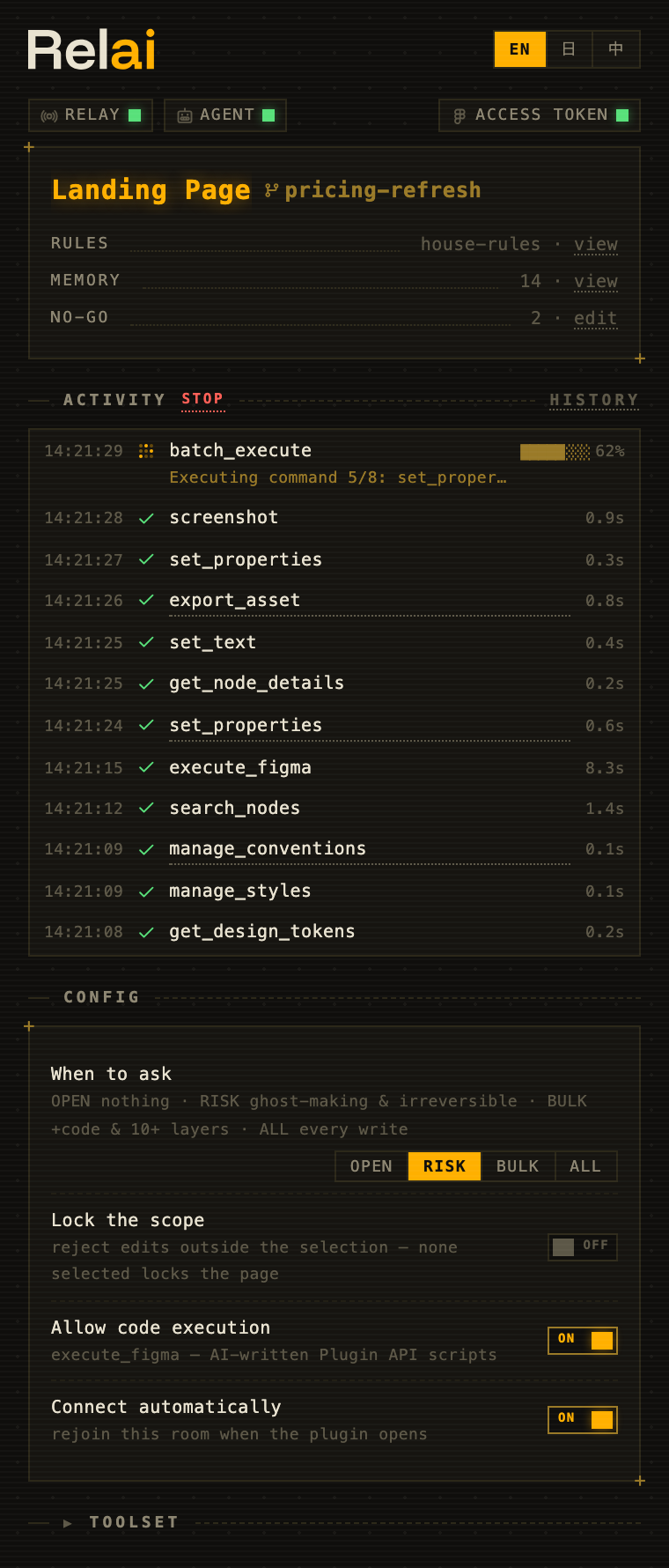
What a session looks like
You: Make the CTA pop and round it off.
AI:
set_properties · 3 nodes · 0.4s ✓→verify_visual · match ✓You: Now sweep the whole screen for dark mode.
AI:
set_properties · 24 nodes · 1.2s ✓→analyze_design · overall → 92/100You: Same sweep on Brand / Masters.
File:
✗ blocked — "Brand / Masters" is a no-go zone
Every command shows up in the plugin as it runs, with timing and success or failure. Click an entry to jump to that layer on the canvas. Press Stop if you change your mind — the rest of the batch is cancelled. And some commands never run at all: pages you fenced off reject writes before they touch the canvas, with the reason on the receipt.
The numbers scale. Relai is how its author maintains a production design system, and this excerpt is from one of those sessions — July 2026, unedited:
audit_colors     45,509 nodes scanned · 3.9s
ghost census     30,251 stale references found
approval gate    designer approved · scope: full file
batch_execute    25,351 bindings rebound
re-census        30,251 → 936 · zero visual change
The gate in the middle is the point: one explicit yes from the designer licensed a 25,351-binding rebind — and every fence stayed up while it ran.
The file carries the law
Code already escaped the speed-versus-standards trade, and not by making models careful: the repo pushes back. Lint flags, checks gate, protected branches refuse — which is why a developer can hand an agent real work and go do something else. Relai builds that pushback into the design file itself. Not a leash — a license.
Rules you'd normally paste into every prompt live inside the Figma file, so any future session — from any MCP client, by anyone who opens the file — starts already briefed. Part of that law is guidance the agent reads. Part of it is enforced: no-go zones and Lock to selection refuse writes that come through Relai, and the confirmation dial holds a command until you answer.
Conventions are a little CLAUDE.md stored in the file: naming rules, token routing, spacing habits. The AI reads them before working. Unlike a CLAUDE.md, they belong to the file rather than to one person's agent setup — every client inherits them, configured or not. Add one by telling the AI ("new convention: colors route through Theme tokens"); the panel's RULES row shows what's stored.
Memory holds your precedents. Rule once — the file remembers. Say "this gap is on purpose" and the ruling is recorded in the file; any later edit that touches what it references gets your words attached to its result:
you        "this gap is on purpose — remember it"
file       record_precedent · saved ✓

(another session, a different AI, about to "fix" the gap)
file       precedent attached — "…is on purpose" · the edit backs off
The panel's Memory row lists every entry; delete any of them any time. Nothing is recorded silently. Case law, not documentation.
Kits. One designer usually runs one product, and its files share the same law. Save this file's rules under a name and other files can use it. Figma drops file-carried law on branch merges; the kit puts it back — one click, or automatically if you flip that kit's auto-restore on.
AI no-go zones fence off whole pages — brand masters, legal, the one that is already pixel-perfect. Writes through Relai into a guarded page are rejected before they run, with the reason on the receipt. You set them in the panel; an agent can also add or lift one with manage_pages, and that command shows in your activity feed like any other. Protected branches, for the canvas.
Confirmation is a dial with four stops — OPEN · RISK · BULK · ALL. At RISK, the default, only destructive operations ask (deleting variables or styles, detach, flatten); everything else keeps moving. Set it in the panel; no Relai tool changes it. It reads the command it receives, so a destructive operation wrapped in batch_execute asks only at ALL, or at BULK when the batch is large. While code execution is on, a script could also rewrite the panel's settings — see below.
How far the law reaches
The law is stored as plugin data inside the file — no extra layers on the canvas, nothing teammates have to tiptoe around — and it survives duplication (branch merges drop it; kits put it back). Any plugin that runs in the file can read that data, and code that knows where it lives can rewrite it, so keep secrets out of your conventions.
What the law can stop depends on how a write arrives:
- Commands sent through Relai's tools are checked in the plugin, on the file's side of the wire, before they run. A write aimed at a node on a fenced page, or outside your selection lock, is refused. Commands that carry their node ids inside a list — a multi-node
set_text,annotate set_multiple— are checked against the current page only. Variables and modes belong to no page, so no-go zones do not cover them. - Scripts sent through
execute_figmarun in the same plugin sandbox as Relai's checks, so they cannot be screened before they run. Relai refuses a script outright when the current page is fenced off. Afterwards, the result warns the agent about nodes the script created through therelaihelpers or returned that sit on a fenced page or outside your lock. While code execution is on, a script can also rewrite Relai's settings and law. Turn code execution off when you want every write to go through checked commands. - Writes that never pass through Relai — another plugin, another MCP server, someone editing by hand, anything done while Relai is closed — are outside its reach. Relai neither refuses them nor notices them.
Precedents work at a different strength: they are your recorded words, arriving at the exact moment an edit touches what they reference. The agent backs off because the author shows up, not because anything blocked it. Any client that connects through Relai is bound by all of this, including ones you never configured — and everything it does leaves receipts.
None of this is setup you grind through — it accumulates. On day one the file is blank law, and the agent behaves like anyone's agent. A month in, it arrives briefed on your conventions and precedents and stops at your fences: the same prompt that produces the average of everyone's design in a fresh file produces yours in yours. Two long-time users are not holding the same tool. They are holding two different instruments.
Get started
You need Figma Desktop, Node.js 18+, and an MCP client.
1. Install the plugin. Download relai-plugin-<version>.zip from the latest release, unzip it, then open Plugins → Development → Import plugin from manifest… in the desktop app and pick manifest.json. Open it in the file you want to edit and keep the panel open — writes go through it. It connects on its own and remembers its room across restarts; when a release ships a new plugin, re-import the new zip.
2. Register the server with your AI client:
claude mcp add Relai -- npx -y figma-relai      # Claude Code
codex mcp add Relai -- npx -y figma-relai       # Codex CLI
For Cursor, add this to .cursor/mcp.json:
{ "mcpServers": { "Relai": { "command": "npx", "args": ["-y", "figma-relai"] } } }
Or hand the setup to your agent — paste this:
Set up Relai: register the MCP server for this client (the command is
`npx -y figma-relai`, e.g. `claude mcp add Relai -- npx -y figma-relai`),
then walk me through importing the Figma plugin from
https://github.com/syoooo/figma-relai/releases/latest — I'll do the Figma clicks.
3. Ask for something. Pairing is automatic; there is nothing to copy between windows. A good first ask: "How is this screen put together?"
What it's good at
Understanding a design. "How is this screen put together?" gets you structure, colors, layout, and token usage in one pass, and the AI can take a screenshot to actually look at the canvas rather than guess.
Bulk edits. "Translate every button label to English" or "recolor this for dark mode" become one round-trip across dozens of layers instead of an afternoon of clicking.
Audits. analyze_design checks color-token coverage, auto-layout quality, component health, and accessibility (WCAG contrast, touch targets, text sizes) — or all four at once as a weighted 0–100 health score you can put in a review, with deviations you already ruled intentional staying waived instead of re-flagged. It also scores agent-readiness (how prepared the file is for AI work, with top gaps), fingerprints the file's voice (its radius/spacing/type signature), and runs a ghost census: references still pointing at soft-deleted variables.
Design systems. Variable collections with modes, token binding, shared styles, components with proper variants, team-library imports. get_design_system inventories what the file — and the libraries it uses — already has (with a token, the library's whole catalog, including components the file has never placed), so the AI builds from your components instead of redrawing near-copies; analyze_design's tokens aspect finds hardcoded values that visually match an existing variable, and one tokenize call binds them all. These run as declarative operations with precondition checks, so the same request behaves the same way every time, and a failure tells the AI what to do next ("call set_layout_mode first") instead of dumping a stack trace.
Everything else. execute_figma runs JavaScript against the Figma Plugin API directly, with a relai.* helper library that makes the correct pattern the shortest one, a registry of pitfalls learned in production that attaches the fix to known errors, and a lint that flags silent mistakes. Scripts run alongside Relai's checks rather than behind them — see "How far the law reaches". If you'd rather the AI never ran code, turn it off with the plugin's "Allow code execution" toggle.
You stay in control
The plugin is the designer's side of the deal: a live activity feed of everything the AI does, an AI-connected indicator that means an agent is actually paired (not just that a server is running), and a Stop button that cancels pending work. Selection and page changes you make flow back to the AI as events, so "now do the same to this one" works without re-explaining.
Lock to selection rejects edits outside whatever you've selected — the AI gets a clear error, not a silent pass. The relay is local: file contents move only between Figma, your machine, and the AI client you already trust. The UI speaks English, 日本語, and 中文.
When something goes wrong anyway — a bad sweep, a wrong "fix" — the feed is your reconstruction and Figma's version history is your restore path. There is no magic undo, and Relai doesn't pretend to have one: diff_nodes checkpoints tell you exactly what changed; version history takes you back. And when the law itself is wrong — a stale precedent guarding a gap you've since changed your mind about — tell the agent to go ahead, then delete the entry from the panel's Memory row. Rulings are one click to remove; the law stays yours to amend.
How it works
AI (any MCP client)
  ↕ stdio
MCP server            33 tools · analysis · verification
  (embedded relay)    WebSocket room hub on 127.0.0.1:9055
  ↕ WebSocket
Figma plugin          executes Plugin API calls
The relay lives inside the MCP server, so there is no extra process to keep alive. When several MCP clients run at once, the first one hosts the relay and the others connect to it; if the host exits, a survivor takes over. Both sides remember their room, rejoin after restarts or sleep, and find each other without any copy-pasting. The join_room tool exists for one rare case only: two Figma files running the plugin at the same time.
Every write and every failure ends with a [relai] line that says whether Figma changed: applied, not_applied, or unknown — it may have, so read the canvas before trying again. Failures are marked as errors and name a code; scripts can read the same receipt from the result's _meta. With several files open, a call can carry room to go to one plugin, or expect_file to refuse unless the target file has that exact name. Text longer than 50,000 characters is cut before it reaches the AI, and the full text is saved on your machine in ~/.figma-relai/results/ (readable only by you, the newest 50 files, none kept longer than a day); the cut notice names the file.
The receipts above are real timings: rule checks run in the plugin before each write, small edits land sub-second, and the 45,509-node audit took 3.9s.
Ports are fixed by Figma's plugin sandbox: the manifest allowlists ws://localhost:9055–9057, and other ports cannot work without editing manifest.json. That's why there is no port setting in the UI.
The tools
| Group | Tools |
|---|---|
| Context | get_document_overview · get_selection_context · get_node_details · search_nodes · get_design_tokens · screenshot · get_events |
| Analysis | analyze_design (color / layout / components / accessibility / overall) · diff_nodes (compare, or checkpoint save/compare) |
| Verification | verify_changes · validate_design_rules · verify_visual |
| Read | get_node_data (summary / tree / full / css / variables) |
| Create & edit | create_node · set_properties · set_text · edit_structure |
| Components | manage_components |
| Design system | get_design_system · manage_variables · manage_styles · import_from_library · manage_conventions · manage_rulesets |
| Document | manage_pages · navigate |
| Assets | export_asset · add_image |
| Annotations | annotate |
| Comments | manage_comments (needs a token — see below) |
| Advanced | batch_execute · execute_figma · join_room |
Each tool is self-describing, so the AI sees full parameter docs. The same contract also exists as a file: npx figma-relai manifest prints a machine-readable JSON of every tool schema, plugin command, and known pitfall — generated from the running code on every build (committed as docs/manifest.json), so it cannot drift — and npx figma-relai docs <tool> renders it for humans. Eleven skill documents ship alongside as MCP prompts: token strategy, component conventions, audit workflows, the QA gate, a Plugin API cheat sheet for execute_figma, file memory & precedents, and recipes for design-system-first building, bulk cleanup, and comment-driven collaboration. Your own skills load too: drop markdown files with a name/description frontmatter into ~/.figma-relai/skills/ and they register as user: prompts.
Relai and Figma's MCP server
Relai can run alongside Figma's MCP server. Its rules apply only to writes that go through Relai; work done through another server is not checked by Relai.
Relai runs on your machine, works with whichever model your MCP client uses, and writes through the Relai Figma plugin.
Optional: a Figma token
Two things live behind Figma's REST API and need a personal access token: comments, and a library's full component catalog — the components published in a library your file has never placed. Which library that is, Relai works out on its own; there is no URL to paste.
Generate a token at figma.com → Settings → Security → Personal access tokens (file content read scope; add the comment scopes if you want manage_comments), then hand it over once:
npx figma-relai login    # verifies it, names the account back, stores it in ~/.figma-relai/credentials.json (0600)
npx figma-relai logout   # removes it
The token never arrives as a command argument — argv lands in shell history and in every ps on the machine — so login takes it from a hidden prompt, or from a pipe (pbpaste | npx figma-relai login). Setting FIGMA_TOKEN in the MCP config still works and still wins, which keeps a per-project override possible:
{ "mcpServers": { "Relai": { "command": "npx", "args": ["-y", "figma-relai"],
  "env": { "FIGMA_TOKEN": "figd_..." } } } }
Either way, the token is read by the MCP server process only and is sent only to api.figma.com. It never crosses the relay to the plugin — the panel's ACCESS TOKEN pill reports presence, never the value. Every other tool works without it.
With it, "apply the feedback in the comments" becomes a thing the AI can actually do: read the threads, make the edits, reply. It also unlocks a quiet workflow: leave an @-comment on the canvas as a task, then tell your AI to "check the comments" — it claims the thread, does the work, and reports back on it.
Troubleshooting
Start with npx figma-relai doctor — one command that checks Node, the relay ports (and whether something foreign is squatting on them), plugin presence, the saved room, and the Figma token — where it came from, and whether the stored file's mode is tight enough — each with its fix.
The plugin shows NO SERVER. No MCP server is listening on ports 9055–9057, which usually means your AI client isn't running or Relai isn't registered in it. The panel shows the exact registration command; the plugin keeps dialing and connects the moment a server appears.
RELAY says LINK but AGENT says WAITING. The plumbing is fine — the AI just hasn't called a Figma tool yet in this session. Ask it something about the file.
"Multiple Figma plugins are connected." Two files are running the plugin. Tell the AI to join_room with the room name shown in the plugin you want to control, or to pass room or expect_file on each call.
room_changed. The plugin moved to a different file — a branch, or another document — since the last call, so the call was not sent. Sending it again continues in the new file; join_room back if that is not the file you meant.
The first npx run is slow. It downloads the package once; later starts are fast.
Security
The relay binds to 127.0.0.1 only and has no authentication: any process on your machine that can reach it can list the open rooms, with each room's file name, and join one. It refuses connections from ordinary web pages, but that check narrows who can connect; it is not authentication. execute_figma runs AI-written code inside Figma's plugin sandbox; it is on by default, every run is visible in the activity feed, and the designer can disable it. Scripts are not atomic — a failed script's earlier changes persist. Full threat model: SECURITY.md.
For contributors
git clone https://github.com/syoooo/figma-relai.git
cd figma-relai
bun setup       # install, build, write local MCP configs
bun test
Requires Bun v1.0+ (the setup script is bash; on Windows use WSL). Load the plugin via Plugins → Development → Import plugin from manifest… → packages/figma-plugin/manifest.json. A standalone relay (bun socket) exists for the unusual case where the relay must run on another machine. More in CONTRIBUTING.md; manual QA lives in docs/smoke-checklist.md.
Project status: Relai is built and dogfooded daily against a production design system; releases track that work. MIT plus local-first is the longevity hedge — nothing phones home, and nothing stops working if the repo goes quiet.
License
MIT — see LICENSE.
Установить Figma Relai в Claude Desktop, Claude Code, Cursor
unyly install figma-relaiСтавит в Claude Desktop, Claude Code, Cursor и VS Code — сам разбирается с npx, uvx и сборкой из исходников.
Впервые? Поставь CLI: curl -fsSL https://unyly.org/install | sh
Или настроить вручную
Выполни в терминале:
claude mcp add figma-relai -- npx -y figma-relaiПошаговые гайды: как установить Figma Relai
FAQ
Figma Relai MCP бесплатный?
Да, Figma Relai MCP бесплатный — установка в пару кликов через Unyly без оплаты.
Нужен ли API-ключ для Figma Relai?
Нет, Figma Relai работает без API-ключей и переменных окружения.
Figma Relai — hosted или self-hosted?
Self-hosted: сервер запускается локально на твоей машине командой из раздела установки.
Как установить Figma Relai в Claude Desktop, Claude Code или Cursor?
Открой Figma Relai на unyly.org, выбери вкладку своего клиента (Claude Desktop, Claude Code, Cursor) и нажми Install — конфиг сгенерируется автоматически, без правки JSON.
Изменения
Версии и запрашиваемые доступы со временем.
- Новая версия опубликована
- Новая версия опубликована
- Новая версия опубликована
- Новая версия опубликована
- Новая версия опубликована
- Новая версия опубликована
- Новая версия опубликована
- Новая версия опубликована
Похожие MCP
LibreOffice Tools
Enables AI agents to read, write, and edit Office documents via LibreOffice with token-efficient design. Supports multiple formats including DOCX, XLSX, PPTX, a
 автор: passerbyflutter
Figma
Extract design specs and assets
 автор: Figma
dannote/figma-use
Figma control: create shapes, text and components, and set styles, auto-layout, variables and exports.
 автор: dannote
Logo.dev
Search and retrieve company logos by brand or domain. Customize size, format, and theme to match your design needs. Accelerate design, prototyping, and content
 автор: NOVA-3951
Design Inspiration Server
Searches top design platforms like Dribbble and Behance to provide UI inspiration, color palettes, and layout patterns via the Serper API. It allows users to re
 автор: YonasValentin
PIX4Dmatic
Enables GUI automation for controlling PIX4Dmatic on Windows through MCP. Supports launching, focusing, capturing screenshots, sending hotkeys, clicking UI elem
 автор: jangjo123
mcp-dockmaster
An Open-Sourced UI to install and manage MCP servers for Windows, Linux and macOS.
ariekogan/ateam-mcp
Build, validate and deploy multi-agent AI solutions on the ADAS platform: design skills with tools and manage the solution lifecycle.
 автор: ariekogan
thinkchainai/mcpbundles
Create custom tool bundles, connect providers with OAuth or API keys, and use one MCP server across many integrations, with a UI for bundles and credentials.
 автор: thinkchainai
jau123/MeiGen-AI-Design-MCP
Image generation and editing with a curated prompt library, prompt enhancement and routing across local ComfyUI, MeiGen Cloud and OpenAI-compatible APIs.
 автор: jau123
Compare Figma Relai with
Не уверен что выбрать?
Найди свой стек за 60 секунд
Автор?
Embed-бейдж для README
Похожее
Все в категории design