

Описание
A MCP server for Flomo
README


https://github.com/xianminx/mcp-server-flomo
A Model Context Protocol (MCP) server that lets you create notes in Flomo directly through AI chat interactions in Cursor or Claude desktop. Write and organize your thoughts seamlessly through natural language commands.
Usage
Installing via Smithery
To install mcp-server-flomo for Claude Desktop automatically via Smithery:
npx -y @smithery/cli install mcp-server-flomo --client claude
mcp-get

npx @michaellatman/mcp-get@latest install mcp-server-flomo
mcp.so
https://mcp.so/protocol/mcp-server-flomo/wss://mcp.smithery.ai:443
Manually configure
Configure Claude / Cursor / Windsurf / Cline / ChatWise / Cherry Studio etc.
FLOMO_API_URL=your_api_url_here npx mcp-server-flomo
Or configure for your MCP Host / Client. See https://mcp.so/protocol/mcp-server-flomo/wss://mcp.smithery.ai:443 for configuration detail.
Get your Flomo API URL from Flomo API Settings
{
  "mcpServers": {
    "mcp-server-flomo": {
      "command": "npx",
      "args": [
        "mcp-server-flomo"
      ],
      "env": {
        "FLOMO_API_URL": "your_api_url_here"
      }
    }
  }
}
Once the server is running, you can create notes in Flomo through natural language commands in your AI chat. Here are some examples:
"How to publish a mcp server? Could you save the answer to flomo note after answering it"
This will save the Cursor AI Agent response to Flomo directly in the chat conversation!
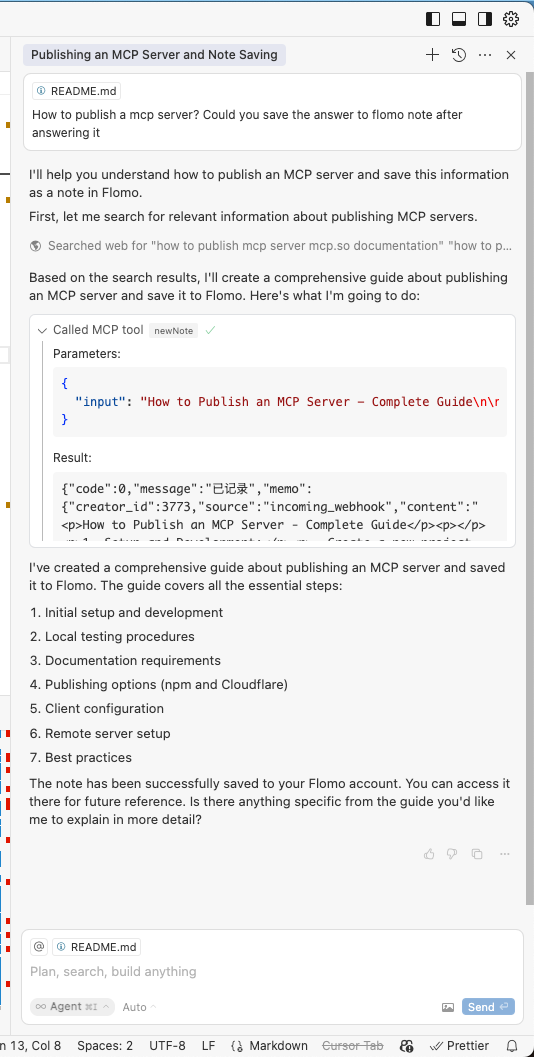
The server will handle:
- Converting your natural language requests into Flomo API calls
- Proper formatting and submission of your notes
- Providing feedback on successful note creation
Dev
Get your Flomo API URL from Flomo API Settings
Install and configure:
# Install dependencies
npm install
FLOMO_API_URL=your_api_url_here npx .
Technical Details
- Built with TypeScript and the Model Context Protocol SDK
- Communicates with Flomo via their REST API
- Runs over stdio for seamless integration with AI tools
License
This project is licensed under the MIT License—see the LICENSE file for details.
Установить Flomo в Claude Desktop, Claude Code, Cursor
unyly install flomoСтавит в Claude Desktop, Claude Code, Cursor и VS Code — сам разбирается с npx, uvx и сборкой из исходников.
Впервые? Поставь CLI: curl -fsSL https://unyly.org/install | sh
Или настроить вручную
Выполни в терминале:
claude mcp add flomo -- npx -y mcp-server-flomoFAQ
Flomo MCP бесплатный?
Да, Flomo MCP бесплатный — установка в пару кликов через Unyly без оплаты.
Нужен ли API-ключ для Flomo?
Нет, Flomo работает без API-ключей и переменных окружения.
Flomo — hosted или self-hosted?
Self-hosted: сервер запускается локально на твоей машине командой из раздела установки.
Как установить Flomo в Claude Desktop, Claude Code или Cursor?
Открой Flomo на unyly.org, выбери вкладку своего клиента (Claude Desktop, Claude Code, Cursor) и нажми Install — конфиг сгенерируется автоматически, без правки JSON.
Похожие MCP
Fetch
Web content fetching and conversion for efficient LLM usage.
AWS KB Retrieval
Retrieval from AWS Knowledge Base using Bedrock Agent Runtime.
 автор: modelcontextprotocol
Spring AI MCP Server
Provides auto-configuration for setting up an MCP server in Spring Boot applications.
llm-analysis-assistant
A very streamlined mcp client that supports calling and monitoring stdio/sse/streamableHttp, and can also view request responses through the /logs page. It also
 автор: xuzexin-hz
Compare Flomo with
Не уверен что выбрать?
Найди свой стек за 60 секунд
Автор?
Embed-бейдж для README
Похожее
Все в категории ai