
Formula 1
БесплатноНе проверенReal-time and historical Formula 1 data including standings, race results, and schedules via OpenF1 API.

Описание
Real-time and historical Formula 1 data including standings, race results, and schedules via OpenF1 API.
README
An MCP (Model Context Protocol) server that provides real-time and historical Formula 1 data via the OpenF1 API.
Features
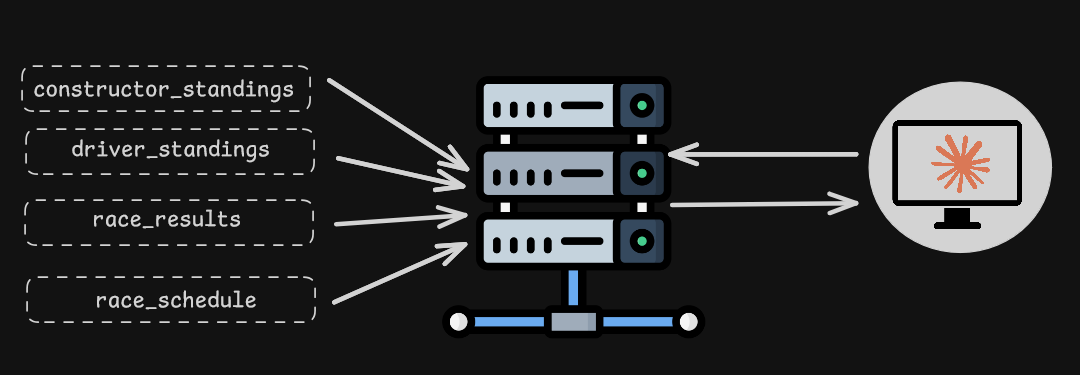
What is MCP?
MCP stands for Model Context Protocol. It is a lightweight, standardized protocol for connecting AI models and agents to external tools and services. MCP makes it easy to expose structured tool actions over transports such as stdio or HTTP, so AI systems can request data and receive responses in a predictable way.
Why MCP is beneficial in AI
- Tool-enabled intelligence — MCP allows AI agents to call external services as tools, so they can access live data and capabilities beyond their training.
- Clear interface — Each tool exposes a name, description, and input/output contract, which helps AI clients choose and use the right capability.
- Better modularity — The server can evolve independently of the AI client, making updates and debugging easier.
- Improved reliability — MCP enables explicit, auditable interactions instead of implicit prompt-based web scraping.
- Agent compatibility — MCP is designed for use with modern AI developer tools like Claude Code and other MCP-aware clients.
Requirements
- Python 3.13+
- OpenF1 API (free, no API key required for historical data)
Installation
pip install -e .
Or with uv:
uv pip install -e .
Usage
Start the MCP server:
$ mcp dev formula-one-mcp.py
This command will redirect you to the URL where the MCP Inspector is serving. Using the user interface, you can test various tools and ensure everything is functioning as intended.
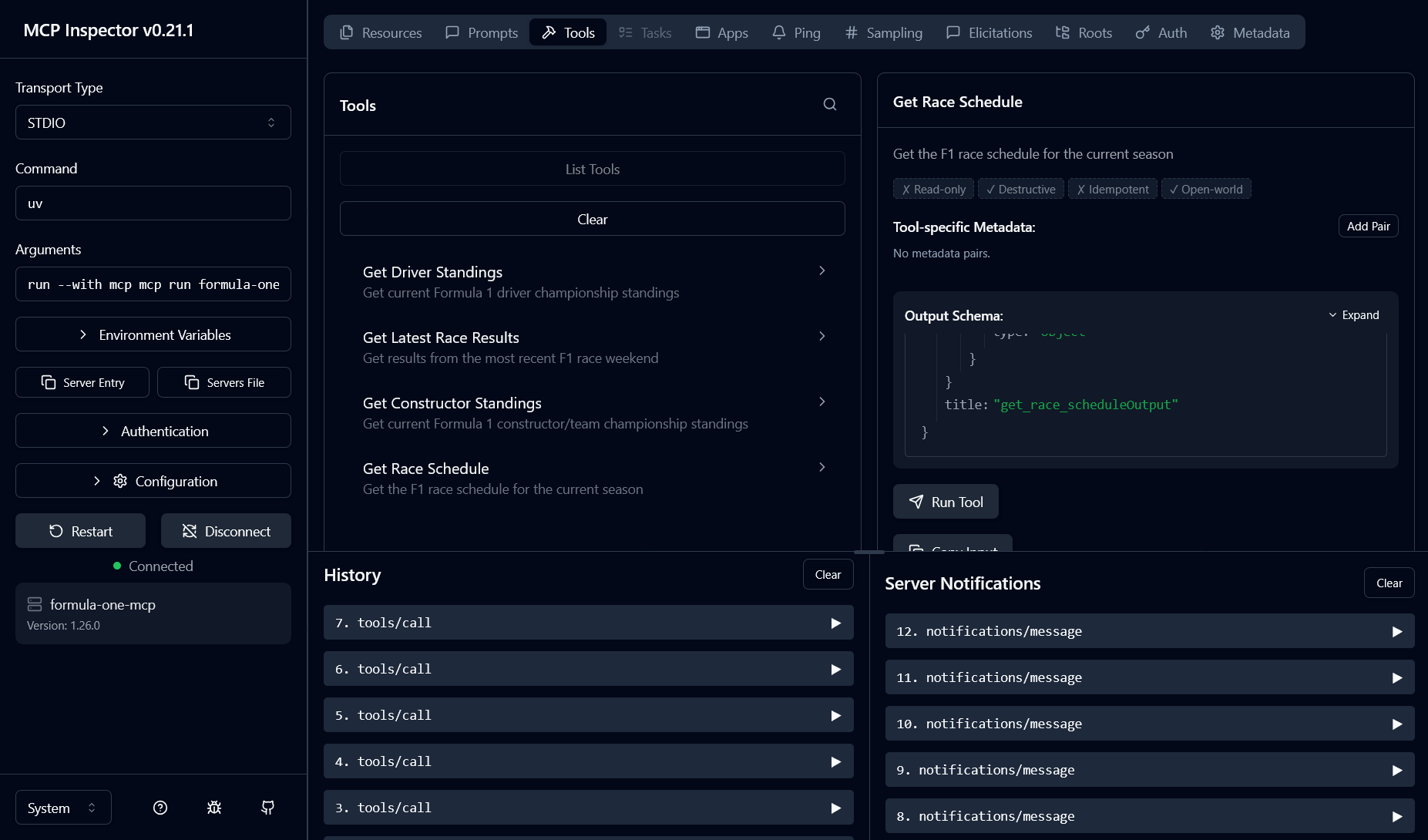
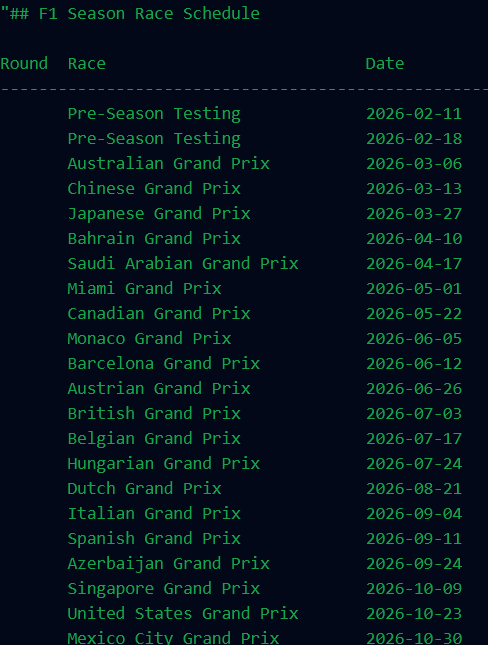
Setting Up MCP server for Claude Desktop
Once the Formula One MCP server is working, install it into Claude Desktop using:
mcp install formula-one-mcp.py --name "Formula One MCP Server"
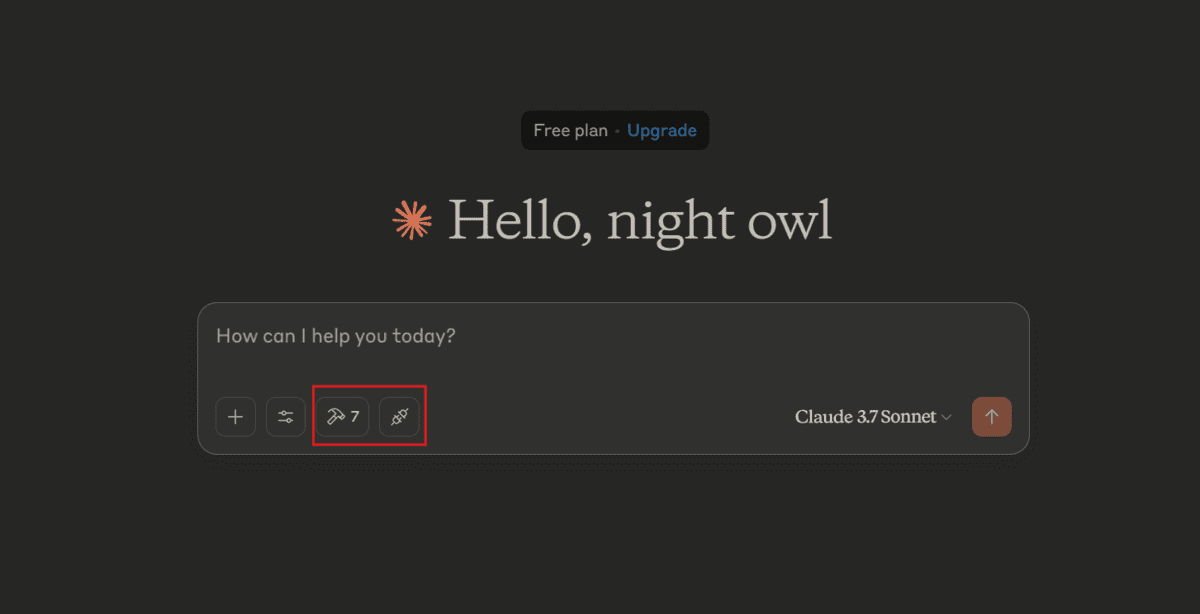
After relaunching Claude Desktop, you should see a new icon below the chat option. That icon means the MCP server is configured, and you can click it to view how many tools are available.
Available Tools
get_driver_standings
Returns the current Formula 1 driver championship standings.
## Current Driver Standings

Pos  Driver             Team                   Points
----------------------------------------------------
1    Max Verstappen     Red Bull Racing        275
2    Lando Norris       McLaren                215
...
get_constructor_standings
Returns the current Formula 1 constructor/team championship standings.
## Current Constructor Standings

Pos  Team                Points   Wins
------------------------------------------
1    McLaren             412      6
2    Red Bull Racing     345      5
...
get_latest_race_results
Returns results from the most recent F1 race weekend.
## Bahrain Grand Prix - 2026-03-27

Circuit: Bahrain

Pos  Driver             Team                   Time
----------------------------------------------------
1    Max Verstappen     Red Bull Racing        1:31:44.420
2    Lando Norris       McLaren                +1.232
...
get_race_schedule
Returns the F1 race calendar for the current season.
## F1 Season Race Schedule

Round  Race                          Date         Circuit
------------------------------------------------------------------------------
1      Bahrain Grand Prix            2026-03-27   Bahrain
2      Saudi Arabian Grand Prix      2026-04-12   Saudi Arabia
...
Key Design Decisions
- Single base URL — Uses
https://api.openf1.org/v1as the sole API endpoint - Fallback key matching — Utilities try multiple possible key names to handle API variations
- Graceful degradation — Returns helpful messages instead of errors when data is unavailable
- Async tools — All MCP tools are async for non-blocking I/O
Data Source
Data is provided by the open-source OpenF1 API, which offers:
- Historical F1 data from 2023 onwards (free, no auth required)
- Real-time data via MQTT/WebSockets (requires paid subscription)
- 18+ endpoints including telemetry, timing, weather, and race control
Rate limits: 3 requests/second, 30 requests/minute (free tier)
Dependencies
mcp[cli]>=1.26.0— MCP server frameworkrequests>=2.33.0— HTTP client
Установка Formula 1
У этого сервера нет опубликованного пакета — он собирается из исходников. Открой репозиторий и следуй инструкции в README.
▸ github.com/inas-21/f1-mcpFAQ
Formula 1 MCP бесплатный?
Да, Formula 1 MCP бесплатный — установка в пару кликов через Unyly без оплаты.
Нужен ли API-ключ для Formula 1?
Нет, Formula 1 работает без API-ключей и переменных окружения.
Formula 1 — hosted или self-hosted?
Self-hosted: сервер запускается локально на твоей машине командой из раздела установки.
Как установить Formula 1 в Claude Desktop, Claude Code или Cursor?
Открой Formula 1 на unyly.org, выбери вкладку своего клиента (Claude Desktop, Claude Code, Cursor) и нажми Install — конфиг сгенерируется автоматически, без правки JSON.
Похожие MCP
GitHub
PRs, issues, code search, CI status
 автор: GitHub
Filesystem
Secure file operations with configurable access controls.
Memory
Knowledge graph-based persistent memory system.
Template MCP Server
A CLI tool to create a new Model Context Protocol server project with TypeScript support, dual transport options, and an extensible structure
 автор: mcpdotdirect
Compare Formula 1 with
Не уверен что выбрать?
Найди свой стек за 60 секунд
Автор?
Embed-бейдж для README
Похожее
Все в категории development