
FortiOS
БесплатноНе проверенMCP server for managing FortiGate firewalls via the FortiOS REST API with approximately 88 tools covering configuration, monitoring, and troubleshooting.

Описание
MCP server for managing FortiGate firewalls via the FortiOS REST API with approximately 88 tools covering configuration, monitoring, and troubleshooting.
README
A Model Context Protocol server that lets an LLM drive a FortiGate via its FortiOS REST API v2. It covers the operator workflows you'd otherwise perform through the GUI or CLI:
- Configuration — firewall policies, addresses, services, VIPs, interfaces, routing, VPN, security profiles, users.
- Troubleshooting — ping, traceroute, packet capture, session inspection, routing-table and ARP checks.
- Monitoring — live counters, sessions, SD-WAN health, licenses, FortiGuard status, Wi-Fi clients, DHCP leases.
- Review — bulk reads, log searches, backup export, HA checksum comparison.
Safe by default: every mutating operation is blocked unless
FORTIOS_ENABLE_WRITES=true.
Supported FortiOS version: 7.6.6 only. The 81 Swagger JSON files bundled under api-docs/ and the curated tool surface are validated against FortiOS 7.6.6. Schema discovery and generic primitives may still work against other releases, but they are not supported; the server logs a warning when it detects a mismatched version on first probe.
Architecture
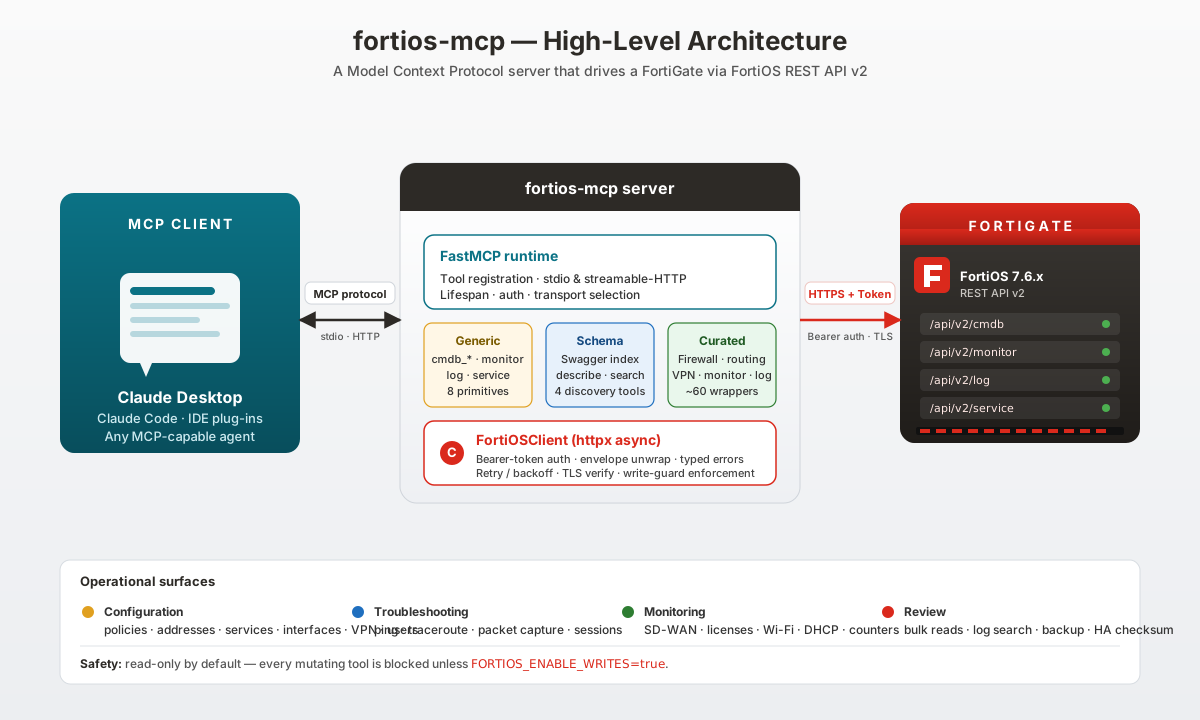
One fortios-mcp instance talks to exactly one FortiGate. The MCP
client speaks the Model Context Protocol over stdio; the server
translates tool calls into authenticated REST requests against
/api/v2/cmdb, /monitor, /log, and /service. Run several
instances (one per device) if you manage a fleet.
Prerequisites
| Requirement | Minimum | Notes |
|---|---|---|
| Python | 3.12 | Installed automatically by uv if missing. |
uv |
latest | https://github.com/astral-sh/uv |
| FortiGate | FortiOS 7.6.6 | The only supported version. |
| Network | Outbound HTTPS from the host to the FortiGate management IP on FORTIOS_PORT (default 443). |
|
| MCP client | Claude Desktop, Claude Code, or any client that speaks MCP. |
Step 1 — Create a REST API token on the FortiGate
Replace <workstation-ip> with the IP of the machine running
fortios-mcp. The trusthost field is a hard allow-list enforced by
FortiOS, so the token is useless from any other source address.
config system accprofile
    edit "mcp_readonly"
        set scope global
        set sysgrp read
        set fwgrp read
        set netgrp read
        set vpngrp read
        set utmgrp read
        set loggrp read
    next
end

config system api-user
    edit "mcp"
        set accprofile "mcp_readonly"
        set trusthost1 <workstation-ip>/32
    next
end

execute api-user generate-key mcp
FortiOS prints the token once — copy it immediately, you cannot fetch it again.
Want write access? Create a second profile with
read-writegroups and a separatemcp_rwapi-user. Keep them apart so you can flip between read-only and read-write tokens deliberately.
Step 2 — Install
Using uv (recommended)
git clone https://github.com/FreddyMcFett/fortios-mcp.git
cd fortios-mcp
uv venv
uv pip install -e .
That's it — the fortios-mcp entry point is now available via
uv run fortios-mcp inside this directory.
Using pip
git clone https://github.com/FreddyMcFett/fortios-mcp.git
cd fortios-mcp
python3 -m venv .venv
source .venv/bin/activate
pip install -e .
Using Docker
Pre-built images are published on GitHub Container Registry:
docker pull ghcr.io/freddymcfett/fortios-mcp:latest
See Docker / HTTP Deployment below for the full Compose example.
Step 3 — Run
FORTIOS_HOST=fgt.example.com \
FORTIOS_API_TOKEN=xxxxxxxxxxxx \
  uv run fortios-mcp
Or hook it into Claude Desktop — edit claude_desktop_config.json:
- macOS:
~/Library/Application Support/Claude/claude_desktop_config.json - Windows:
%APPDATA%\Claude\claude_desktop_config.json - Linux:
~/.config/Claude/claude_desktop_config.json
{
  "mcpServers": {
    "fortios": {
      "command": "uv",
      "args": ["run", "--directory", "/absolute/path/to/fortios-mcp", "fortios-mcp"],
      "env": {
        "FORTIOS_HOST": "fgt.example.com",
        "FORTIOS_API_TOKEN": "xxxxxxxxxxxx",
        "FORTIOS_VERIFY_SSL": "false",
        "FORTIOS_DEFAULT_VDOM": "root"
      }
    }
  }
}
Restart Claude Desktop and fortios will appear in the MCP servers
panel.
For Claude Code, drop the same mcpServers block into
.claude/mcp.json and run claude mcp list to confirm.
See docs/installation.md for the full setup guide (Claude Code CLI, Perplexity, reverse-proxy, troubleshooting).
Docker / HTTP Deployment
# docker-compose.yml
services:
  fortios-mcp:
    image: ghcr.io/freddymcfett/fortios-mcp:latest
    container_name: fortios-mcp
    restart: unless-stopped
    ports:
      - "8002:8002"
    env_file:
      - .env
    environment:
      - MCP_SERVER_MODE=http
      - MCP_SERVER_HOST=0.0.0.0
      - MCP_SERVER_PORT=8002
      - FORTIOS_HOST=fgt.example.com
      - FORTIOS_VERIFY_SSL=false
      - FORTIOS_DEFAULT_VDOM=root
      - FORTIOS_TOOL_MODE=full
      - LOG_LEVEL=INFO
Put secrets in .env (never tracked in git):
# .env
FORTIOS_API_TOKEN=your-api-token
MCP_AUTH_TOKEN=your-secret-bearer-token  # optional, enables HTTP auth
chmod 600 .env
docker compose up -d
Verify the server:
curl http://localhost:8002/health
# {"status": "healthy", "service": "fortios-mcp", "fortigate_connected": true, ...}
Connecting an MCP client over HTTP
Claude Code (~/.claude/mcp_servers.json):
{
  "mcpServers": {
    "fortios": {
      "type": "streamable-http",
      "url": "https://your-mcp-host.example.com/mcp",
      "headers": {
        "Authorization": "Bearer your-mcp-auth-token"
      }
    }
  }
}
Claude Desktop (claude_desktop_config.json):
{
  "mcpServers": {
    "fortios": {
      "type": "streamable-http",
      "url": "https://your-mcp-host.example.com/mcp",
      "headers": {
        "Authorization": "Bearer your-mcp-auth-token"
      }
    }
  }
}
Production Deployment (Reverse Proxy)
Behind a TLS-terminating reverse proxy (Traefik, nginx) you must set
MCP_ALLOWED_HOSTS so the MCP SDK accepts the external hostname:
MCP_ALLOWED_HOSTS=["mcp.example.com"]
And always set a Bearer token:
MCP_AUTH_TOKEN=$(openssl rand -hex 32)
Full Traefik-labelled Compose example: see docs/installation.md.
Update
cd fortios-mcp
git pull --ff-only
uv pip install -e . --upgrade
Or, for Docker:
docker compose pull
docker compose up -d
Restart your MCP client (Claude Desktop / Claude Code) so it spawns the new process.
Uninstall
# Local
rm -rf /path/to/fortios-mcp

# Docker
docker compose down
docker image rm ghcr.io/freddymcfett/fortios-mcp:latest

# FortiGate — revoke the token(s) you created
config system api-user
    delete mcp
end
Configuration
All settings come from environment variables (or a .env file). See
.env.example for the full template.
| Variable | Default | Purpose |
|---|---|---|
FORTIOS_HOST |
required | FortiGate hostname / IP |
FORTIOS_PORT |
443 |
HTTPS port |
FORTIOS_API_TOKEN |
required | REST API admin token |
FORTIOS_VERIFY_SSL |
true |
Set false for self-signed certs |
FORTIOS_TIMEOUT |
30 |
Per-request timeout (seconds) |
FORTIOS_MAX_RETRIES |
3 |
Retries on 429 / 5xx / network error |
FORTIOS_DEFAULT_VDOM |
root |
VDOM used when a tool call omits one |
FORTIOS_ENABLE_WRITES |
false |
Must be true for any mutating tool |
FORTIOS_TOOL_MODE |
full |
full registers everything, dynamic registers only discovery tools |
MCP_SERVER_MODE |
auto |
auto, stdio, or http |
MCP_SERVER_HOST |
0.0.0.0 |
HTTP bind address |
MCP_SERVER_PORT |
8002 |
HTTP port |
MCP_AUTH_TOKEN |
unset | Bearer token required on every HTTP request except /health |
MCP_ALLOWED_HOSTS |
unset | Extra Host headers to accept (JSON array or CSV) — required behind a reverse proxy |
LOG_LEVEL |
INFO |
DEBUG / INFO / WARNING / ERROR |
LOG_FILE |
unset | Path to mirror logs to disk |
.env files must be chmod 600; utils/config.py emits a warning
otherwise.
How write-guarding works
- Every mutating tool is decorated with
@require_writes. - When
FORTIOS_ENABLE_WRITES=false, the decorator short-circuits the call and returns{"status": "error", "message": "..."}. tests/test_write_guard.pyfails if anyone adds a mutating tool without the guard.
Recommended workflow when you do need to make changes:
- Generate a separate read-write token on the FortiGate.
- Set
FORTIOS_API_TOKENto the RW token andFORTIOS_ENABLE_WRITES=true. - Restart the server.
- Flip back to the read-only token when you're done.
Tip: Even with writes enabled, ask the model to describe the change first (e.g. show the JSON body it plans to POST) and explicitly approve before it calls a mutating tool.
Tool catalog
Generic primitives (8) — cover the full API
cmdb_get, cmdb_set*, cmdb_add*, cmdb_update*, cmdb_delete*,
monitor_get, log_search, service_execute*
Schema discovery (4) — browse the bundled Swagger
list_api_categories, list_endpoints, describe_endpoint,
search_endpoints
Curated — System (14)
get_system_status, get_system_performance, get_system_global,
list_interfaces, get_interface, get_interface_status,
set_interface*, list_admins, get_ha_status, get_ha_checksum,
get_firmware_info, backup_config, reboot_device*, shutdown_device*
Curated — Firewall (12)
list_firewall_policies, get_firewall_policy, add_firewall_policy*,
update_firewall_policy*, delete_firewall_policy*,
move_firewall_policy*, list_firewall_addresses,
list_firewall_address_groups, list_firewall_services,
list_firewall_vips, list_firewall_ippools
Curated — Routing (8)
list_static_routes, add_static_route*, delete_static_route*,
get_routing_table, get_bgp_neighbors, get_ospf_neighbors,
get_policy_routes, get_arp_table
Curated — VPN (7)
list_ipsec_phase1, list_ipsec_phase2, get_ipsec_tunnel_status,
bring_up_ipsec_tunnel*, bring_down_ipsec_tunnel*,
list_ssl_vpn_sessions, get_ssl_vpn_settings
Curated — Users & auth (6)
list_local_users, list_user_groups, list_ldap_servers,
list_radius_servers, list_fsso_agents,
list_firewall_auth_sessions
Curated — Security profiles (8)
list_antivirus_profiles, list_ips_sensors,
list_web_filter_profiles, list_dns_filter_profiles,
list_application_control_lists, list_dlp_profiles,
list_ssl_inspection_profiles, list_profile_groups
Curated — Monitoring (10)
list_sessions, kill_session*, get_top_sources,
get_top_destinations, get_bandwidth_by_interface,
get_license_status, get_fortiguard_status, get_sdwan_health,
list_wifi_clients, list_dhcp_leases
Curated — Logs (5)
log_search_disk, log_search_memory, log_search_fortianalyzer,
log_search_forticloud, log_download
Curated — Diagnostics (6)
list_packet_captures, start_packet_capture*,
stop_packet_capture*, download_packet_capture, ping, traceroute
* = write-guarded (requires FORTIOS_ENABLE_WRITES=true).
Total: ~88 tools. Everything not listed above is still reachable via
the generic primitives combined with describe_endpoint.
When the model needs an endpoint that isn't curated, it uses the four
schema-discovery tools to browse the bundled Swagger and then calls the
matching generic primitive (cmdb_get, monitor_get, etc.) with the
right path and parameters.
VDOMs
Every tool that accepts a vdom argument defaults to
FORTIOS_DEFAULT_VDOM. Override per-call by passing the VDOM name
explicitly. For a multi-VDOM box, set FORTIOS_DEFAULT_VDOM to the
VDOM you operate in most often.
Troubleshooting
| Symptom | Likely cause | Fix |
|---|---|---|
error: Missing required environment variables: FORTIOS_HOST, FORTIOS_API_TOKEN on startup |
Env vars not exported into the shell (or .env not loaded) |
Export both variables or populate .env, then rerun. |
AuthenticationError on first call |
Wrong FORTIOS_API_TOKEN or source IP not in trusthost |
Re-check the token and trusthost1 on the api-user. |
ssl.SSLCertVerificationError |
Self-signed FortiGate cert | Set FORTIOS_VERIFY_SSL=false (lab only) or install a trusted cert on the FortiGate. |
Tool call returns "writes are disabled" |
Write-guard blocking a mutating tool | Set FORTIOS_ENABLE_WRITES=true and restart. |
NotFoundError on a valid-looking path |
VDOM mismatch | Pass vdom= explicitly or set FORTIOS_DEFAULT_VDOM. |
Claude Desktop shows no fortios server |
command / args / cwd wrong in claude_desktop_config.json |
Use an absolute path, and check the Claude Desktop MCP log file. |
HTTP 401 from /mcp |
MCP_AUTH_TOKEN mismatch |
Check both ends of the Bearer token. |
| Reverse-proxy requests rejected before reaching the app | MCP_ALLOWED_HOSTS unset |
Add your public hostname to MCP_ALLOWED_HOSTS. |
/health returns "fortigate_connected": false |
Initial probe failed | Inspect container logs; check network / token. |
Turn on LOG_LEVEL=DEBUG for per-request traces; all tokens,
passwords, and PSKs are redacted by sanitize_for_logging() before
anything hits the log.
Development
uv venv
uv pip install -e ".[dev]"
uv run ruff check src/ tests/
uv run ruff format --check src/ tests/
uv run mypy src/
uv run pytest
Integration tests against a real FortiGate:
FORTIOS_HOST=... FORTIOS_API_TOKEN=... \
  uv run pytest -m integration tests/integration
See CLAUDE.md for the contributor handbook and CONTRIBUTING.md for commit conventions.
Every feature change must ship with matching doc updates — see CLAUDE.md §10a.
Documentation map
| Doc | What's in it |
|---|---|
| docs/installation.md | Full installation & setup guide (prerequisites, clients, Docker, reverse proxy, troubleshooting) |
| docs/UPDATING.md | Workflow for bumping to a new FortiOS release |
| docs/architecture.svg | High-level architecture diagram |
| CLAUDE.md | Project handbook — architecture, coding standards, tool taxonomy, release flow, security posture |
| CONTRIBUTING.md | Pre-PR checklist and commit conventions |
| SECURITY.md | Private-disclosure process for security issues |
| CHANGELOG.md | Auto-generated release notes — do not edit by hand |
Versioning & release
Fully automated via python-semantic-release:
- Commit messages follow Conventional Commits.
- Every push to
mainruns.github/workflows/release.yml, which bumps the version, updatesCHANGELOG.md, tags, and drafts a GitHub release.
Never edit CHANGELOG.md or bump pyproject.toml manually.
License
MIT © FreddyMcFett
Установка FortiOS
У этого сервера нет опубликованного пакета — он собирается из исходников. Открой репозиторий и следуй инструкции в README.
▸ github.com/freddymcfett/fortios-mcpFAQ
FortiOS MCP бесплатный?
Да, FortiOS MCP бесплатный — установка в пару кликов через Unyly без оплаты.
Нужен ли API-ключ для FortiOS?
Нет, FortiOS работает без API-ключей и переменных окружения.
FortiOS — hosted или self-hosted?
Self-hosted: сервер запускается локально на твоей машине командой из раздела установки.
Как установить FortiOS в Claude Desktop, Claude Code или Cursor?
Открой FortiOS на unyly.org, выбери вкладку своего клиента (Claude Desktop, Claude Code, Cursor) и нажми Install — конфиг сгенерируется автоматически, без правки JSON.
Похожие MCP
GitHub
PRs, issues, code search, CI status
 автор: GitHub
Filesystem
Secure file operations with configurable access controls.
Memory
Knowledge graph-based persistent memory system.
Template MCP Server
A CLI tool to create a new Model Context Protocol server project with TypeScript support, dual transport options, and an extensible structure
 автор: mcpdotdirect
Compare FortiOS with
Не уверен что выбрать?
Найди свой стек за 60 секунд
Автор?
Embed-бейдж для README
Похожее
Все в категории development