
Framegrab Server
БесплатноНе проверенAn MCP server for capturing images from cameras and video streams via the framegrab library, providing tools to create framegrabbers and grab frames.

Описание
An MCP server for capturing images from cameras and video streams via the framegrab library, providing tools to create framegrabbers and grab frames.
README
Overview
A Model Context Protocol (MCP) server for capturing images from cameras and video streams. Uses the framegrab library to handle the actual image capture.
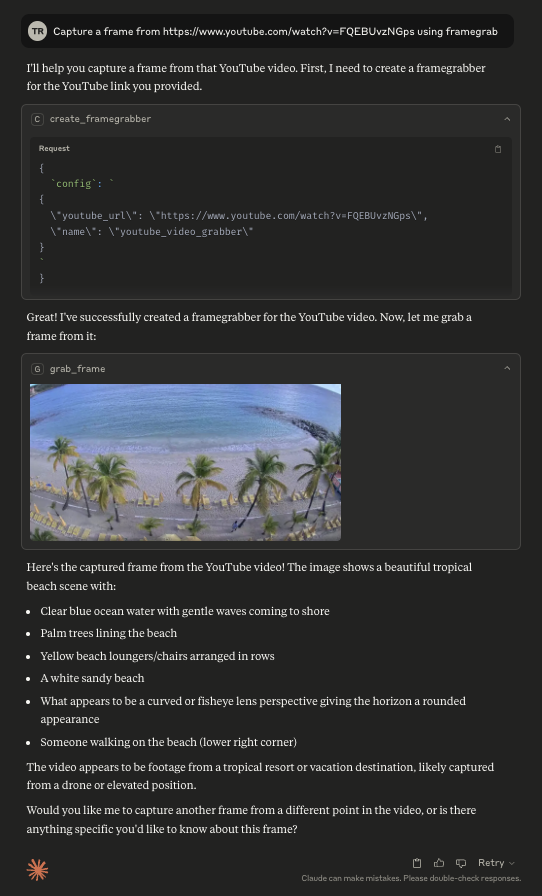
This server can be used to capture images from a webcam, a USB camera, an RTSP stream, a youtube live stream, or any other video source supported by the framegrab library.
This MCP server is still in early development. The functionality and available tools are subject to change and expansion as we continue to develop and improve the server.
Tools
The following tools are available in the Framegrab MCP server:
- create_framegrabber: Create a new framegrabber from a configuration object and add it to the available grabbers.
- grab_frame: Grab a frame from the specified framegrabber and return it as an image in the desired format (png, jpg, or webp).
- list_framegrabbers: List all available framegrabbers by name, sorted alphanumerically.
- get_framegrabber_config: Retrieve the configuration of a specific framegrabber.
- set_framegrabber_config: Update the configuration options for a specific framegrabber.
- release_framegrabber: Release a framegrabber and remove it from the available grabbers.
Resources
The following resources are available in the Framegrab MCP server:
- framegrabbers: Lists all available framegrabbers by name, sorted alphanumerically.
Configuration
Usage with Claude Desktop
Add this to your claude_desktop_config.json:
{
  "mcpServers": {
    "framegrab": {
      "command": "uvx",
      "args": [
        "framegrab-mcp-server"
      ]
    }
  }
}
Usage with Zed
Add the following to your zed settings.json:
{
  "context_servers": {
    "framegrab": {
      "command": {
        "path": "uvx",
        "args": [
          "framegrab-mcp-server"
        ]
      }
    }
  }
}
(experimental) Enabling autodiscovery of framegrabbers
Enable autodiscovery of framegrabbers (such as your webcam or usb cameras) by setting
ENABLE_FRAMEGRAB_AUTO_DISCOVERY="true" in your environment variables. This will automatically add any discovered framegrabbers to the list of available framegrabbers.
If autodiscovery is enabled, then you can also configure how RTSP autodiscovery works by changing FRAMEGRAB_RTSP_AUTO_DISCOVERY_MODE. By default, it is set to "off", which disables RTSP autodiscovery. For a thorough attempt at autodiscovery, set it to "complete_fast".
{
  "mcpServers": {
    "framegrab": {
      "command": "uvx",
      "args": [
        "framegrab-mcp-server"
      ],
      "env": {
        "ENABLE_FRAMEGRAB_AUTO_DISCOVERY": "true",
        "FRAMEGRAB_RTSP_AUTO_DISCOVERY_MODE": "complete_fast"
      }
    }
  }
}
This will increase server startup time.
Установить Framegrab Server в Claude Desktop, Claude Code, Cursor
unyly install framegrab-mcp-serverСтавит в Claude Desktop, Claude Code, Cursor и VS Code — сам разбирается с npx, uvx и сборкой из исходников.
Впервые? Поставь CLI: curl -fsSL https://unyly.org/install | sh
Или настроить вручную
Выполни в терминале:
claude mcp add framegrab-mcp-server -- uvx framegrab-mcp-serverFAQ
Framegrab Server MCP бесплатный?
Да, Framegrab Server MCP бесплатный — установка в пару кликов через Unyly без оплаты.
Нужен ли API-ключ для Framegrab Server?
Нет, Framegrab Server работает без API-ключей и переменных окружения.
Framegrab Server — hosted или self-hosted?
Self-hosted: сервер запускается локально на твоей машине командой из раздела установки.
Как установить Framegrab Server в Claude Desktop, Claude Code или Cursor?
Открой Framegrab Server на unyly.org, выбери вкладку своего клиента (Claude Desktop, Claude Code, Cursor) и нажми Install — конфиг сгенерируется автоматически, без правки JSON.
Похожие MCP
Omni Video
An MCP server that transforms LLM-enabled IDEs into professional video editors by pre-processing footage into text proxies, generating motion graphics via HTML/
 автор: buildwithtaza
ARA
Generate images, video and audio from any AI agent — one connector.
 автор: ARA
YouTube
Transcripts, channel stats, search
 автор: YouTube
EverArt
AI image generation using various models.
 автор: modelcontextprotocol
Compare Framegrab Server with
Не уверен что выбрать?
Найди свой стек за 60 секунд
Автор?
Embed-бейдж для README
Похожее
Все в категории media