
Gemini Chatbot
БесплатноНе проверенAn MCP server exposing calculator, file read, and file write tools for the Gemini CLI agent, enabling mathematical computations and file operations through natu

Описание
An MCP server exposing calculator, file read, and file write tools for the Gemini CLI agent, enabling mathematical computations and file operations through natural language.
README
A simple MCP (Model Context Protocol) server over STDIO exposing calculator, file read, and file write tools for the Gemini CLI agent.
Features
- Calculator
- File Read
- File Write
Architecture at a Glance
Gemini CLI ──STDIO──> MCP Server (src/server.py) ──Tools──> Your Python Functions
The CLI launches the MCP server, streams requests over STDIO, and receives tool responses without needing sockets or REST.
Project Tour
.gemini/settings.json
// filepath: f:\Workspace\AI Training\Gemini CLI\.gemini\settings.json
{
  "mcpServers": {
    "pythonTools": {
      "command": "poetry",
      "args": ["run", "python", "src/server.py"],
      "cwd": "",
      "env": {
        "MCP_PROXY_AUTH_TOKEN": "<MCP_PROXY_AUTH_TOKEN>"
      },
      "timeout": 15000
    }
  }
}
This configuration wires the CLI to spawn the MCP server through Poetry, injects the proxy token, and enforces a 15-second timeout.
Note: When the server starts, it prints the configured token in the terminal so you can confirm the placeholder value.
Python tools
The CLI mounts the MCP server defined in src/server.py, exposing calculator and file helpers for quick automation.
MCP - Import
FastMCP class from mcp package can be used to instantly create mcp servers.
# filepath: f:\Workspace\AI Training\Gemini CLI\src\server.py
from mcp.server.fastmcp import FastMCP

mcp = FastMCP("demo")
MCP decorators for tool registration
Decorators expose calculator and file utilities as discoverable MCP tools.
Docstrings define parameters and return values for each tool so Gemini CLI can build the right schemas for invocation.
# filepath: f:\Workspace\AI Training\Gemini CLI\src\server.py
@mcp.tool()
def handle_calculator(expression):
    """
    Evaluate a mathematical expression and return the result.
    ...
    """
    ...

@mcp.tool()
def handle_file_read(path):
    """
    Read the contents of a file at the given path.
    ...
    """
    ...

@mcp.tool()
def handle_file_write(path: str, content: str):
    """
    Write content to a file at the given path.
    ...
    """
    ...
Run MCP server
# filepath: f:\Workspace\AI Training\Gemini CLI\src\server.py
if __name__ == "__main__":
    mcp.run()
By default, the server listens on STDIO, ready to process incoming tool calls from the Gemini CLI. The transport parameter of mcp.run() can adjust this behavior.
Setup
- Install Python 3.6+ and Poetry.
- In project folder run:
(No external dependencies required)poetry install
Running MCP Server
Start the MCP server (STDIO transport):
poetry run python src/server.py
The process stays attached to STDIO (no TCP port).
Gemini CLI Integration
The Gemini CLI is configured to connect to this MCP server via .gemini/settings.json (command points to python src/server.py).
Launch Gemini CLI:
gemini
Use /mcp inside the CLI to list connected MCP servers and tools.
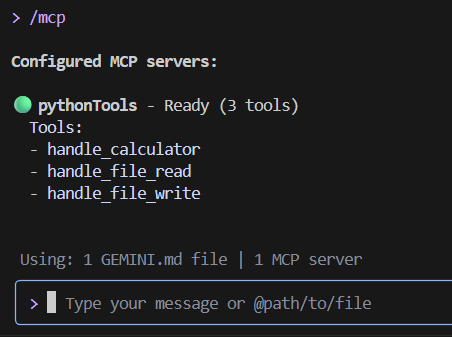
The Gemini agent can invoke these tools in based on the need.
You may ask naturally (e.g. “Compute 2 + 2 * 3” or “Read ./notes.txt”) and the agent will call the appropriate tool.
Usage Examples
User: "Hey, what's 15% tip on a $47.50 bill?"
Agent: _[Proposes to use calculator tool: 47.50 _ 0.15]_
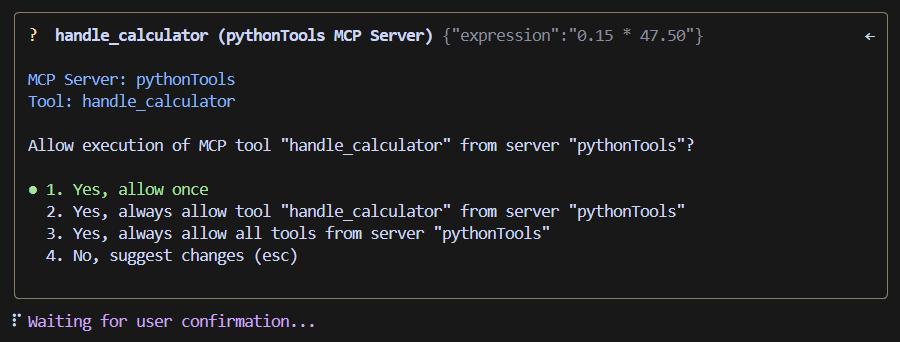
Tool Call and Response: (Upon Approval from the User) ✓ handle_calculator (pythonTools MCP Server) {"expression":"47.50 * 0.15"}

Установка Gemini Chatbot
У этого сервера нет опубликованного пакета — он собирается из исходников. Открой репозиторий и следуй инструкции в README.
▸ github.com/NanthagopalEswaran/Gemini-MCP-IntegrationFAQ
Gemini Chatbot MCP бесплатный?
Да, Gemini Chatbot MCP бесплатный — установка в пару кликов через Unyly без оплаты.
Нужен ли API-ключ для Gemini Chatbot?
Нет, Gemini Chatbot работает без API-ключей и переменных окружения.
Gemini Chatbot — hosted или self-hosted?
Self-hosted: сервер запускается локально на твоей машине командой из раздела установки.
Как установить Gemini Chatbot в Claude Desktop, Claude Code или Cursor?
Открой Gemini Chatbot на unyly.org, выбери вкладку своего клиента (Claude Desktop, Claude Code, Cursor) и нажми Install — конфиг сгенерируется автоматически, без правки JSON.
Похожие MCP
Fetch
Web content fetching and conversion for efficient LLM usage.
AWS KB Retrieval
Retrieval from AWS Knowledge Base using Bedrock Agent Runtime.
 автор: modelcontextprotocol
Spring AI MCP Server
Provides auto-configuration for setting up an MCP server in Spring Boot applications.
llm-analysis-assistant
A very streamlined mcp client that supports calling and monitoring stdio/sse/streamableHttp, and can also view request responses through the /logs page. It also
 автор: xuzexin-hz
Compare Gemini Chatbot with
Не уверен что выбрать?
Найди свой стек за 60 секунд
Автор?
Embed-бейдж для README
Похожее
Все в категории ai