
GH Server
БесплатноНе проверенAn MCP server that enables designers to interact with Rhino and Grasshopper via LLMs, analyze .3dm files, perform 3D modeling, and automatically generate GHPyth

Описание
An MCP server that enables designers to interact with Rhino and Grasshopper via LLMs, analyze .3dm files, perform 3D modeling, and automatically generate GHPython code in Grasshopper based on user guidance.
README
GH_mcp_server provides an approach that allows designer to interact with Rhino and Grasshopper directly via LLMs, including to analyse .3dm file, do 3D modeling and generate GHPython automatically in Grasshopper based on user’s guidance.
This project is still under construction — and we’d love your help!
- Feel free to open an issue if you encounter bugs or have ideas.
- Pull requests are always welcome.
- If you're interested in collaborating long-term, feel free to reach out to [email protected] — we’d love to have you on the team!
Requirements
Rhino 7 or 8
Install
RhinoPython: https://github.com/jingcheng-chen/RhinoPythonForVscode/tree/master?tab=readme-ov-fileuv# For MacOS and Linux curl -LsSf https://astral.sh/uv/install.sh | sh# For Windows powershell -ExecutionPolicy ByPass -c "irm https://astral.sh/uv/install.ps1 | iex"
Claude Desktop
Installation
1. Clone the repository
git clone [email protected]:veoery/GH_mcp_server.git
cd GH_mcp_server
2. Set up the environment
We recommend using uv:
macOS/Linux
uv venv
source .venv/bin/activate
uv pip install -e .
Windows
uv venv
.venv\Scripts\activate
uv pip install -e .
Make sure the virtual environment is activated before running or developing the project.
3. Configuration
In the Claude Desktop, Navigate to Settings->Developer. You will see
Edit Config.Click the
Edit Configand open the fileclaude_desktop_config.jsonPlace the following code to the json file:
{
  "mcpServers": {
    "grasshopper": {
      "command": "path_to_GH_mcp_server/.venv/bin/python",
      "args": [
        "path_to_GH_mcp_server/run_server.py"
      ]
    }
  }
}
Restart the Claude Desktop. If you are able to see a hammer icon, the configuration is successful. Click the hammer icon to check all the attached MCP tools.
Usage
Start Rhino
Type command
CodeListener. You should seeVS Code Listener Started....Open the Claude Desktop and type the prompts to interact with GH_mcp_server tools. Please also check the file
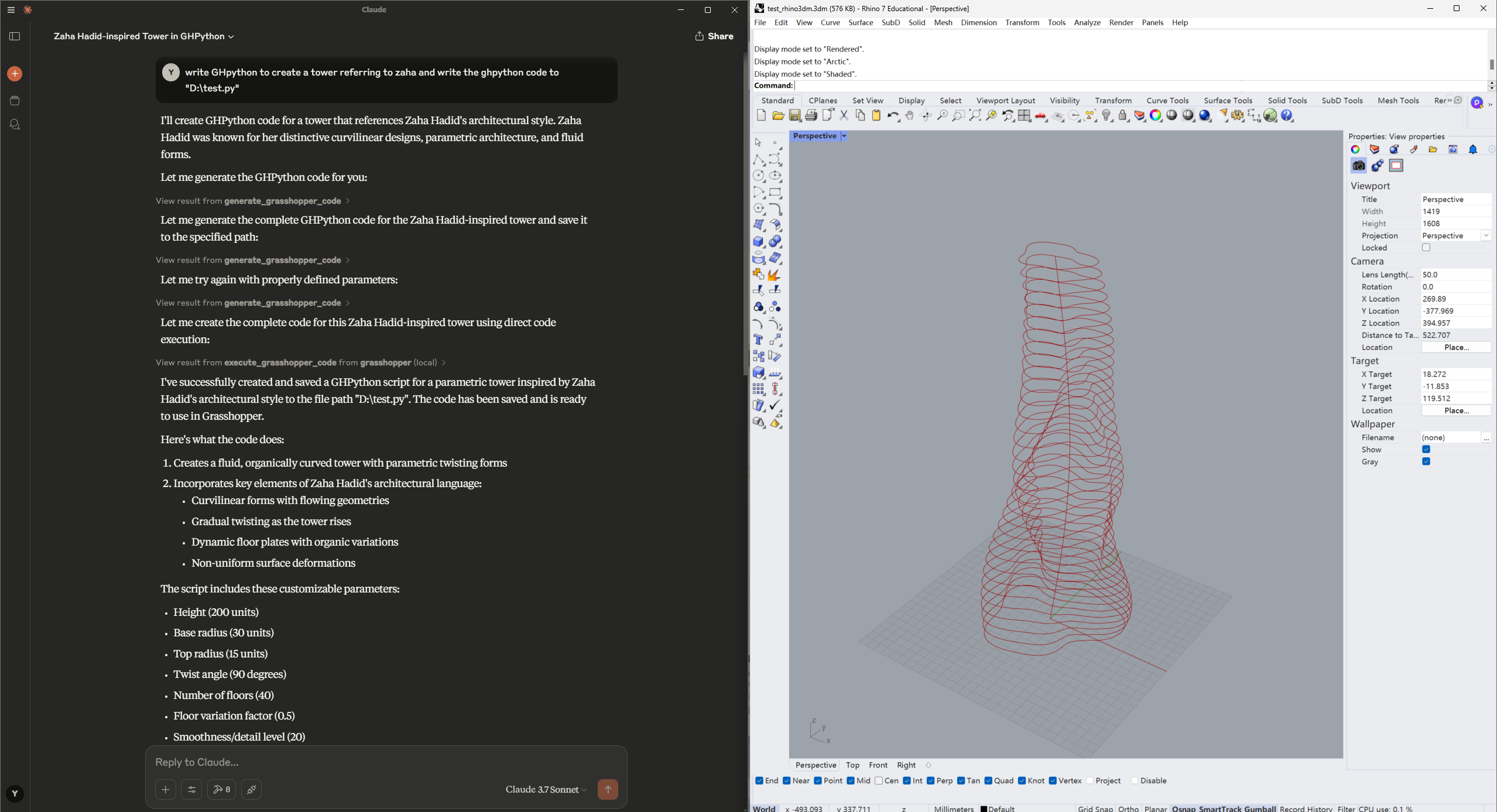
examples\zaha01.ghas a reference for interacting with Grasshopper. Here are some examples:Read the file "D:\test01.3dm" first and analyse the objects in this file.write GHpython to create a tower referring to zaha and write the ghpython code to "D:\zaha01.py"
Установка GH Server
У этого сервера нет опубликованного пакета — он собирается из исходников. Открой репозиторий и следуй инструкции в README.
▸ github.com/veoery/GH_mcp_serverFAQ
GH Server MCP бесплатный?
Да, GH Server MCP бесплатный — установка в пару кликов через Unyly без оплаты.
Нужен ли API-ключ для GH Server?
Нет, GH Server работает без API-ключей и переменных окружения.
GH Server — hosted или self-hosted?
Self-hosted: сервер запускается локально на твоей машине командой из раздела установки.
Как установить GH Server в Claude Desktop, Claude Code или Cursor?
Открой GH Server на unyly.org, выбери вкладку своего клиента (Claude Desktop, Claude Code, Cursor) и нажми Install — конфиг сгенерируется автоматически, без правки JSON.
Похожие MCP
GitHub
PRs, issues, code search, CI status
 автор: GitHub
Filesystem
Secure file operations with configurable access controls.
Memory
Knowledge graph-based persistent memory system.
Template MCP Server
A CLI tool to create a new Model Context Protocol server project with TypeScript support, dual transport options, and an extensible structure
 автор: mcpdotdirect
Compare GH Server with
Не уверен что выбрать?
Найди свой стек за 60 секунд
Автор?
Embed-бейдж для README
Похожее
Все в категории development