
GID Server
БесплатноНе проверенEnables AI to analyze, query, and manage a graph-based representation of software architecture for impact analysis, dependency tracking, and design.

Описание
Enables AI to analyze, query, and manage a graph-based representation of software architecture for impact analysis, dependency tracking, and design.
README
Model Context Protocol server for Graph-Indexed Development
Give AI assistants structural awareness of your codebase. GID represents software systems as typed, directed graphs — so AI can reason about architecture, not just syntax.
Why GID?
AI can generate code, but it can't answer:
- "What breaks if I change UserService?"
- "Which components implement the auth feature?"
- "What's the dependency path from Controller to Database?"
GID fills this gap by providing a graph-based map of your software architecture that AI assistants can query and update.
Two workflows:
- Top-down: Describe what you want to build → GID generates the architecture graph → AI implements against it
- Bottom-up: Extract a graph from existing code → Use it for impact analysis, safe refactoring, and planning new changes
The graph evolves with your project. Every time you add a feature or refactor, the graph updates — so AI always has the current map.
Dogfooding: GID's own architecture is defined as a GID graph. We used GID to build GID — tracking components, querying impact before refactoring, and planning new features. See the self-referential graph.
Tools
Query & Analysis
| Tool | Description |
|---|---|
gid_query_impact |
Analyze what components and features are affected by changing a node |
gid_query_deps |
Get dependencies or dependents of a node (with depth control) |
gid_query_common_cause |
Find shared dependencies between two nodes (useful for debugging) |
gid_query_path |
Find dependency path between two nodes |
gid_analyze |
Deep analysis of a file (functions, classes, complexity) |
gid_get_file_summary |
Structured file analysis for AI summarization |
gid_advise |
Graph health score, validation issues, and improvement suggestions |
gid_get_schema |
Get the GID graph schema with dynamic relations |
Graph Management
| Tool | Description |
|---|---|
gid_read |
Read graph structure (YAML, JSON, or summary) |
gid_init |
Initialize a new GID graph in a project |
gid_edit_graph |
Add, update, or delete nodes, edges, and relation types |
gid_refactor |
Rename, move, or delete nodes with cascade |
gid_history |
Version history — list, diff, or restore previous versions |
AI-Assisted
| Tool | Description |
|---|---|
gid_design |
Generate a graph from natural language requirements |
gid_extract |
Extract dependency graph from existing code (TypeScript/JavaScript) |
gid_semantify |
Propose semantic upgrades — map files to components, assign layers, detect features |
gid_complete |
Analyze docs to identify gaps and suggest graph additions |
gid_visual |
Generate interactive D3.js HTML visualization |
Resources
| Resource | Description |
|---|---|
gid://graph |
Current dependency graph (YAML) |
gid://health |
Health score and validation results |
gid://features |
List of all features in the graph |
Installation
Claude Desktop
Add to ~/Library/Application Support/Claude/claude_desktop_config.json:
{
  "mcpServers": {
    "gid": {
      "command": "npx",
      "args": ["graph-indexed-development-mcp"]
    }
  }
}
Claude Code
claude mcp add gid -- npx graph-indexed-development-mcp
Cursor / VS Code
Add to your MCP settings:
{
  "gid": {
    "command": "npx",
    "args": ["graph-indexed-development-mcp"]
  }
}
Quick Start
- Install the MCP server (see above)
- Initialize a graph in your project:
You: "Initialize a GID graph for this project"
→ Claude uses gid_init
- Extract dependencies from your code:
You: "Extract the dependency graph from the codebase"
→ Claude uses gid_extract
- Start querying:
You: "What would break if I change UserService?"
→ Claude uses gid_query_impact

You: "Design the architecture for a notification feature"
→ Claude uses gid_design

You: "Show me the project health score"
→ Claude uses gid_advise
Example Conversations
Top-Down: Design First, Then Build
You: "Design an e-commerce backend with auth, payments, and order tracking"
Claude uses gid_design →
  Created 4 features: UserAuth, Payment, OrderTracking, ProductCatalog
  Created 8 components across 4 layers
  Created 15 dependency edges
  Health score: 95/100

You: "Now implement the AuthService based on the graph"
Claude uses gid_query_deps →
  AuthService depends on: UserRepository, TokenManager
  Implements: UserAuth feature
  Layer: application
Claude generates code that fits the architecture.
Bottom-Up: Extract from Existing Code
You: "Extract the dependency graph from this project"
Claude uses gid_extract →
  Found 42 files, 156 dependencies
  Grouped into 12 components across 4 layers

You: "I need to refactor UserService. What would break?"
Claude uses gid_query_impact →
  Direct dependents: AuthController, ProfileController, OrderService
  Affected features: UserRegistration, OrderPayment
  5 components impacted, 2 features at risk

You: "Why do OrderService and PaymentService keep failing together?"
Claude uses gid_query_common_cause →
  Shared dependency: DatabaseService
  Both services depend on it — that's likely the root cause.
Continuous: Keep the Graph Updated
You: "I just added a NotificationService. Update the graph."
Claude uses gid_edit_graph →
  Added node: NotificationService (Component, application layer)
  Added edges: depends_on EmailClient, implements Notifications feature

You: "Check the project health"
Claude uses gid_advise →
  Health: 87/100
  Warning: NotificationService has no tests
  Warning: EmailClient has 6 dependents (high coupling)
  Suggestion: Consider splitting EmailClient into smaller modules
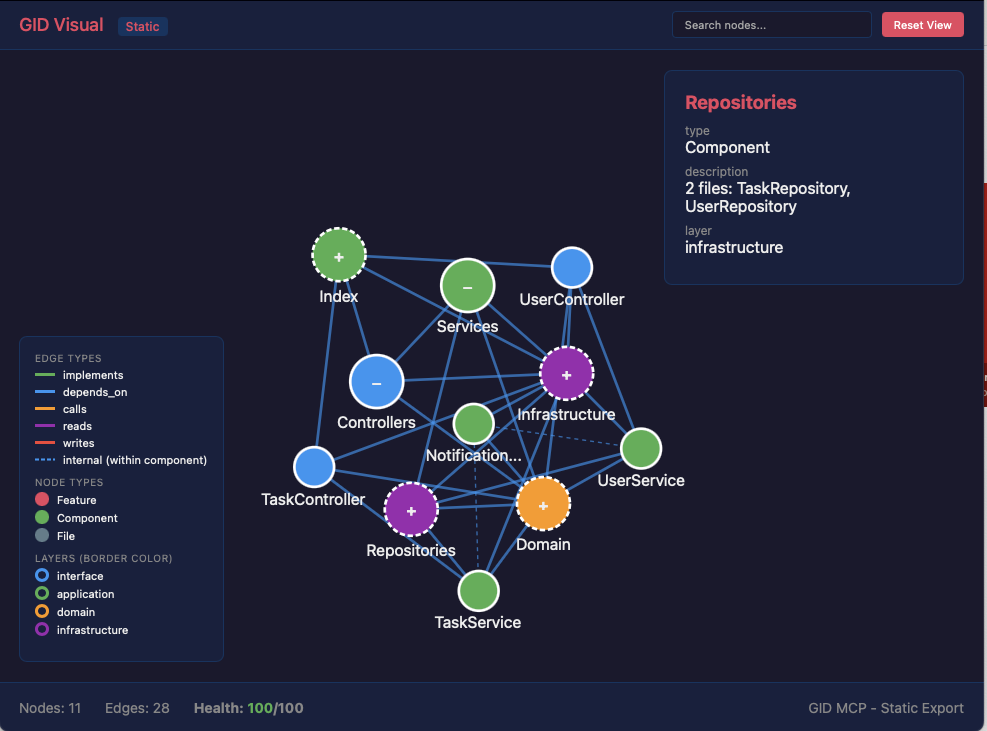
Visualization
You: "Visualize the current project architecture"
Claude uses gid_visual → Generates an interactive D3.js HTML file
Graph Format
GID uses a YAML-based graph format (.gid/graph.yml):
nodes:
  UserAuth:
    type: Feature
    description: User authentication and authorization
    priority: core
    status: active
  AuthService:
    type: Component
    layer: application
    description: Handles authentication logic
    path: src/services/auth.ts
  AuthController:
    type: Component
    layer: interface
    path: src/controllers/auth.ts

edges:
  - from: AuthService
    to: UserAuth
    relation: implements
  - from: AuthController
    to: AuthService
    relation: depends_on
Node types: Feature, Component, Interface, Data, File, Test, Decision
Relation types: implements, depends_on, calls, reads, writes, tested_by, defined_in, enables, blocks, requires, precedes, refines, validates, related_to, decided_by — plus custom relations you define.
Task Tracking
Nodes can have an optional tasks field for inline step tracking:
webhook-push:
  type: Component
  layer: infrastructure
  status: in_progress
  description: "Webhook push notifications HMAC-SHA256"
  tasks:
    - "[x] Implement HMAC signing"
    - "[x] DM webhook events"
    - "[ ] Run migration 011 on prod"
    - "[ ] Add retry logic"
Convention: When all tasks are done, remove the tasks field and set status: active.
Tools
| Tool | Description |
|---|---|
gid_tasks |
Query tasks across the graph. No args = all pending. --node <id> for specific node. --done to include completed. |
gid_task_update |
Toggle task completion: --node <id> --task "task text" --done true/false |
gid_read |
Now shows tasks inline in summary output |
Display Format
webhook-push [Component, infrastructure, in_progress]
  "Webhook push notifications HMAC-SHA256"
  Tasks: 2/4 done
    ✅ Implement HMAC signing
    ✅ DM webhook events
    ☐ Run migration 011 on prod
    ☐ Add retry logic
Requirements
- Node.js >= 20.0.0
Related
- GID Methodology — Specification, examples, and dogfood graph
- GID CLI — Command line interface
- GID Paper — Formal methodology (Zenodo)
License
AGPL-3.0 — See LICENSE for details.
For commercial licensing, see COMMERCIAL-LICENSE.md.
Author
Toni Tang — @tonioyeme
from github.com/potatouniverse/graph-indexed-development-mcp
Установить GID Server в Claude Desktop, Claude Code, Cursor
unyly install gid-mcp-serverСтавит в Claude Desktop, Claude Code, Cursor и VS Code — сам разбирается с npx, uvx и сборкой из исходников.
Впервые? Поставь CLI: curl -fsSL https://unyly.org/install | sh
Или настроить вручную
Выполни в терминале:
claude mcp add gid-mcp-server -- npx -y graph-indexed-development-mcpFAQ
GID Server MCP бесплатный?
Да, GID Server MCP бесплатный — установка в пару кликов через Unyly без оплаты.
Нужен ли API-ключ для GID Server?
Нет, GID Server работает без API-ключей и переменных окружения.
GID Server — hosted или self-hosted?
Self-hosted: сервер запускается локально на твоей машине командой из раздела установки.
Как установить GID Server в Claude Desktop, Claude Code или Cursor?
Открой GID Server на unyly.org, выбери вкладку своего клиента (Claude Desktop, Claude Code, Cursor) и нажми Install — конфиг сгенерируется автоматически, без правки JSON.
Похожие MCP
LibreOffice Tools
Enables AI agents to read, write, and edit Office documents via LibreOffice with token-efficient design. Supports multiple formats including DOCX, XLSX, PPTX, a
 автор: passerbyflutter
dannote/figma-use
Full Figma control: create shapes, text, components, set styles, auto-layout, variables, export. 80+ tools.
 автор: dannote
Logo.dev
Search and retrieve company logos by brand or domain. Customize size, format, and theme to match your design needs. Accelerate design, prototyping, and content
 автор: NOVA-3951
PIX4Dmatic
Enables GUI automation for controlling PIX4Dmatic on Windows through MCP. Supports launching, focusing, capturing screenshots, sending hotkeys, clicking UI elem
 автор: jangjo123
Compare GID Server with
Не уверен что выбрать?
Найди свой стек за 60 секунд
Автор?
Embed-бейдж для README
Похожее
Все в категории design