
Glyphs
БесплатноНе проверенA Model Context Protocol server for Glyphs that exposes font‑specific tools to AI/LLM agents.

Описание
A Model Context Protocol server for Glyphs that exposes font‑specific tools to AI/LLM agents.
README
[!IMPORTANT] Glyphs 3 and Glyphs 4: the
mainbranch supports both major versions. The macOS installer detects each installed version and can target either or both. The terminal installer defaults to Glyphs 4; pass--glyphs-version 3for Glyphs 3.
Site: https://ap.cx/gmcp
A Model Context Protocol server for Glyphs that exposes font‑specific tools to AI/LLM agents.
macOS Installer app (recommended)
The Installer app is the simplest way to install Glyphs MCP.glyphsPlugin, install Python dependencies, and link Glyphs MCP into:
- Codex App
- Codex CLI (terminal tools or in VS Code)
- Claude App
- Claude CLI (terminal tools or in VS Code)
The macOS app detects Glyphs 3 and Glyphs 4 independently. If both are installed, both are selected by default; you can install or update either version alone by clearing the other checkbox. Each version keeps its own plug-in, Python, and Application Support status.
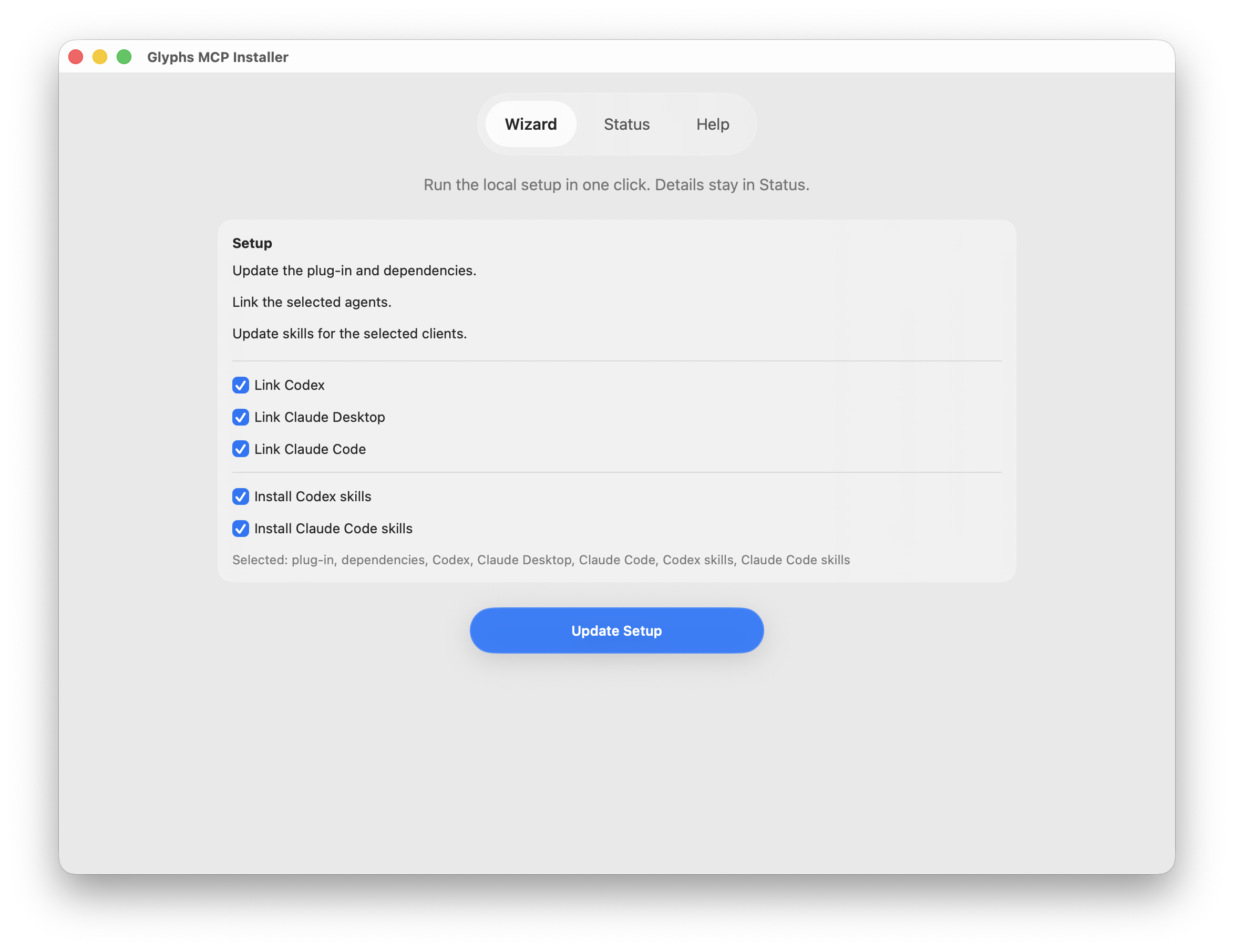
- Download (DMG): https://github.com/thierryc/Glyphs-mcp/releases/latest/download/GlyphsMCPInstaller.dmg
- Download (ZIP): https://github.com/thierryc/Glyphs-mcp/releases/latest/download/GlyphsMCPInstaller.zip
- Latest release: https://github.com/thierryc/Glyphs-mcp/releases/latest
The installer can also install the bundled Glyphs MCP skills for Codex and Claude CLI.
Any MCP client compatible with the MCP protocol can use this server. For now, the automatic installer covers only the apps listed above. Because Glyphs MCP is a localhost MCP server, manual setup in other clients is usually just the endpoint URL:
http://127.0.0.1:9680/mcp/
Terminal installer:
python3 install.py
The terminal installer targets Glyphs 4 by default. To install into Glyphs 3 explicitly, pass --glyphs-version 3. The macOS app instead detects and offers every installed Glyphs 3/4 target.
Finder alternative on macOS: double-click RunInstall.command in the repo root. It launches the same installer. If Gatekeeper blocks it, right-click → Open once.
To uninstall, open the app’s Status page and choose Uninstall…. The review sheet lists the exact Glyphs 3/4 plug-ins, managed skills, and matching client entries before asking for confirmation. From Terminal, preview both versions first and then run the interactive uninstall:
python3 install.py --uninstall --glyphs-version both --dry-run
python3 install.py --uninstall --glyphs-version both
The uninstaller intentionally preserves shared Python packages, Glyphs preferences, plug-in settings, font annotations, documents, repositories, and shared parent folders.
Scripted install example:
python3 install.py --non-interactive --python-mode glyphs --plugin-mode link --install-skills --skills-target codex --overwrite-plugin --overwrite-skills --skip-client-guidance
Minimum requirements:
- macOS 13.0+
- Glyphs 3 or Glyphs 4 beta
- Python 3.11–3.14 (recommended: python.org 3.14)
Glyphs 3 backward compatibility is maintained for the shared MCP server code where possible. The macOS app can target it directly; use --glyphs-version 3 with the terminal installer.
Repo skills for Codex and Claude Code
This repo ships a small bundle of workflow skills in skills/ for common Glyphs MCP tasks. The same source of truth is exposed to both clients:
- Codex reads them through
.agents/skills - Claude Code reads them through
.claude/skills
The supported usage patterns are:
Use repo-local skills
Use this when you are developing in this repository or want the clients to discover the skills directly from the repo checkout.
- Open this repository in Codex or Claude Code so the repo-local bridges are visible.
- Connect Glyphs MCP:
codex mcp add glyphs-mcp-server --url http://127.0.0.1:9680/mcp/
codex mcp list

claude mcp add --scope user --transport http glyphs-mcp http://127.0.0.1:9680/mcp/
claude mcp list
- In Codex, trust the workspace so
.agents/skillsloads. - In Claude Code, reload or restart if
.claude/skillsdoes not appear immediately. - Start Glyphs, confirm the server is running in Edit -> Glyphs MCP Server, and keep the default
Editprofile unless you only need read-only inspection. - Invoke a specific skill when you want a guided workflow:
Use $glyphs-mcp-connect to verify my Glyphs MCP setup, call list_open_fonts, and tell me which font_index to use next.
Install skills globally
Use this when you want the bundled glyphs-mcp-* skills available without opening the repo.
- Run the installer from the repo root, or use the signed macOS installer app:
python3 install.py
- In the installer, enable Install Glyphs MCP agent skills for Codex and/or Claude Code.
- The installer copies the bundled skills into:
~/.codex/skills/~/.claude/skills/
- Reload or restart Codex / Claude Code after the installer finishes.
- Ask for the skill by name:
Use the glyphs-mcp-connect skill to verify my Glyphs MCP setup, call list_open_fonts, and tell me which font_index to use next.
Advanced Codex-only alternative: you can install individual skills with Codex’s built-in $skill-installer, but that is not the primary Glyphs MCP workflow.
Current repo skills focus on:
- connection and health checks for the local Glyphs MCP server
- OpenType feature and stylistic-set inspection with Glyphs links
- guarded kerning bumper reviews and applies
- guarded spacing reviews and applies
- outlines, components, anchors, and docs lookup workflows
- guarded roman-to-italic first-pass copy and slant workflows
For the website docs version, see the agent skills pages in the docs site.
What Is an MCP Server?
A Model Context Protocol server is a lightweight process that:
- Registers tools (JSON‑RPC methods) written in the host language (Python here).
- Streams JSON output back to the calling agent.
Command Set (MCP server v1.2.24)
This table describes the tool surface exposed by the MCP server shipped in this repo (FastMCP version="1.2.24").
Glyph/layer inspection responses may include showUrl, showHttpUrl, and
showMarkdown fields. showUrl keeps the native glyphsapp://show/ URL.
showMarkdown uses a local http://127.0.0.1:9680/glyphs-show/ bridge URL so
LLM clients that block custom URL schemes can still render a clickable link; the
bridge redirects to Glyphs. Unsaved fonts return showUrlUnavailableReason
instead because Glyphs requires an absolute file path.
| Tool | Description |
|---|---|
get_server_info |
Return runtime version, runtime ID, code hash, resource path, Glyphs reachability, and open-font count for health checks. |
list_open_fonts |
List all open fonts and basic metadata. |
get_font_glyphs |
Return glyph list and key attributes for a font, including clickable Glyphs show links when available. |
get_font_masters |
Detailed master information for a font, including Metrics italicAngle and legacy custom-parameter slantAngle. |
get_font_instances |
List instances and their interpolation data. |
get_glyph_details |
Full glyph data including layers, paths, components, and Glyphs show links. |
list_style_sets |
List stylistic-set features (ss01-ss20) with source/replacement glyphs and a group-level Glyphs show link for alternates. |
get_font_kerning |
All kerning pairs for a given master. |
generate_kerning_tab |
Generate a kerning review proof tab (missing relevant pairs + outliers) and open it. |
review_kerning_bumper |
Review kerning collisions / near-misses and compute deterministic “bumper” suggestions (no mutation). |
apply_kerning_bumper |
Apply “bumper” suggestions as glyph–glyph kerning exceptions (supports dry_run; requires confirm=true to mutate). |
create_glyph |
Add a new glyph to the font. |
delete_glyph |
Remove a glyph from the font. |
update_glyph_properties |
Change unicode, category, export flags, etc. |
copy_glyph |
Duplicate outlines / components from one glyph to another. |
update_glyph_metrics |
Adjust width and side‑bearings. |
review_spacing |
Review spacing and suggest sidebearings/width (area-based; no mutation). |
apply_spacing |
Apply spacing suggestions (supports dry_run; requires confirm=true to mutate). |
set_spacing_params |
Set spacing parameters as font/master custom parameters (no auto-save). |
set_spacing_guides |
Add or clear glyph-level guides visualizing the spacing measurement band (no auto-save). |
review_master_stem_metrics |
Review master stem metrics required by Cursivy and related filters (no mutation). |
set_master_stem_metrics |
Create or update master stem metrics (supports dry_run; requires confirm=true to mutate). |
set_master_italic_angle |
Set a master’s Glyphs Font Info Metrics italicAngle (supports dry_run; requires confirm=true to mutate). |
review_italic_first_pass |
Preview a guarded roman-to-italic layer copy and slant workflow (default +12 Glyphs source angle; no mutation). |
apply_italic_first_pass |
Apply a first-pass italic/oblique copy and slant workflow (default +12 Glyphs source angle; supports dry_run; requires confirm=true to mutate). |
measure_stem_ratio |
Measure a stem ratio b between two masters (ref/base) for compensated tuning (no mutation). |
review_compensated_tuning |
Compute compensated-tuned outlines for one glyph from a base master plus a different compatible reference master (returns set_glyph_paths-compatible JSON; no mutation). |
apply_compensated_tuning |
Apply the same two-master compensated scaling transform across glyphs (backs up layers; supports dry_run; requires confirm=true to mutate). |
get_glyph_components |
Inspect components used in a glyph. |
add_component_to_glyph |
Append a component to a glyph layer. |
add_anchor_to_glyph |
Add an anchor to a glyph layer. |
get_glyph_annotations |
Inspect native Glyphs annotations for a layer, including MCP ownership metadata when available. |
get_glyph_annotation_groups |
Inspect MCP-managed linked annotation groups on a layer. |
add_glyph_annotation |
Add a native Glyphs annotation and store MCP ownership metadata in layer userData. |
add_glyph_annotation_group |
Add linked annotations, such as a circle or arrow plus a text note, under one MCP group ID. |
update_glyph_annotation |
Update a native annotation by MCP annotation ID or explicit layer annotation index. |
delete_glyph_annotation |
Delete one native annotation by MCP annotation ID or explicit layer annotation index. |
clear_glyph_annotations |
Clear MCP-managed annotations by default, or all annotations with scope="all". |
set_kerning_pair |
Set or remove a kerning value. |
get_selected_glyphs |
Info about glyphs currently selected in UI, including Glyphs show links. |
get_selected_font_and_master |
Current font + master and selection snapshot, including Glyphs show links for selected glyph layers. |
get_selected_nodes |
Detailed selected nodes with per‑master mapping for edits, plus links for the containing glyph/layer. |
add_corner_to_all_masters |
Add a _corner.* corner hint at selected nodes (and intersection handles) across all masters (requires _corner_name; optional _alignment: left/right/center or 0/1/2). |
get_glyph_paths |
Export paths in a JSON format suitable for LLM editing, including a Glyphs show link for the layer. |
render_glyph_review_image |
Render selected or named glyph layers to a read-only PNG visual review image with optional metrics, bounds, nodes, anchors, and guide overlays. |
review_collinear_handles |
Review a single path for curve nodes that should be smooth based on handle collinearity (no mutation). |
apply_collinear_handles_smooth |
Apply smooth=True for collinear-handle curve nodes in a single path (supports dry_run; requires confirm=true to mutate). |
set_glyph_paths |
Replace glyph paths from JSON. |
ExportDesignspaceAndUFO |
Export designspace/UFO bundles with structured logs and errors. |
execute_code |
Execute arbitrary Python in the Glyphs context. |
execute_code_with_context |
Execute Python with injected helper objects. |
save_font |
Save the active font (optionally to a new path). |
docs_search |
Search bundled Glyphs SDK/ObjectWrapper docs by title/summary. |
docs_get |
Fetch a bundled docs page by id/path (supports paging via offset/max_chars). |
docs_enable_page_resources |
Register each documentation page as its own MCP resource (optional; can flood clients). |
For performance-sensitive scripts, you can opt into lower-overhead execution:
capture_output=falseto avoid capturing stdout/stderr (prints go to the Macro Panel).return_last_expression=falseto skip evaluating the final line as an expression.max_output_chars/max_error_charsto cap returned output and avoid huge responses.snippet_only=trueto return a ready-to-paste Macro Panel snippet instead of executing (useful when you want manual control).- Prefer
execute_code_with_contextfor glyph-scoped mutations so the script runs with explicitfont/glyph/layerhelpers. - Large glyph edits should use documented layer/font update APIs such as
layer.beginChanges()/endChanges(); avoid glyph-level undo groups for MCP-driven batch writes. - Glyphs undo is glyph-scoped, so master/global edits are not guaranteed undoable.
Avoid calling exit() / quit() / sys.exit() in execute_code*; they won't exit Glyphs and can disrupt the call.
Macro (Glyphs): mark collinear-handle joins as smooth
Paste into Window → Macro Panel. Set APPLY = False first to review, then flip to True.
import math
from GlyphsApp import Glyphs

THRESHOLD_DEG = 3.0
MIN_HANDLE_LEN = 5.0
APPLY = False

def vec(a, b):
    return (b.x - a.x, b.y - a.y)

def length(v):
    return math.hypot(v[0], v[1])

def angle_deg(v1, v2):
    l1 = length(v1)
    l2 = length(v2)
    if l1 == 0 or l2 == 0:
        return None
    dot = v1[0]*v2[0] + v1[1]*v2[1]
    c = max(-1.0, min(1.0, dot/(l1*l2)))
    return math.degrees(math.acos(c))

font = Glyphs.font
tab = font.currentTab if font else None
layers = list(getattr(tab, "layers", []) or []) if tab else list(getattr(font, "selectedLayers", []) or [])

hits = 0
for layer in layers:
    gname = layer.parent.name if layer.parent else "?"
    for p_i, path in enumerate(getattr(layer, "paths", []) or []):
        nodes = list(path.nodes)
        ncount = len(nodes)
        closed = bool(getattr(path, "closed", True))
        for i, n in enumerate(nodes):
            if getattr(n, "type", None) != "curve":
                continue
            prev_i = (i - 1) % ncount if closed else (i - 1)
            next_i = (i + 1) % ncount if closed else (i + 1)
            if prev_i < 0 or next_i >= ncount:
                continue
            prev_n = nodes[prev_i]
            next_n = nodes[next_i]
            if getattr(prev_n, "type", None) != "offcurve":
                continue
            if getattr(next_n, "type", None) != "offcurve":
                continue

            v_in = vec(prev_n.position, n.position)
            v_out = vec(n.position, next_n.position)
            if min(length(v_in), length(v_out)) < MIN_HANDLE_LEN:
                continue
            ang = angle_deg(v_in, v_out)
            if ang is None or ang > THRESHOLD_DEG:
                continue
            if bool(getattr(n, "smooth", False)):
                continue

            print(f"{gname} path={p_i} node={i} angle={ang:.3f} -> smooth")
            hits += 1
            if APPLY:
                n.smooth = True

print(f"Done. Candidates={hits}. APPLY={APPLY}")
ExportDesignspaceAndUFO
Kick off a headless export of UFO masters and designspace documents directly from the MCP server. The tool returns absolute paths to generated files along with the exporter log so clients can surface progress in real time. Debug lines are prefixed with [ExportDesignspaceAndUFO DEBUG] and include helpful context about axis mappings, temporary folders, and file moves.
Failures now yield rich diagnostics instead of a bare string. In addition to error, the payload includes errorType, a formatted traceback, and contextual details about the font and options that triggered the exception. Use these fields to surface actionable feedback or drive automated retries without guessing what went wrong.
Install & Setup
The simplest setup is the macOS Installer app or the terminal installer:
python3 install.py
The installer installs the plug-in, installs Python dependencies, and links Glyphs MCP into:
- Codex App
- Codex CLI (terminal tools or in VS Code)
- Claude App
- Claude CLI (terminal tools or in VS Code)
In the macOS app, choose Glyphs 3, Glyphs 4, or both. Missing versions remain visible but disabled, and a running unselected Glyphs version does not block the selected installation.
Any MCP-compatible client can use this server. For now, the automatic installer covers only the apps above. Because this is a localhost MCP server, manual configuration in other clients is usually just the endpoint URL:
http://127.0.0.1:9680/mcp/
For automation or reproducible dev setup, use non-interactive mode:
python3 install.py --non-interactive --python-mode glyphs --plugin-mode link --install-skills --skills-target codex --overwrite-plugin --overwrite-skills --skip-client-guidance
Safe uninstall preview and non-interactive removal:
python3 install.py --uninstall --glyphs-version both --dry-run
python3 install.py --uninstall --glyphs-version both --non-interactive --confirm-uninstall
Use repeatable --uninstall-component plugin, skills, or clients options to limit the removal. Without those options, all safely attributable components are reviewed. Python dependencies are never removed because their installation locations can be shared with unrelated Glyphs scripts and Python tools.
If you need a manual install instead, copy or symlink src/glyphs-mcp/Glyphs MCP.glyphsPlugin into ~/Library/Application Support/Glyphs 4/Plugins/, then restart Glyphs.
After installation, Glyphs MCP adds one menu item:
- Edit → Glyphs MCP Server
The server endpoint is http://127.0.0.1:9680/mcp/.
Tool profiles (reduce tool/schema prompt bloat)
Many MCP clients include the tool list + schemas in their prompt context. As the tool surface grows, this can waste tokens.
Use the Profile dropdown in Glyphs MCP Server to choose between Read-only and Edit. Edit is the default and exposes the complete server surface. The selection is saved in Glyphs.defaults and takes effect the next time the server starts.
Tip: If your coding agent doesn't connect to Glyphs, start the MCP server first on a fresh Glyphs launch, then launch the coding agent afterwards.
Open the Macro Panel to access the console.
Resources (Helpers)
Resources are optional helpers to improve tool usage (especially code generation), not the primary feature.
- Guide:
glyphs://glyphs-mcp/guide - Docs directory listing:
glyphs://glyphs-mcp/docs - Docs index:
glyphs://glyphs-mcp/docs/index.json
The guide defines the runtime execution contract for LLM agents:
- Read context before mutating.
- Prefer dedicated tools, then
execute_code_with_context/execute_codefor multi-step workflows. - Verify changes with a read-back pass and report changed/skipped counts.
By default, per-page doc resources are not registered to avoid flooding clients.
Preferred: use docs_search + docs_get (on-demand). If you really want per-page resources, call docs_enable_page_resources (or set GLYPHS_MCP_REGISTER_DOC_PAGES=1).
Installer Notes
- If you are unsure, accept the defaults: Glyphs Python and Copy.
- Prefer python.org Python 3.12+ over Homebrew for fewer macOS compatibility issues.
- On Apple Silicon, avoid Rosetta-translated Python builds.
- No
sudois required. - Verify the local endpoint with
curl -H 'Accept: application/json' http://127.0.0.1:9680/mcp/.
After regenerating the ObjectWrapper documentation, refresh the bundled copy with:
python src/glyphs-mcp/scripts/copy_documentation.py
Build Site Images (WebP)
Docs use a splash image at /images/glyphs-app-mcp/glyphs-mcp.webp.
- Requirements: Node 20+ and the
sharppackage (npm i sharp). - Convert PNG assets from
content/images/glyphs-app-mcpto WebP inpublic/images/glyphs-app-mcp:
node scripts/convert-images.mjs
The script ensures glyphs-mcp.webp (the hero image for the doc) is generated, then converts the rest.
Build Release ZIP (Clean)
To package the plug‑in for distribution without accidentally shipping local artifacts (__pycache__, .pyc, .venv, __MACOSX, etc.), use:
./scripts/build_release_zip.sh
Optionally override the version label used in the filename:
./scripts/build_release_zip.sh --version 1.0.0
The ZIP is written to dist/ (ignored by git).
Release
This repo ships two plugin bundle locations:
- Canonical source bundle:
src/glyphs-mcp/Glyphs MCP.glyphsPlugin - Glyphs Plugin Manager bundle (repo‑relative
path=target):plugin-manager/Glyphs MCP.glyphsPlugin
Release flow (copy/paste):
# Optional: do the release on a branch
git switch -c lit/release-X.Y.Z

# 1) Bump the plugin/server version everywhere it needs to be
python3 scripts/bump_version.py X.Y.Z

# 2) Build the Plugin Manager bundle from tracked files (no __pycache__, .pyc, etc.)
# This creates a self-contained Plugin Manager bundle (includes vendored deps).
./scripts/build_plugin_manager_bundle.sh --vendor
# If you already have deps installed into Glyphs' Scripts/site-packages and want an offline build:
# ./scripts/build_plugin_manager_bundle.sh --vendor-from-installed --allow-missing-targets

# 3) Run tests
python3 -m unittest discover -s src/glyphs-mcp/tests

# 4) Commit release artifacts
git add README.md
git add "src/glyphs-mcp/Glyphs MCP.glyphsPlugin/Contents/Info.plist"
git add "plugin-manager/Glyphs MCP.glyphsPlugin"
git commit -m "Release X.Y.Z"

# 5) Build a clean ZIP for distribution
./scripts/build_release_zip.sh

# 6) Tag + push
git tag "vX.Y.Z"
git push origin HEAD --tags
Glyphs Plugin Manager / glyphs-packages
In glyphs-packages (glyphs3/packages.plist), the plug‑in entry uses path= to point at a folder inside this repo.
For this repo, use:
url = "https://github.com/thierryc/Glyphs-mcp";
path = "plugin-manager/Glyphs MCP.glyphsPlugin";
dependencies = ();
The Plugin Manager bundle generated by ./scripts/build_plugin_manager_bundle.sh --vendor vendors its Python dependencies inside the plug‑in, so no additional glyphs-packages modules are required.
Contributing
PRs and feedback are welcome.
Contributors
- Thierry Charbonnel (@thierryc) — Author
- Florian Pircher (@florianpircher)
- Georg Seifert (@schriftgestalt)
- Jeremy Tribby (@jpt)
Установка Glyphs
У этого сервера нет опубликованного пакета — он собирается из исходников. Открой репозиторий и следуй инструкции в README.
▸ github.com/thierryc/Glyphs-mcpFAQ
Glyphs MCP бесплатный?
Да, Glyphs MCP бесплатный — установка в пару кликов через Unyly без оплаты.
Нужен ли API-ключ для Glyphs?
Нет, Glyphs работает без API-ключей и переменных окружения.
Glyphs — hosted или self-hosted?
Self-hosted: сервер запускается локально на твоей машине командой из раздела установки.
Как установить Glyphs в Claude Desktop, Claude Code или Cursor?
Открой Glyphs на unyly.org, выбери вкладку своего клиента (Claude Desktop, Claude Code, Cursor) и нажми Install — конфиг сгенерируется автоматически, без правки JSON.
Похожие MCP
Fetch
Web content fetching and conversion for efficient LLM usage.
AWS KB Retrieval
Retrieval from AWS Knowledge Base using Bedrock Agent Runtime.
 автор: modelcontextprotocol
Spring AI MCP Server
Provides auto-configuration for setting up an MCP server in Spring Boot applications.
llm-analysis-assistant
A very streamlined mcp client that supports calling and monitoring stdio/sse/streamableHttp, and can also view request responses through the /logs page. It also
 автор: xuzexin-hz
Compare Glyphs with
Не уверен что выбрать?
Найди свой стек за 60 секунд
Автор?
Embed-бейдж для README
Похожее
Все в категории ai