

Описание
Gmail Telegram MCP Server
README
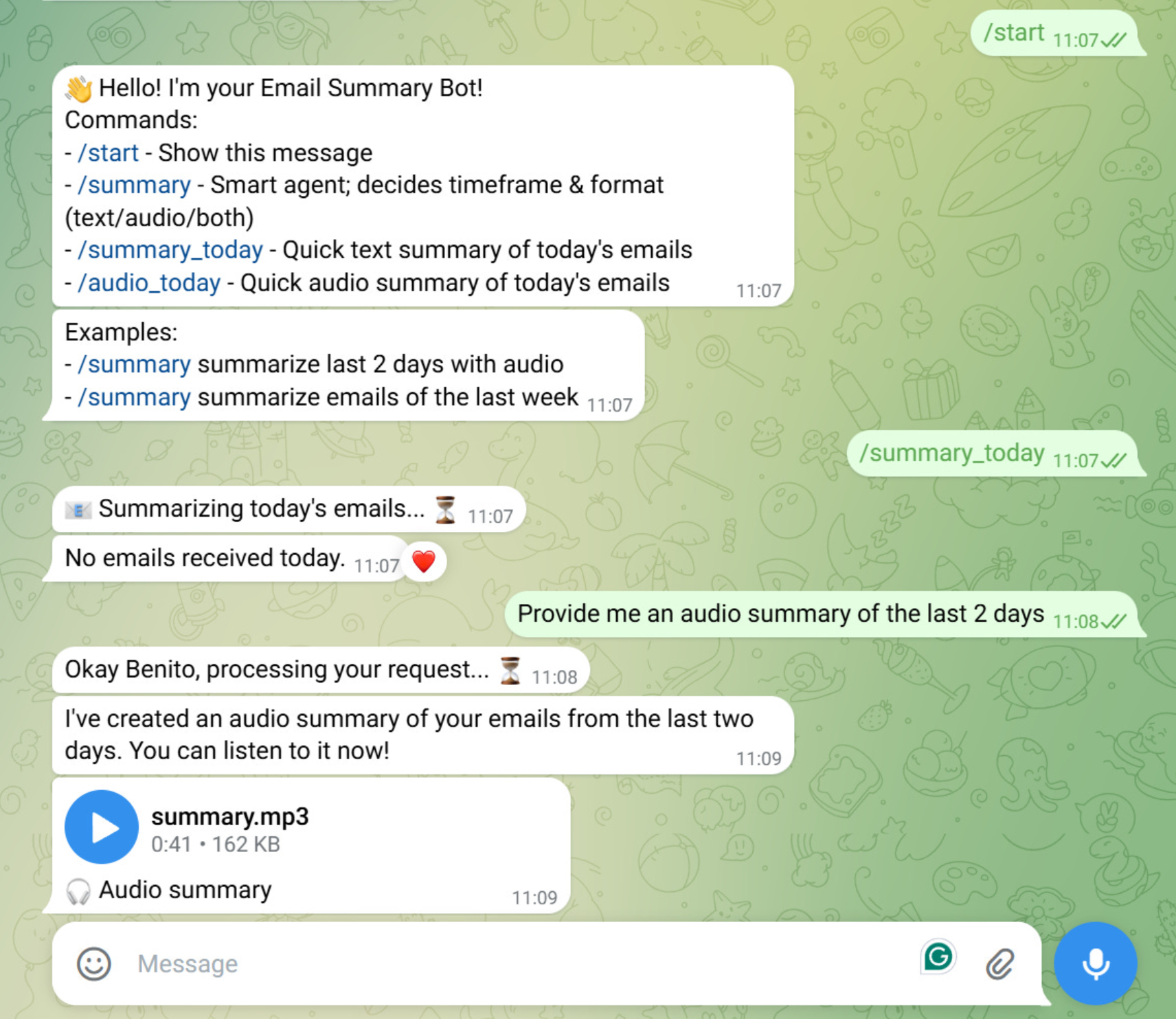
Table of Contents
Overview
Gmail Telegram MCP Server is a Python project that connects Gmail and Telegram using a Model Context Protocol (MCP) server.
It allows to interact with Gmail emails via a Telegram bot. The following commands are available:
- /start - Start interaction with the bot
- /summary_today - Quick text summary of today's emails
- /audio_today - Quick audio summary of today's emails
- /summary - Smart agent; decides timeframe & format (text/audio/both)
You can read the article about this project in my Substack Newsletter:
Project Structure
├── Makefile
├── pyproject.toml
├── pre-commit-config.yaml
├── README.md
├── run_bot.py
├── uv.lock
├── src/
│   └── voice_agent/
│       ├── config.py                    # Configuration settings
│       ├── client/                      # Client-side code
│       │   └── agent.py                 # Voice agent client
│       ├── host/
│       │   └── bot.py                   # Telegram bot
│       ├── server/
│       │   ├── gmail_server.py          # Gmail server logic
│       │   ├── prompts/
│       │   │   ├── email_prompts.py     # Email-related prompts
│       │   │   └── prompt_calls.py      # Prompt call definitions
│       │   └── tools/
│       │       ├── get_emails.py        # Email retrieval tool
│       │       └── tts_reply.py         # Text-to-speech tool
│       └── utils/
│           ├── email_parser_util.py     # Email parsing utilities
│           ├── gmail_auth_util.py       # Gmail authentication utilities
│           ├── logger_util.py           # Logging utilities
│           └── openai_utils.py          # OpenAI API utilities
├── test/                                # Unit/Integration tests
Prerequisites
- Python 3.12
- uv (for environment and package management)
- Google Cloud Project
- Telegram Bot with a bot token
- OpenAI API key
Environment Variables
Create a .env file in the root directory with the following variables:
TELEGRAM__BOT_TOKEN=your_bot_token
OPENAI__API_KEY=your_openai_api
OPENAI__MODEL=gpt-4o-mini
GOOGLE__CLIENT_ID=your_client_id
GOOGLE__CLIENT_SECRET=your_client_secret
GOOGLE__APPLICATION_CREDENTIALS=path_to_your_credentials.json
GOOGLE__SCOPES='["https://www.googleapis.com/auth/gmail.readonly"]'
GOOGLE__REDIRECT_URIS='["http://localhost"]'
GOOGLE__AUTH_URI=https://accounts.google.com/o/oauth2/auth
GOOGLE__TOKEN_URI=https://oauth2.googleapis.com/token
Additionally, after the first authentication, this token will be generated and added automatically to the .env file to make the session persistent:
GOOGLE__GMAIL_TOKEN=your_gmail_token
Installation
- Clone the repository:
   git clone [email protected]:benitomartin/gmail-telegram-mcp-server.git
   cd gmail-telegram-mcp-server
Create a virtual environment:
uv venvActivate the virtual environment:
source .venv/bin/activateInstall the required packages:
uv sync --all-groupsCreate a
.envfile in the root directory:cp env.example .env
Usage
Configuration
Configure API keys, model names, and other settings in:
src/voice_agent/config.py.envfile
Google Cloud Project Setup
Create a Google Cloud Project.
Enable the Gmail API and Cloud Text-to-Speech API for your project.
Under "APIs & Services" > "OAuth consent screen", create your app (external) and configure the necessary scopes.
- Add the following scopes (also in the
.envfile):https://www.googleapis.com/auth/gmail.readonly
- Add the following scopes (also in the
Add your email address as an authorized tests user.
Create OAuth 2.0 credentials (application type: Desktop App) and copy the client ID and secret to your
.envfile.Run the following command to set the
GOOGLE__APPLICATION_CREDENTIALSvariable. Add the path of the credentials JSON file to the.envfile. In Linux/Ubuntu is under/home/user/.config/gcloud/application_default_credentials.jsongcloud auth application-default login
Modules
- Voice Agent: Handles voice interactions and agent logic.
- Client: Contains the agent for client-side operations.
- Host: Telegram bot integration.
- Server: Gmail server logic, prompt management, and tools for email and TTS.
- Utils: Utilities for email parsing, Gmail authentication, logging, and OpenAI integration.
Run the Telegram bot
uv run run_bot.py
Testing
Run all tests:
make tests
Quality Checks
Run all quality checks (lint, format, type check, clean):
make all
Individual Commands:
Display all available commands:
make helpCheck code formatting and linting:
make all-checkFix code formatting and linting:
make all-fixClean cache and build files:
make clean
License
This project is licensed under the MIT License - see the LICENSE file for details.
Установка Gmail Telegram
У этого сервера нет опубликованного пакета — он собирается из исходников. Открой репозиторий и следуй инструкции в README.
▸ github.com/benitomartin/gmail-telegram-mcp-serverFAQ
Gmail Telegram MCP бесплатный?
Да, Gmail Telegram MCP бесплатный — установка в пару кликов через Unyly без оплаты.
Нужен ли API-ключ для Gmail Telegram?
Нет, Gmail Telegram работает без API-ключей и переменных окружения.
Gmail Telegram — hosted или self-hosted?
Self-hosted: сервер запускается локально на твоей машине командой из раздела установки.
Как установить Gmail Telegram в Claude Desktop, Claude Code или Cursor?
Открой Gmail Telegram на unyly.org, выбери вкладку своего клиента (Claude Desktop, Claude Code, Cursor) и нажми Install — конфиг сгенерируется автоматически, без правки JSON.
Похожие MCP
Gmail
Read, send and search emails from Claude
 автор: Google
Slack
Send, search and summarize Slack messages
 автор: Slack
Runbear
No-code MCP client for team chat platforms, such as Slack, Microsoft Teams, and Discord.
Discord Server
A community discord server dedicated to MCP by [Frank Fiegel](https://github.com/punkpeye)
Klavis AI
Open Source MCP Infra. Hosted MCP servers and MCP clients on Slack and Discord.
Work90210/APIFold
Turn any REST API into a hosted MCP server, with ready-made public servers for GitHub, Stripe, Slack, OpenAI, Notion and more.
 автор: Work90210
arikusi/deepseek-mcp-server
DeepSeek AI chat and reasoning with multi-turn sessions, function calling, thinking mode and cost tracking.
 автор: arikusi
hashgraph-online/hashnet-mcp-js
Discover, register and chat with AI agents on the Hashgraph network via the Registry Broker.
 автор: hashgraph-online
profullstack/mcp-server
Developer utilities: SEO optimization, document conversion, domain lookup, email validation, QR codes, weather data, social media posting and security scanning.
 автор: profullstack
WayStation-ai/mcp
Connect MCP hosts to apps such as Notion, Slack, Monday and Airtable.
 автор: waystation-ai
Compare Gmail Telegram with
Не уверен что выбрать?
Найди свой стек за 60 секунд
Автор?
Embed-бейдж для README
Похожее
Все в категории communication