
Godot Autopilot
БесплатноНе проверенGodot-Autopilot is a plugin-based MCP server that runs inside the Godot editor. Once installed, your AI programming assistant can operate your project just like you do: build scenes, adjust properties, run games, click buttons, take screenshots, view logs — and then iterate based on the results it sees.

Описание
Godot-Autopilot is a plugin-style MCP server that lives inside the Godot editor. Once installed, your AI programming assistant can operate your project just like you do: build scenes, adjust properties, run games, click buttons, take screenshots, view logs—and then iterate based on the results it sees.
README



Let an AI agent build, playtest, and debug your Godot game — from inside the editor.
English | 简体中文 | 繁體中文 | 日本語 | 한국어
Godot-Autopilot is an MCP server that lives inside the Godot editor as a plugin. Once installed, your AI coding assistant (Claude Code, Cursor, Codex, OpenCode, …) can operate your project the way you do: build scenes, tweak properties, run the game, press buttons, take screenshots, and read the logs — then iterate on what it sees.
No bridge process, no copy-pasting errors into a chat window. The server starts when your project opens and stops when it closes.
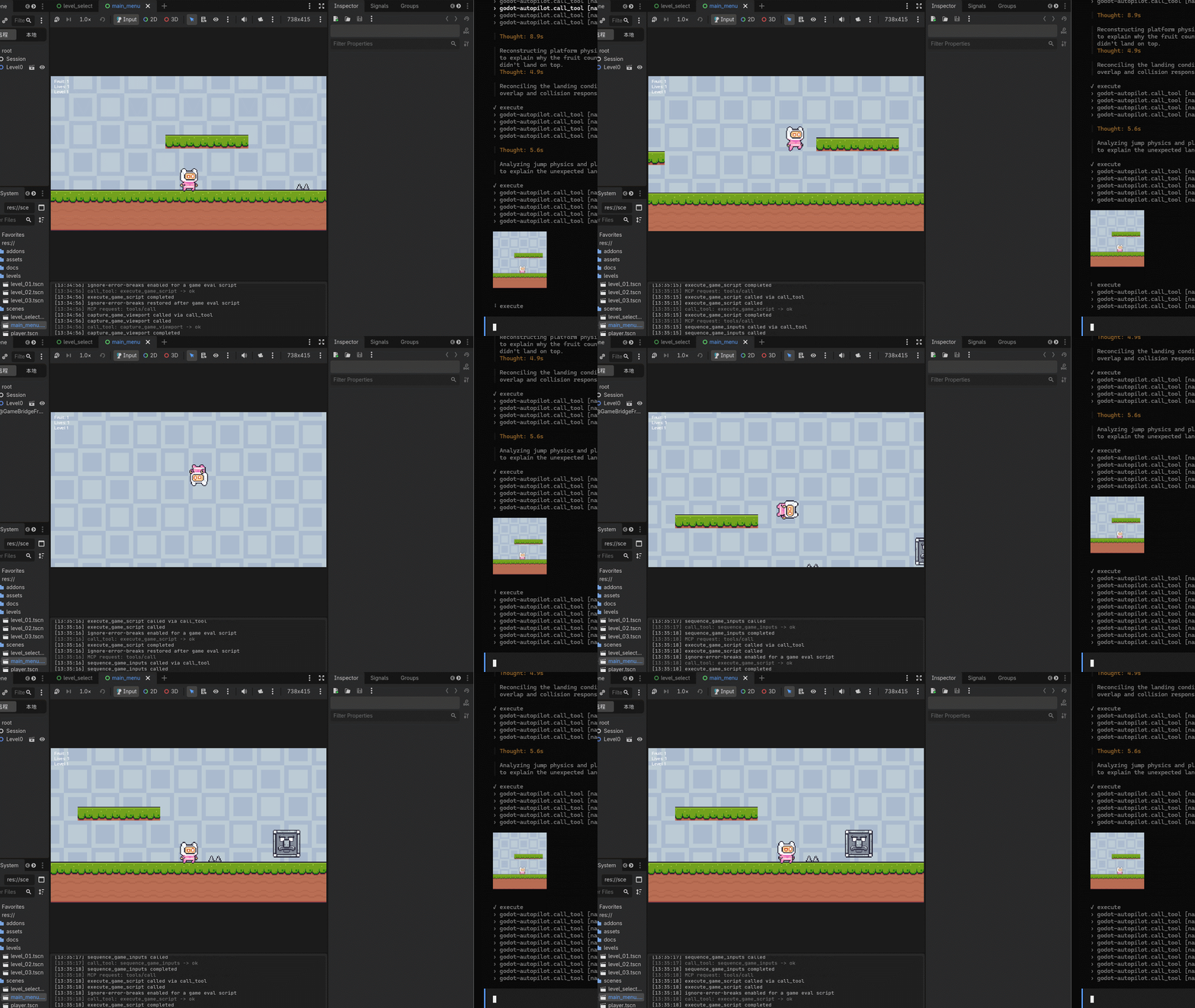
End-to-end demo
AI controlling a game character in real time during end-to-end tests:
What it can do
Over 452 tools covering the whole editor-to-game loop (the exact count grows with each version — ask the agent to check via search_tools). Highlights:
- Build scenes — create, rename, move, and delete nodes; read and write properties; connect signals; build 3D block levels with GridMap (e.g.
create_scene_node,property_set,signal_connect,scene_tree_items; GridMap:create_gridmap,set_gridmap_cell,fill_gridmap_box). - Look, sound, and feel — meshes and materials, lights and environments, audio playback, animations and tweens, UI themes, tilemaps (e.g.
create_animation,tween_editor_property,create_game_tween,play_audio_player,fill_tilemap_rect). - Physics and navigation — ray/shape casts, rigid bodies, navigation maps and path queries (e.g.
intersect_physics_3d_ray,create_nav_3d_map,get_nav_3d_map_path). - Hands: input and UI automation — simulate keys, mouse, and gamepad; click editor controls by name; run editor shortcuts; click buttons in the running game (e.g.
click_input_mouse,get_editor_ui_elements,click_editor_element,run_editor_shortcut,click_game_ui_element). - Scripts and debugging — run GDScript in the editor or in the game, launch long game scripts as background jobs, read plugin/game/script-error logs (e.g.
execute_script,execute_game_script,start_game_job,get_plugin_log). - Project and knowledge — read, search, and copy project files and directories, inspect project settings, query the engine's built-in API docs offline (e.g.
read_file,find_in_files,list_directory,copy_file,get_project_settings,get_docs_class). - Play and verify visually — launch the current scene, inject timed input sequences, screenshot the editor and the game, and diff before/after (e.g.
play_editor_current_scene,queue_game_input,capture_editor_viewport,capture_game_viewport,review_scene_visually).
How the agent works with it
You don't need to memorize tool names. The agent follows a simple loop:
- Discover —
search_toolsto find candidates,get_tool_detailto confirm parameters (never guess names). - Act —
call_toolfor one step,batch_executefor a batch. - Verify — screenshot the result, compare with the previous capture, fix, and repeat.
To make agents good at this out of the box, the plugin ships 9 skill books (an overview, a calling guide, plus scenes, resources, scripting, runtime, servers, content, and C# volumes) and 7 starter guides (3D scene, character controller, physics debugging, input map, GUI, …). One click in the MCP Config panel renders the skills into your project's .agents/skills/. Positioning: MCP is the primary product channel and skills/scripts are the experience layer — the calling guide falls back to the GDA CLI when MCP is down, and to a manual guide with no CLI available.
Two editor panels come with the plugin:
- MCP Config — server status and port, one-click client configuration, capability switches, skill generation.
- Log — plugin-only log with level/category filters and search, so misbehaving calls are easy to trace.
Getting started
Requires Godot 4.7+.
- Get the plugin — download
addons.zipfrom the project's GitHub Releases page (jesspig/Godot-Autopilot) and copy thegodot-autopilot/folder into your project'saddons/directory:your-project/ └── addons/ └── godot-autopilot/ ├── godot-autopilot.dll (Windows) ├── libgodot-autopilot.so (Linux) ├── libgodot-autopilot.dylib (macOS) └── godot-autopilot.gdextension - Open your project — the server starts automatically on the port from the plugin settings (default
http://127.0.0.1:9527/mcp). No enable toggle needed. - Connect your AI client — in the editor's MCP Config panel, pick your client and click Generate. 20 clients are supported, including Claude Code, Codex, Cursor, OpenCode, and Copilot. Approve the generated config file in the client if it asks.
- Unlock powerful capabilities (optional) — script execution (
code_execute) and game control (game_runtime) are off by default; tick them in the panel when you need them. - Ask for something — e.g. “create a player character that can run and jump, then playtest it and fix what looks wrong.”
Want to build from source or contribute? See docs/wiki/ (start at index.md, building at build.md) and tests/README.md.
Command-line access
Prefer a terminal to a chat client? The GDA CLI drives a running GDA instance from the shell — no MCP client integration needed. It is Bun + TypeScript, runs from source, and has zero runtime dependencies and no build step.
Run it one-off with bunx (quoted on PowerShell, because # starts a comment):
bunx "github:jesspig/Godot-Autopilot#0.3.0" ping
Or install it globally once and use the gda command:
bun install -g github:jesspig/Godot-Autopilot#0.3.0
gda ping
Command families: calling — ping / status / categories / search / describe / call; lifecycle — list / start / stop / restart / logs; control plane — serve; REST — api (list / describe / call subcommands, direct REST without MCP handshake); endpoints (prints the MCP/REST endpoints, port source, and liveness probe result).
Requires Bun; on a machine without Bun or Node, use the standalone gda binary from the Releases page instead (see docs/wiki/modules/cli.md for the full reference).
Let an AI set it up for you
Rather than following the steps above by hand, hand them to a coding agent that has shell access on the same machine. Copy the block below, fill in the absolute path of your project, and send it:
Set up Godot Autopilot (GDA) on this machine end to end, then prove it works.

Project: <ABSOLUTE PATH TO YOUR GODOT PROJECT> (Godot 4.7+).

1. Install the plugin: download addons.zip from
   https://github.com/jesspig/Godot-Autopilot/releases/latest and extract it so that
   <project>/addons/godot-autopilot/godot-autopilot.gdextension exists.
2. Start the editor: run `godot --editor --path <project>` (ask me for the engine path if it is
   not on PATH) and wait until http://127.0.0.1:9527/mcp answers.
3. Verify the server from a shell. Try in this order, stop at the first that works, and tell me
   which one it was:
   - bunx "github:jesspig/Godot-Autopilot#0.3.0" ping
   - download the gda release asset for this OS and CPU from the same Releases page, verify it
     against sha256sums.txt, then run ./gda ping
4. Connect my AI client: add
   {"mcpServers":{"godot-autopilot":{"url":"http://127.0.0.1:9527/mcp"}}}
   to its MCP configuration, or tell me to use the plugin's MCP Config panel instead.
5. Summarize: which channel worked, every command you ran, and anything that failed.

Rules: never hand-write HTTP requests against the port; never expose 9527 beyond loopback;
leave code_execute and game_runtime disabled unless I ask for them.
If your client supports skills (Claude Code, Codex, Cursor and others do), also point it at this repository's skills/ directory so the agent gets the full calling protocol instead of improvising.
Safety notes
The server only listens on your machine's loopback address (port from the plugin settings, 9527 by default, fixed path /mcp) and refuses non-local addresses. Script execution, game control, and OS process tools are denied by default — enable them only in a local project you trust. Details: docs/wiki/security_contract.md.
Asset attribution
The 5 sample projects under demo/ (2D/3D beginner tutorials, UI control gallery, viewport composition, networked Pong) come from the official Godot demo projects; only their assets and clean project configurations are kept for testing. The sixth project, demo/pink_man_adventure, is an in-repo example restored from the historical Example/ demo project: its 173 PNG assets come from Pixel Frog's Pixel Adventure 1 (CC0 1.0), and its design documentation is original to this repository. Copyright and licensing details live in each project's README and LICENSE files.
License
MIT
Установка Godot Autopilot
У этого сервера нет опубликованного пакета — он собирается из исходников. Открой репозиторий и следуй инструкции в README.
▸ github.com/jesspig/Godot-AutopilotFAQ
Godot Autopilot MCP бесплатный?
Да, Godot Autopilot MCP бесплатный — установка в пару кликов через Unyly без оплаты.
Нужен ли API-ключ для Godot Autopilot?
Нет, Godot Autopilot работает без API-ключей и переменных окружения.
Godot Autopilot — hosted или self-hosted?
Self-hosted: сервер запускается локально на твоей машине командой из раздела установки.
Как установить Godot Autopilot в Claude Desktop, Claude Code или Cursor?
Открой Godot Autopilot на unyly.org, выбери вкладку своего клиента (Claude Desktop, Claude Code, Cursor) и нажми Install — конфиг сгенерируется автоматически, без правки JSON.
Похожие MCP
Opencode Omniroute Plugin
OpenCode plugin for the OmniRoute AI Gateway. Drives dynamic model discovery, /connect auth flow, and multi-instance OmniRoute providers via the official @openc
 автор: GitHub Actions
Roblox Studio
Enables AI coding tools to control Roblox Studio for workspace exploration, instance manipulation, and script management. It provides tools for playtesting, sce
 автор: paralov
Antigravity Drawio
MCP server that enables AI assistants to create, parse, render, and validate Draw.io diagrams programmatically.
 автор: S-SUJAN-S
Fetch
Web content fetching and conversion for efficient LLM usage.
AWS KB Retrieval
Retrieval from AWS Knowledge Base using Bedrock Agent Runtime.
 автор: modelcontextprotocol
Spring AI MCP Server
Provides auto-configuration for setting up an MCP server in Spring Boot applications.
llm-analysis-assistant
A very streamlined mcp client that supports calling and monitoring stdio/sse/streamableHttp, and can also view request responses through the /logs page. It also
 автор: xuzexin-hz
MCP-Agent
A simple, composable framework to build agents using Model Context Protocol by [LastMile AI](https://www.lastmileai.dev)
 автор: lastmile-ai
Spring AI MCP Client
Provides auto-configuration for MCP client functionality in Spring Boot applications.
mcp.natoma.ai
A Hosted MCP Platform to discover, install, manage and deploy MCP servers by [Natoma Labs](https://www.natoma.ai)
Compare Godot Autopilot with
Не уверен что выбрать?
Найди свой стек за 60 секунд
Автор?
Embed-бейдж для README
Похожее
Все в категории ai