
Godot Pilot
БесплатноПоддерживаетсяAn MCP server that gives AI assistants direct control over Godot 4 game development projects. It enables launching the editor, running projects, creating and ed

Описание
An MCP server that gives AI assistants direct control over Godot 4 game development projects. It enables launching the editor, running projects, creating and editing scenes, writing GDScript, and inspecting assets through natural language commands.
README
Model Context Protocol server for Godot 4 — Give AI assistants (Claude, Cursor, Cline, etc.) direct control over your Godot projects.
npm version License: MIT Docs CI
godot-mcp-pilot exposes Godot engine operations as MCP tools, letting AI assistants launch the editor, run projects, create and edit scenes, write GDScript, and inspect assets — all through natural language. Works for both 2D and 3D games.
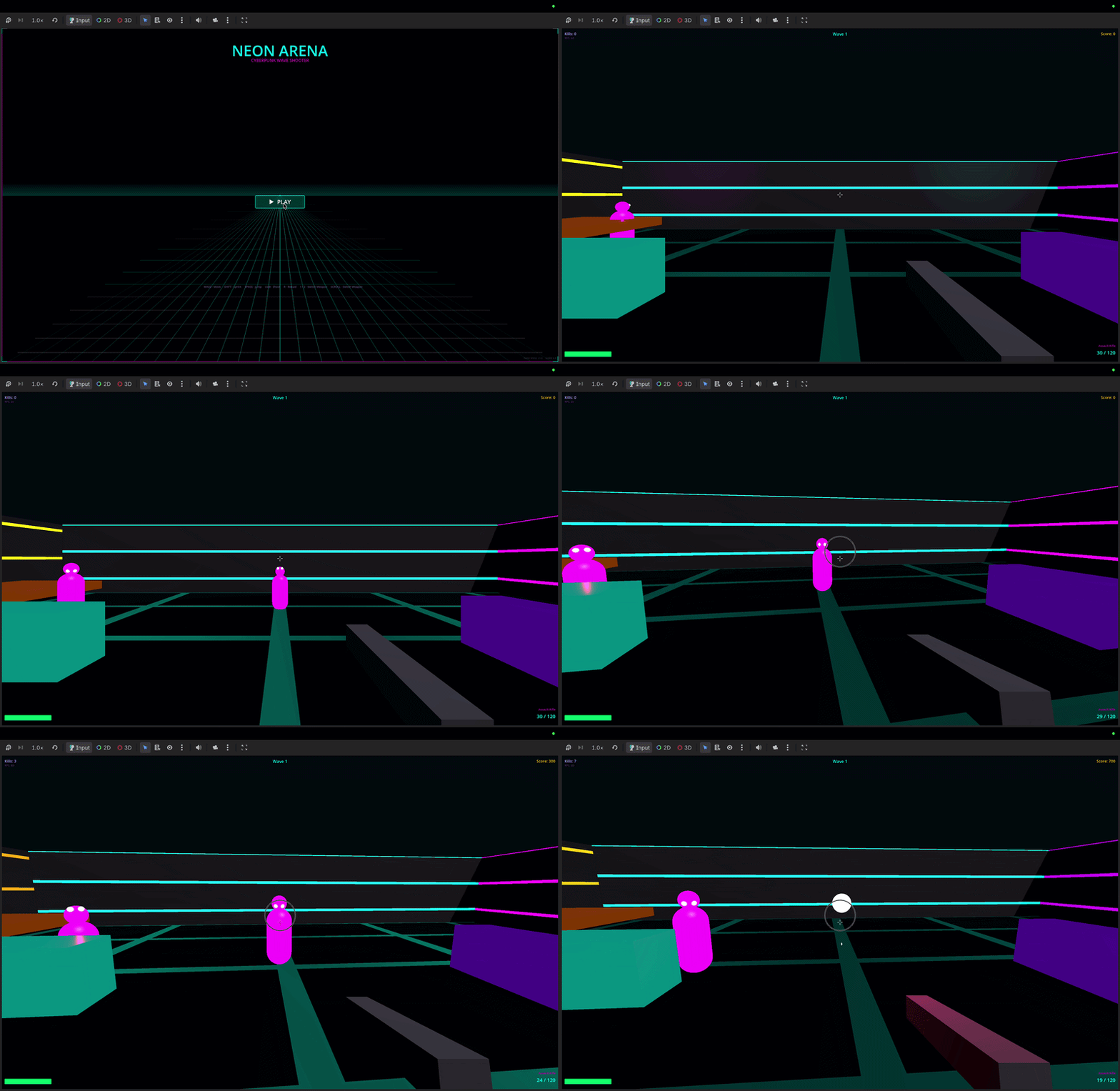
"Create a CharacterBody3D player scene with a Camera3D and collision"
"Run the project and show me any errors"
"Add a DirectionalLight3D to the scene"
"Create a 2D platformer with sprites and tilemaps"
Quick Start
1. Install
npm install -g godot-mcp-pilot
Or use without installing:
npx godot-mcp-pilot
2. Run the setup wizard
npx godot-mcp-pilot setup
# or, if installed globally:
godot-mcp-pilot-setup
The wizard will:
- Auto-detect your Godot binary (checks Applications, Downloads, PATH)
- Ask which AI client you use
- Write the config to the right place for that client
Manual Setup
Claude Code (CLI / IDE extension)
Critical: Claude Code reads
.mcp.jsonfrom the directory where you launch it.
The file must be in your game project folder, not the godot-mcp-pilot folder.
# From inside your game project directory:
claude mcp add godot -- npx godot-mcp-pilot
This writes .mcp.json to your current directory. Then always launch Claude Code from that directory:
cd ~/games/my-platformer
claude
If Godot isn't auto-detected (e.g. you never moved it out of ~/Downloads):
claude mcp add godot -e GODOT_PATH=/path/to/Godot.app/Contents/MacOS/Godot -- npx godot-mcp-pilot
Or write .mcp.json manually in your game project root:
{
  "mcpServers": {
    "godot": {
      "command": "npx",
      "args": ["godot-mcp-pilot"],
      "env": {
        "GODOT_PATH": "/path/to/your/Godot"
      }
    }
  }
}
Claude Desktop
Claude Desktop uses a different config file — it does not read .mcp.json.
Edit ~/Library/Application Support/Claude/claude_desktop_config.json (macOS)
or %APPDATA%\Claude\claude_desktop_config.json (Windows):
{
  "mcpServers": {
    "godot": {
      "command": "npx",
      "args": ["godot-mcp-pilot"],
      "env": {
        "GODOT_PATH": "/path/to/your/Godot"
      }
    }
  }
}
Then quit and reopen Claude Desktop.
Cursor (.cursor/mcp.json)
{
  "mcpServers": {
    "godot": {
      "command": "npx",
      "args": ["godot-mcp-pilot"],
      "env": {
        "GODOT_PATH": "/path/to/your/Godot"
      }
    }
  }
}
Godot Path Detection
The server searches these locations automatically (in order):
| OS | Paths checked |
|---|---|
| macOS | /Applications/Godot.app, /Applications/Godot_4.app, versioned names like Godot_v4.3.app, ~/Applications/..., ~/Downloads/..., Homebrew |
| Linux | /usr/bin/godot, /usr/local/bin/godot, /snap/bin/godot, ~/.local/bin/godot |
| Windows | C:\Program Files\Godot\Godot.exe, %LOCALAPPDATA%\Godot\Godot.exe |
If auto-detection fails, set GODOT_PATH to the absolute path of your Godot executable.
2D and 3D Games
godot-mcp-pilot works equally well for 2D and 3D. Use the appropriate node types:
| 2D | 3D | |
|---|---|---|
| Player | CharacterBody2D |
CharacterBody3D |
| Root | Node2D |
Node3D |
| Camera | Camera2D |
Camera3D |
| Mesh | Sprite2D |
MeshInstance3D |
| Collision | CollisionShape2D |
CollisionShape3D |
| Physics | RigidBody2D |
RigidBody3D |
| Light | — | DirectionalLight3D, OmniLight3D |
Example prompts:
"Create a 3D scene with a Node3D root, MeshInstance3D floor, and DirectionalLight3D"
"Add a CharacterBody3D with a CollisionShape3D using a CapsuleShape3D"
"Write a GDScript for 3D first-person movement"
Features
| Category | Tools |
|---|---|
| System | get_godot_version, list_projects, get_project_info |
| Editor / Run | launch_editor, run_project, stop_project, get_debug_output, run_gdscript |
| Scenes | list_project_scenes, read_scene, create_scene, save_scene |
| Nodes | add_node, edit_node, remove_node, duplicate_node, move_node, load_sprite, instantiate_scene |
| Scripts | list_project_scripts, read_script, create_script, modify_script, analyze_script, list_script_functions, add_script_function, remove_script_function, add_signal, add_variable |
| Project | get_project_settings, set_project_setting, get_main_scene, set_main_scene, list_autoloads, add_autoload, remove_autoload, list_input_actions, add_input_action, remove_input_action |
| Assets | list_assets, get_asset_info |
| UIDs | get_uid, update_project_uids |
Configuration
| Environment Variable | Default | Description |
|---|---|---|
GODOT_PATH |
auto-detected | Absolute path to the Godot executable |
READ_ONLY_MODE |
false |
If true, disables all modifying tools (safe for CI/review) |
DEBUG |
false |
Print debug info to stderr |
Troubleshooting
"MCP server not connected" / tools not appearing
Claude Code: The .mcp.json must be in the directory where you run claude. Open a new terminal, cd into your game project, and run claude from there.
Claude Desktop: Make sure you edited the right file (claude_desktop_config.json, not .mcp.json) and fully quit and reopened the app.
Godot not found
Set GODOT_PATH explicitly in the config env block. On macOS, if you downloaded Godot but never moved it:
GODOT_PATH=/Users/yourname/Downloads/Godot.app/Contents/MacOS/Godot
To find where Godot is:
# macOS / Linux
find ~/Downloads ~/Applications /Applications -name "Godot" -type f 2>/dev/null
Scene parse errors / malformed .tscn
If Godot refuses to load a scene edited by the MCP, check that instance= lines are unquoted:
# Correct
instance=ExtResource("1_abc")

# Wrong (Godot rejects this)
instance="ExtResource(\"1_abc\")"
Run the project headless to see the exact error:
/path/to/Godot --path /path/to/project --headless --quit 2>&1
MCP disconnects during a session
This is a known issue with some MCP host implementations. Workaround: close and reopen your AI client. The MCP server itself is stateless — reconnecting is safe.
Example Workflows
2D top-down shooter
"Create a 2D scene called Main.tscn"
"Add a CharacterBody2D called Player at the center"
"Create a movement + shooting script for the Player"
"Add an Area2D called Enemy that moves toward the player"
"Run the project and show errors"
3D platformer
"Create a 3D scene with a StaticBody3D floor (MeshInstance3D box, scale 20x1x20)"
"Add a CharacterBody3D player with a CapsuleShape3D collision"
"Create a 3D character controller script with jump and gravity"
"Add a Camera3D as a child of the player with offset Vector3(0, 2, 5)"
Read-Only Mode
READ_ONLY_MODE=true npx godot-mcp-pilot
Disables all write tools. Useful for CI/CD or review workflows.
Development
git clone https://github.com/pushks18/godot-mcp-pilot
cd godot-mcp-pilot
npm install
npm run build

# Run the setup wizard
npm run setup

# Development mode (ts-node, no build step)
npm run dev
Project Structure
godot-mcp-pilot/
├── src/
│   ├── index.ts               # Entry point
│   ├── server.ts              # MCP server + tool routing
│   ├── config.ts              # Godot path detection, env config
│   ├── godot-process.ts       # Process management (spawn, capture)
│   ├── tools/
│   │   ├── system.ts          # Version, project listing/info
│   │   ├── execution.ts       # Launch editor, run/stop project
│   │   ├── scene.ts           # Scene CRUD + node manipulation
│   │   ├── script.ts          # GDScript read/write/analyze
│   │   ├── assets.ts          # Asset listing/inspection
│   │   ├── project_settings.ts # Settings, autoloads, input maps
│   │   └── uid.ts             # Godot 4 UID management
│   └── utils/
│       ├── path.ts            # Path validation (prevents traversal)
│       ├── tscn.ts            # .tscn parser and serializer
│       └── project_godot.ts   # project.godot reader
└── scripts/
    ├── setup.js               # Interactive setup wizard
    └── godot_operations.gd    # Bundled GDScript for runtime ops
Compatibility
- Godot 4.x (primary target — tested on 4.2, 4.3, 4.4)
- Godot 3.x — basic tools work; scene format differences apply
- MCP Protocol — 2024-11-05 spec
- Node.js — 18+
Security
- All file paths are validated to stay within the project directory (no path traversal)
launch_editorandrun_projectonly start processes with safe, predefined args- Use
READ_ONLY_MODE=truein untrusted environments - The server never executes arbitrary shell commands — only the Godot binary
License
MIT
Установить Godot Pilot в Claude Desktop, Claude Code, Cursor
unyly install godot-mcp-pilotСтавит в Claude Desktop, Claude Code, Cursor и VS Code — сам разбирается с npx, uvx и сборкой из исходников.
Впервые? Поставь CLI: curl -fsSL https://unyly.org/install | sh
Или настроить вручную
Выполни в терминале:
claude mcp add godot-mcp-pilot --env GODOT_PATH="" --env READ_ONLY_MODE="" -- npx -y godot-mcp-pilotПошаговые гайды: как установить Godot Pilot
FAQ
Godot Pilot MCP бесплатный?
Да, Godot Pilot MCP бесплатный — установка в пару кликов через Unyly без оплаты.
Нужен ли API-ключ для Godot Pilot?
Да, требуются переменные окружения: GODOT_PATH, READ_ONLY_MODE. Unyly подставит их в конфиг при установке.
Godot Pilot — hosted или self-hosted?
Self-hosted: сервер запускается локально на твоей машине командой из раздела установки.
Как установить Godot Pilot в Claude Desktop, Claude Code или Cursor?
Открой Godot Pilot на unyly.org, выбери вкладку своего клиента (Claude Desktop, Claude Code, Cursor) и нажми Install — конфиг сгенерируется автоматически, без правки JSON.
Изменения
Версии и запрашиваемые доступы со временем.
- Новая версия опубликована
- Новая версия опубликована
- Новая версия опубликована
- Новая версия опубликована
- Новая версия опубликована
Похожие MCP
Fetch
Web content fetching and conversion for efficient LLM usage.
Roblox Studio
Enables AI coding tools to control Roblox Studio for workspace exploration, instance manipulation, and script management. It provides tools for playtesting, sce
 автор: paralov
Opencode Omniroute Plugin
OpenCode plugin for the OmniRoute AI Gateway. Drives dynamic model discovery, /connect auth flow, and multi-instance OmniRoute providers via the official @openc
 автор: GitHub Actions
AWS KB Retrieval
Retrieval from AWS Knowledge Base using Bedrock Agent Runtime.
 автор: modelcontextprotocol
Spring AI MCP Server
Provides auto-configuration for setting up an MCP server in Spring Boot applications.
llm-analysis-assistant
A very streamlined mcp client that supports calling and monitoring stdio/sse/streamableHttp, and can also view request responses through the /logs page. It also
 автор: xuzexin-hz
MCP-Agent
A simple, composable framework to build agents using Model Context Protocol by [LastMile AI](https://www.lastmileai.dev)
 автор: lastmile-ai
Spring AI MCP Client
Provides auto-configuration for MCP client functionality in Spring Boot applications.
mcp.natoma.ai
A Hosted MCP Platform to discover, install, manage and deploy MCP servers by [Natoma Labs](https://www.natoma.ai)
MCPHub
Website to list high quality MCP servers and reviews by real users. Also provide online chatbot for popular LLM models with MCP server support.
Compare Godot Pilot with
Не уверен что выбрать?
Найди свой стек за 60 секунд
Автор?
Embed-бейдж для README
Похожее
Все в категории ai