

Описание
MCP server for Godot game engine integration
README
Give your AI assistant full access to the Godot editor.
Build games faster with Claude, Cursor, or any MCP-compatible AI — no copy-pasting, no context switching. AI reads, writes, and manipulates your scenes, scripts, nodes, and project settings directly.
Godot 4.4+ · 69 tools · Undo/redo · Interactive project visualizer · MIT license
Now on the Godot Asset Store as Godlink MCP. If it helps you, please leave a review there. It's the main way other Godot developers find it.
Quick Start
0. Install Node.js (one-time setup)
Download and run the installer from nodejs.org (LTS version). It's a standard installer — no terminal needed.
1. Install the Godot plugin
Godot 4.7 and newer: inside the Godot editor, click the Asset Store tab at the top → search "Godlink" → find "Godlink MCP" → Install. (Store page)
Godot 4.6 and older: click the AssetLib tab instead → search "mcp" → find "Godot AI Assistant tools MCP" → Install.
Manual install: copy the addons/godot_mcp/ folder from this repo into your project's addons/ folder.
Then go to Project → Project Settings → Plugins and enable the Godot MCP plugin.
2. Add the server config to your AI client
Claude Desktop — Settings → Developer → Edit Config → open the config file and paste:
Mac / Linux:
{
  "mcpServers": {
    "godot": {
      "command": "npx",
      "args": ["-y", "godot-mcp-server"]
    }
  }
}
Windows:
{
  "mcpServers": {
    "godot": {
      "command": "cmd",
      "args": ["/c", "npx", "-y", "godot-mcp-server"]
    }
  }
}
Cursor — Settings → MCP → Add Server:
Mac / Linux:
{
  "mcpServers": {
    "godot": {
      "command": "npx",
      "args": ["-y", "godot-mcp-server"]
    }
  }
}
Windows:
{
  "mcpServers": {
    "godot": {
      "command": "cmd",
      "args": ["/c", "npx", "-y", "godot-mcp-server"]
    }
  }
}
Claude Code — run in terminal:
claude mcp add godot -- npx -y godot-mcp-server
Works with any MCP-compatible client (Cline, Windsurf, etc.)
3. Restart your AI client
Close and reopen Claude Desktop / Cursor / your client so it picks up the new config.
4. Restart your Godot project
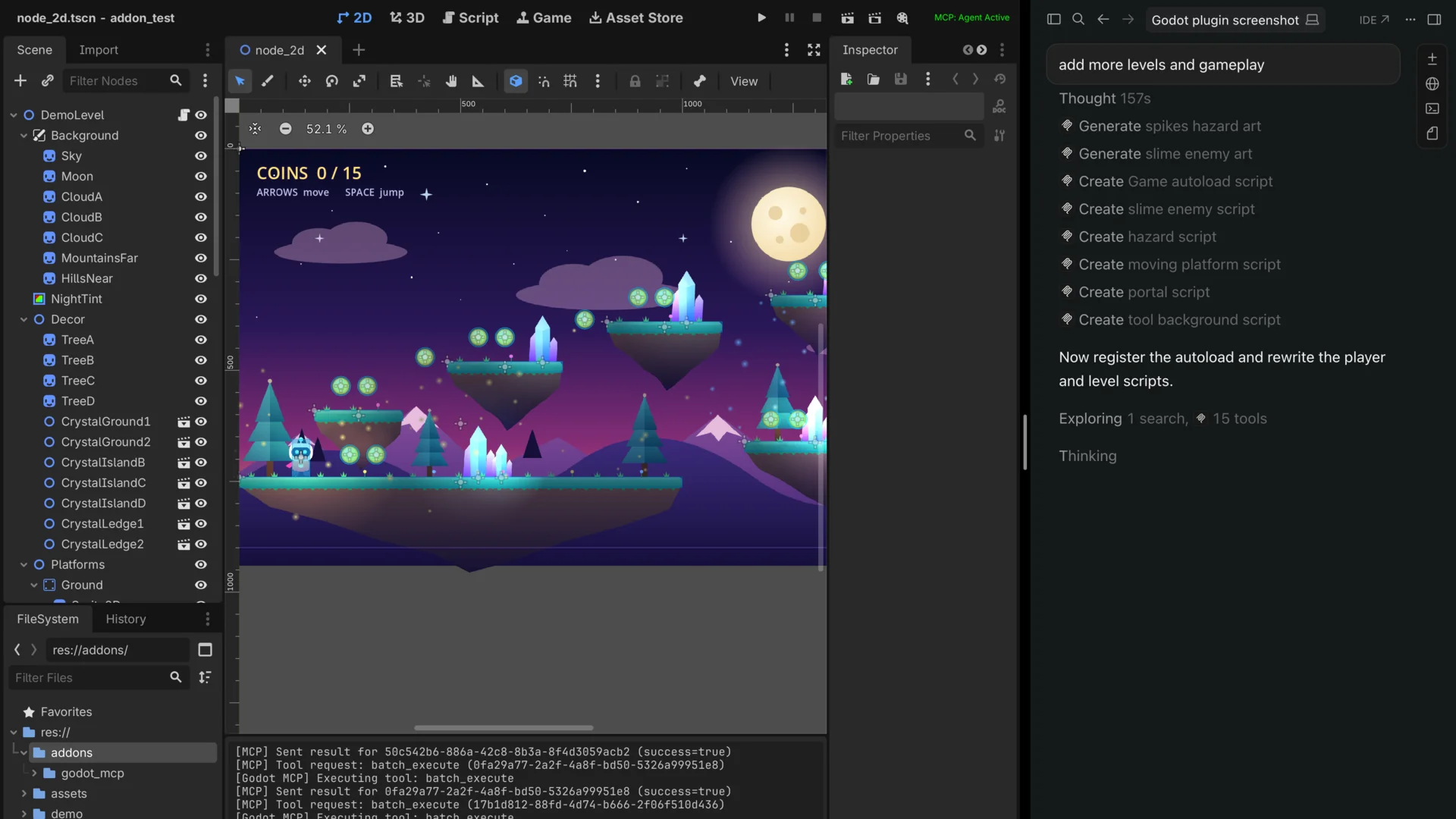
Hit Restart Project in the Godot editor. Check the top-right corner — once your AI client is running you should see MCP: Agent Active in green. You're ready to go.
If it shows MCP: No Agent in orange, Godot found the server but no AI client is using it yet. Restart your AI client. MCP: Disconnected in red means the server isn't running. Check that Node.js is installed and the config from step 2 is saved.
What Can It Do?
69 Tools Across 7 Categories
| Category | Tools | Examples |
|---|---|---|
| Scene Operations | 23 | Create whole node trees in one call, add/remove/move nodes, set any property including textures, shapes, meshes and materials (by file path or inline), attach scripts, signals, groups, call methods |
| Project & Runtime | 28 | Run/stop the game, send input, take screenshots, inspect live nodes, read errors and logs, project settings, input map, autoloads |
| Script & File Operations | 8 | Edit and validate scripts, write files, rename/move files with reference updates, create and delete folders |
| File Browsing | 4 | Browse directories, read files, search the project, create scripts |
| Undo & Batching | 4 | Undo/redo any AI change, run many changes as one all-or-nothing batch |
| Asset Generation | 1 | Generate 2D sprites from SVG |
| Visualization | 1 | Interactive browser-based project map and scene explorer |
Interactive Visualizer
Run map_project and get a browser-based explorer at localhost:6510:
- Force-directed graph of all scripts and their relationships
- Click any script to see variables, functions, signals, and connections
- Edit code directly in the visualizer — changes sync to Godot in real time
- Scene view with node property editing
- Find usages before refactoring
Limitations
AI cannot create 100% of a game by itself — it struggles with complex UI layouts, compositing scenes, and some node property manipulation. It's still in active development, so feedback is very welcome!
Architecture
┌─────────────┐    MCP (stdio)   ┌──────────────┐   WebSocket   ┌──────────────┐
│  AI Client  │◄────────────────►│  MCP Server  │◄─────────────►│ Godot Editor │
│  (Claude,   │                  │  (Node.js)   │   port 6505   │  (Plugin)    │
│   Cursor)   │                  │              │               │              │
└─────────────┘                  │  Visualizer  │               │  69 tool     │
                                 │  HTTP :6510  │               │  handlers    │
                                 └──────┬───────┘               └──────────────┘
                                        │
                                 ┌──────▼───────┐
                                 │   Browser    │
                                 │  Visualizer  │
                                 └──────────────┘
Current Limitations
- Local only — runs on localhost, no remote connections
- One Godot editor at a time — multiple AI clients can connect concurrently, but they all share a single Godot instance
- Ctrl+Z does not reach AI changes — the plugin writes to disk rather than the editor's live tree, so Godot's native undo has nothing to revert. Use the
mcp_undotool instead (ask the agent to undo). - AI is still limited in Godot knowledge — it can't create 100% of the game alone, but it can help debug, write scripts, and tag along for the journey
Development
To build from source instead of using npm:
cd mcp-server
npm install
npm run build
Then point your AI client at mcp-server/dist/index.js instead of using npx.
Release notes
Narrative write-ups of each release live in release-notes/ (latest: v0.6.1). For the full change history, see CHANGELOG.md.
License
MIT
Star History
Установить Godot Mcp Server в Claude Desktop, Claude Code, Cursor
unyly install godot-mcp-serverСтавит в Claude Desktop, Claude Code, Cursor и VS Code — сам разбирается с npx, uvx и сборкой из исходников.
Впервые? Поставь CLI: curl -fsSL https://unyly.org/install | sh
Или настроить вручную
Выполни в терминале:
claude mcp add godot-mcp-server -- npx -y godot-mcp-serverПошаговые гайды: как установить Godot Mcp Server
FAQ
Godot Mcp Server MCP бесплатный?
Да, Godot Mcp Server MCP бесплатный — установка в пару кликов через Unyly без оплаты.
Нужен ли API-ключ для Godot Mcp Server?
Нет, Godot Mcp Server работает без API-ключей и переменных окружения.
Godot Mcp Server — hosted или self-hosted?
Self-hosted: сервер запускается локально на твоей машине командой из раздела установки.
Как установить Godot Mcp Server в Claude Desktop, Claude Code или Cursor?
Открой Godot Mcp Server на unyly.org, выбери вкладку своего клиента (Claude Desktop, Claude Code, Cursor) и нажми Install — конфиг сгенерируется автоматически, без правки JSON.
Изменения
Версии и запрашиваемые доступы со временем.
- Новая версия опубликована
- Новая версия опубликована
- Новая версия опубликована
- Новая версия опубликована
- Новая версия опубликована
- Новая версия опубликована
- Новая версия опубликована
- Новая версия опубликована
Похожие MCP
Opencode Omniroute Plugin
OpenCode plugin for the OmniRoute AI Gateway. Drives dynamic model discovery, /connect auth flow, and multi-instance OmniRoute providers via the official @openc
 автор: GitHub Actions
Roblox Studio
Enables AI coding tools to control Roblox Studio for workspace exploration, instance manipulation, and script management. It provides tools for playtesting, sce
 автор: paralov
Antigravity Drawio
MCP server that enables AI assistants to create, parse, render, and validate Draw.io diagrams programmatically.
 автор: S-SUJAN-S
Fetch
Web content fetching and conversion for efficient LLM usage.
AWS KB Retrieval
Retrieval from AWS Knowledge Base using Bedrock Agent Runtime.
 автор: modelcontextprotocol
Spring AI MCP Server
Provides auto-configuration for setting up an MCP server in Spring Boot applications.
llm-analysis-assistant
A very streamlined mcp client that supports calling and monitoring stdio/sse/streamableHttp, and can also view request responses through the /logs page. It also
 автор: xuzexin-hz
MCP-Agent
A simple, composable framework to build agents using Model Context Protocol by [LastMile AI](https://www.lastmileai.dev)
 автор: lastmile-ai
Spring AI MCP Client
Provides auto-configuration for MCP client functionality in Spring Boot applications.
mcp.natoma.ai
A Hosted MCP Platform to discover, install, manage and deploy MCP servers by [Natoma Labs](https://www.natoma.ai)
Compare Godot Mcp Server with
Не уверен что выбрать?
Найди свой стек за 60 секунд
Автор?
Embed-бейдж для README
Похожее
Все в категории ai