
Google Surf
БесплатноНе проверенAnti-bot Google search MCP that replaces the usual search MCP + URL fetcher combo with one server. No API key, no proxies, includes graceful CAPTCHA recovery.

Описание
Anti-bot Google search MCP that replaces the usual search MCP + URL fetcher combo with one server. No API key, no proxies, includes graceful CAPTCHA recovery.
README

google-surf-mcp
English | 한국어
npm version npm downloads ci MCP Toplist google-surf-mcp MCP server
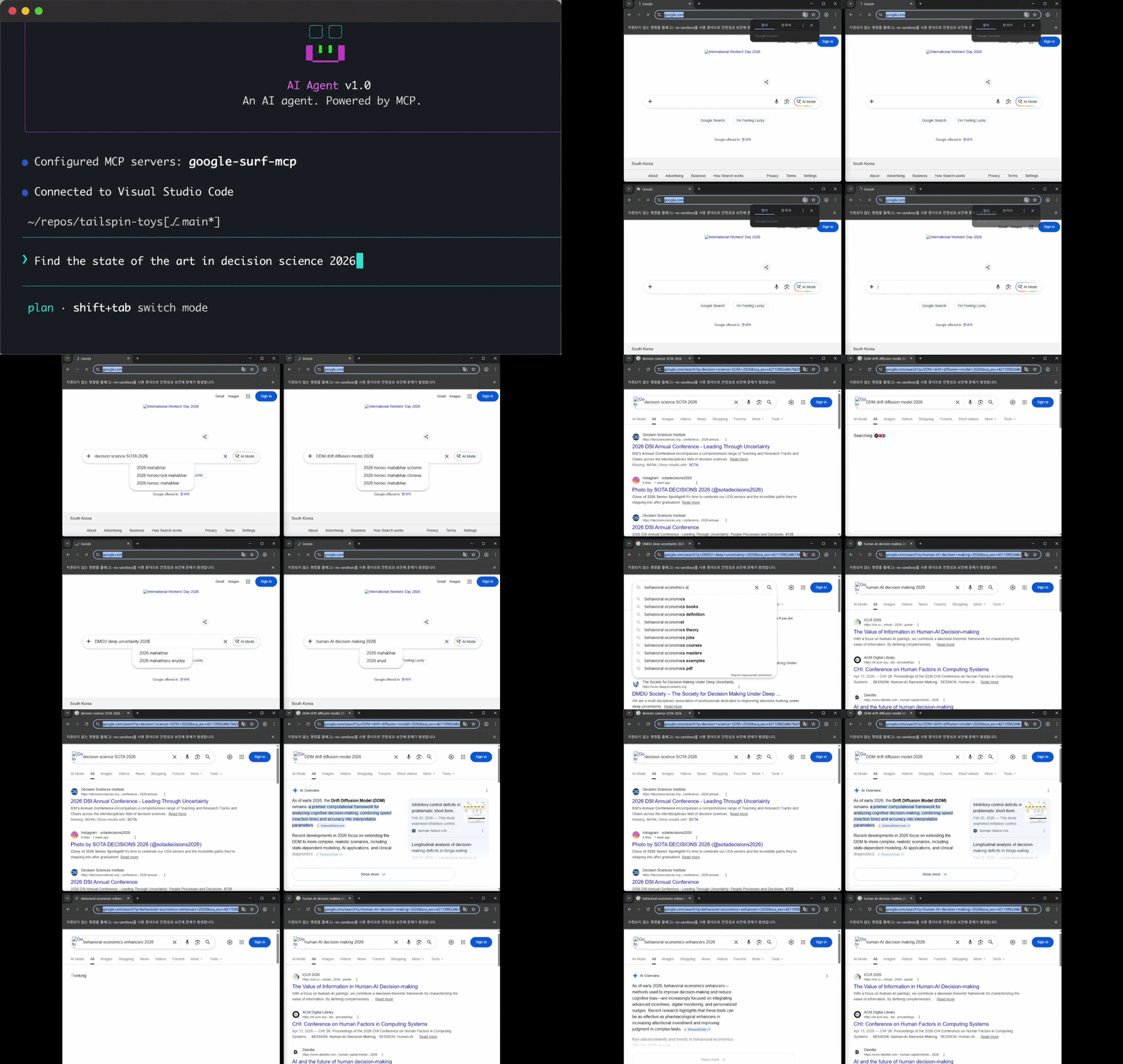
Demo only. Actual searches run headless by default (no visible browser). Set
SURF_HEADLESS=falseto make Chrome visible like in the clip above.
Google search MCP. No API key. Just works.
One MCP replaces three: search + URL fetcher + academic-paper extractor.
- ✅ Actually works (tested 6 free Google search MCPs, all failed)
- ✅ Search + URL + academic PDF extract in one MCP (replaces the search MCP + fetch MCP + academic-search MCP combo)
- ✅ Academic PDFs extracted inline: arxiv, biorxiv, Nature, OpenReview, NeurIPS, JMLR, PMLR, Springer, PubMed (via PMC)
- ✅
search_extractdefaults to abstract mode (~1500 chars/result, token-cheap),mode="full"for whole bodies - ✅ Sponsored ads + knowledge panels dropped (geometric verification, not just text matching)
- ✅ CAPTCHA recovery in 4 modes: OS notification (default) /
SURF_HEADLESS=false/SURF_REMOTE_DEBUG/SURF_CLOUD_MODE(fail-fast) - ✅ No API key, no proxies, no solver
5 tools: search / search_parallel / extract / search_extract / health
What
Plug it into any MCP client and you get Google search as a tool.
No CAPTCHA solver. When CAPTCHA fires on any tool, a Chrome window opens for a human to solve. Each solve preserves the profile's reputation with Google.
First call auto-bootstraps the warm profile. Designed for local use. For headless / serverless environments set SURF_CLOUD_MODE=true (fail-fast on CAPTCHA, worker pool disabled).
Numbers
| result | |
|---|---|
| sequential | ~1.5s/query (first call ~4s, includes setup) |
| parallel x4 | ~1.5s wall (first call ~9s, includes pool warm) |
| parallel x10 | ~4.5s wall |
| search_extract x5 (abstract, default) | ~3s wall |
| search_extract x5 (full) | ~5s wall (search + 5 parallel extracts) |
Measured on a workstation with a 1Gb/s connection.
Stack
- Playwright + persistent Chrome profile
playwright-extrastealth as a cascade fallback tier- Multi-strategy SERP parser + geometric verification (drops sponsored / knowledge_panel / related)
@llamaindex/liteparsefor PDF text extraction (PDFium spatial parsing, optional OCR); Mozilla Readability + Turndown for HTML- Resource-blocked images / media / fonts for speed
- Auto-bootstrap on first call; pool falls back to single-context after repeated warm failures
- Self-healing: runtime parser-strategy reorder (deterministic) + daily cron repair PR (synthesis → optional LLM → triple-gate validation, human review)
Install
Requires Node 18+ and Google Chrome (or Chromium) on the system.
npx google-surf-mcp # actual MCP - register in client config
First tool call auto-bootstraps the warm profile (you may see Chrome open briefly).
Or local clone:
git clone https://github.com/HarimxChoi/google-surf-mcp
cd google-surf-mcp
npm install
If auto-bootstrap fails (rare), run it manually:
npm run bootstrap
Override paths if needed:
CHROME_PATH=/path/to/chrome SURF_TZ=America/New_York npm run bootstrap
Use with Claude Code
Paste this into your ~/.claude.json:
{
  "mcpServers": {
    "google-surf": {
      "command": "npx",
      "args": ["-y", "google-surf-mcp"]
    }
  }
}
Restart Claude Code. Done. search, search_parallel, extract, search_extract, health are now available.
For other MCP clients, use the same JSON shape in their config file.
Local clone variant:
{
  "mcpServers": {
    "google-surf": {
      "command": "node",
      "args": ["/abs/path/to/google-surf-mcp/build/index.js"]
    }
  }
}
Tools
search(query, limit?)- single query, ~1.5s. Returns title / url / snippet. Sponsored ads + knowledge-panel dropped (response includesdroppedcount +dropped_reasons). Results cached 24h (SURF_CACHE_TTL_SEARCH_MS=0to bypass).search_parallel(queries[], limit?)- pool of 4, max 10 queries per call.extract(url, max_chars?, mode?)- fetch a URL, return article content.mode="full"(default): whole body. HTML via Readability, PDFs vialiteparse(spatial parsing, multi-column reading order).mode="abstract": ~1500-char survey (PDF page 1 or HTML meta description). Triage relevance before paying for full text.mode="metadata": PDF page count only.- Response:
content,title,excerpt,length,is_pdf,page_count,extraction_quality. Failures return{ error }, never throw.
search_extract(query, limit?, max_chars?, mode?)- search + parallel extract in one call. Defaultmode="abstract"returns SERP enriched with ~1500-char summaries (cheap triage). Usemode="full"when you actually need the article texts (slower, more tokens).health()- server status. Response:cascade/pool(warmFailures+fallback) /rateLimiter/cache/telemetry/selfHealing(current strategy order + stats) /config. Call it if searches start failing —pool.fallback=trueor risingcascade.totalCaptchasare the usual culprits.
Env vars
| var | default | notes |
|---|---|---|
CHROME_PATH |
auto-detected | absolute path to Chrome binary |
SURF_PROFILE_ROOT |
~/.google-surf-mcp |
where the warm profile lives |
SURF_LOCALE |
en-US |
browser locale |
SURF_TZ |
system tz | e.g. America/New_York |
SURF_HEADLESS |
true |
set false to run Chrome visibly (demos / debugging). When false, CAPTCHA recovery skips the OS notification (user is already watching). |
SURF_REMOTE_DEBUG |
false |
set true on a headless server with remote DevTools. CAPTCHA path emits the DevTools port and throws instead of spawning a window; attach chrome://inspect from a local machine over SSH port-forward to solve. |
SURF_IDLE_CLOSE_MS |
30000 |
idle ms before closing the sequential ctx and pool. 0 disables idle auto-close. Lower = faster cleanup, higher = warmer cache for spaced-out calls. |
SURF_ALLOW_PRIVATE |
false |
set true to allow extract to fetch private/loopback addresses (localhost, 127.0.0.1, 10.x, 192.168.x, 169.254.x, etc). Default blocks them as an SSRF guard. |
SURF_EXTRACT_MAX_CHARS |
8000 |
default extract truncation (200–50000); per-call max_chars still overrides |
SURF_EXTRACT_OCR |
false |
OCR scanned/image PDFs via Tesseract (slower; off by default) |
SURF_CLOUD_MODE |
false |
headless/serverless mode: TLS bypass + --no-sandbox + --disable-dev-shm-usage + worker pool disabled + fail-fast on CAPTCHA |
SURF_CASCADE_DISABLED |
false |
pin a single stealth mode (chosen by SURF_USE_STEALTH) instead of the 3-tier auto-cascade |
SURF_USE_STEALTH |
true |
initial stealth tier — only consulted when SURF_CASCADE_DISABLED=true |
SURF_HUMANLIKE_MODE |
off |
off / background (fire-and-forget after returning results) / inline (await before returning, slower) — opt-in humanlike browsing |
SURF_RATE_LIMIT_PER_MIN |
10 |
internal cap on Google-facing requests per minute |
SURF_CACHE_TTL_SEARCH_MS |
86400000 |
search cache TTL (24h); 0 disables caching |
SURF_CACHE_MAX_ENTRIES |
1000 |
LRU cap per cache namespace |
SURF_CACHE_ROOT |
<profile>/cache |
cache directory |
SURF_INSECURE_TLS |
=SURF_CLOUD_MODE |
--ignore-certificate-errors (auto-on in cloud mode) |
SURF_NO_SANDBOX |
=SURF_CLOUD_MODE |
--no-sandbox (auto-on in cloud mode) |
SURF_TELEMETRY |
false |
set true to enable jsonl event logging (search outcomes, cache hits/misses, tool errors, parser staleness) under {SURF_TELEMETRY_ROOT}. Designed as the input feed for the self-healing pipeline. Off by default. |
SURF_TELEMETRY_ROOT |
<profile>/telemetry |
directory for jsonl telemetry files. UTC-dated one file per day (YYYY-MM-DD.jsonl). |
SURF_SELF_HEALING |
true |
per-strategy outcome tracking + persisted reordering. Healing must win by 3 outcomes before reorder kicks in, so single-call flapping is impossible. Set false to pin the default strategy order. |
SURF_SELF_HEALING_FILE |
<profile>/.heal/strategy-order.json |
persistence path for healing state. Atomic tmp+rename writes; debounced 5s. |
SURF_LLM_HEAL |
false |
opt-in for LLM-assisted selector repair in the workflow-only repairWithLLM helper. Off by default → no third-party LLM request ever fires. When true, requires ANTHROPIC_API_KEY (your own); the package never ships a maintainer key. |
ANTHROPIC_API_KEY |
— | your Anthropic key. Read only when SURF_LLM_HEAL=true. The runtime self-healing in SURF_SELF_HEALING is deterministic and never reads this variable. |
Troubleshooting
- CAPTCHA in 4 modes (picked automatically from env):
- default (local desktop): OS notification fires, headed Chrome opens, human solves, call retries
SURF_HEADLESS=false: headed Chrome opens, no notification (user is already watching)SURF_REMOTE_DEBUG=true: DevTools port + instructions printed, attachchrome://inspectlocally to solveSURF_CLOUD_MODE=true: fail-fast withCAPTCHA_REQUIREDerror
- Headed Chrome opens to a plain search box instead of CAPTCHA: just type any query in the box and press Enter. Subsequent calls work.
- "Chrome not found": install Chrome or set
CHROME_PATH. - Stale selectors: two-layer mitigation — runtime per-strategy reorder (
SURF_SELF_HEALING, deterministic) + daily cron that opens draft PRs with candidate fixes (SURF_LLM_HEALoptional, human review required, never auto-merged). - Searches feel slower than the Numbers table: check
health().pool.fallback.truemeans the worker pool gave up after 3 warm failures and is using a single context. Usually fixed bynpm run bootstrapto refresh the seed profile. - SSRF:
extractblockslocalhost, private IPs, AWS metadata by default. SetSURF_ALLOW_PRIVATE=trueto allow them.
Changelog
See CHANGELOG.md.
License
MIT
Установить Google Surf в Claude Desktop, Claude Code, Cursor
unyly install google-surf-mcpСтавит в Claude Desktop, Claude Code, Cursor и VS Code — сам разбирается с npx, uvx и сборкой из исходников.
Впервые? Поставь CLI: curl -fsSL https://unyly.org/install | sh
Или настроить вручную
Выполни в терминале:
claude mcp add google-surf-mcp -- npx -y google-surf-mcpПошаговые гайды: как установить Google Surf
FAQ
Google Surf MCP бесплатный?
Да, Google Surf MCP бесплатный — установка в пару кликов через Unyly без оплаты.
Нужен ли API-ключ для Google Surf?
Нет, Google Surf работает без API-ключей и переменных окружения.
Google Surf — hosted или self-hosted?
Self-hosted: сервер запускается локально на твоей машине командой из раздела установки.
Как установить Google Surf в Claude Desktop, Claude Code или Cursor?
Открой Google Surf на unyly.org, выбери вкладку своего клиента (Claude Desktop, Claude Code, Cursor) и нажми Install — конфиг сгенерируется автоматически, без правки JSON.
Похожие MCP
GitHub
PRs, issues, code search, CI status
 автор: GitHub
Filesystem
Secure file operations with configurable access controls.
Memory
Knowledge graph-based persistent memory system.
Template MCP Server
A CLI tool to create a new Model Context Protocol server project with TypeScript support, dual transport options, and an extensible structure
 автор: mcpdotdirect
Compare Google Surf with
Не уверен что выбрать?
Найди свой стек за 60 секунд
Автор?
Embed-бейдж для README
Похожее
Все в категории development