
Graphify
БесплатноНе проверенA Python MCP server that exposes the Graphify knowledge graph as MCP tools, prompts, and resources, enabling AI assistants to explore codebases through a token-

Описание
A Python MCP server that exposes the Graphify knowledge graph as MCP tools, prompts, and resources, enabling AI assistants to explore codebases through a token-budgeted, structural graph during development.
README
A Python MCP server that exposes the Graphify knowledge graph as MCP tools, prompts and resources — so an AI assistant can explore your codebase through the graph during development, cheaply (token-budgeted) and structurally.
Note: Graphify ships its own embedded MCP server (
graphify ./raw --mcp). This project adds analysis tools, token-budgeted subgraph extraction, git freshness checks, per-community resources, reusable prompts, and LLM-friendly tool annotations + structured (JSON) output on top.
Why graphify_locate
One MCP call turns a natural-language question into a navigational map, not a wall of code:
- 🔎 Semantic + structural, one call — semble finds the relevant code, the graph gives its neighborhood. ~235 tokens to orient vs ~61k for grep+read (263× fewer on httpx).
- 🔗
hidden_links— semantically similar code that is structurally disconnected (duplication / missing-abstraction / sync-async-twin candidates) that neither search nor the graph surfaces alone. - 🌍 Multi-language, zero config — Python via stdlib
ast; JS/TS · Go · Java · Rust · C++ · 165+ more via tree-sitter with automatic language detection. Span-join precision 69–91% on real HTTP-client repos in six languages (benchmark). - 🕒 Cosmetic-aware freshness —
graphify_freshnessignores comment/format-only edits (in every language) so a reformat never triggers a needless rebuild.
One call beats running semble and graphify separately
semble finds what's relevant; graphify gives how it connects. They're complementary — but stitching them by hand means four calls, ~2.7k tokens, and manually aligning semble's line ranges to graph nodes. graphify-mcp does that join for you, in one call:
| per query | semble alone | graphify alone | both, by hand | graphify_locate |
|---|---|---|---|---|
| Semantic search | ✓ | — | ✓ | ✓ |
| Graph structure | — | ✓ | ✓ | ✓ |
| Chunk → symbol join | — | — | you wire it | ✓ automatic |
hidden_links cross-check |
— | — | — | ✓ only here |
| Calls | 1 | 1 | 4 | 1 |
| Tokens to orient | 1,613 | 1,107 | 2,721 | 235 |
→ 11.6× fewer tokens than running the two separately — in a single call, and hidden_links (semantically similar code that is structurally disconnected) is a signal neither tool produces alone. So the combined tool isn't just convenience: it's cheaper, and it surfaces something the parts can't. (full benchmark ↓)
Installation
# graphify-mcp itself
pip install graphify-mcp

# plus the Graphify CLI it wraps (needed for build/query/path/explain/add)
pip install graphifyy && graphify install
From source:
git clone https://github.com/yasinyaman/graphify-mcp
cd graphify-mcp
pip install -e ".[dev]"
Running
GRAPHIFY_PROJECT_DIR=/path/to/repo graphify-mcp-server
# equivalently, collision-proof:
GRAPHIFY_PROJECT_DIR=/path/to/repo python -m graphify_mcp
Heads-up:
graphifyyships its owngraphify-mcpconsole script (its embedded server). To avoid a silent collision, this package deliberately doesn't define a baregraphify-mcpof its own — usegraphify-mcp-serverorpython -m graphify_mcpto always launch this server. The boot banner on stderr (graphify-mcp vX.Y.Z | transport=… | project=…) confirms which server and project dir you're actually running.
Claude Code
Copy mcp.json to a .mcp.json at your project root. GRAPHIFY_PROJECT_DIR: "." uses the project root.
Claude Desktop / Cowork
Add the contents of claude_desktop_config.json to your Claude Desktop config:
- macOS:
~/Library/Application Support/Claude/claude_desktop_config.json - Windows:
%APPDATA%\Claude\claude_desktop_config.json
Transport (stdio default, optional HTTP)
stdio is the default and the right choice for a per-developer local server. To serve over HTTP instead (e.g. a shared graph for a team or a web MCP client):
GRAPHIFY_TRANSPORT=streamable-http GRAPHIFY_HOST=127.0.0.1 GRAPHIFY_PORT=8000 \
  GRAPHIFY_PROJECT_DIR=/path/to/repo graphify-mcp-server
Any HTTP transport force-enables path containment (GRAPHIFY_RESTRICT_PATHS)
so a network client can't drive graphify_build to extract arbitrary filesystem
paths. HTTP binds 127.0.0.1 by default. To expose it beyond localhost, set
GRAPHIFY_API_KEY — every request must then send Authorization: Bearer <key>
(constant-time checked, 401 otherwise); binding a non-loopback host without a key
prints a warning.
The CLI is always invoked as an argument list with no shell (subprocess.run
with shell=False), so a build path or query string can't inject shell commands.
For a shared/network deployment, also consider lowering GRAPHIFY_TIMEOUT (default
600s) so a single slow graphify_build can't tie up a worker for ten minutes.
GRAPHIFY_TRANSPORT=streamable-http GRAPHIFY_HOST=0.0.0.0 GRAPHIFY_API_KEY=$(openssl rand -hex 16) \
  GRAPHIFY_PROJECT_DIR=/path/to/repo graphify-mcp-server
For a smaller tool surface (helps some models pick the right tool), set
GRAPHIFY_TOOLSET=lean to expose only the core exploration tools.
Environment variables
| Variable | Default | Description |
|---|---|---|
GRAPHIFY_PROJECT_DIR |
. |
Project root to extract the graph from |
GRAPHIFY_OUT_DIR |
graphify-out |
Output folder name |
GRAPHIFY_BIN |
graphify |
CLI path |
GRAPHIFY_TIMEOUT |
600 |
CLI timeout (seconds) |
GRAPHIFY_RESTRICT_PATHS |
0 |
Confine graphify_build's path to the project dir (auto-on for HTTP) |
GRAPHIFY_TRANSPORT |
stdio |
stdio | streamable-http | sse |
GRAPHIFY_HOST |
127.0.0.1 |
Bind host for HTTP transports |
GRAPHIFY_PORT |
8000 |
Bind port for HTTP transports |
GRAPHIFY_API_KEY |
(unset) | Require Authorization: Bearer <key> on HTTP transports |
GRAPHIFY_TOOLSET |
full |
full | lean (core exploration tools only) |
GRAPHIFY_TOKENIZER |
(heuristic) | tiktoken → exact token counts (needs the [tiktoken] extra); else chars/3.5 estimate |
GRAPHIFY_SEMANTIC_BACKEND |
semble |
Semantic backend for locate/duplication_scan. semble (offline default) or a module.path:Factory implementing the SemanticIndex protocol (search/find_related; results expose .chunk.file_path/.start_line/.end_line) — plug in local sentence-transformers, an OpenAI-compatible / on-prem vLLM endpoint, etc. |
GRAPHIFY_WATCH |
0 |
1 → watch the project for structural source changes and re-sync the graph automatically (needs the [watch] extra; cosmetic edits are ignored) |
GRAPHIFY_WATCH_DEBOUNCE |
2.0 |
Seconds to coalesce a burst of file events before re-graphing (watch mode) |
Keeping the graph fresh
The analysis tools surface staleness for you: graphify_overview and
graphify_subgraph carry a lightweight graph_age ("built 3 commits ago"), and
graphify_freshness gives a full recommended_action (fresh / update / rebuild).
To stop thinking about it, regenerate on every commit with a git post-commit
hook — the recommended first-class auto-update flow:
# .git/hooks/post-commit   (then: chmod +x .git/hooks/post-commit)
#!/bin/sh
# incremental, viz-free, backgrounded so the commit returns immediately
graphify . --update --no-viz >/dev/null 2>&1 &
Incremental --update only re-extracts changed files — it can't drop nodes for
deleted/renamed code on its own. graphify_prune closes that gap: it surgically
removes the phantom nodes (and their edges) for source files that are gone from the
working tree, so after a delete/rename you can graphify_prune (preview with
dry_run=True) + graphify_build(update=True) instead of a full rebuild.
graphify_freshness knows about this — it only steers to a rebuild while phantom
nodes for the removed files still linger, and reports them in phantom_files. An
agent can also just call graphify_build(update=True) when graph_age /
graphify_freshness says the graph drifted.
Tools
CLI-backed (the first two write state; the rest are read-only):
| Tool | Purpose |
|---|---|
graphify_build |
Build/update the graph (--update, --cluster-only, --mode deep) |
graphify_add |
Add a source by URL (arXiv, tweet) |
graphify_query |
Natural-language query (--dfs, --budget) |
graphify_path |
Exact path between two nodes |
graphify_explain |
Everything about a node |
graph.json analysis (read-only, no CLI needed, as_json=True for structured output):
| Tool | Purpose |
|---|---|
graphify_overview |
Call first — size, god nodes, communities, surprises, suggested next steps |
graphify_god_nodes |
Most connected nodes |
graphify_communities |
Leiden community summaries |
graphify_surprises |
Unexpected cross-domain connections |
graphify_search |
Node search |
graphify_neighbors |
1-hop neighbors of a node |
graphify_subgraph |
Token-budgeted BFS subgraph around a node — the cheap way to feed the model just the relevant slice |
graphify_impact |
Reverse-dependency / blast radius — what breaks if a node changes (direction=dependents/dependencies/both), ordered by hop distance |
graphify_node_details |
Node metadata: type, source file/line, docstring, community |
graphify_skeleton |
def/class signatures (decorators kept, bodies stripped) for a file/node/community — the middle layer between the map and full code |
graphify_fetch |
Token-budgeted source hydration — reads the real code for a node (its enclosing def/class span ± context), the map→code other half of subgraph/locate |
graphify_freshness |
Is the graph stale vs. git HEAD? Returns recommended_action (fresh/update/rebuild) + reason — lingering phantom nodes / large changes steer to a rebuild |
graphify_diff |
Structural changeset between two git refs (default HEAD~1..HEAD) — added/removed/renamed/modified, with cosmetic-only changes separated (file-level, for review/audit) |
graphify_prune |
Drop phantom nodes (and their edges) for deleted/renamed source files — the surgical alternative to a full rebuild (dry_run=True to preview) |
graphify_validate |
Lint the graph for dangling/duplicate/self-loop edges and orphan nodes (read-only) |
graphify_duplication_scan |
Repo-wide hidden-link / duplication audit — the batch form of locate's hidden_links (similar-but-structurally-far pairs); needs [semble], outside lean |
graphify_cycles |
Circular dependencies — strongly-connected node groups in the directed graph (an architectural smell), self-loops listed separately |
graphify_package_apis |
Symbol-level external API surface — which names each external package is actually used for (fastapi: Depends, APIRouter), with qualified paths (numpy.linalg.norm) for version-diff audits; a lower bound (dynamic/star/getattr use is invisible). Python via stdlib ast; JS/TS, Go, Java need [treesitter] |
Semantic naming (uses the host model via MCP sampling — no API key — or a backend key):
| Tool | Purpose |
|---|---|
graphify_sampling_status |
Capability test: reports whether the client supports host-LLM sampling, whether a backend key is set, and which method will be used |
graphify_label_communities |
Give Leiden communities human-readable names. method="auto" (sampling → key → placeholder), "sampling", "cli", or "placeholder" |
graphify_set_labels |
Persist assistant-provided community names (sampling-free fallback) to .graphify_labels.json and patch them into graph.html |
Semantic bridge (optional [semble] extra — semantic search joined to graph structure):
| Tool | Purpose |
|---|---|
graphify_locate |
NL query → enclosing graph node → token-budgeted subgraph, plus hidden_links: semantically-similar code that is structurally disconnected (duplication / missing-abstraction candidates) |
Naming communities without an API key (MCP sampling)
The Leiden clustering is keyless, but turning Community 7 into Authentication
needs a model. Three ways, in graphify_label_communities's preference order:
- Host-LLM sampling — the server asks the connected client to run the
completion via MCP
sampling/createMessage. The model the user already uses (e.g. Claude in a sampling-capable client) does the naming; the server holds no API key. Subject to client support — callgraphify_sampling_statusfirst; it degrades gracefully when unsupported. - Backend API key (
method="cli") — setGEMINI_API_KEY/OPENAI_API_KEY/ANTHROPIC_API_KEY/ … (or run a local ollama) and graphify's own backend names them. This option always remains available. - Placeholders — no model anywhere: names stay
Community N.
If the client can't sample and you have no backend (e.g. Claude Code, which
doesn't support sampling), use the assistant-driven fallback: the assistant
is already a capable model in the loop, so it reads graphify_communities and
pushes names back via graphify_set_labels({"0": "Authentication", ...}) —
no key, no sampling, works in any client. The names persist to
.graphify_labels.json and are patched into graph.html.
Semantic bridge (optional [semble])
pip install "graphify-mcp[semble]" adds graphify_locate, which joins
semble's semantic code search to the graph
in one call. Graphify gives structure (how code connects); semble gives
retrieval (which code is semantically relevant) — they're complementary.
graphify_locate("how does retry backoff work"):
- semble finds the most relevant code and resolves the top hit to its enclosing graph node (better than label matching).
- returns the token-budgeted subgraph around it (structure).
- runs semble
find_relatedand cross-checks: a cousin that is semantically similar but not within the seed's structural neighborhood is flagged as ahidden_link(with its hop distance) — a duplication / missing-abstraction / implicit-coupling candidate that neither tool surfaces alone.
The extra is optional: without it the core tools are unchanged and graphify_locate
returns an install hint. It also pairs well with running semble's own MCP server
alongside graphify-mcp.
The chunk→node join and the freshness cosmetic-vs-structural check work
across languages: Python uses the stdlib ast (no extra deps), and every
other language (JS/TS, Go, Rust, Java, Ruby, C/C++, …) is handled by an optional
tree-sitter backend — pip install "graphify-mcp[treesitter]", also pulled in
by graphify. Without it, non-Python files fall back to nearest-line matching.
Benchmark
Averaged over 6 queries spanning httpx subsystems (send path, digest auth, redirects, content decoding, cookies, timeouts) on the 2,101-node graph. Each query orients an agent to a code area; tokens = what reaches the model's context (≈ chars/4).
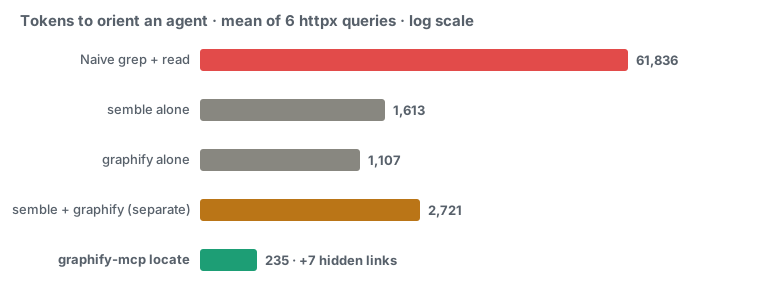
| Approach | Tokens (avg) | Calls | Structure | Semantic | Hidden links |
|---|---|---|---|---|---|
| Naive grep + read | 61,836 | ~14 | — | — | 0 |
| semble alone | 1,613 | 1 | — | ✓ | 0 |
| graphify alone | 1,107 | 1 | ✓ | — | 0 |
| semble + graphify (separately) | 2,721 | 4 | ✓ | ✓ | 0 |
graphify_locate |
235 | 1 | ✓ | ✓ | 7 |
graphify_locate averages 263× fewer tokens than grep+read and 11.6× fewer
than running semble and graphify separately (one call instead of four) — and it's
the only approach that surfaces hidden_links (semantically similar but structurally
disconnected code), 5–10 per query.
Those ~235 tokens are a navigational map (seed file:line + structural
neighborhood + hidden links), not raw code — you fetch the specific code only where
needed. That's the trade graphify-mcp optimizes: cheapest orientation plus the
cross-check signal, then drill in precisely.
Case study — the hidden links are real. Asked "does httpx duplicate
request-sending across sync and async?", graphify_locate returned the seed
Client._send_single_request and flagged hidden links. Checking the source
confirmed every production flag is a genuine sync/async twin:
Client._send_single_request (_client.py:1001) ↔ AsyncClient._send_single_request
(:1717); BaseTransport.handle_request ↔ handle_async_request (in every
transport); __enter__ ↔ __aenter__. ~500 tokens (one locate + a targeted read)
surfaced a real architectural pattern that naively reading _client.py (~16k tokens)
would. The unreachable bucket also held test files (related, not refactor targets) —
the distance field separates production parallels (3–4) from that noise.
Across languages — real HTTP-client repos. The span join and freshness check aren't Python-only. I built AST-only graphs for an HTTP client in five more languages and ran the same kind of queries (send · redirects · timeout/retry · headers/auth · transport):
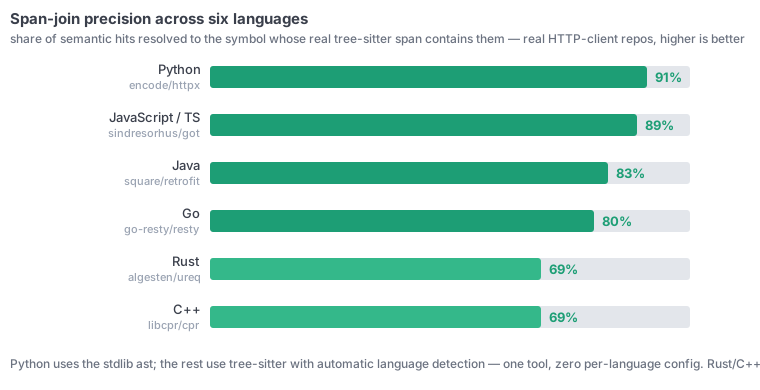
| Language | Repo | Span-join precision | Qualname | Hidden / q | locate vs grep |
|---|---|---|---|---|---|
| Python (ast) | encode/httpx |
91% (49/54) | 67% | 4.0 | 232× |
| JavaScript / TS | sindresorhus/got |
89% (48/54) | 67% | 3.2 | 494× |
| Go | go-resty/resty |
80% (43/54) | 67% | 4.7 | 748× |
| Java | square/retrofit |
83% (45/54) | 50% | 5.5 | 208× |
| Rust | algesten/ureq |
69% (37/54) | 83% | 5.3 | 477× |
| C++ | libcpr/cpr |
69% (37/54) | 100% | 4.2 | 223× |
Python uses the stdlib ast; JS/TS · Go · Java · Rust · C++ go through tree-sitter with
automatic language detection — one tool, zero per-language config. Span-join precision =
share of semantic hits whose resolved node's real span actually contains the chunk. It's
69–91% across six 347–2,101-node graphs, hidden-links keep surfacing 3–6/query, and locate
stays 200–750× cheaper than grep+read. Rust and C++ trail at 69% — their misses are mostly
impl-block / file-top chunks where the resolution is still correct (they recover qualified
names at 83–100%). graphify_freshness's cosmetic-vs-structural check is correct in every
language too (comment/reformat → cosmetic; operator/rename → structural). Reproduce with
benchmarks/multilang.py.
→ Full benchmark report (interactive HTML, per-query breakdown + the cross-language tables) — or open docs/benchmark.html locally. (Türkçe)
Measured 2026-06 with semble 0.3.4 + graphify (tree-sitter backend). httpx headline = 6
queries (per-query locate 189–286 tokens); cross-language = 6 queries × 54 hits each on
got / resty / retrofit / ureq / cpr. Sample bias: every repo benchmarked here is
an HTTP-client library — a deliberately uniform family chosen for cross-language comparability.
Token savings and span-join precision will differ on other architectures (data pipelines, GUI
apps, sprawling monorepos), so treat these as indicative, not guarantees. Numbers vary by
codebase and query.
Resources
graphify://report— GRAPH_REPORT.mdgraphify://graph— graph.json (raw)graphify://community/{id}— per-community wiki (members + internal/boundary edges)
Prompts
Reusable templates that orchestrate the tools for the assistant:
onboard— orient to the codebase (overview → communities → subgraphs → surprises → summary)trace_bug(symptom)— find likely root-cause locations through the graphexplain_flow(flow)— end-to-end walkthrough of a named flow with file:line refs
LLM-friendliness
- Tool annotations (
readOnlyHint,destructiveHint, titles) tell the model which tools are safe to call freely vs. which mutate state. - Server instructions describe the recommended flow (overview → targeted subgraph/query → build update).
as_jsonoutput on every analysis tool returns structured data the model can chain on instead of re-parsing prose.- Token budgeting (
graphify_subgraph) keeps context small on large graphs — the core of Graphify's ~71× compression. - Host-LLM sampling (
graphify_label_communities) lets the server borrow the client's model via MCPsampling/createMessage, so semantic naming works with no server-side API key — with a capability test (graphify_sampling_status) and a backend-key fallback.
Typical workflow
graphify_overview()— orientationgraphify_communities()— subsystemsgraphify_subgraph("SomeNode")— token-cheap targeted explorationgraphify_query("how does the auth flow work?")— questions- After code changes:
graphify_freshness()→graphify_build(".", update=True)
Project layout
graphify-mcp/
├── src/graphify_mcp/      # package (server.py, __init__.py)
├── tests/                 # pytest suite + fixture graph.json
├── .github/workflows/     # CI (ruff + pytest, py 3.10–3.12)
├── pyproject.toml         # packaging + console script
├── mcp.json               # Claude Code example config
└── claude_desktop_config.json
Development
pip install -e ".[dev]"
ruff check .
pytest -q
See CONTRIBUTING.md. Licensed under MIT.
Установка Graphify
У этого сервера нет опубликованного пакета — он собирается из исходников. Открой репозиторий и следуй инструкции в README.
▸ github.com/yasinyaman/graphify-mcpFAQ
Graphify MCP бесплатный?
Да, Graphify MCP бесплатный — установка в пару кликов через Unyly без оплаты.
Нужен ли API-ключ для Graphify?
Нет, Graphify работает без API-ключей и переменных окружения.
Graphify — hosted или self-hosted?
Доступен hosted-вариант: Unyly запускает сервер в облаке, локальная установка не обязательна.
Как установить Graphify в Claude Desktop, Claude Code или Cursor?
Открой Graphify на unyly.org, выбери вкладку своего клиента (Claude Desktop, Claude Code, Cursor) и нажми Install — конфиг сгенерируется автоматически, без правки JSON.
Похожие MCP
Fetch
Web content fetching and conversion for efficient LLM usage.
AWS KB Retrieval
Retrieval from AWS Knowledge Base using Bedrock Agent Runtime.
 автор: modelcontextprotocol
Spring AI MCP Server
Provides auto-configuration for setting up an MCP server in Spring Boot applications.
llm-analysis-assistant
A very streamlined mcp client that supports calling and monitoring stdio/sse/streamableHttp, and can also view request responses through the /logs page. It also
 автор: xuzexin-hz
Compare Graphify with
Не уверен что выбрать?
Найди свой стек за 60 секунд
Автор?
Embed-бейдж для README
Похожее
Все в категории ai