
Gtwmcp
БесплатноНе проверенAggregates multiple MCP servers behind a single stdio interface, supporting stdio-based and HTTP SSE-based upstreams with OAuth.

Описание
Aggregates multiple MCP servers behind a single stdio interface, supporting stdio-based and HTTP SSE-based upstreams with OAuth.
README
CI npm version node license dependencies
A zero-dependency MCP gateway. Connect multiple AI harnesses to multiple MCP servers through a single, centrally-managed stdio interface. No overhead, no bloat — just the Node.js stdlib. Secrets stay in the OS keychain, never in config files.
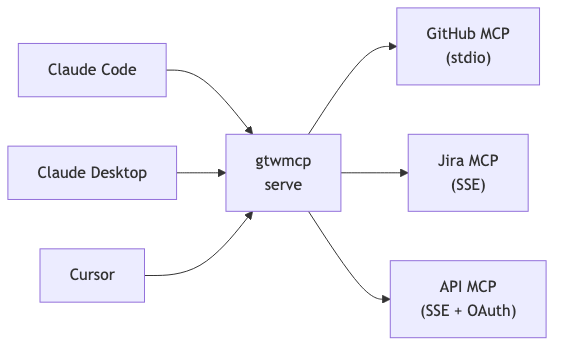
Install
npm install -g gtwmcp
Requires Node.js >= 22.
Quick Start
Add a stdio MCP server:
$ gtwmcp add github --type stdio --command npx --args "-y,@modelcontextprotocol/server-github" --description "GitHub MCP"
Server "github" added.
Add an SSE MCP server with OAuth:
$ gtwmcp add jira --type sse --url https://mcp.jira.example.com/sse --oauth --description "Jira MCP"
Server "jira" added.
List servers:
$ gtwmcp list
NAME    TYPE   STATUS       DESCRIPTION
------  -----  -----------  -----------
github  stdio  ✅ enabled   GitHub MCP
jira    sse    ✅ enabled   Jira MCP
Authenticate an OAuth server:
$ gtwmcp auth jira
[jira] https://mcp.jira.example.com/sse
  ✅ Token valid (expires in 45m)

$ gtwmcp auth --force          # re-authenticate all OAuth servers
List tools from a server:
$ gtwmcp get jira
jira (sse) — https://mcp.jira.example.com/sse
Listing tools...

  1. search_jira_issues: Search Jira issues using JQL
  2. get_jira_issue: Get a specific Jira issue

2 tools available.
CLI Reference
gtwmcp add    <name>    Add or update an MCP server
gtwmcp remove <name>    Remove an MCP server
gtwmcp get    <name>    List tools and descriptions from a server
gtwmcp list             List all servers with status
gtwmcp auth   [name]    Authenticate OAuth servers (--force to re-auth)
gtwmcp enable <name>    Enable a server
gtwmcp disable <name>   Disable a server
gtwmcp serve            Start the MCP gateway in stdio mode
Gateway
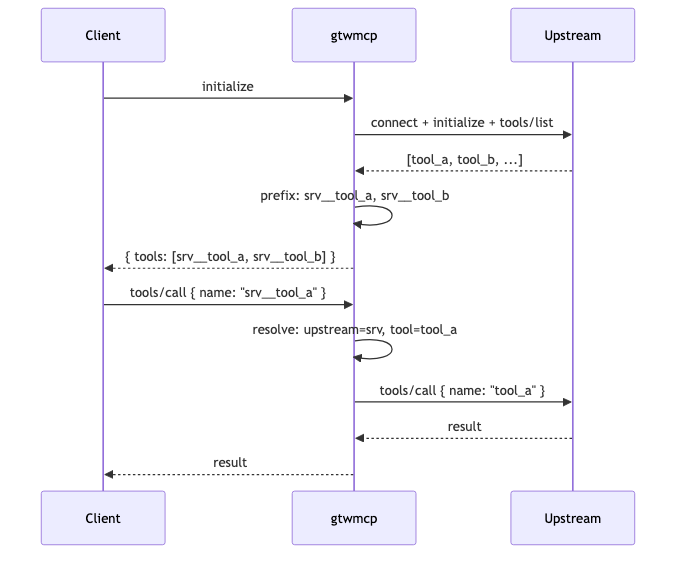
The gateway (gtwmcp serve) speaks MCP over stdio to the client. On startup it:
- Reads
~/.gtwmcp.json - Connects to all enabled upstream servers in parallel
- Calls
initializeandtools/liston each - Prefixes every tool with the server name:
<server>__<tool> - Applies allow/block list filters
- Presents a single consolidated tool list
Tool Filtering
Control which tools are exposed via environment variables:
| Variable | Behavior |
|---|---|
GTWMCP_ALLOW_LIST |
Only matching tools pass |
GTWMCP_BLOCK_LIST |
All tools except matching pass |
| Both set | Allow first, then block removes from that subset |
| Neither set | All tools pass |
Patterns support trailing * wildcard:
# Expose only read tools
GTWMCP_ALLOW_LIST="github__read_*,github__search_*,github__list_*"

# Expose everything except destructive tools
GTWMCP_BLOCK_LIST="github__delete_*,github__admin_*"
Configuration
~/.gtwmcp.json:
{
  "version": 1,
  "servers": {
    "github": {
      "type": "stdio",
      "enabled": true,
      "description": "GitHub MCP server",
      "command": "npx",
      "args": ["-y", "@modelcontextprotocol/server-github"],
      "env": {
        "GITHUB_PERSONAL_ACCESS_TOKEN": "ghp_xxxxxxxxxxxx"
      }
    },
    "jira": {
      "type": "sse",
      "enabled": true,
      "description": "Jira MCP",
      "url": "https://mcp.jira.example.com/sse",
      "headers": {
        "X-Custom-Header": "value"
      },
      "oauth": true
    }
  }
}
- stdio:
command,args, optionalenvanddescription - sse:
url, optionalheaders,oauth, anddescription "oauth": truemeans all OAuth data lives in the OS keychain (never in this file)
OAuth
The gateway supports Authorization Code Flow with PKCE for SSE servers.
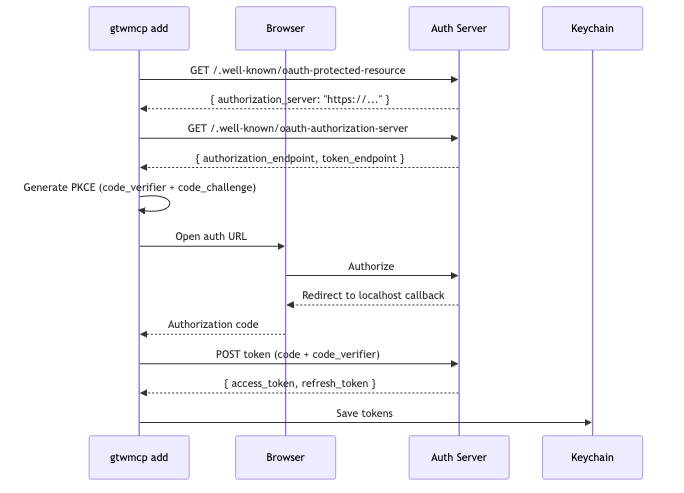
At runtime, gtwmcp serve auto-refreshes expired tokens before each call.
Keychain
| Platform | Backend |
|---|---|
| macOS | /usr/bin/security (Keychain) |
| Linux | secret-tool (libsecret) |
Use with Claude Code
Point Claude Code's MCP config at the gateway:
{
  "mcpServers": {
    "gtwmcp": {
      "type": "stdio",
      "command": "npx",
      "args": ["-y", "gtwmcp", "serve"]
    }
  }
}
All your upstream MCP tools appear prefixed and unified in Claude Code.
Development
npm install
npm run check   # syntax validation
npm test        # 57 tests
Zero external dependencies. Node.js 22+ stdlib only.
Установка Gtwmcp
У этого сервера нет опубликованного пакета — он собирается из исходников. Открой репозиторий и следуй инструкции в README.
▸ github.com/pcandido/gtwmcpFAQ
Gtwmcp MCP бесплатный?
Да, Gtwmcp MCP бесплатный — установка в пару кликов через Unyly без оплаты.
Нужен ли API-ключ для Gtwmcp?
Нет, Gtwmcp работает без API-ключей и переменных окружения.
Gtwmcp — hosted или self-hosted?
Self-hosted: сервер запускается локально на твоей машине командой из раздела установки.
Как установить Gtwmcp в Claude Desktop, Claude Code или Cursor?
Открой Gtwmcp на unyly.org, выбери вкладку своего клиента (Claude Desktop, Claude Code, Cursor) и нажми Install — конфиг сгенерируется автоматически, без правки JSON.
Похожие MCP
GitHub
PRs, issues, code search, CI status
 автор: GitHub
Filesystem
Secure file operations with configurable access controls.
Memory
Knowledge graph-based persistent memory system.
Template MCP Server
A CLI tool to create a new Model Context Protocol server project with TypeScript support, dual transport options, and an extensible structure
 автор: mcpdotdirect
Compare Gtwmcp with
Не уверен что выбрать?
Найди свой стек за 60 секунд
Автор?
Embed-бейдж для README
Похожее
Все в категории development