
Haku
БесплатноНе проверенDraw on a canvas, get cozy lofi music. With a CLI and MCP server so AI agents can draw too.

Описание
Draw on a canvas, get cozy lofi music. With a CLI and MCP server so AI agents can draw too.
README
Draw on a canvas, get a cozy lofi track.
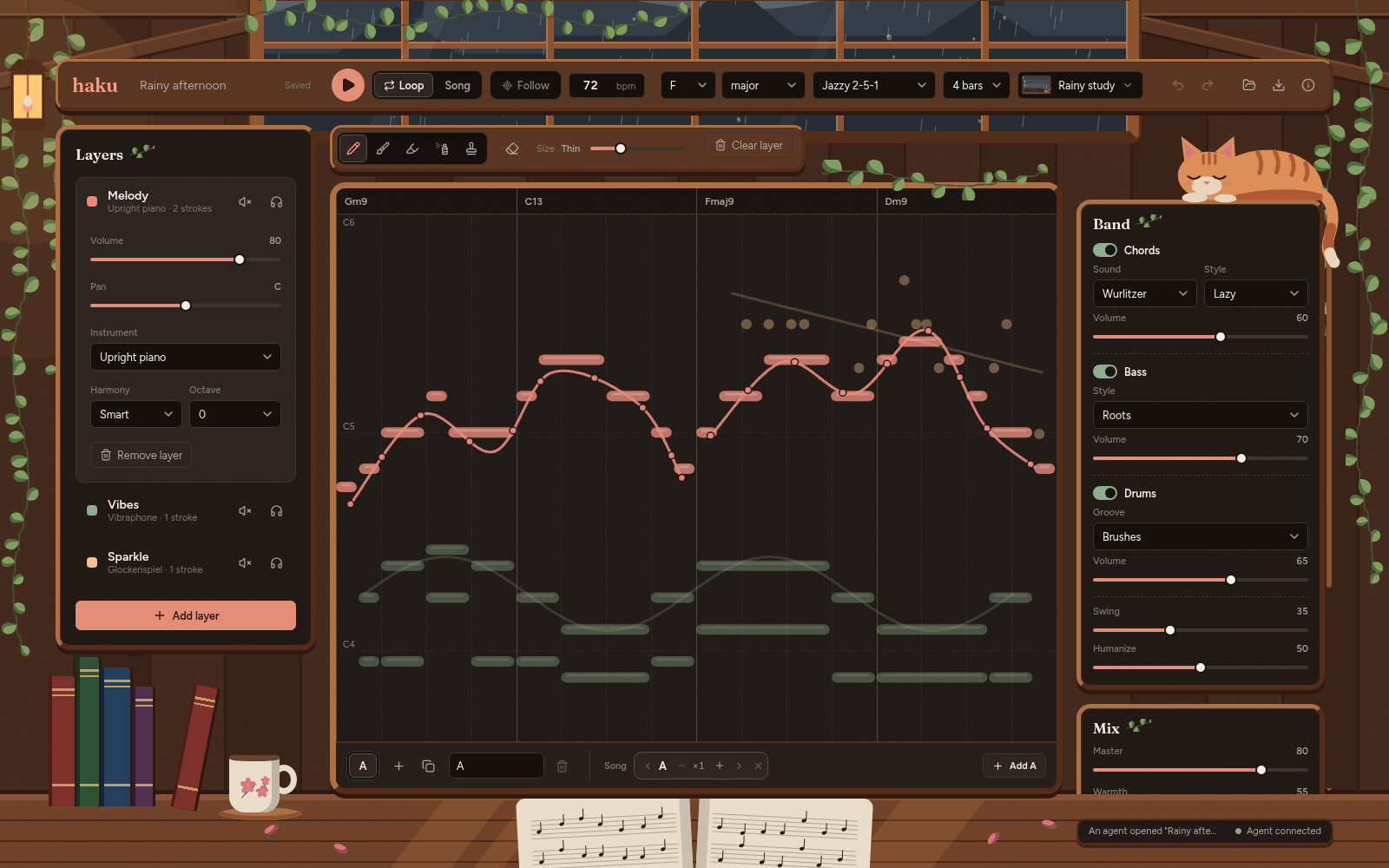
You sketch a line and Haku reads it as a melody: left to right is time, up and down is pitch. Every note gets nudged onto the chords, so whatever you draw fits. Underneath, a little backing band (warm keys, a round bass, brushed drums) follows the progression, and the whole thing gets the usual lofi treatment of swing, vinyl crackle, tape wobble, and rain on the window.
There's also a CLI and an MCP server, so AI agents can draw music with the same tools you use.
What it does
- Turns strokes into notes. Pencil for eighth-note melodies, brush for long soft notes, chalk for two-note harmonies, spray for sparkles, stamp for one hit per step.
- Keeps everything in tune. Notes on strong beats land on chord tones, and the rest stay in the key. You can also pick plain scale, pentatonic, chord-only, or chromatic snapping per layer.
- Reads a few gestures. Tap for a single note, a short vertical line strums the chord, a tight zigzag plays a trill, a quick flick adds a grace note.
- Plays a backing band. Voice-led jazzy chords (7ths, 9ths, 13ths) with six comping styles, including rolled chords and rootless shells. Roots, walking, or dub bass. Seven drum grooves, from dusty boom bap and a jazzy ride to a kick that drags behind the beat.
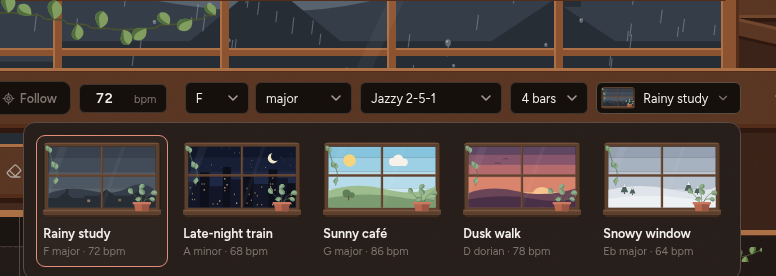
- Comes with moods. Rainy study, late-night train, sunny café, dusk walk, and snowy window. Each one sets the tempo, key, chords, band, and mix.
- Sounds like lofi. Sampled upright piano, Wurlitzer, glock, vibraphone, marimba, kalimba, harp, and nylon guitar, synth keys, pads, plucks, celesta, music box, and bass, and a real drum kit, all run through tape warmth, wobble, reverb, vinyl crackle, and rain.
- Exports MIDI with a track per layer, and renders WAV offline (the browser and Node use the same audio code, so they sound the same).
- Lets agents draw too. The
hakuCLI and the MCP server have a tool for every command, plus snapshots, analysis, playback, and export. They work on project files, or live on the tab you have open.
Running it
The quickest way is the hosted app at https://haku.pinkpixel.dev. In Chrome or Edge you can install it from the address bar, and it keeps working offline once it's loaded.
The hosted app is just the app, though. AI agents can only work live on Haku running on your own machine (see Agents and the CLI), and projects are saved per address, so the hosted app and a local copy keep separate project lists.
To run it from the repo, you'll need Node 22.18 or newer and pnpm. Rebuilding the samples also needs ffmpeg with libvorbis.
pnpm install
pnpm --filter @haku/web dev
Then open http://localhost:5178, draw on the canvas, and press play (or Space). The number keys 1 to 5 pick brushes and E switches to the eraser.
A few more things worth knowing:
- Your loop saves on its own in the browser, and it's still there when you come back. The folder button in the top bar lists your projects, starts new ones, and saves or imports
.haku.jsonfiles. - Ctrl+Z undoes and Ctrl+Shift+Z (or Ctrl+Y) redoes.
- Scenes live under the canvas. Add or duplicate one, then build the song in the strip next to them. Switch the top bar from Loop to Song to hear the whole thing. Turn on Follow if you want the canvas to switch to whichever scene is playing.
- The download button exports WAV or MIDI, for the current scene or the whole song.
- The mood button in the top bar shows a little window for each mood. The big window at the top of the room follows the mood, but you can pick a different view outside under Ambience in the Mix panel whenever you want.
To run the tests and typecheck everything:
pnpm test
pnpm typecheck
pnpm render renders every mood with a little demo melody to ./renders and prints the peak, RMS, and loudness of each. It's mostly there for tuning the mix. Add --mood sunny-cafe for just one, or --project path/to/project.json to render a saved project.
The processed samples are already in assets/samples/. To rebuild them from the original recordings:
pnpm samples:fetch   # downloads about 450 MB into assets/sources/ (needs 7z for the guitar)
pnpm samples:build   # makes assets/samples/ again
The two rain recordings come from Freesound, which needs a login, so those get downloaded by hand. Grab Soft rain on roof window and January rain on a window and save them into assets/sources/freesound/ with their original names (235827__metadex__soft-rain-on-roof-window.wav and 333510__mmorgaine__january-rain-on-a-window.aiff).
Agents and the CLI
Haku comes with a CLI and an MCP server, so an AI agent (or you, from a terminal) can draw music with the same commands the canvas uses. Point your MCP client at the server:
claude mcp add haku -- node /absolute/path/to/haku/apps/agent/src/cli.ts mcp
The CLI is also on npm, so you can skip the repo entirely: npx @pinkpixel/haku mcp runs the server, and npm install -g @pinkpixel/haku gives you the haku command. The npm package carries the whole web app too, so haku web opens Haku in your browser with no clone needed. In Chrome or Edge you can install it from there (the install icon in the address bar), and it gets its own window and keeps working even when haku web isn't running.
With Haku open in a browser, the agent works live on that tab. You hear and see every change, and Ctrl+Z still works. If a tool needs the tab and nothing's open, Haku starts haku web in the background and opens it for you. Pass a .haku.json file instead and tools work on that file and render audio offline. A quick taste from the terminal:
pnpm haku new-project -f lofi.haku.json --mood rainy-study
pnpm haku draw-shape -f lofi.haku.json --shape wave --x 0 --y 0.5 --width 1 --height 0.4 --cycles 2
pnpm haku snapshot -f lofi.haku.json --out lofi.png
pnpm haku play -f lofi.haku.json
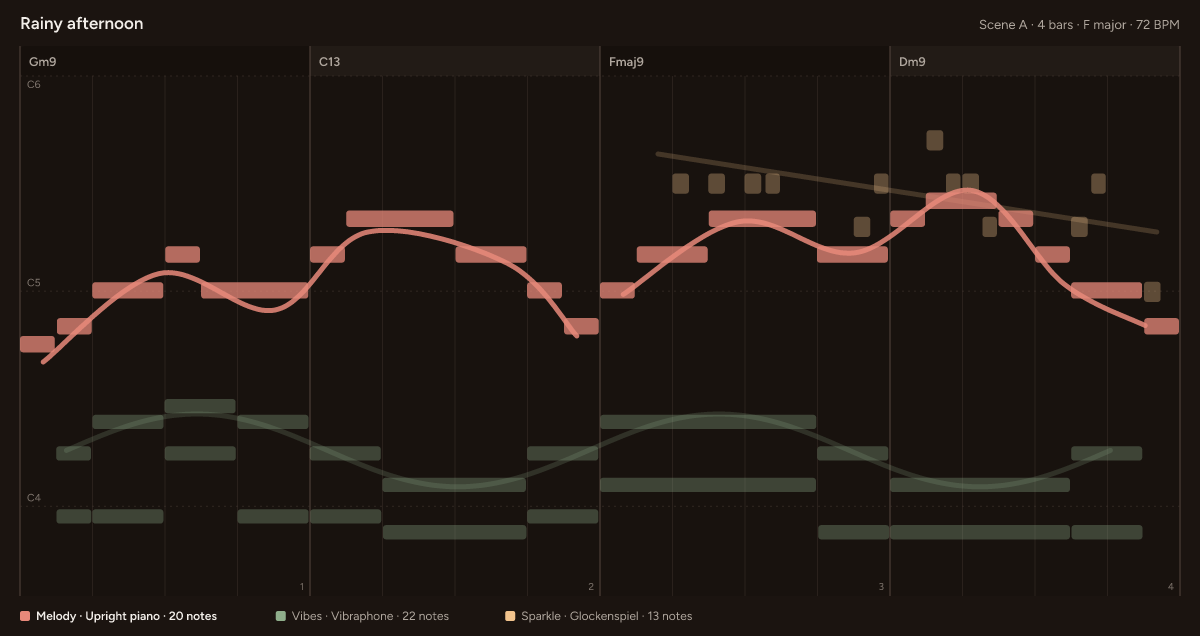
snapshot gives the agent a picture of what it drew, chords and all:
The package README covers the setup, the browser link, environment variables, and every tool.
Using the engine from code
Everything goes through commands, the same ones the CLI and MCP server use:
import { createProject, buildSceneScore, describeProject } from '@haku/core';
import { execute } from '@haku/protocol';

let project = createProject({ mood: 'rainy-study' });
project = execute(project, {
  type: 'draw_curve',
  points: [{ x: 0, y: 0.6 }, { x: 0.3, y: 0.3 }, { x: 0.6, y: 0.5 }, { x: 1, y: 0.4 }],
}).project;

console.log(describeProject(project)); // chords, layers, and a little piano roll
const score = buildSceneScore(project); // every note, in beats
The canvas is 0 to 1 on both axes. x spans the whole scene and y = 0 is the top (the highest notes).
Credits
The sounds come from VSCO 2 CE, VCSL (vibraphone, kalimba, shaker, and cabasa), the FreePats Spanish classical guitar, Big Rusty Drums, Greg Sullivan's Wurlitzer EP200, and two rain recordings from Freesound. The Wurlitzer is CC-BY 3.0, and everything else is CC0. Snapshots use the Figtree font (SIL Open Font License). The Credits button in the app lists every source with links, and so does the package README.
License
Apache 2.0. See LICENSE.
Made with 💖 by Pink Pixel
Установка Haku
У этого сервера нет опубликованного пакета — он собирается из исходников. Открой репозиторий и следуй инструкции в README.
▸ github.com/pinkpixel-dev/hakuFAQ
Haku MCP бесплатный?
Да, Haku MCP бесплатный — установка в пару кликов через Unyly без оплаты.
Нужен ли API-ключ для Haku?
Нет, Haku работает без API-ключей и переменных окружения.
Haku — hosted или self-hosted?
Self-hosted: сервер запускается локально на твоей машине командой из раздела установки.
Как установить Haku в Claude Desktop, Claude Code или Cursor?
Открой Haku на unyly.org, выбери вкладку своего клиента (Claude Desktop, Claude Code, Cursor) и нажми Install — конфиг сгенерируется автоматически, без правки JSON.
Похожие MCP
LibreOffice Tools
Enables AI agents to read, write, and edit Office documents via LibreOffice with token-efficient design. Supports multiple formats including DOCX, XLSX, PPTX, a
 автор: passerbyflutter
Figma
Extract design specs and assets
 автор: Figma
dannote/figma-use
Figma control: create shapes, text and components, and set styles, auto-layout, variables and exports.
 автор: dannote
Logo.dev
Search and retrieve company logos by brand or domain. Customize size, format, and theme to match your design needs. Accelerate design, prototyping, and content
 автор: NOVA-3951
Design Inspiration Server
Searches top design platforms like Dribbble and Behance to provide UI inspiration, color palettes, and layout patterns via the Serper API. It allows users to re
 автор: YonasValentin
PIX4Dmatic
Enables GUI automation for controlling PIX4Dmatic on Windows through MCP. Supports launching, focusing, capturing screenshots, sending hotkeys, clicking UI elem
 автор: jangjo123
Codebase Onboarder
Drop a path. Get a map. A zero-dependency codebase visualizer with a CLI onboarding wizard, a web UI, and an optional key-gated self-hosted mode.
 автор: its.amit
mcp-dockmaster
An Open-Sourced UI to install and manage MCP servers for Windows, Linux and macOS.
ariekogan/ateam-mcp
Build, validate and deploy multi-agent AI solutions on the ADAS platform: design skills with tools and manage the solution lifecycle.
 автор: ariekogan
thinkchainai/mcpbundles
Create custom tool bundles, connect providers with OAuth or API keys, and use one MCP server across many integrations, with a UI for bundles and credentials.
 автор: thinkchainai
Compare Haku with
Не уверен что выбрать?
Найди свой стек за 60 секунд
Автор?
Embed-бейдж для README
Похожее
Все в категории design