
HaltProof
БесплатноНе проверенMCP server for HaltProof's emergency-shutdown orchestration and cryptographic audit-proof layer, enabling AI agents to dry-run or execute cluster halt operation

Описание
MCP server for HaltProof's emergency-shutdown orchestration and cryptographic audit-proof layer, enabling AI agents to dry-run or execute cluster halt operations across Slurm, Kubernetes, and IPMI, and verify signed, hash-chained attestation logs.
README
HaltProof
Emergency-shutdown orchestration for Slurm, Kubernetes, and IPMI clusters, with an Ed25519-signed, hash-chained attestation record of exactly what ran.
Signed, dry-run-by-default shutdown orchestration for Slurm, Kubernetes, and IPMI clusters, with a tamper-evident audit trail.
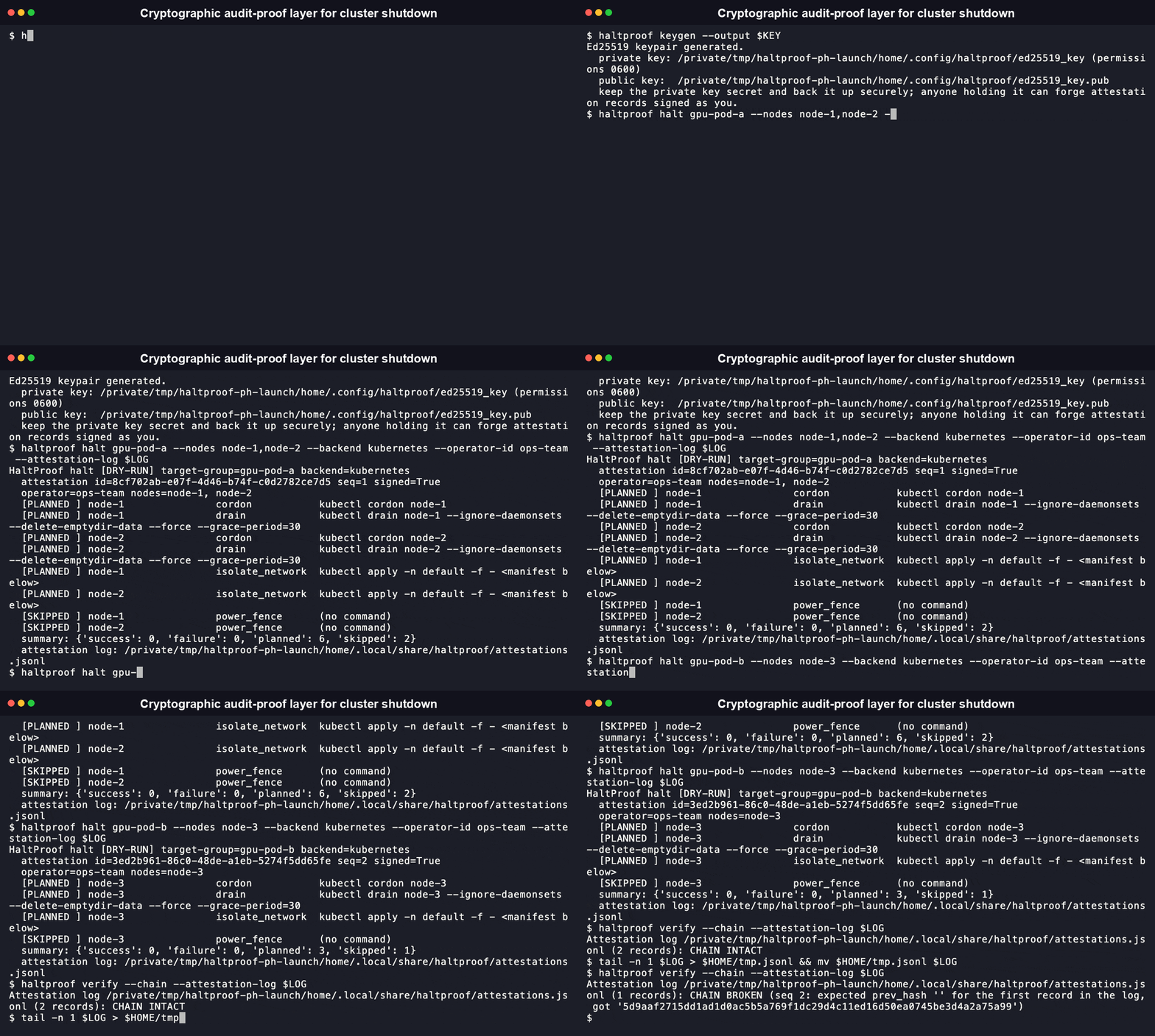
HaltProof is an emergency-shutdown orchestration and cryptographic audit-proof layer for compute clusters. It does not implement a new low-level shutdown mechanism. It coordinates cluster primitives you already trust (Slurm, Kubernetes, IPMI/BMC) and produces a signed, tamper-evident record of exactly what was targeted, what ran, and who authorized it.
pip install haltproof-cli
(Full install options, including the npm wrapper, are in Install below.)
Why
Operators already have the tools to drain a Slurm partition, cordon a Kubernetes node pool, or power-fence a physical host over IPMI. What's usually missing is:
- One consistent interface across those tools during an incident, instead of three different command sets under pressure.
- A dry-run-by-default safety rail, so a mistyped target group doesn't take down the wrong nodes.
- A signed, tamper-evident record of what happened: who ran it, what commands were issued, against which nodes, whether each step succeeded, and whether the record itself has been altered or has a piece missing.
HaltProof is that layer. It calls out to scontrol, kubectl, and
ipmitool (or mcp-invokable equivalents) and wraps every invocation in an
Ed25519-signed, hash-chained attestation.
Install
pip install haltproof-cli
An npm wrapper is also published for Node.js-based tooling and agent runtimes:
npm install -g haltproof-cli
[!WARNING] The npm package requires the Python
haltproof-clipackage to already be installed and onPATH. It is a thinexecFileSyncwrapper, not a reimplementation. If it can't find the Python CLI, it prints an actionable error and exits non-zero rather than silently doing something else.
Table of Contents
- Features
- Quickstart
- Commands
- Architecture
- Security model
- MCP server (for AI agents)
- Comparison
- What Is HaltProof, and Why Does It Exist
- FAQ
- Contributing
- License
Features
- Dry-run required by default.
haltproof haltprints exactly which commands it would run, against which nodes, and still writes a signed attestation of that plan, unless you pass--confirm. The gate lives at a single chokepoint (haltproof.backends.runner.run_step) that all three backends route through, so it can't be quietly bypassed by one backend's code path. - One interface across three real backends.
kubernetes(viakubectl),slurm(viascontrol), andipmi(viaipmitool) each implement the same four-operationClusterBackendinterface:drain,isolate_network,power_fence,status. A backend that doesn't support an operation, for example Kubernetes has no physical power-fencing primitive, returns aSKIPPEDresult with an explanation instead of raising, so a halt across a mixed environment still produces one complete attestation. - Ed25519-signed, hash-chained attestations. Every halt, dry-run or executed, appends one signed record to a local append-only NDJSON log. Each record embeds
prev_hash, the content hash of the record before it, sohaltproof verify --chaincan catch a deleted or reordered entry that a single record's own signature check would miss. - Structured output on every command.
--json(or--format json) is available onhalt,verify,status, andkeygen, so a script or an agent can parse the result without screen-scraping human-formatted text. - A real MCP server, built for agents.
haltproof mcp-serverexposeshalt,verify,verify_chain,status, andkeygenas MCP tools over stdio, built on the officialmcpPython SDK. It calls the samehaltproof.corefunctions the CLI calls, so an agent invoking the MCP tool gets the identical dry-run-by-default behavior a human gets from the CLI. - Tested. 76 tests, 90% overall line coverage, run and confirmed in this audit with
pytest -v --cov=haltproof --cov-report=term-missing. Backend tests mocksubprocesscalls; none of them require a real cluster.
Quickstart
[!IMPORTANT]
haltproof haltis a no-op without--confirm. It prints the plan and writes a signed dry-run attestation, but nothing destructive runs until you pass--confirmexplicitly.
# Generate a signing key for attestations (do this once).
haltproof keygen --output ~/.config/haltproof/ed25519_key

# See what backend HaltProof auto-detected on this host.
haltproof status

# Dry-run a halt against an explicit node list. Nothing runs yet.
haltproof halt gpu-pod-a --nodes node-1,node-2

# Same halt, actually executed.
haltproof halt gpu-pod-a --nodes node-1,node-2 --confirm

# Verify a past attestation's signature and print its timeline.
haltproof verify 1

# Verify the entire attestation log's hash chain instead of a single
# record: this catches a deleted or reordered entry that a
# single-record signature check alone would miss.
haltproof verify --chain --attestation-log ~/.local/share/haltproof/attestations.jsonl
Every command also supports --json for agent-parseable output:
haltproof status --json
haltproof halt gpu-pod-a --nodes node-1 --json
Config file (optional)
Target groups, the preferred backend, and default paths can live in a haltproof.toml file (checked in the current directory, then ~/.config/haltproof/config.toml, or at a path given by --config / HALTPROOF_CONFIG):
backend = "kubernetes"
operator_id = "ops-team"
attestation_log_path = "/var/log/haltproof/attestations.jsonl"

[groups]
gpu-pod-a = ["node-1", "node-2", "node-3"]

[kubernetes]
namespace = "training"

[ipmi]
user = "admin"
Every config value has a matching CLI flag, and an explicit flag always wins over the config file.
Commands
Reference below is regenerated from the CLI's actual --help output.
haltproof halt TARGET_GROUP
Drain, isolate, and power-fence TARGET_GROUP. Dry-run is the default; nothing destructive runs without --confirm.
Options:
  --nodes TEXT             Comma-separated explicit node list, overrides
                           config group lookup.
  --backend TEXT           Backend to use: kubernetes, slurm, or ipmi.
  --confirm                Actually execute the halt. Without this, dry-run
                           only.
  --reason TEXT            Reason recorded for drain operations.
  --operator-id TEXT       Operator identity to record. Defaults to OS user.
  --config TEXT            Path to a haltproof.toml config file.
  --attestation-log TEXT   Path to the attestation log file.
  --attestation-key TEXT   Path to the Ed25519 private key used to sign the
                           attestation.
  --no-sign                Skip signing (not recommended); still logs the
                           record unsigned.
  --remote-collector TEXT  Optional URL to POST the signed attestation to.
  --format [human|json]    Output format.
  --json                   Shorthand for --format=json.
haltproof verify [ATTESTATION_REF]
Verify one attestation record's signature, or an entire log's hash chain. ATTESTATION_REF is a path to a record file, or an attestation id / sequence number to look up in the log. Pass --chain instead of ATTESTATION_REF to verify a whole --attestation-log: every record's signature holds, and none has been deleted or reordered.
| Flag | Description |
|---|---|
--attestation-log TEXT |
Log to search when ATTESTATION_REF is an id/sequence number, or to verify with --chain. |
--trusted-key TEXT |
Path to a trusted Ed25519 public key; if given, the record's signing key must match it. |
--chain |
Verify the full hash chain of --attestation-log instead of a single record. |
--format [human|json] |
Output format. |
--json |
Shorthand for --format=json. |
haltproof status
Show backend auto-detection results and, optionally, target-group health.
| Flag | Description |
|---|---|
--backend TEXT |
Backend to check status for; defaults to the auto-detected/configured backend. |
--nodes TEXT |
Comma-separated node list to report health for. |
--group TEXT |
Named target group (from config) to report health for. |
--config TEXT |
Path to a haltproof.toml config file. |
--format [human|json] |
Output format. |
--json |
Shorthand for --format=json. |
haltproof keygen
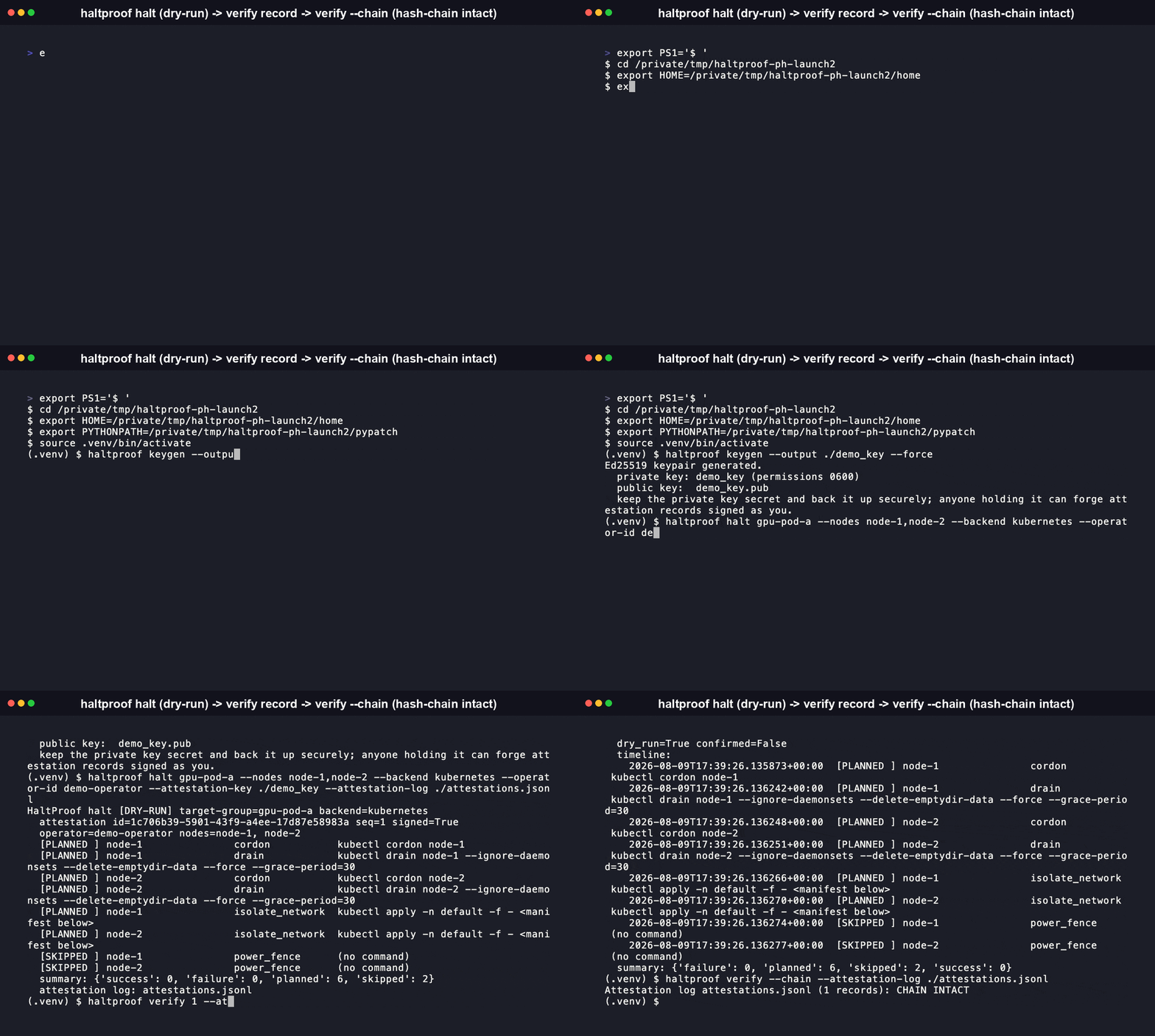
Generate an Ed25519 keypair for attestation signing. The private key is written with 0600 permissions and is never printed or logged.
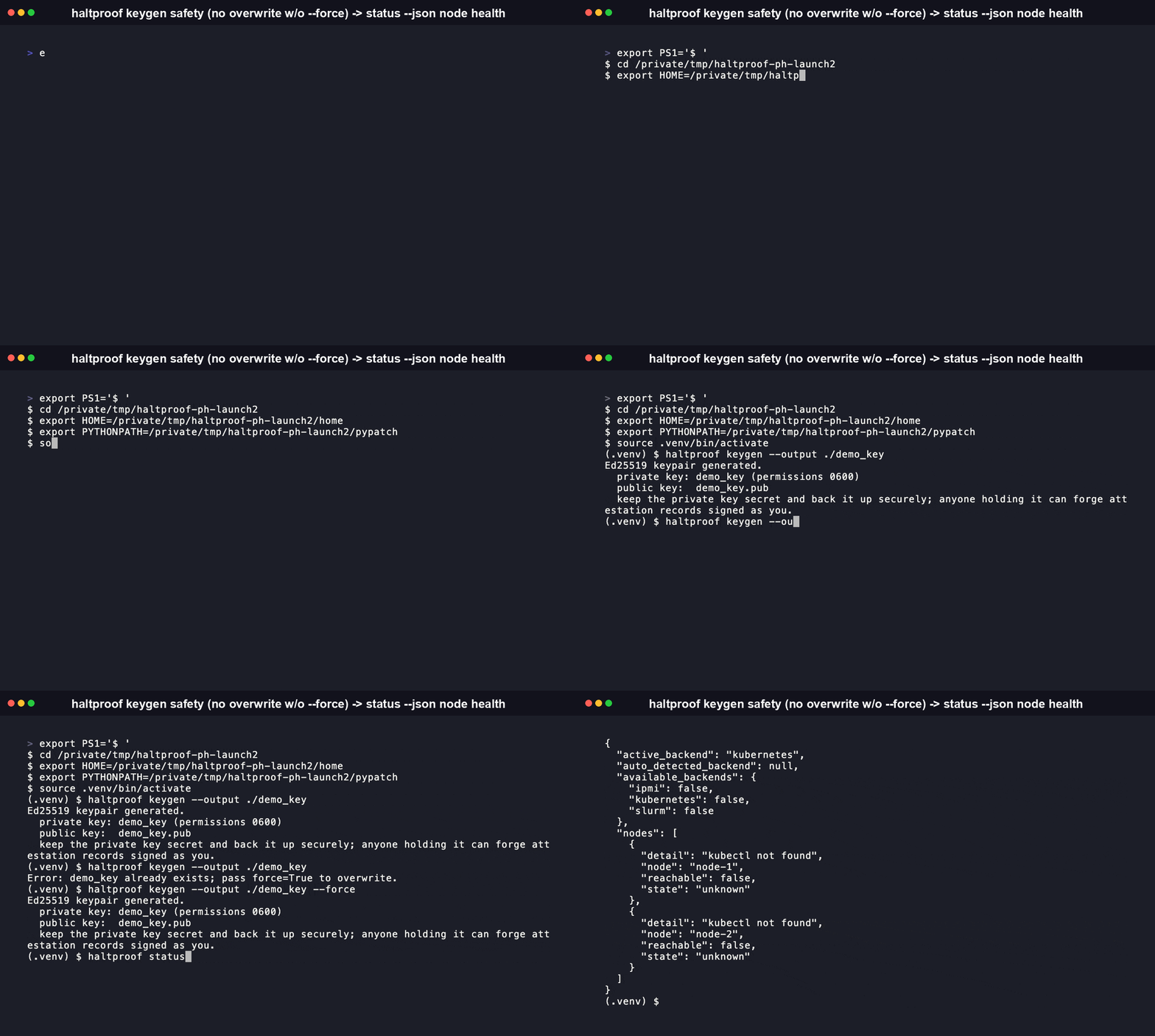
Options:
  --output TEXT          Path to write the private key to.
  --force                Overwrite an existing key at the output path.
  --format [human|json]  Output format.
  --json                 Shorthand for --format=json.
haltproof mcp-server
Starts the HaltProof MCP server on stdio, exposing halt, verify, verify_chain, status, and keygen as MCP tools. No flags beyond --help.
Every subcommand also accepts --help directly for the same reference shown above.
Architecture
HaltProof has three layers:
Transport layer: the Click-based CLI (
haltproof.cli) and the MCP server (haltproof.mcp_server). Both are thin wrappers over the same core functions inhaltproof.core, so a human running the CLI and an agent calling the MCP tool get identical behavior, including the dry-run-by-default gate onhalt.Backend layer: a
ClusterBackendabstract interface (haltproof.backends.base) with four operations:ClusterBackend ├── drain(nodes, dry_run, reason) -> stop new work being scheduled ├── isolate_network(nodes, dry_run) -> cut nodes off from the workload network ├── power_fence(nodes, dry_run) -> hard power off └── status(nodes) -> current reachability/stateThree backends implement it today:
Backend drain isolate_network power_fence Underlying tool kubernetescordon + drain deny-all NetworkPolicy not supported (use ipmi)kubectlslurmscontrol update state=drainstate=power_down(SuspendProgram hook)not supported (use ipmi)scontrolipminot supported (use slurm/kubernetes)not supported ipmitool chassis power offipmitoolA backend that doesn't support a given operation returns a
SKIPPEDresult with an explanation instead of raising, so a halt sequence against a mixed environment still produces one complete, honest attestation record. Adding support for a new scheduler or fencing tool means adding one backend module and registering it inhaltproof.backends.detect, not touching the orchestration or attestation layers.Backend selection order: an explicit
--backendflag, then the config file'sbackendkey, then auto-detection based on which ofkubectl/scontrol/ipmitoolis found onPATH.Attestation layer (
haltproof.attestation): every halt operation, dry-run or real, produces one signed, hash-chained record and appends it to a local append-only NDJSON log.
Security model
- Signing. Attestation records are signed with Ed25519 (
cryptographylibrary). The signing public key is embedded in the record itself, sohaltproof verifycan check internal signature validity on its own. Pass--trusted-keyto additionally require the record be signed by one specific known operator key. - Tamper evidence, per record. Signing covers the entire record, operator, target nodes, every step's command and status, timestamps, and the chain link below, except the signature field itself. Changing any field, including hiding a failed step, invalidates the signature.
- Tamper evidence, across the log. A record's own signature only proves that record's content is unaltered; it says nothing about whether an entire record was deleted or reordered. Every record embeds
prev_hash, the content hash of the record immediately before it, sohaltproof verify --chaincan confirm sequence numbers have no gaps and every link in the chain matches. - Key handling.
haltproof keygenwrites the private key with0600permissions and never prints or logs key material, in CLI output, JSON output, or the MCP tool result. Anyone holding the key can sign records that verify as coming from you, so treat it like an SSH private key. - BMC credentials. The IPMI backend reads the BMC password from the
IPMI_PASSWORDenvironment variable and passesipmitool -E, so it never appears as a command-line argument, in the process list, or in the attestation record's logged command. - Dry-run by default.
haltproof haltrequires an explicit--confirmto execute anything destructive, enforced at one chokepoint (haltproof.backends.runner.run_step) that every backend routes through. - Operator identity. Recorded from, in order, an explicit
--operator-id, an SSH certificate identity if the environment exposes one, or the OS user running the command.
MCP server (for AI agents)
haltproof mcp-server
Starts an MCP server on stdio exposing halt, verify, verify_chain, status, and keygen as tools, built on the official mcp Python SDK. An agent connected over MCP gets the same dry-run-by-default halt behavior and the same JSON-shaped results as the CLI's --json mode, because the CLI and the MCP server call the same underlying functions in haltproof.core.
Comparison
HaltProof doesn't compete with Slurm, Kubernetes, or IPMI. It sits on top of the tools operators already use for this job and adds what none of them provide on their own: one interface, one safety gate, and a signed record.
| Capability | HaltProof | kubectl (native) |
scontrol (native) |
ipmitool (native) |
|---|---|---|---|---|
| Single command across Slurm + Kubernetes + IPMI | Yes | No, Kubernetes only | No, Slurm only | No, IPMI only |
| Consistent dry-run gate before any backend executes | Yes, one --confirm flag for all three backends |
Partial: --dry-run=client validates syntax only, not real cluster mutation |
No built-in simulate mode; state=drain takes effect immediately |
No dry-run concept for power commands |
| Cryptographically signed record of what ran | Yes, Ed25519 | No | No | No |
| Detects a deleted or reordered record in the audit trail | Yes, hash-chained log | No | No | No |
| Structured JSON output for every action | Yes, every command | Partial: -o json covers read/get commands, not the drain/cordon action result |
No, plain text only | No, plain text only |
| MCP server for direct AI agent invocation | Yes | No | No | No |
A GitHub search run for this audit (August 2026) found no existing open-source project combining unified multi-backend cluster orchestration, a dry-run-by-default gate, and a cryptographically signed, hash-chained audit trail. The closest adjacent projects, like AI agent tool-call policy proxies, operate one layer up: they intercept and audit what an AI agent's tool calls are allowed to do, not the infrastructure-level shutdown of the underlying compute itself. See the FAQ below for how HaltProof relates to that category.
What Is HaltProof, and Why Does It Exist
HaltProof is an orchestration and audit-proof layer over cluster shutdown primitives operators already trust: scontrol for Slurm, kubectl for Kubernetes, ipmitool for IPMI/BMC. It does not reimplement draining, isolating, or power-fencing a node. It calls the real tool, gates the call behind a dry-run-by-default safety check, and signs a tamper-evident record of exactly what was targeted, what ran, and who authorized it.
It exists because three separate problems tend to show up together during a real incident:
- Three different command sets under pressure. Operators already know how to drain a Slurm partition, cordon a Kubernetes node pool, or power-fence a physical host over IPMI, but doing it consistently across all three during an incident means three different tools, three different flag conventions, and three different failure modes to remember at the worst possible time.
- No shared safety rail.
kubectl drain --dry-run=clientonly validates syntax; it doesn't simulate the actual cluster mutation.scontrol update state=draintakes effect the moment you run it. A mistyped target group has no consistent, tool-independent way to catch itself before something real happens. - No proof after the fact. None of the three native tools produce a signed, tamper-evident record of what was targeted, what actually ran, whether it succeeded, and who authorized it. Building that logging and signing layer yourself, for change-management evidence or for a compliance framework like the EU AI Act's human-oversight provisions, means writing it from scratch.
HaltProof is the layer that answers all three at once: one CLI and one MCP surface, one --confirm gate that every backend routes through, and one Ed25519-signed, hash-chained attestation log.
FAQ
What does HaltProof actually do, and what's its sharpest difference from just scripting kubectl/scontrol/ipmitool directly?
HaltProof calls the same tools you'd call directly, scontrol, kubectl, ipmitool, but wraps every call in a dry-run-by-default gate and produces an Ed25519-signed, hash-chained attestation record. A hand-rolled script can call the same underlying commands, but it doesn't refuse to execute without --confirm and doesn't produce a record that proves, after the fact, that nothing was altered or deleted from the log.
Does HaltProof actually cut power or network access itself?
No. It calls scontrol, kubectl, and ipmitool, tools you already run and trust, and wraps each invocation in a dry-run gate and a signed record. HaltProof adds orchestration and proof, not a new low-level shutdown mechanism.
Which operating systems and Python versions does HaltProof support?
The published PyPI package targets Python 3.10 and up, on Linux and macOS (see its Operating System :: POSIX :: Linux and Operating System :: MacOS classifiers). There's no Windows classifier yet, and the IPMI backend in particular depends on shelling out to ipmitool, which isn't the primary target on Windows. If you need it there, open an issue.
How is this different from writing a runbook or an Ansible playbook that calls the same tools? A runbook or an Ansible playbook can call the same underlying commands, but it doesn't produce a cryptographically signed, tamper-evident record of what actually ran on its own; you'd need to build that logging and signing layer yourself. HaltProof ships that as the default behavior, and it also gives you a single dry-run-by-default gate across all three backends instead of three separate playbooks with three separate safety conventions.
Is this an "AI safety kill switch"? No. HaltProof is infrastructure incident-response and compliance-audit tooling for cluster operators. It has no opinion on AI model behavior and makes no claims about AI safety or alignment. Tools that intercept and audit an AI agent's individual tool calls operate at a different layer entirely; HaltProof orchestrates the underlying compute shutdown itself, the same way it would for a non-AI workload.
What happens if a node's underlying tool isn't installed?
The relevant backend reports that step as failed with the actual error, for example executable not found, and the attestation record still gets written and signed, so the failure itself becomes part of the auditable history.
Can I use HaltProof without signing attestations?
Yes, --no-sign skips signing but still writes the record to the log. This is meant for local testing, not production incident response, since an unsigned record can't be verified as authentic.
Does the attestation log need a central server?
No. It's a local, append-only NDJSON file by default. --remote-collector optionally POSTs each signed record to a URL you configure, for teams that want a central copy, but verification doesn't depend on that server being reachable.
What happens if two operators run halt at the same time against the same attestation log?
Appends are file-locked (fcntl.flock on POSIX) so writes don't interleave, but sequence numbers are assigned by reading the log at the moment each command starts. Point both operators at backend-specific or per-incident log files if you need strict per-operation serialization.
What license is HaltProof under, and can I use it commercially? MIT. You can use, modify, and redistribute it, including commercially, as long as the copyright notice and license text stay attached. See LICENSE.
Contributing
Contributions are welcome. Read CONTRIBUTING.md first: it covers setting up a dev environment, running the test suite (pytest -v --cov=haltproof --cov-report=term-missing), and the steps for adding a new backend by implementing the ClusterBackend interface. Changes touching attestation signing/verification or the dry-run/--confirm gate get extra review, per CODEOWNERS. See SECURITY.md to report a vulnerability privately instead of opening a public issue.
git clone https://github.com/RudrenduPaul/HaltProof.git
cd HaltProof
python -m venv .venv && source .venv/bin/activate
pip install -e ".[dev]"
pytest -v --cov=haltproof --cov-report=term-missing
License
MIT © Rudrendu Paul and Sourav Nandy
Установка HaltProof
У этого сервера нет опубликованного пакета — он собирается из исходников. Открой репозиторий и следуй инструкции в README.
▸ github.com/RudrenduPaul/HaltProofFAQ
HaltProof MCP бесплатный?
Да, HaltProof MCP бесплатный — установка в пару кликов через Unyly без оплаты.
Нужен ли API-ключ для HaltProof?
Нет, HaltProof работает без API-ключей и переменных окружения.
HaltProof — hosted или self-hosted?
Self-hosted: сервер запускается локально на твоей машине командой из раздела установки.
Как установить HaltProof в Claude Desktop, Claude Code или Cursor?
Открой HaltProof на unyly.org, выбери вкладку своего клиента (Claude Desktop, Claude Code, Cursor) и нажми Install — конфиг сгенерируется автоматически, без правки JSON.
Похожие MCP
GitHub
PRs, issues, code search, CI status
 автор: GitHub
Filesystem
Secure file operations with configurable access controls.
Memory
Knowledge graph-based persistent memory system.

Unyly Deploy
Deploy sites and MCP servers to Unyly straight from your AI agent
 автор: Unyly
Amap Maps Mcp Server
MCP server for using the AMap Maps API
 автор: duxiaohui
PayMCP
Lightweight payments layer for MCP servers: turn tools into paid endpoints with a two-line decorator. [PyPI](https://pypi.org/project/paymcp/) · [npm](https://w
 автор: blustAI
Server For Power BI
Enables exploring Microsoft Fabric / Power BI workspaces and semantic models, and executing ad-hoc DAX queries.
 автор: Mitsubishi-Fuso
Gpt Image 2 Mcp
RunAPI GPT Image 2 MCP server for image generation: create tasks, poll results, and check pricing across 1 model from Claude Code, Codex, Cursor, and VS Code.
 автор: runapi-ai
Template MCP Server
A CLI tool to create a new Model Context Protocol server project with TypeScript support, dual transport options, and an extensible structure
 автор: mcpdotdirect
Supabase
Database, auth and storage
 автор: Supabase
Compare HaltProof with
Не уверен что выбрать?
Найди свой стек за 60 секунд
Автор?
Embed-бейдж для README
Похожее
Все в категории development