
Harrier Emr
БесплатноНе проверенEvidence-backed EMR, Spark, and Kubernetes diagnosis MCP server for AWS DevOps Agent

Описание
Evidence-backed EMR, Spark, and Kubernetes diagnosis MCP server for AWS DevOps Agent
README

Evidence-backed EMR, Spark, and Kubernetes diagnosis for AWS DevOps Agent.





Website | Docs Site | Feature Showcase | Features | Why Harrier | Quick Start | What It Diagnoses | Runtimes | Prompts | Docs | Security
Harrier is a headless Model Context Protocol server that gives AWS DevOps Agent a structured way to investigate failed or slow Amazon EMR workloads. It collects runtime metadata, reads bounded log and metric evidence, classifies failure signals, produces a human-readable initial diagnosis report, and can prepare safe pull request recommendations.
Harrier does not provide its own chat UI. AWS DevOps Agent, or any compatible MCP client, is the operator experience.
Why Harrier
Generic AWS tools can list clusters, fetch logs, and show metrics. Harrier turns those raw pieces into an EMR-aware diagnosis flow:
- one report contract across EMR on EC2, EMR Serverless, and EMR on EKS
- clear separation between
PASS,ISSUE,NOT_CHECKED, and inconclusive evidence - Spark-specific reasoning for driver, executor, shuffle, dependency, and Python worker failures
- optional Kubernetes pod diagnostics for EMR on EKS
- bounded evidence excerpts instead of raw log dumps
- dry-run remediation previews with validation and rollback steps
Use Harrier when the operator needs a readable first-pass diagnosis with an evidence trail. Use the AWS APIs, CloudWatch, S3, or Kubernetes directly when you need raw control-plane details.
Feature Showcase
Harrier keeps the investigation readable for an operator while still preserving the evidence trail an automation agent needs.
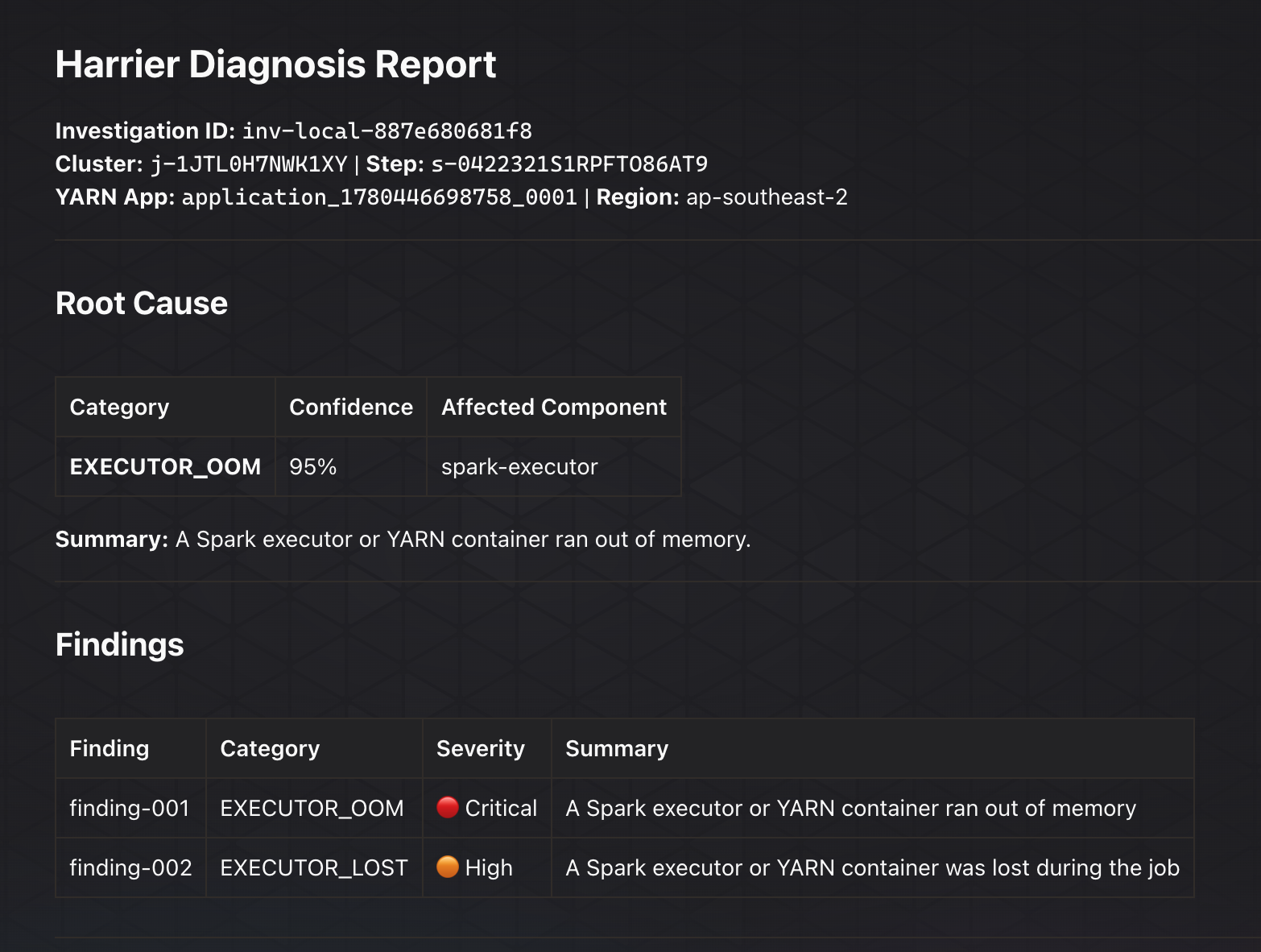
Root Cause And Findings
Harrier starts with the likely failure mode, confidence, affected component, and the first human-readable summary before moving into lower-level evidence.
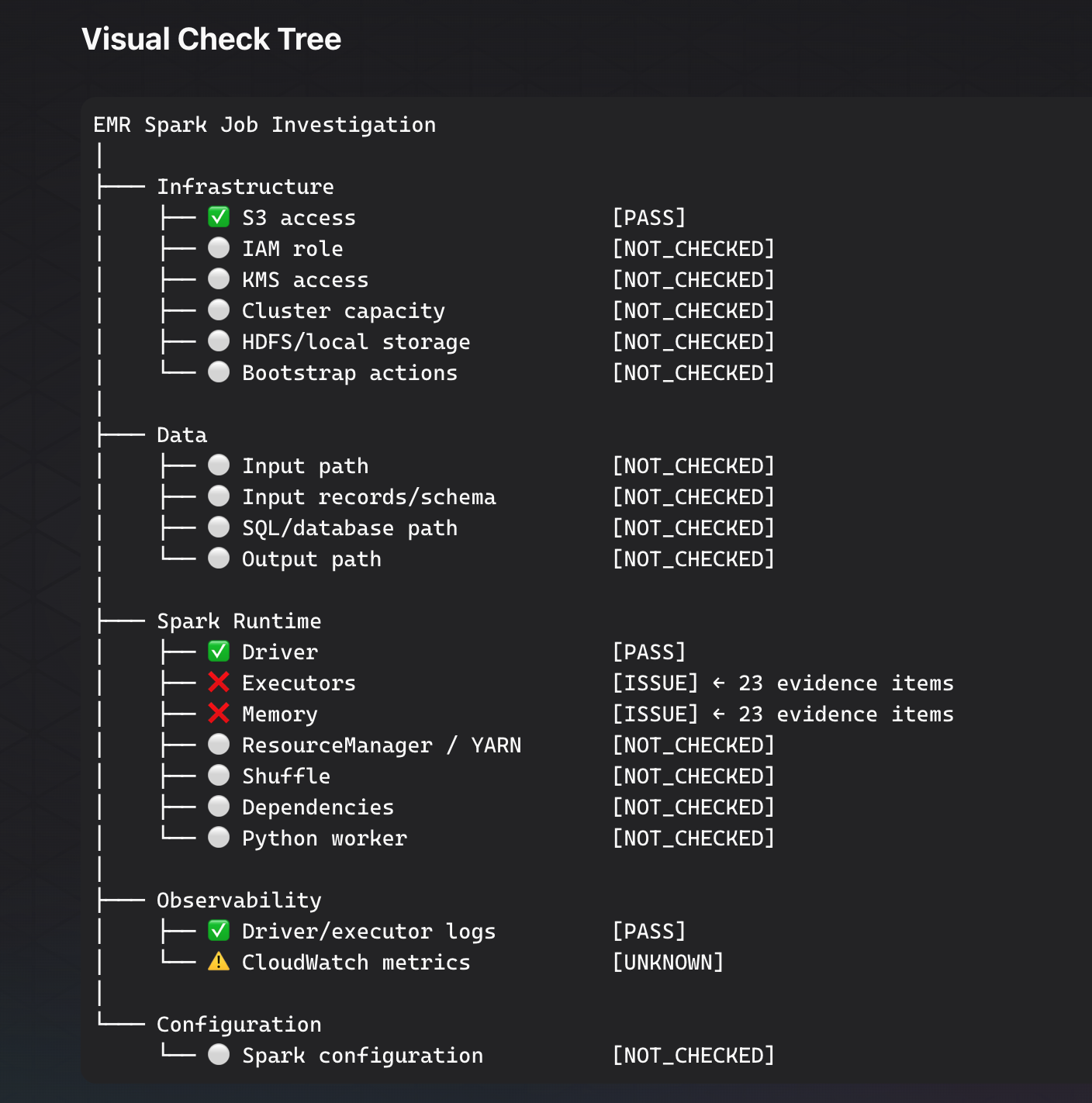
Visual Check Tree
The check tree shows what passed, what failed, and what was not checked yet, so the first-pass diagnosis does not look more certain than the evidence supports.
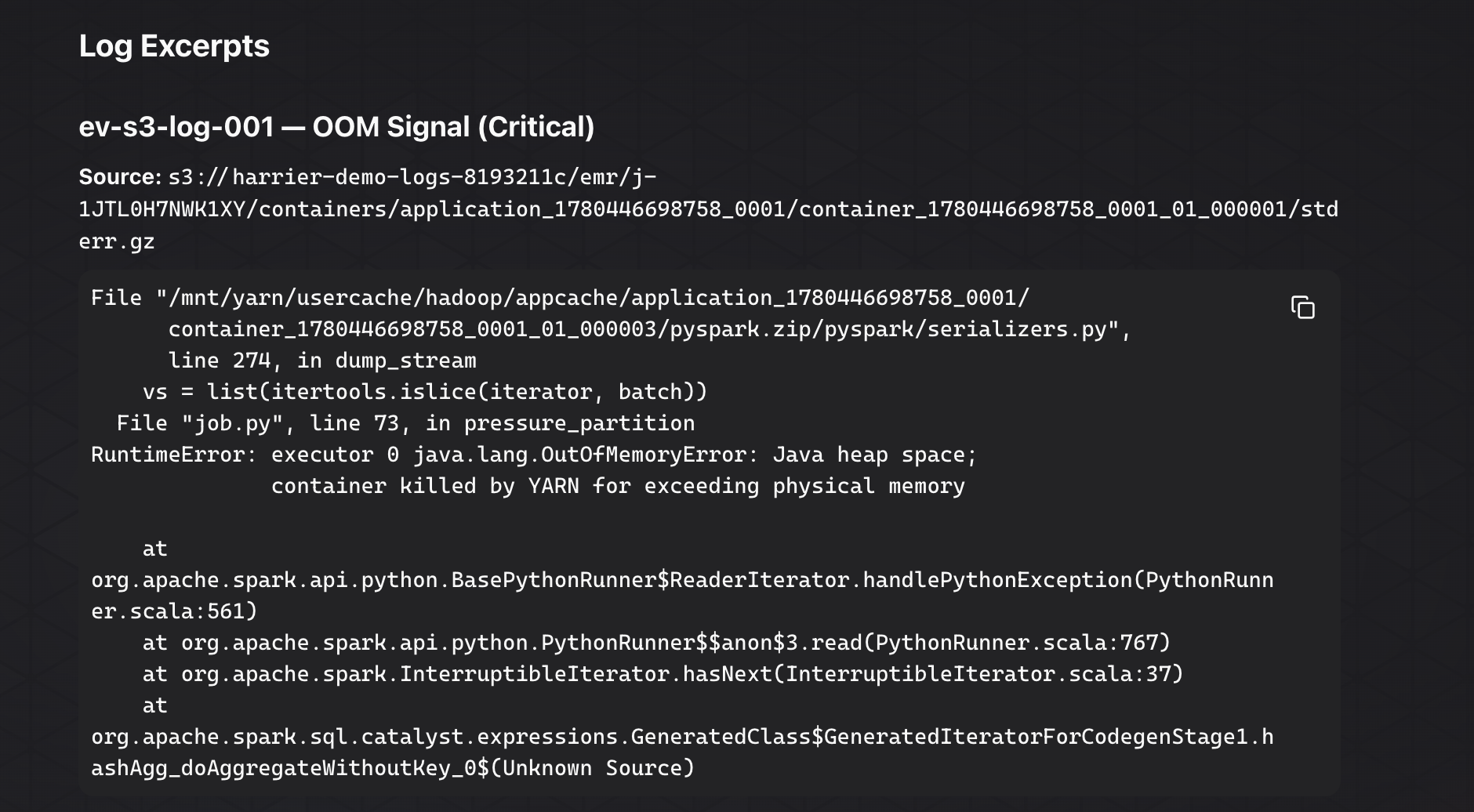
Log Excerpt Evidence
Failure snippets are separated from explanatory text, making stack traces useful without turning the report into a raw log dump.
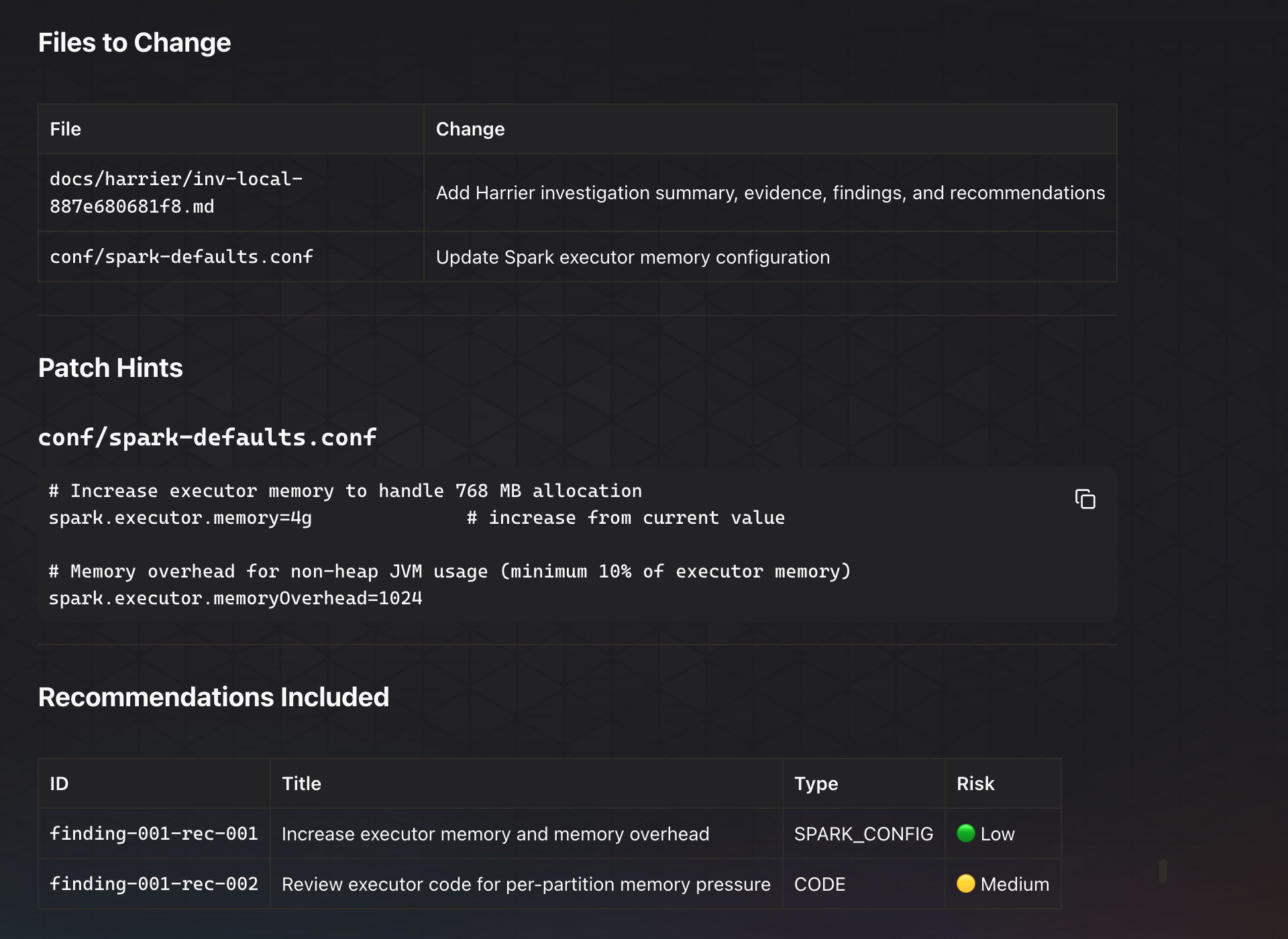
Dry-Run PR Preview
When Harrier proposes a remediation, it stays advisory first: files, patch hints, risk, validation, and rollback are shown before any branch or pull request is created.
Complete Feature List
See the visual report experience in the Diagnosis Showcase.
- 🧭 Runtime-aware EMR investigation for EMR on EC2, EMR Serverless, and EMR on EKS.
- 🔌 Streamable HTTP MCP server for AWS DevOps Agent and compatible MCP clients.
- 🧰 MCP tools for starting investigations, fetching reports, retrieving evidence, and preparing dry-run PR recommendations.
- 🧾 Human-readable initial diagnosis reports with root cause, confidence, findings, gaps, and next actions.
- 🌳 Visual check tree that separates
PASS,ISSUE,NOT_CHECKED,INCONCLUSIVE, and unavailable evidence. - ✅ Pass/fail check summaries for infrastructure, data, Spark runtime, Kubernetes, observability, and configuration.
- 🧠 Evidence-backed classifiers for executor OOM, driver OOM, executor loss, shuffle spill, dependency failures, bad data, S3 access issues, KMS issues, and more.
- 📚 Evidence cards that summarize signals before asking operators to read raw logs.
- 🔍 Bounded log excerpt rendering that keeps stack traces visually distinct from explanatory text.
- 📦 EMR on EC2 collection from EMR APIs, step metadata, YARN application IDs, S3 logs, and CloudWatch metrics.
- ⚡ EMR Serverless collection from application metadata, job run state, monitoring config, S3 logs, CloudWatch logs, and metrics.
- ☸️ EMR on EKS collection from EMR Containers APIs, virtual cluster metadata, job runs, S3 logs, CloudWatch logs, and optional Kubernetes diagnostics.
- 🩺 Optional Kubernetes pod diagnostics for pod phase, container status, restarts,
OOMKilled,ImagePullBackOff, evictions, and pending reasons. - 🧱 Runtime-specific recommendation types for Spark config, job config, observability, Kubernetes, and code-level fixes.
- 🛡️ Dry-run-first remediation flow with no branch, commit, PR, database, or infrastructure mutation unless explicitly enabled.
- 🧯 Validation and rollback steps attached to recommendations so operators can review the safety path before acting.
- 🧼 Redaction and bounded evidence handling for safer log/report output.
Quick Start
Try Harrier locally without AWS first:
make setup
make local-sample
Run the MCP server locally:
cd mcp-server
python3 -m venv .venv
source .venv/bin/activate
pip install -e ".[dev]"
python3 -m harrier_mcp.server
Run tests:
make test
make lint
Run a no-AWS sample investigation:
make local-sample
Deploy the demo ECS service:
./scripts/deploy.sh
Smoke test a deployed endpoint:
HARRIER_MCP_URL=https://example.execute-api.region.amazonaws.com/mcp \
./scripts/smoke-test.sh
Connect Harrier to AWS DevOps Agent after deployment:
- Deploy a Streamable HTTP endpoint.
- Register the endpoint in AWS DevOps Agent.
- Grant read-only AWS permissions for the EMR runtime you want to investigate.
- Ask DevOps Agent to call Harrier with the cluster, step, application, or job-run IDs.
See docs/installation.md, docs/devops-agent-integration.md, and docs/aws-permissions.md.
What Harrier Diagnoses
Harrier turns raw EMR evidence into an initial triage map. It separates “where should we investigate next?” from “this is the final RCA.”
| Area | Examples |
|---|---|
| Infrastructure | IAM, S3 access, KMS access, bootstrap failures, cluster capacity |
| Data | missing paths, malformed records, schema mismatch, SQL/metastore failures |
| Spark Runtime | driver OOM, executor OOM, shuffle spill, dependencies, Python worker crashes |
| Kubernetes | EMR on EKS pod pending, image pull failures, evictions, OOMKilled containers |
| Observability | missing logs, CloudWatch logs, S3 archived logs, metrics coverage |
| Configuration | worker sizing, pod templates, Spark memory/shuffle/retry settings |
Example report sections:
Harrier Initial Diagnosis Report
1. Quick Readout
2. Initial Triage Board
3. Visual Check Map
4. Evidence Cards
5. Log Excerpts
6. Inconclusive Checks
7. What Harrier Will Explore Next
Supported Runtimes
| Runtime | Status | Harrier Inputs | Evidence Sources |
|---|---|---|---|
| EMR on EC2 | Supported | cluster_id, step_id, time window |
EMR APIs, YARN app IDs, S3 logs, CloudWatch metrics |
| EMR Serverless | Supported | application ID, job run ID | Serverless APIs, S3 logs, CloudWatch logs, metrics |
| EMR on EKS | Supported | virtual cluster ID, job run ID | EMR Containers APIs, S3 logs, CloudWatch logs, optional Kubernetes pod diagnostics |
MCP Tools
| Tool | Purpose |
|---|---|
harrier_start_emr_investigation |
Start a runtime-aware investigation and return the current best diagnosis. |
harrier_get_investigation_report |
Fetch the full report, including the human diagnosis markdown. |
harrier_get_evidence |
Retrieve evidence items by investigation ID. |
harrier_prepare_pr |
Build a dry-run PR preview, or create a guarded PR when explicitly enabled. |
See docs/mcp-tool-contracts.md for request and response contracts.
DevOps Agent Prompts
Investigate an EMR on EC2 step:
Use Harrier to investigate EMR cluster j-1234567890 and step s-1234567890.
Show the initial diagnosis report, visual check map, evidence cards, log excerpts,
and what Harrier will explore next. Treat this as initial triage, not final RCA.
Fetch an existing report:
Use Harrier to get investigation report inv-local-285a92e09df0.
Summarize the high-level issue category, pass/fail/inconclusive checks, evidence,
and next investigation steps. Avoid raw JSON.
Prepare recommendations:
Use Harrier to prepare a dry-run PR preview for investigation inv-local-285a92e09df0.
Only include recommendations that are marked PR-ready, and show validation and rollback steps.
Architecture

flowchart LR
  Agent["AWS DevOps Agent"] --> MCP["Harrier MCP Server"]
  MCP --> Router["Runtime Router"]
  Router --> EC2["EMR on EC2 Provider"]
  Router --> Serverless["EMR Serverless Provider"]
  Router --> EKS["EMR on EKS Provider"]
  EC2 --> Evidence["Evidence Model"]
  Serverless --> Evidence
  EKS --> Evidence
  Evidence --> Classifier["Classifier + Diagnosis"]
  Classifier --> Report["Human Report"]
  Classifier --> Recs["Recommendations"]
  Recs --> PR["Dry-run PR Preview"]
Repository Boundary
This repository contains:
- production MCP server
- runtime collectors and analyzers
- diagnosis report and recommendation engine
- deployment infrastructure for the MCP service
- AWS DevOps Agent integration docs
The live demo environment, Spark jobs, generated data, expected findings, and validation harness live in the separate harrier-emr-demo-lab repository.
Documentation
- Architecture
- Installation
- Configuration
- Runtime support matrix
- AWS permissions
- Local development
- Local quickstart
- Diagnosis report showcase
- MCP tool contracts
- AWS DevOps Agent integration
- Security model
- Prompt and secret handling
- Troubleshooting
- Compatibility matrix
- Roadmap
- Support
- Maintainers
- Architecture decisions
- Examples
Maintainer Notes
These pages are useful for maintaining Harrier, but are not part of the external operator documentation.
- Harrier domain setup
- Cloudflare Pages docs deployment
- Cloudflare Pages website deployment
- Social preview assets
- Known issue archive
- Release process
- Public release checklist
- GitHub labels
Security
Harrier reads operational evidence and treats logs as untrusted input. It redacts common secret patterns, flags suspicious prompt-injection content, and keeps PR creation disabled unless explicitly enabled with repository allowlists.
Start with SECURITY.md, then review docs/security-model.md for IAM, S3, CloudWatch, Kubernetes, and GitHub permission guidance.
Contributing
Contributions are welcome for diagnosis rules, runtime support, examples, documentation, and safety improvements. See CONTRIBUTING.md.
License
Apache-2.0. See LICENSE.
Установка Harrier Emr
У этого сервера нет опубликованного пакета — он собирается из исходников. Открой репозиторий и следуй инструкции в README.
▸ github.com/the-platform-layer/harrier-emr-mcpFAQ
Harrier Emr MCP бесплатный?
Да, Harrier Emr MCP бесплатный — установка в пару кликов через Unyly без оплаты.
Нужен ли API-ключ для Harrier Emr?
Нет, Harrier Emr работает без API-ключей и переменных окружения.
Harrier Emr — hosted или self-hosted?
Self-hosted: сервер запускается локально на твоей машине командой из раздела установки.
Как установить Harrier Emr в Claude Desktop, Claude Code или Cursor?
Открой Harrier Emr на unyly.org, выбери вкладку своего клиента (Claude Desktop, Claude Code, Cursor) и нажми Install — конфиг сгенерируется автоматически, без правки JSON.
Похожие MCP
GitHub
PRs, issues, code search, CI status
 автор: GitHub
Filesystem
Secure file operations with configurable access controls.
Memory
Knowledge graph-based persistent memory system.
Template MCP Server
A CLI tool to create a new Model Context Protocol server project with TypeScript support, dual transport options, and an extensible structure
 автор: mcpdotdirect
Amap Maps Mcp Server
MCP server for using the AMap Maps API
 автор: duxiaohui
Supabase
Database, auth and storage
 автор: Supabase
Everything
Reference / test server with prompts, resources, and tools.
Git
Tools to read, search, and manipulate Git repositories.
Sequential Thinking
Dynamic and reflective problem-solving through thought sequences.
Time
Time and timezone conversion capabilities.
Compare Harrier Emr with
Не уверен что выбрать?
Найди свой стек за 60 секунд
Автор?
Embed-бейдж для README
Похожее
Все в категории development