
Hatchet
БесплатноНе проверенEnables running durable, traceable AI agents via LangGraph through a universal MCP interface, integrating with Hatchet for orchestration, logging, and retries.

Описание
Enables running durable, traceable AI agents via LangGraph through a universal MCP interface, integrating with Hatchet for orchestration, logging, and retries. Provides tools for knowledge management (ingestion, RAG) and Kubernetes operations (diagnosis, auto-fix).
README
This is my local AI agent setup that can run durable and fully traceable devOps agent workflows to help troubleshoot and manage my K8S clusters, using a MCP server as the control plane. Compared to using an LLM or agent harness to execute pure bash commands in the terminal, this approach has the added benefit of full audit trails and explicit approvals, by using an orchestration layer provided by Hatchet. Also onboarding is much faster, compared to traditional dashboards like Flowise or Dify, as the MCP interface hides all the complexity behind natural language interactions.
Features
- Full K8s agent self-correcting loop — check cluster, diagnose, execute fixes, verify, retry until exhausted
- Human-in-the-loop approval — agent pauses before every fix (unless for safe read-only checks) and waits for approval
- Direct K8s tools — individual MCP tools for checking pods, logs, deployments, events, kubectl, and more through chat interface
- Scheduled nightly runs — daily checks at 2 AM with optional push notifications when issues are found
- Durable execution — runs survive crashes, retry from last checkpoint, stop and resume at any point
- Traceability — full logging from every agent run, every LLM call and bash command is recorded in Hatchet
Agent Graph Overview
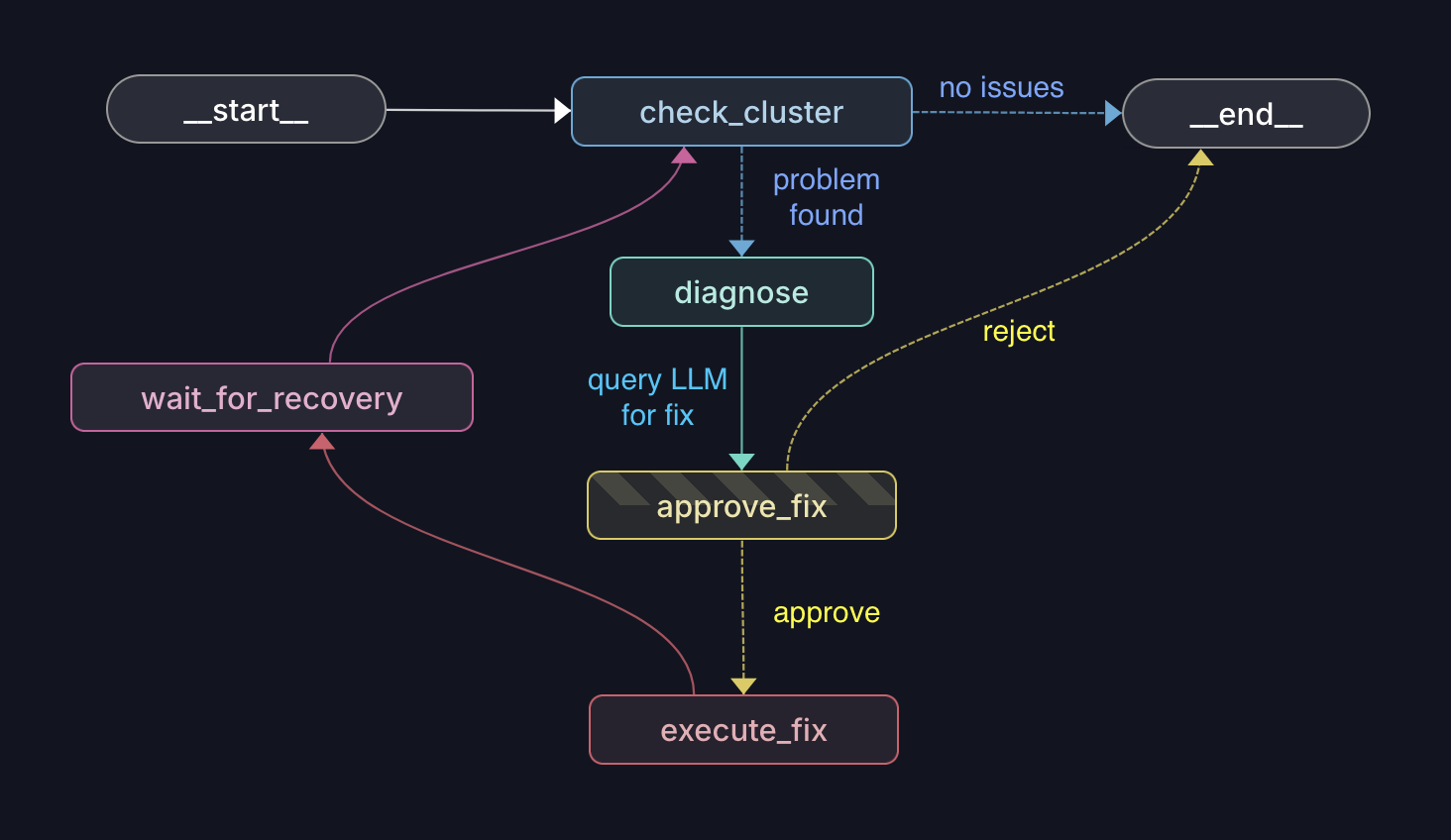
- check_cluster — scans pods, deployments, nodes, events for problems
- diagnose — LLM analyzes cluster state and proposes a kubectl command
- approve_fix — pauses for human approval (skips if command is read-only)
- execute_fix — runs the approved kubectl command
- verify_fix — polls cluster until healthy or timeout
- decide — done (END), or retry (back to START > check_cluster)
Quick Start
Prerequisites: Python 3.12+, Docker, Just
git clone <repo>
cd hatchet-mcp
cp .env.example .env   # fill in all required env vars
just start              # Hatchet server - http://localhost:8888
just worker             # start the Hatchet worker
MCP Configuration
| Tool | What it does |
|---|---|
k8s_inspect |
List pods, describe, logs, events, exec, problem pods |
k8s_run_agent |
Run the autonomous devops agent with a task prompt |
k8s_resume |
Approve/reject fixes, list/check/cleanup HITL threads |
k8s_exec_kubectl |
Raw kubectl commands if needed |
Add this to your LLM client's MCP config:
{
  "mcpServers": {
    "k8s-devops": {
      "command": "uv",
      "args": ["run", "python", "/ABSOLUTE/PATH/TO/src/mcp/k8s_server.py"]
    }
  }
}
Local Development
just lint               # ruff check + basedpyright
just test               # run tests
just dev                # LangGraph Studio (visual graph debugger)
Acknowledgments
Built with LangGraph for agent orchestration, Hatchet for durable execution, and the Model Context Protocol for the tool interface. Kubernetes cluster interactions use the Kubernetes Python client.
License
Установка Hatchet
У этого сервера нет опубликованного пакета — он собирается из исходников. Открой репозиторий и следуй инструкции в README.
▸ github.com/swang62/hatchet-mcpFAQ
Hatchet MCP бесплатный?
Да, Hatchet MCP бесплатный — установка в пару кликов через Unyly без оплаты.
Нужен ли API-ключ для Hatchet?
Нет, Hatchet работает без API-ключей и переменных окружения.
Hatchet — hosted или self-hosted?
Self-hosted: сервер запускается локально на твоей машине командой из раздела установки.
Как установить Hatchet в Claude Desktop, Claude Code или Cursor?
Открой Hatchet на unyly.org, выбери вкладку своего клиента (Claude Desktop, Claude Code, Cursor) и нажми Install — конфиг сгенерируется автоматически, без правки JSON.
Похожие MCP
GitHub
PRs, issues, code search, CI status
 автор: GitHub
Filesystem
Secure file operations with configurable access controls.
Memory
Knowledge graph-based persistent memory system.
Template MCP Server
A CLI tool to create a new Model Context Protocol server project with TypeScript support, dual transport options, and an extensible structure
 автор: mcpdotdirect
Compare Hatchet with
Не уверен что выбрать?
Найди свой стек за 60 секунд
Автор?
Embed-бейдж для README
Похожее
Все в категории development