
Hireflow
БесплатноНе проверенHireFlow is an intelligent multi-agent system designed to streamline and automate the new-hire onboarding process. Built as a capstone project for the Kaggle Ag

Описание
HireFlow is an intelligent multi-agent system designed to streamline and automate the new-hire onboarding process. Built as a capstone project for the Kaggle Agents Intensive, it leverages Google's Agent Development Kit (ADK) and the Model Context Protocol (MCP) to create a seamless, efficient, and interactive onboarding experience.
README
Automating the employee onboarding journey with Multi-Agent Systems and MCP.
Overview
HireFlow is an intelligent multi-agent system designed to streamline and automate the new-hire onboarding process. Built as a capstone project for the Kaggle Agents Intensive, it leverages Google's Agent Development Kit (ADK) and the Model Context Protocol (MCP) to create a seamless, efficient, and interactive onboarding experience.
By orchestrating specialized sub-agents and integrating with external data sources via MCP, HireFlow reduces the administrative burden on HR and IT teams while ensuring new employees have everything they need from day one.
Value Proposition
- Efficiency: Reduces manual coordination time by automating checklist tracking.
- Consistency: Ensures every new hire goes through a standardized, error-free onboarding process.
- Interactivity: Provides a conversational interface for new hires to check their status and complete tasks.
- Scalability: Modular multi-agent architecture allows for easy addition of new departments or tasks.
Architecture
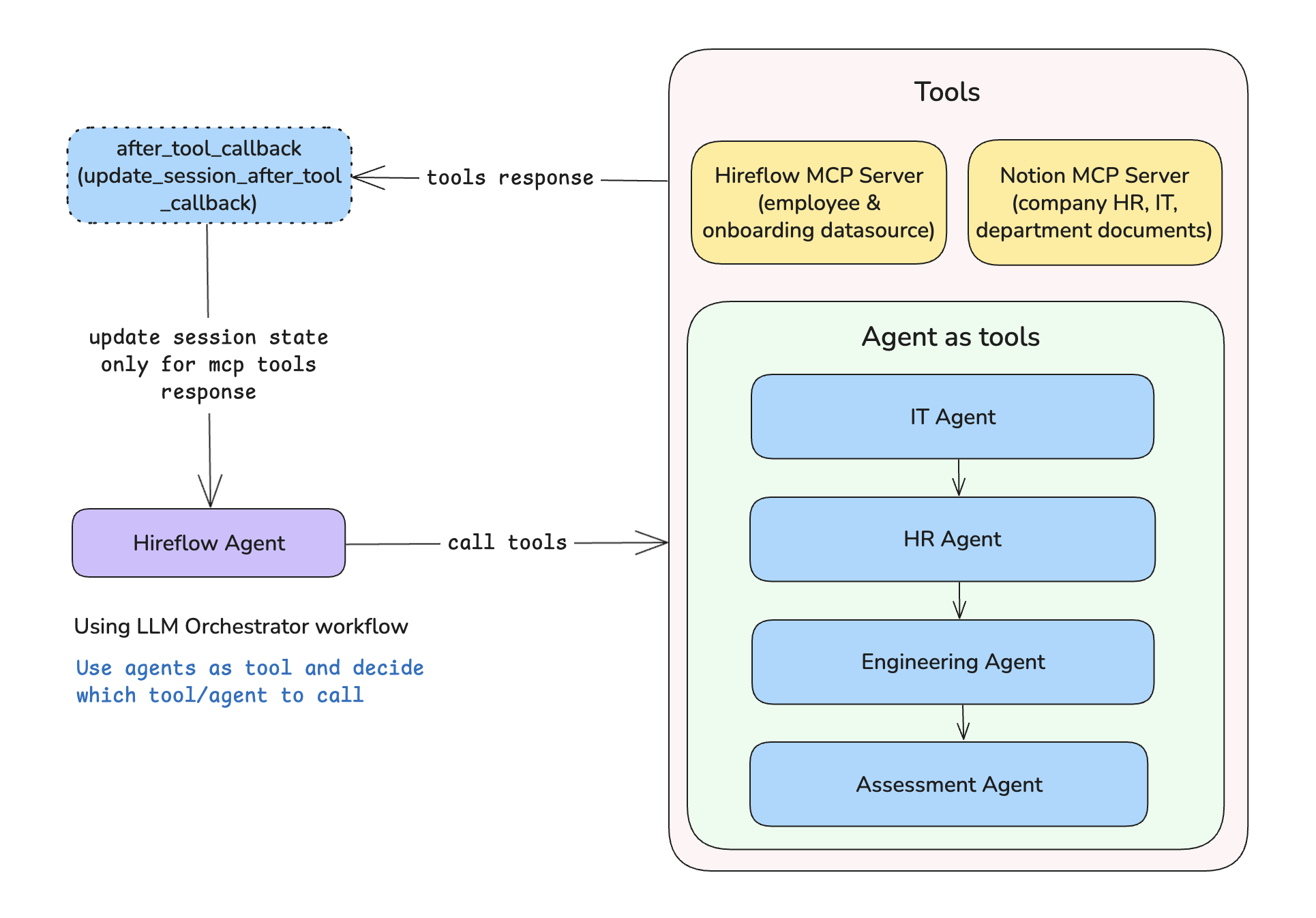
HireFlow uses a Multi-Agent LLM Orchestrator pattern. The main HireFlow Agent acts as the orchestrator, delegating specific tasks to specialized sub-agents based on the user's intent. It also connects to an MCP Server to securely access employee data, generate dynamic onboarding checklists and access to internal company documents on notion (if notion is configured).
Core Components
- HireFlow Agent (Orchestrator): The entry point for the user. It understands the user's request and routes it to the appropriate sub-agent or tool.
- MCP Server: A dedicated server implementing the Model Context Protocol to provide safe, standardized access to:
employee_lookup: Retrieves employee details from the staff database.get_onboarding_checklist: Generates department-specific onboarding checklists.API-post-search(query:, sort, filter, start_cursor, page_size): it is use to search Notion pages/documents by title (if notion is configured)API-retrieve-a-page( page_id: str): it is use to retrieve a specific page/document by page_id (if notion is configured)
- Sub-Agents: Specialized agents focused on specific domains (HR, IT, Engineering, etc.).
- DatabaseSessionService: For persistent of chat session
- Context engineering: I use context compaction for context management.
Agents
Main Agent
- HireFlow Agent: The central controller. It initializes the session, authenticates the user via the MCP
employee_lookuptool, and manages the overall conversation flow.
Sub-Agents
- HR Agent: Hireflow HR Agent: Manages HR onboarding tasks.
- IT Agent: Hireflow IT Agent: Manages IT onboarding tasks.
- Engineering Agent: Hireflow Engineering Agent: Manages Engineering onboarding tasks.
- Finance Agent: Hireflow Finance Agent: Manages Finance onboarding tasks.
- Assessment Agent: Hireflow Assessment Agent: Manages Assessment onboarding tasks.
Tools
MCP Tools (Data Layer)
These tools are served via the MCP server and provide data to the agents.
employee_lookup(email: str): Looks up an employee by email to retrieve their profile, department, and ID.get_onboarding_checklist(department: str): Generates a consolidated checklist containing mandatory HR/IT tasks and department-specific items.
Some other tools use from Notion MCP Server
API-post-search(query:, sort, filter, start_cursor, page_size): it is use to search Notion pages/documents by titleAPI-retrieve-a-page( page_id: str): it is use to retrieve a specific page/document by page_id
Agent Tools (Action Layer)
These tools are used by the agents to modify the session state and track progress.
update_checklist_status(category, task, is_complete): Updates the status of a specific checklist item (e.g., marking "Sign employee handbook" as complete).
Workflow
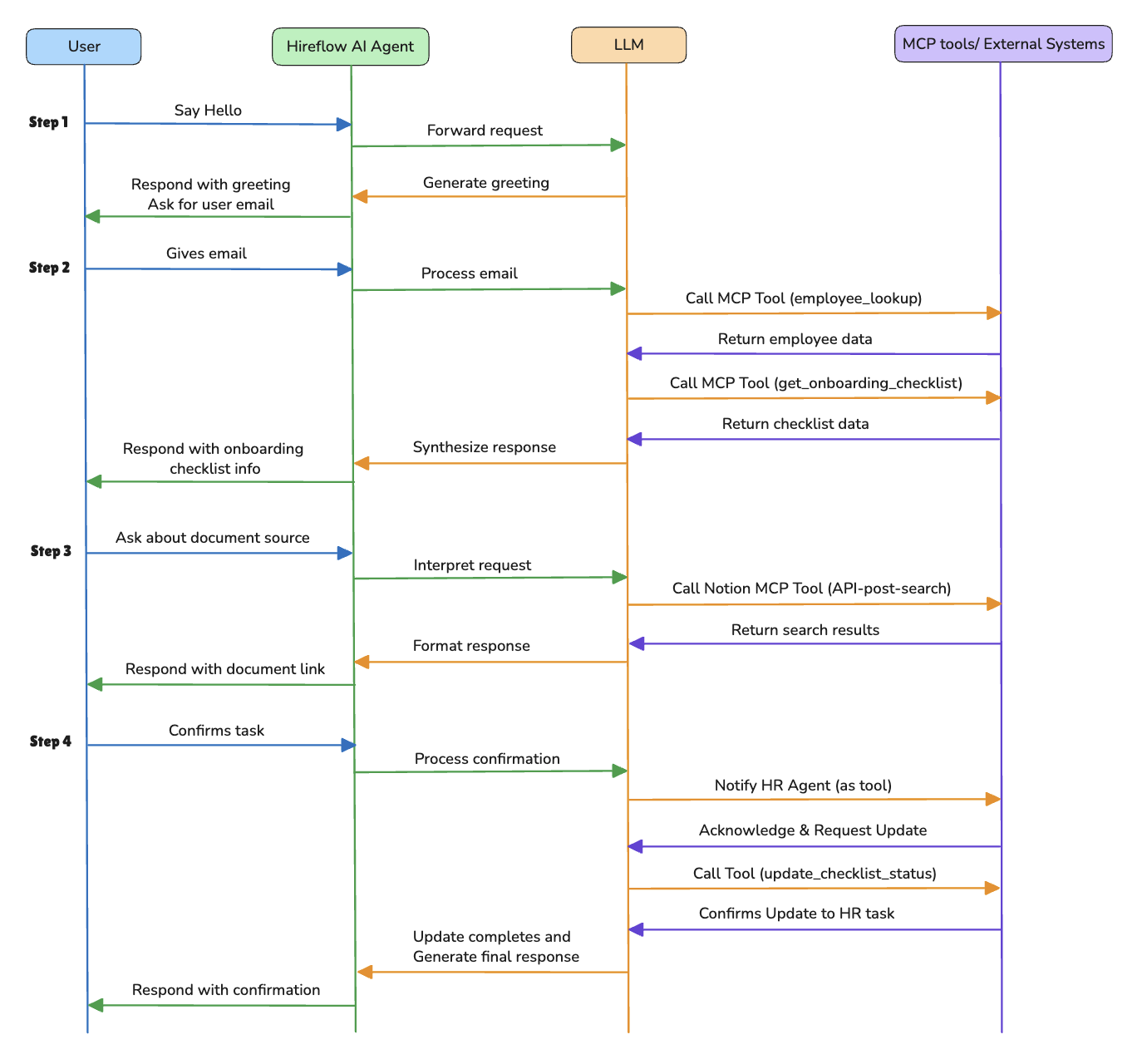
- Authentication: The user provides their email. The HireFlow Agent calls the
employee_lookupMCP tool to verify identity and load the user's profile.
Note: For realife scenario, this agent will be access within staff portal ensuring user is already authenticated
- Initialization: Based on the user's department, the agent calls
get_onboarding_checklist(MCP) to generate a personalized onboarding checklist.- Orchestration: The user interacts with the agent (e.g., "I've signed my handbook").
- Delegation: The HireFlow Agent routes the request to the relevant sub-agent (e.g., HR Agent).
- Execution: The sub-agent uses tools like
update_checklist_statusto mark the task as complete in the session state.- Feedback: The agent confirms the action to the user and suggests the next steps.
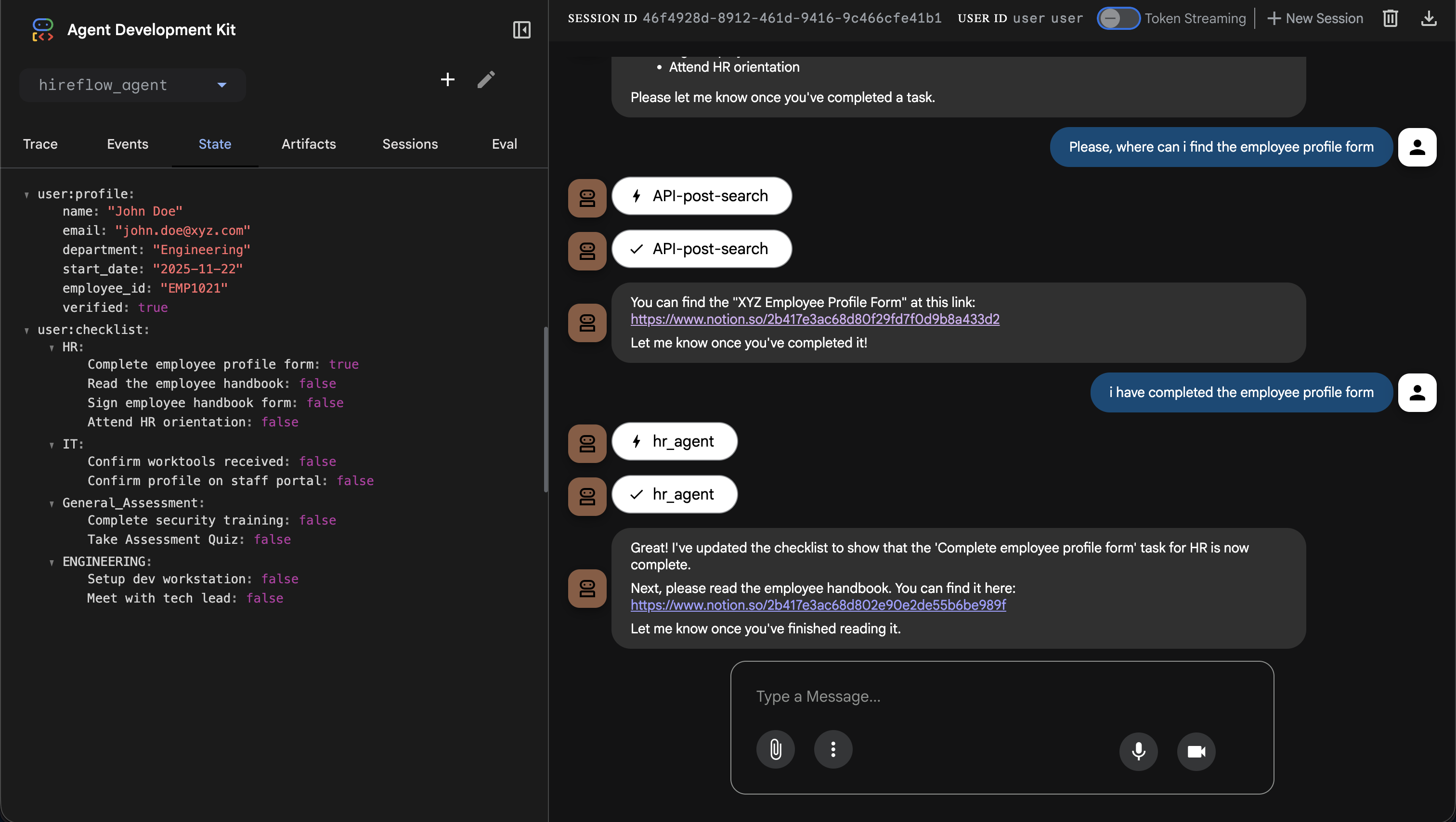
See sample screenshots in the Demo folder folder below.
Setup & Usage
Prerequisites
- Python 3.11+
uvpackage manager- Clone the repository
- Configure your Gemini API Key
- Configure your Notion API Key
Configure your Gemini API Key
This project uses the Gemini API, which requires an API key.
- Get your API key: If you don't have one already, create an API key in Google AI Studio.
3. Configure Environment Variables
- Copy the example environment file:
cp .env.example .env - Open
.envand add your API keys:GOOGLE_API_KEY=your_google_api_key_here NOTION_API_KEY=your_notion_api_key_here #optional
4. Notion Integration Setup (Optional)
To enable the agent to access your Notion workspace (for employee handbook, company policies, etc.), you need to set up a Notion Integration.
👉 Read the Notion Setup Guide for step-by-step instructions.
Installation
- Clone the repository.
- Install dependencies:
make install - Set up environment variables in
.env. as described under the Configure your Gemini API Key section.
Running the Agent
Run as a web app (e.g Start the adk web UI playground)
make playgroundOpen the provided URL in your browser to interact with HireFlow.
Run via notebook, open the hireflow_demo notebook and run the cells
Run as a console app
make run
Test Data
Use the following sample emails to authenticate as different users:
| Name | Department | |
|---|---|---|
| John Doe | [email protected] |
Engineering |
| Sarah Daniels | [email protected] |
Finance |
Thank you
Установка Hireflow
У этого сервера нет опубликованного пакета — он собирается из исходников. Открой репозиторий и следуй инструкции в README.
▸ github.com/Ahmzyjazzy/hireflowFAQ
Hireflow MCP бесплатный?
Да, Hireflow MCP бесплатный — установка в пару кликов через Unyly без оплаты.
Нужен ли API-ключ для Hireflow?
Нет, Hireflow работает без API-ключей и переменных окружения.
Hireflow — hosted или self-hosted?
Self-hosted: сервер запускается локально на твоей машине командой из раздела установки.
Как установить Hireflow в Claude Desktop, Claude Code или Cursor?
Открой Hireflow на unyly.org, выбери вкладку своего клиента (Claude Desktop, Claude Code, Cursor) и нажми Install — конфиг сгенерируется автоматически, без правки JSON.
Похожие MCP
Notion
Read and write pages in your workspace
 автор: Notion
Linear
Issues, cycles, triage — from Claude
 автор: Linear
Google Drive
Search and read your Drive files
 автор: Google
mindsdb/mindsdb
Connect and unify data across various platforms and databases with [MindsDB as a single MCP server](https://docs.mindsdb.com/mcp/overview).
 автор: mindsdb
Compare Hireflow with
Не уверен что выбрать?
Найди свой стек за 60 секунд
Автор?
Embed-бейдж для README
Похожее
Все в категории productivity