loading…
/ru
Весь каталог
Hive
БесплатноНе проверенTransforms idle LAN machines into a unified compute cluster for AI agents to offload CPU-intensive tasks like simulations and backtesting. It provides a broker-

Описание
Transforms idle LAN machines into a unified compute cluster for AI agents to offload CPU-intensive tasks like simulations and backtesting. It provides a broker-worker architecture that integrates with MCP-compatible tools to distribute workloads across a local network.
README
Distributed compute MCP server — pool idle LAN machines into a compute cluster for AI agents.
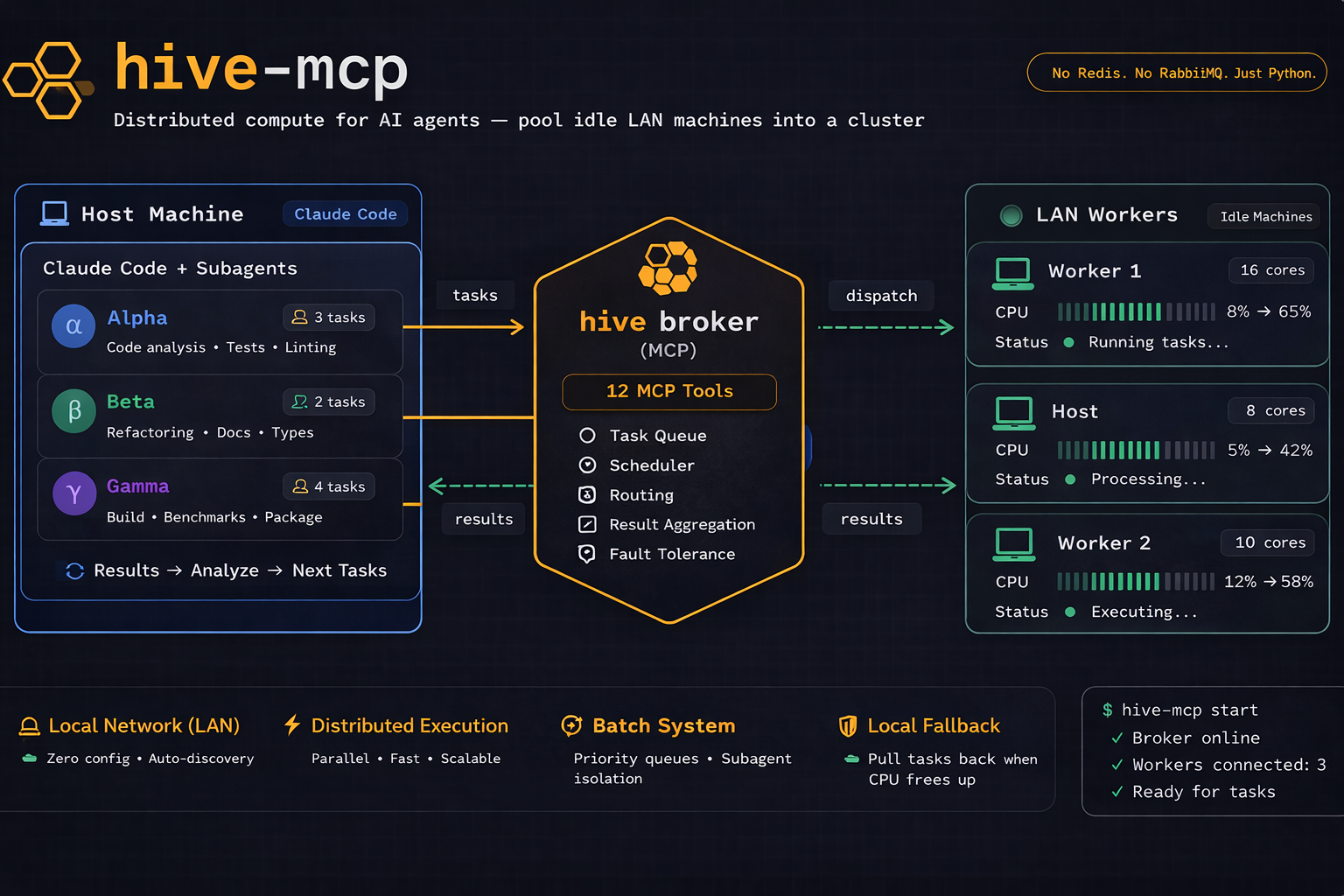
The Problem
Running CPU-intensive agentic workloads (backtesting, simulations, hyperparameter sweeps) can peg your host machine at 100% with just 6-7 subagents. Meanwhile, other machines on your LAN sit idle with dozens of cores unused.
The Solution
hive-mcp turns idle machines on your LAN into a unified compute pool, accessible via MCP from Claude Code, Cursor, Copilot, or any MCP-compatible AI tool.
  Host                     Worker A            Worker B
  +-----------------+      +----------------+  +----------------+
  | Claude Code     |      | hive worker    |  | hive worker    |
  | hive-mcp broker |<---->| daemon         |  | daemon         |
  | (MCP + WS)      |  ws  | auto-discovered|  | auto-discovered|
  +-----------------+      +----------------+  +----------------+
        8 cores               14 cores             6 cores
                    = 28 total cores
Quick Start
1. Install
pip install hive-mcp
2. Start the Broker (host machine)
hive broker
# Prints the shared secret and starts listening
3. Join Workers (worker machines)
Worker machines are headless compute — they only need Python and hive-mcp. No Claude Code, no AI tools, no API keys. They just execute tasks and return results.
# Copy the secret from the broker, then:
hive join --secret <token>
# Auto-discovers broker via mDNS — no address needed!
4. Configure Claude Code
Register hive-mcp as an MCP server:
claude mcp add hive-mcp -- hive broker
This writes the config to ~/.claude.json scoped to your current project directory.
Now Claude Code can submit compute tasks to your cluster:
You: "Run backtests for these 20 parameter combinations"

Claude Code: I'll run 6 locally and submit 14 to hive...
  submit_task(code="run_backtest(params_7)", priority=1)
  submit_task(code="run_backtest(params_8)", priority=1)
  ...
MCP Tools
| Tool | Description |
|---|---|
create_batch |
Create a named batch for grouping related tasks |
close_batch |
Close a batch after all tasks are submitted |
get_batch_status |
Get task counts and status for a batch |
get_batch_results |
Retrieve all results from a batch in one call |
submit_task |
Submit a Python or shell task (optionally to a batch) |
get_task_status |
Check if a task is queued, running, or complete |
get_task_result |
Retrieve the output of a completed task |
pull_task |
Pull a queued task back for local execution |
report_local_result |
Report result of a locally-executed pulled task |
cancel_task |
Cancel a pending or running task |
list_workers |
See all connected workers and their capacity |
get_cluster_status |
Overview of the entire cluster |
Features
- Zero-config discovery — workers find the broker automatically via mDNS
- Adaptive capacity — workers monitor CPU and reject tasks when overloaded (
--max-cpu 80) - File transfer — send input files to workers, collect output files back
- Local fallback — pull queued tasks back when local CPU frees up
- Subprocess isolation — tasks can't crash the worker daemon
- Priority queue — higher-priority tasks run first
- Auto-reconnect — workers reconnect with exponential backoff
- Claude Code hook —
hive contextinjects cluster info into every prompt - Python SDK — programmatic access via
HiveClient - Shell tasks — run shell commands, not just Python
CLI Reference
hive broker                     # Start broker + MCP server
hive join                       # Join as worker (auto-discover broker)
hive join --broker-addr IP:PORT # Join with explicit address
hive join --max-cpu 60          # Limit CPU usage to 60%
hive join --max-tasks 4         # Hard cap at 4 concurrent tasks
hive status                     # Show cluster status
hive secret                     # Show/generate shared secret
hive context                    # Output machine + cluster info (for hooks)
hive tls-setup                  # Generate self-signed TLS certificates
Claude Code Hook
Add automatic cluster awareness to every prompt:
{
  "hooks": {
    "UserPromptSubmit": [
      {
        "command": "hive context",
        "timeout": 3000
      }
    ]
  }
}
This injects:
[hive-mcp] Local machine: 8 cores / 16 threads, CPU: 45%, RAM: 14GB free / 32GB total
[hive-mcp] Cluster: 2 workers online (20 cores), 0 queued, 3 active
[hive-mcp] Tip: 20 remote cores available via hive. Use submit_task() for overflow.
Python SDK
from hive_mcp.client.sdk import HiveClient

async with HiveClient("192.168.1.100", 7933, secret="...") as client:
    task = await client.submit("print('hello from hive')")
    result = await client.wait(task["task_id"])
    print(result["stdout"])  # "hello from hive"
How It Works
- Broker runs on the host machine alongside Claude Code. It's both an MCP server (stdio, for Claude Code) and a WebSocket server (for workers).
- Workers run on worker machines. They discover the broker via mDNS, authenticate with a shared secret, and wait for tasks.
- Tasks are Python code strings or shell commands. The broker serializes them with cloudpickle and dispatches to workers.
- Workers execute tasks in isolated subprocesses — a hung or crashing task can't affect the worker daemon.
- Results flow back through WebSocket, including stdout, stderr, return values, and output files.
Security
- Shared secret — broker generates a 32-byte random token; workers must present it to connect
- TLS (optional) — run
hive tls-setupto generate self-signed certificates - Subprocess isolation — tasks run in separate processes, not in the worker daemon
Troubleshooting
Windows: MCP tools not loading
There is a known Claude Code bug where Windows drive letter casing (c:/ vs C:/) creates duplicate project entries in ~/.claude.json. The MCP config ends up under one casing while Claude Code looks up the other.
Fix: Open ~/.claude.json, search for your project path in the "projects" object, and ensure both case variants have identical mcpServers config. Or re-run claude mcp add from the same terminal type you use for Claude Code sessions.
Broker not starting
Check ~/.hive/broker.log for startup errors. Common causes:
- Port 7933 already in use (another broker instance)
- Python version mismatch between
hiveCLI and expected environment
Requirements
- Python 3.10+
- All machines on the same LAN (for mDNS discovery)
- Same Python version on broker and workers (for cloudpickle compatibility)
License
MIT
Как установить
Выполни в терминале:
claude mcp add hive-mcp -- npx 
