
HoloViz Server
БесплатноНе проверенLet AI agents create interactive visualizations that render live inside your chat — no code required.

Описание
Let AI agents create interactive visualizations that render live inside your chat — no code required.
README



HoloViz MCP Server
Let AI agents create interactive visualizations that render live inside your chat — no code required.
Built with FastMCP · Panel · HoloViews · hvPlot · Bokeh
27 MCP tools · 4 interactive UI templates · live streaming · bidirectional interaction
Demo
1. Inline Chart
"Create a bar chart comparing programming language popularity: Python=32%, JavaScript=28%, Java=18%, TypeScript=12%, Others=10%"
2. Panel Widgets & Interactivity
"Build a Panel dashboard with a slider controlling sigma in a normal distribution, updating the histogram in real time"
3. Streaming / Live Data
"Create a live dashboard showing a real-time sine wave that updates every 500ms"
4. Remote Data Loading
"Load this dataset and profile it, then show a correlation heatmap: https://raw.githubusercontent.com/mwaskom/seaborn-data/master/tips.csv"
5. Maps
"Plot the top 10 most populous cities in the world on an interactive tile map with population shown as point size"
6. Multi-Panel Dashboard
"Build a dashboard with 3 panels: a bar chart of fruit sales (Apple=50, Banana=30, Mango=45), a pie chart of the same data, and a summary stats table"
7. Bidirectional Interaction
"Create an interactive scatter plot of the tips dataset where selecting points in the chart updates a summary statistics table below it"
Architecture
This project is designed as an MCP-native visualization platform: LLMs call tools, the server validates and executes visualization code safely, and users get live, interactive UIs inline in chat.
Architecture at a glance
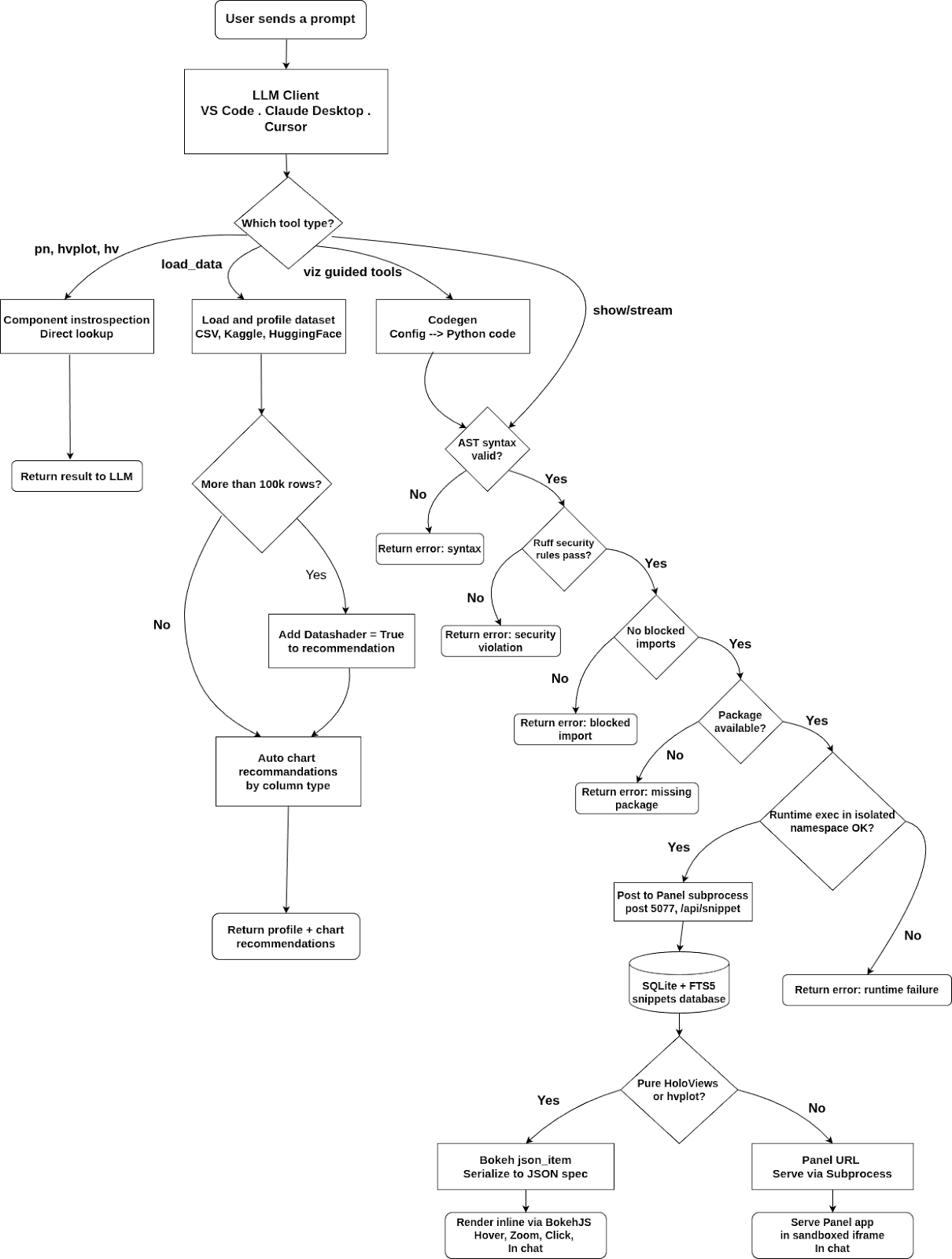
Layer responsibilities
| Layer | Responsibility | Key implementation modules |
|---|---|---|
| LLM Client Layer | Hosts the chat UX and invokes MCP tools | VS Code Copilot, Claude Desktop, Cursor |
| MCP Orchestration | Defines tool surface and namespaces | server/main.py, server/compose.py |
| Validation and Safety | Enforces secure code execution before rendering | validation.py, utils.py, display/database.py |
| Display Runtime | Runs Panel as managed subprocess, serves rendered apps | display/manager.py, display/app.py, display/endpoints.py |
| Persistence | Stores every snippet and execution metadata for replay/debug/search | display/database.py |
| MCP App UI | Renders interactive outputs inline in chat sandboxes | templates/show.html, templates/stream.html |
| HoloViz Stack | Visualization abstraction and rendering backend | Panel, HoloViews, hvPlot, Bokeh, Param |
| Data Layer | Ingestion and profiling for local and remote datasets | load_data() tool in server/main.py |
End-to-end flow
- An agent calls a tool such as
showorstream. - The server runs a 5-layer validation pipeline (syntax, security, packages, extensions, runtime).
- Validated code/config is sent to the Panel display subprocess via REST.
- The display server executes and persists the snippet in SQLite.
- The tool returns either:
- a Bokeh JSON spec for direct in-chat embedding, or
- a Panel URL rendered in an iframe.
- MCP App templates provide rich UX (filters, theme toggle, exports, click-to-insight).
Development Setup
For contributing or running from source:
1. Install Pixi
curl -fsSL https://pixi.sh/install.sh | bash
source ~/.bashrc
2. Clone and install
git clone https://github.com/SuMayaBee/HoloViz-MCP-Server
cd HoloViz-MCP-Server

pixi install
pixi run postinstall
3. Verify
.pixi/envs/default/bin/hvmcp --version
Example Prompts
Simple chart:
Create a bar chart showing: Jan=120, Feb=95, Mar=140, Apr=110
Scatter plot:
Show a scatter plot of 50 random points using hvplot
Full dashboard:
Create a dashboard with this sales data:
products=[Apples, Bananas, Oranges, Grapes],
revenue=[500, 300, 450, 200],
units=[50, 30, 45, 20]
Load a dataset:
Load /path/to/data.csv and create a visualization
Live streaming chart:
Create a live streaming chart that updates every second with random values
Explore available tools:
What hvplot chart types are available?
What Panel widgets are available?
Show me the hvplot skill guide
Features
Core Visualization
- Ask your AI assistant to create a chart — renders inline in the chat via MCP Apps
- Interactive charts (zoom, pan, hover) powered by Bokeh
- Every visualization persisted and accessible via URL
- Works in VS Code Insiders, Claude Desktop, and Cursor
View Code Button
Every chart rendered inline has a View Code button in the toolbar — click it to see the exact Python that generated the visualization, with a one-click copy. Great for learning HoloViz.
Kaggle Integration
Paste any Kaggle dataset or competition URL directly into the chat:
Load https://www.kaggle.com/datasets/uciml/iris and show a scatter plot colored by species
Requires KAGGLE_USERNAME and KAGGLE_KEY in your MCP config env (free Kaggle account).
HuggingFace Datasets
Paste any HuggingFace dataset URL and get instant EDA:
Load https://huggingface.co/datasets/scikit-learn/iris and show a correlation heatmap
HF_TOKEN is optional — only needed for private datasets.
Automatic Chart Recommendations
After load_data(), the server analyses column types and returns up to 3 ready-to-render chart recommendations with working hvplot code — no manual chart selection needed.
Datashader for Big Data
Datasets with >100k rows automatically use datashade=True in all recommended chart code — rendering stays fast regardless of dataset size.
Live Streaming Dashboards
Real-time dashboards with periodic callbacks — sine waves, counters, live feeds — all rendered inline.
Maps
Interactive tile maps using hvPlot + GeoViews:
Plot the top 10 most populous cities on an interactive map with population as point size
Tools
| Tool | Description |
|---|---|
show(code) |
Execute Python viz code, render as live UI with View Code button |
stream(code) |
Execute streaming Panel code with periodic callbacks |
load_data(source) |
Profile a dataset + auto chart recommendations. Supports CSV, Parquet, Kaggle, HuggingFace, S3 |
validate(code) |
Run 5-layer validation before show() |
viz.create |
High-level: describe a chart in plain config, no Python needed |
viz.dashboard |
Create a multi-panel dashboard from structured config |
viz.stream |
Create a live streaming visualization |
viz.multi |
Create a multi-chart grid with linked selections |
pn.list / pn.get / pn.params / pn.search |
Panel component introspection |
hvplot.list / hvplot.get |
hvPlot chart type discovery |
hv.list / hv.get |
HoloViews element discovery |
skill_list / skill_get |
Access best-practice guides for Panel, hvPlot, HoloViews |
list_packages |
List installed packages in the server environment |
Project Structure
src/holoviz_mcp_server/
├── cli.py               # CLI entry point (hvmcp serve / mcp / status)
├── config.py            # Pydantic config + env var loading
├── validation.py        # 5-layer code validation pipeline
├── utils.py             # Code execution, extension detection utilities
│
├── server/              # MCP server layer (FastMCP)
│   ├── main.py          # Main server + core tools (show, stream, load_data, ...)
│   ├── compose.py       # Mounts all sub-servers with namespaces
│   ├── panel_mcp.py     # pn.* tools
│   ├── hvplot_mcp.py    # hvplot.* tools
│   └── holoviews_mcp.py # hv.* tools
│
├── introspection/       # Pure Python discovery functions
│   ├── panel.py         # Panel component discovery
│   ├── holoviews.py     # HoloViews element discovery
│   ├── hvplot.py        # hvPlot chart type discovery
│   └── skills.py        # Skill file loading
│
├── display/             # Panel display server (runs as subprocess)
│   ├── app.py           # Panel server entry point
│   ├── manager.py       # Subprocess lifecycle management
│   ├── client.py        # HTTP client (MCP → Panel)
│   ├── database.py      # SQLite + FTS5 persistence
│   ├── endpoints.py     # REST handlers (/api/snippet, /api/health)
│   └── pages/           # Web UI pages (feed, view, add, admin)
│
├── templates/           # MCP App HTML (inline rendering in chat)
│   ├── show.html        # Chart viewer + click-to-insight
│   └── stream.html      # Live streaming viewer
│
└── skills/              # Best-practice guides (SKILL.md files)
    ├── panel/
    ├── hvplot/
    ├── holoviews/
    ├── param/
    └── data/
Installation
Prerequisite: Install uv first:
# macOS / Linux
curl -LsSf https://astral.sh/uv/install.sh | sh
# Windows
powershell -ExecutionPolicy ByPass -c "irm https://astral.sh/uv/install.sh | iex"
# Or via pip
pip install uv
VS Code / Copilot Chat (Recommended)
Add to your global ~/.config/Code - Insiders/User/mcp.json or workspace .vscode/mcp.json:
{
  "servers": {
    "holoviz": {
      "type": "stdio",
      "command": "uvx",
      "args": ["--from", "hvmcp", "hvmcp", "mcp"]
    }
  }
}
Open Copilot Chat (Ctrl+Alt+I) → switch to Agent mode → start chatting.
Claude Desktop
Add to ~/Library/Application Support/Claude/claude_desktop_config.json (macOS) or %APPDATA%\Claude\claude_desktop_config.json (Windows):
{
  "mcpServers": {
    "holoviz": {
      "command": "uvx",
      "args": ["--from", "hvmcp", "hvmcp", "mcp"]
    }
  }
}
Restart Claude Desktop.
Cursor
Add to ~/.cursor/mcp.json:
{
  "mcpServers": {
    "holoviz": {
      "command": "uvx",
      "args": ["--from", "hvmcp", "hvmcp", "mcp"]
    }
  }
}
Claude Code / Other stdio clients
{
  "mcpServers": {
    "holoviz": {
      "command": "uvx",
      "args": ["--from", "hvmcp", "hvmcp", "mcp"]
    }
  }
}
Optional extras
The base install is lightweight. Add only what you need:
| Extra | What it adds | Install |
|---|---|---|
geo |
Maps via GeoViews + Cartopy | uvx --from "hvmcp[geo]" hvmcp mcp |
bigdata |
Datashader for >100k row datasets | uvx --from "hvmcp[bigdata]" hvmcp mcp |
kaggle |
Kaggle dataset loading | uvx --from "hvmcp[kaggle]" hvmcp mcp |
huggingface |
HuggingFace dataset loading | uvx --from "hvmcp[huggingface]" hvmcp mcp |
all |
Everything above | uvx --from "hvmcp[all]" hvmcp mcp |
Optional: Kaggle & HuggingFace Integration
To load datasets directly from Kaggle or HuggingFace URLs, add credentials to the env section of your config:
{
  "env": {
    "KAGGLE_USERNAME": "your_kaggle_username",
    "KAGGLE_KEY": "your_kaggle_api_key",
    "HF_TOKEN": "your_huggingface_token"
  }
}
- Kaggle token: kaggle.com → Account → Settings → Create New Token
- HuggingFace token: huggingface.co → Settings → Access Tokens → New token (Read role)
HF_TOKEN is optional — only needed for private HuggingFace datasets. If credentials are not provided, Kaggle/HuggingFace URLs will return a friendly message instead of failing silently.
Example prompts once configured:
Load https://www.kaggle.com/datasets/uciml/iris and show a scatter plot colored by species
Load https://huggingface.co/datasets/scikit-learn/iris and show a correlation heatmap
License
BSD 3-Clause
Установка HoloViz Server
У этого сервера нет опубликованного пакета — он собирается из исходников. Открой репозиторий и следуй инструкции в README.
▸ github.com/SuMayaBee/HoloViz-MCP-ServerFAQ
HoloViz Server MCP бесплатный?
Да, HoloViz Server MCP бесплатный — установка в пару кликов через Unyly без оплаты.
Нужен ли API-ключ для HoloViz Server?
Нет, HoloViz Server работает без API-ключей и переменных окружения.
HoloViz Server — hosted или self-hosted?
Self-hosted: сервер запускается локально на твоей машине командой из раздела установки.
Как установить HoloViz Server в Claude Desktop, Claude Code или Cursor?
Открой HoloViz Server на unyly.org, выбери вкладку своего клиента (Claude Desktop, Claude Code, Cursor) и нажми Install — конфиг сгенерируется автоматически, без правки JSON.
Похожие MCP
Gmail
Read, send and search emails from Claude
 автор: Google
Slack
Send, search and summarize Slack messages
 автор: Slack
Runbear
No-code MCP client for team chat platforms, such as Slack, Microsoft Teams, and Discord.
Discord Server
A community discord server dedicated to MCP by [Frank Fiegel](https://github.com/punkpeye)
Compare HoloViz Server with
Не уверен что выбрать?
Найди свой стек за 60 секунд
Автор?
Embed-бейдж для README
Похожее
Все в категории communication