
Huaqiu KiCad
БесплатноНе проверенExposes KiCad PCB and schematic editor capabilities as tools through a custom IPC API integration.

Описание
Exposes KiCad PCB and schematic editor capabilities as tools through a custom IPC API integration.
README
KiCad MCP integrated with the KiCad IPC API.
PyPI version License
Usage
Run the latest release
You can run the MCP server directly without installing it using uvx:
uvx kicad-mcp --editor-type schematic
This will download and execute the latest version from PyPI in an isolated environment.
MCP client configuration
- Claude Code
{
	"mcpServers": {
		"Kicad-Schematic-MCP": {
			"type": "stdio",
			"command": "uvx",
			"args": [
				"kicad-mcp",
				"--editor-type",
				"schematic"
			]
		},
		"Kicad-PCB-MCP": {
			"type": "stdio",
			"command": "uvx",
			"args": [
				"kicad-mcp",
				"--editor-type",
				"pcb"
			]
		}
	},
	"inputs": []
}
- VSCode
Add the following configuration to your MCP client:
{
	"servers": {
		"Kicad-Schematic-MCP": {
			"type": "stdio",
			"command": "uvx",
			"args": [
				"kicad-mcp",
				"--editor-type",
				"schematic"
			]
		},
		"Kicad-PCB-MCP": {
			"type": "stdio",
			"command": "uvx",
			"args": [
				"kicad-mcp",
				"--editor-type",
				"pcb"
			]
		}
	},
	"inputs": []
}
- Cherry Studio
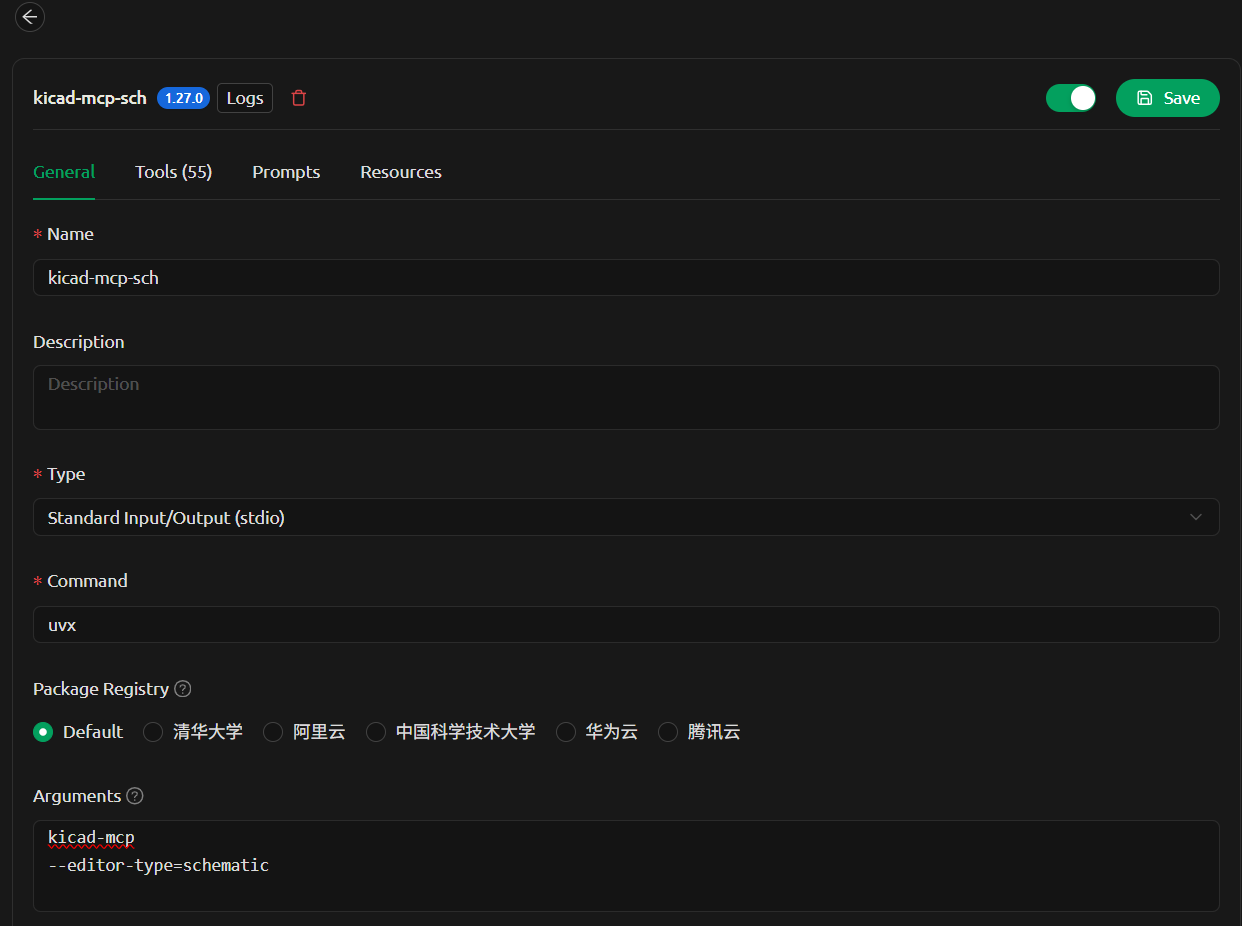
Options
--editor-type supports:
schematicpcbsymbolfootprint
Development
1. Clone the repository
git clone <your-repo-url>
cd kicad-mcp
2. Configure MCP client (local development)
Example configuration in VSCode:
{
  "servers": {
    "kicad-pcb-mcp": {
      "type": "stdio",
      "command": "uv",
      "args": [
        "--directory",
        "C:/code/kicad-mcp",
        "run",
        "kicad-mcp",
        "--editor-type",
        "pcb"
      ]
    },
    "kicad-schematic-mcp": {
      "type": "stdio",
      "command": "uv",
      "args": [
        "--directory",
        "C:/code/kicad-mcp",
        "run",
        "kicad-mcp",
        "--editor-type",
        "schematic"
      ]
    }
  }
}
3. Run locally
Install dependencies and run:
uv sync
uv run kicad-mcp --editor-type schematic
4. Iterate
Modify the code and restart your MCP client to see changes.
Notes
- Requires
uv: https://github.com/astral-sh/uv - Python 3.11+
- Ensure KiCad is running with IPC enabled
Установка Huaqiu KiCad
У этого сервера нет опубликованного пакета — он собирается из исходников. Открой репозиторий и следуй инструкции в README.
▸ github.com/huaqiu-electronics/kicad-mcpFAQ
Huaqiu KiCad MCP бесплатный?
Да, Huaqiu KiCad MCP бесплатный — установка в пару кликов через Unyly без оплаты.
Нужен ли API-ключ для Huaqiu KiCad?
Нет, Huaqiu KiCad работает без API-ключей и переменных окружения.
Huaqiu KiCad — hosted или self-hosted?
Self-hosted: сервер запускается локально на твоей машине командой из раздела установки.
Как установить Huaqiu KiCad в Claude Desktop, Claude Code или Cursor?
Открой Huaqiu KiCad на unyly.org, выбери вкладку своего клиента (Claude Desktop, Claude Code, Cursor) и нажми Install — конфиг сгенерируется автоматически, без правки JSON.
Похожие MCP
GitHub
PRs, issues, code search, CI status
 автор: GitHub
Filesystem
Secure file operations with configurable access controls.
Memory
Knowledge graph-based persistent memory system.
Template MCP Server
A CLI tool to create a new Model Context Protocol server project with TypeScript support, dual transport options, and an extensible structure
 автор: mcpdotdirect
Compare Huaqiu KiCad with
Не уверен что выбрать?
Найди свой стек за 60 секунд
Автор?
Embed-бейдж для README
Похожее
Все в категории development