
Huawei Cloud Servers
БесплатноНе проверенProvides MCP servers for managing Huawei Cloud ECS, CodeArts Pipeline, and CTS audit logs with unified JWT authentication and role-based access control.

Описание
Provides MCP servers for managing Huawei Cloud ECS, CodeArts Pipeline, and CTS audit logs with unified JWT authentication and role-based access control.
README
English | 中文
One MCP Server for all Huawei Cloud services. Agents connect to one URL and access every enabled cloud service tool. Enable only the services you need, secure production with JWT auth, and add new cloud services with zero Agent-side config change.
Why unified? Without this server, each Huawei Cloud service needs its own MCP entry — 8+ servers to configure, update, and maintain. With this server, the Agent configures one entry, forever. New services appear as additional tools (obs_*, rds_*, …) with no Agent-side change.
Supported services
| Service | Description | Tools |
|---|---|---|
| ECS | Cloud servers | 8 |
| CodeArts Pipeline | CI/CD | 6 |
| CTS | Audit logs | 2 |
| CCE | Cloud container engine | 6 |
| LTS | Log tank service | 6 |
| CES | Cloud eye (monitoring) | 6 |
| VPC | Virtual network + security groups | 19 |
| RDS | Relational database | 10 |
| OBS | Object storage | 12 |
75 tools total — Per-tool details: docs/TOOLS.md
Key features
| Feature | Description |
|---|---|
| Single URL | Agent configures one MCP server entry, forever |
| On-demand enable | Service-level: MCP_ENABLED_SERVICES=ecs,pipelineTool-level: MCP_INCLUDE_TOOLS / MCP_EXCLUDE_TOOLS glob-filter |
| JWT auth | RS256 verification + role RBAC for production; no auth for local dev |
| Two-phase commit | Destructive ops (delete/stop/resize) require explicit user approval |
| Zero-config growth | New cloud services are server-side only, Agent is unaware |
Quick start
Prerequisites
- Python 3.10+
- uv (recommended) or pip
- Huawei Cloud AK/SK
1. Install
uv sync
2. Configure
Edit .env in the repo root:
HUAWEICLOUD_ACCESS_KEY_ID=your-ak
HUAWEICLOUD_SECRET_ACCESS_KEY=your-sk
HUAWEICLOUD_REGION=cn-north-4
HUAWEICLOUD_PROJECT_ID=your-project-id
CODEARTS_DEFAULT_PROJECT_ID=your-codearts-project-id
3. Connect your Agent (stdio mode)
stdio mode is the simplest — no gateway, no JWT. Configure your Agent (see Agent Configuration) and you're done.
4. Start the gateway (gateway mode, optional)
Skip this step for stdio mode.
Add to .env:
MCP_GATEWAY_AUTH_MODE=dev
MCP_GATEWAY_HOST=127.0.0.1
Start:
# Linux / macOS
./start.sh

# Windows
powershell -File start.ps1

# Or via CLI
mcp-gateway serve --manifest manifest.yaml --host 0.0.0.0 --port 8080
Verify:
curl http://127.0.0.1:8080/healthz
# {"status":"ok","mounted":[{"name":"huaweicloud","mount_path":"/hwc"}]}
Agent Configuration
Use the templates below. Replace <RUN_SCRIPT> with the absolute path to scripts/run-with-env.sh (Linux/macOS) or scripts/run-with-env.ps1 (Windows).
stdio (local dev, recommended)
{
  "mcpServers": {
    "huaweicloud": {
      "command": "<RUN_SCRIPT>",
      "timeout": 120
    }
  }
}
SSE via gateway (production)
{
  "mcpServers": {
    "huaweicloud": {
      "url": "http://<HOST>:<PORT>/hwc/sse",
      "transport": "sse",
      "timeout": 120,
      "headers": {
        "Authorization": "Bearer <TOKEN>"
      }
    }
  }
}
Where to put the config
| Agent | Config location | Notes |
|---|---|---|
| Hermes | hermes config set "mcp_servers.huaweicloud.command" <RUN_SCRIPT> |
Do NOT edit config.yaml directly |
| Claude Code | ~/.claude/mcp.json |
Or project-level .claude/mcp.json |
| Claude Desktop | macOS: ~/Library/Application Support/Claude/claude_desktop_config.jsonWindows: %APPDATA%\Claude\claude_desktop_config.json |
|
| Cursor | ~/.cursor/mcp.json |
|
| Windsurf | ~/.codeium/windsurf/mcp_config.json |
|
| Cline | VS Code Settings → Cline MCP Servers |
Verify
# Hermes
hermes mcp test huaweicloud
#   ✓ Connected (643ms)
#   ✓ Tools discovered: 75
Key point: Regardless of how many Huawei Cloud services are added, the Agent always configures one MCP server entry. New services appear as additional tools without any Agent-side config change.
Gateway architecture
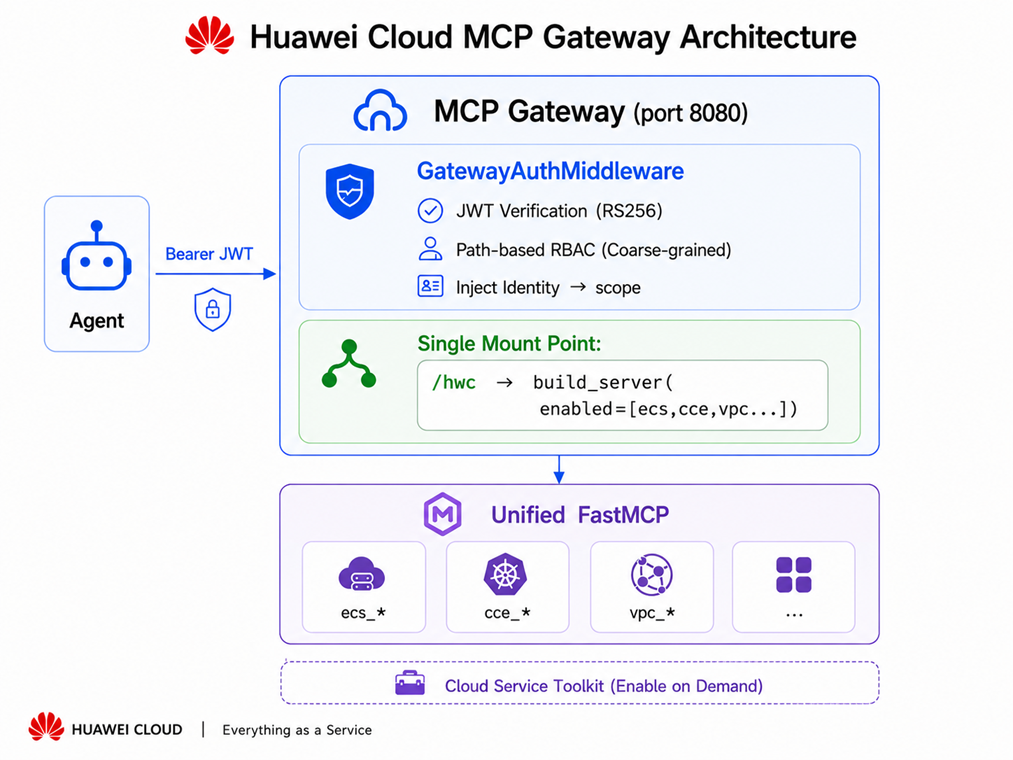
Auth is handled at two layers — gateway middleware (JWT verify + path RBAC) and per-tool role checks inside the MCP server. See docs/DEPLOY.md for auth modes, Token CLI, and production setup.
stdio mode (local dev, no gateway)
The unified server can run directly via stdio — no gateway or JWT needed:
# All services (75 tools)
huaweicloud-mcp-server

# Subset only
MCP_ENABLED_SERVICES=ecs,pipeline huaweicloud-mcp-server

# SSE mode
MCP_TRANSPORT=sse MCP_PORT=8000 huaweicloud-mcp-server
Two-phase commit (destructive operations)
Destructive tools (stop, reboot, delete, resize, disable pipeline, update pipeline, scale-down node pool, disassociate EIP, delete route, create manual backup, delete OBS object, set OBS bucket policy) follow a two-phase commit pattern to prevent accidental execution:
Phase 1: Tool call returns a preview + approval_id (TTL 120s)
         → {status: "pending_approval", approval_id: "...", preview: {...}}

Phase 2: User explicitly approves
         → ecs_confirm_destructive(approval_id="...")
         → Operation executes, returns {ok: true, data: {...}}
If the approval ID expires, re-issue the original call to get a fresh one.
Configuration
Core environment variables
| Variable | Required | Description |
|---|---|---|
HUAWEICLOUD_ACCESS_KEY_ID |
yes | Access key ID |
HUAWEICLOUD_SECRET_ACCESS_KEY |
yes | Secret access key |
HUAWEICLOUD_REGION |
yes | Region, e.g. af-south-1 |
MCP_ENABLED_SERVICES |
no | Comma-separated service subset (default: all) |
MCP_GATEWAY_AUTH_MODE |
gateway | jwt (production) / dev (local) |
Full variable reference: docs/CONFIGURATION.md · .env.example
Service & tool filtering
- Service-level:
MCP_ENABLED_SERVICES=ecs,pipelineor--enable/--disableCLI flags - Tool-level:
MCP_INCLUDE_TOOLS/MCP_EXCLUDE_TOOLSfnmatch globs in manifest or env - RBAC multi-mount: mount separate FastMCP instances per role at different paths
See docs/CONFIGURATION.md for manifest examples, RBAC patterns, and mcp-gateway config preview.
Production deployment
- systemd: see
mcp-gateway/deploy/mcp-gateway.service - Nginx: TLS termination only — one
location /rule, no changes when services are added/removed - JWT tokens:
mcp-gateway token keygen→token create→token verify
Full guide: docs/DEPLOY.md
Adding a new Huawei Cloud service
- Create
huaweicloud_mcp/services/<name>/withmake_tools(settings) → dict - Add
if "<name>" in enabledbranch inserver.py:build_server() - Append
"<name>"tobuild_kwargs.enabledinmanifest.yaml - Restart gateway — new tools appear automatically
No Nginx change. No gateway code change. No Agent config change.
Documentation
| Document | Content |
|---|---|
| docs/TOOLS.md | Per-tool parameters, return values, role requirements |
| docs/EXAMPLES.md | Agent query examples, cross-service scenarios, two-phase commit dialogs |
| docs/CONFIGURATION.md | Service/tool filtering, RBAC multi-mount, env vars, config preview |
| docs/DEPLOY.md | Auth layers, Token CLI, systemd, Nginx, Windows |
| docs/ARCHITECTURE.md | Project structure, shared infrastructure, auth library, test structure |
| CONTRIBUTING.md | Dev setup, running tests, adding services |
License
MIT
Установка Huawei Cloud Servers
У этого сервера нет опубликованного пакета — он собирается из исходников. Открой репозиторий и следуй инструкции в README.
▸ github.com/lexcodee/huaweicloud-mcp-serverFAQ
Huawei Cloud Servers MCP бесплатный?
Да, Huawei Cloud Servers MCP бесплатный — установка в пару кликов через Unyly без оплаты.
Нужен ли API-ключ для Huawei Cloud Servers?
Нет, Huawei Cloud Servers работает без API-ключей и переменных окружения.
Huawei Cloud Servers — hosted или self-hosted?
Доступен hosted-вариант: Unyly запускает сервер в облаке, локальная установка не обязательна.
Как установить Huawei Cloud Servers в Claude Desktop, Claude Code или Cursor?
Открой Huawei Cloud Servers на unyly.org, выбери вкладку своего клиента (Claude Desktop, Claude Code, Cursor) и нажми Install — конфиг сгенерируется автоматически, без правки JSON.
Похожие MCP
GitHub
PRs, issues, code search, CI status
 автор: GitHub
Filesystem
Secure file operations with configurable access controls.
Memory
Knowledge graph-based persistent memory system.
Template MCP Server
A CLI tool to create a new Model Context Protocol server project with TypeScript support, dual transport options, and an extensible structure
 автор: mcpdotdirect
Compare Huawei Cloud Servers with
Не уверен что выбрать?
Найди свой стек за 60 секунд
Автор?
Embed-бейдж для README
Похожее
Все в категории development